
新建maven指定jdk版本-eclipse新建maven项目报错The superclass "javax.servlet.http.HttpServlet" was not found on the Java Build Path的解决方案
具体表现为:
使用Eclipse+Maven建立了一个Javaweb工程,JSP页面顶端出现“红色”的报错信息:The superclass "javax.servlet.http.HttpServlet" was not found on the Java Build Path。
解决方法:
在pom.xml中的 <build></build>中 添加:
    <plugins>

        <!-- 编码和编译和JDK版本 -->

        <plugin>

            <groupId>org.apache.maven.plugins</groupId>

            <artifactId>maven-compiler-plugin</artifactId>

            <version>2.3.2</version>

            <configuration>

                <source>1.8</source>

                <target>1.8</target>

                <encoding>utf8</encoding>

            </configuration>

        </plugin>

    </plugins>
然后Maven > Update project即可
如果报错:
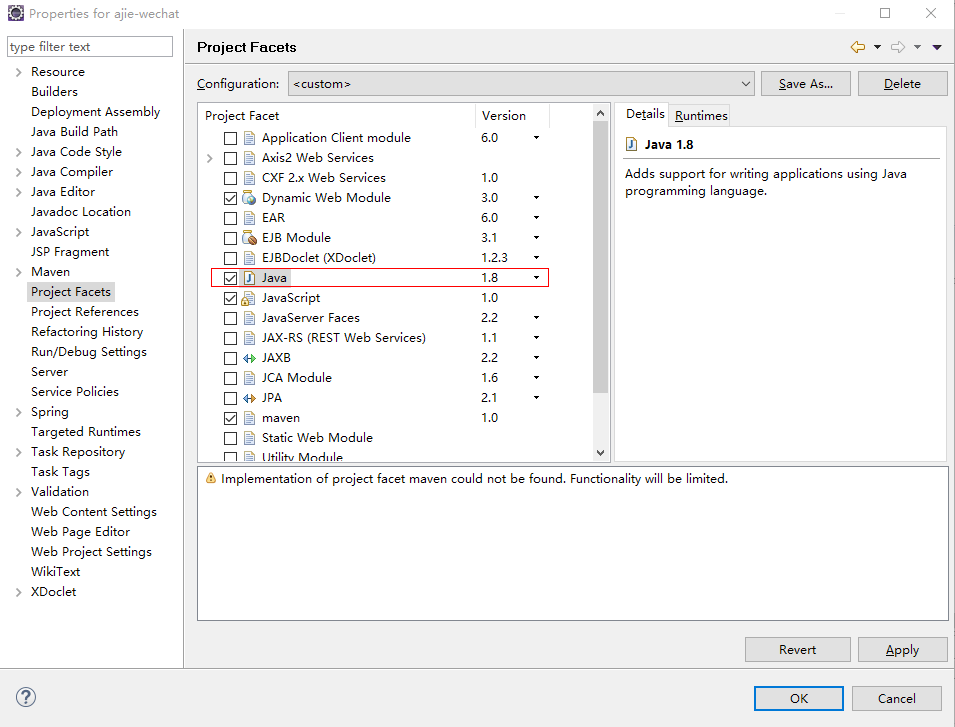
Java compiler level does not match the version of the installed Java project facet. xxx Unknown Faceted Project Problem (Java Version Mismatch)
可以:项目--properties---project Facets设置java文件的版本为 1.8(自己对应上面步骤的jdk)
新建maven指定jdk版本-eclipse新建maven项目报错The superclass "javax.servlet.http.HttpServlet" was not found on the Java Build Path的解决方案的更多相关文章
- eclipse中web工程新建jsp文件报错:The superclass "javax.servlet.http.HttpServlet" was not found on the Java Build Path
web工程中新建jsp文件提示:The superclass "javax.servlet.http.HttpServlet" was not found on the Java ...
- 新建jsp报错“The superclass "javax.servlet.http.HttpServlet" was not found on the Java Build Path”
今天新建jsp文件时,就报错“Visual Page Editor has experimental support for Windows 64-bit”,然后刚好stackoverflow上面有这 ...
- [IDE - Eclipse] JSP报错:The superclass “javax.servlet.http.HttpServlet” was not found on the Java Build Path
是因为Eclipse的Web项目不自动引入相关jar包. Right Click on the Project ❯ Properties ❯ Project Facets. You would be ...
- 使用maven创建项目时报错The superclass "javax.servlet.http.HttpServlet" was not found on the Java Build Path
Description Resource Path Location Type The superclass "javax.servlet.http.HttpServlet" wa ...
- java eclipse maven The superclass "javax.servlet.http.HttpServlet" was not found on the Java Build Path 解决方法
在eclipse 中使用maven 创建java web项目,启动服务器遇到提示:The superclass "javax.servlet.http.HttpServlet" w ...
- Eclipse中新建Maven Web项目报错:The superclass "javax.servlet.http.HttpServlet" was not found on the Java Build Path
在maven web项目中的index.jsp中的错误信息如下: The superclass "javax.servlet.http.HttpServlet" was not f ...
- maven新建web项目提示The superclass "javax.servlet.http.HttpServlet" was not found on the Java Build Path
maven新建web项目提示The superclass "javax.servlet.http.HttpServlet" was not found on the Java Bu ...
- maven项目The superclass "javax.servlet.http.HttpServlet" was not found on the Java Build Path
用Eclipse创建了一个maven web程序,使用tomcat8.5作为服务器,可以正常启动,但是却报如下错误 The superclass "javax.servlet.http.Ht ...
- 新建 jsp异常,The superclass "javax.servlet.http.HttpServlet" was not found on the Java Build Path
新项目,新建jsp页面的时候报异常: Multiple annotations found at this line: - The superclass "javax.servlet.htt ...
随机推荐
- Office_Visio_Pro_2007
Office_Visio_Pro_2007http://pan.baidu.com/share/link?shareid=473782&uk=3474501992 解压后在文件夹里找到密钥[一 ...
- Nginx作为反向代理服务器
前言:Nginx通过proxy模块实现反向代理功能.在作为web反向代理服务器时,nginx负责接收客户请求,并能够根据URI.客户端参数或其它的处理逻辑将用户请求调度至上游服务器上(upstream ...
- 解决maven项目 maven install失败 错误 Failed to execute goal org.apache.maven.plugins
1.Maven构建失败 Failed to execute goal org.apache.maven.plugins:maven-compiler-plugin: 2.3.4 :compile ( ...
- Android 底部菜单固定到底部
今天搞了很久的一个问题,导航菜单没有固定到底部,因为上面是ListView,可是没内容,于是就浮动上去了. 效果如下: 这里采用的是一个碎片,代码是: <LinearLayout xmlns:a ...
- [转]关于重定向RedirectAttributes的用法
刚才做项目的时候看到一篇写的很不错的博客,解决我之前对于RedirectAttributes的困惑,也给大家推荐下~ 原文地址https://zhuanlan.zhihu.com/p/21353217 ...
- 微服务之springCloud和docker-Eureka(一)
前言 本文记录怎么搭建服务注册中心eureka,然后打包成docker镜像,用docker swarm部署eureka集群 1.环境 环境 版本及说明 参考地址 docker v1.13.1,D ...
- win7下memCache安装过程
1.下载memcache 的windows 稳定版,解压放某个盘下面,比如在H:/wamp/www/php api/memcache: 2.在终端(即cmd 命令界面)下,输入安装命令 :H:/wam ...
- sphinx/Coreseek 4.1 执行make出错
参考的网址: http://blog.csdn.net/jcjc918/article/details/39032689 configure正确之后,执行make,出现如下的报错信息 configur ...
- 将已有jar添加至本地maven仓库
官网链接:http://maven.apache.org/guides/mini/guide-3rd-party-jars-local.html 比如有 commons-dbutils-1.6.jar ...
- windows和linux文件的转换
由于windows与unix系统的换行不一致,因此需要相互之前的格式转换 只需要在linux上执行 dos2unix filename 将windows下的文本文件转换成linux上可以浏览的文件 u ...