
mysql 启动卡主,cpu 100%
[mysql@mysqlhq scripts]$ cat /etc/redhat-release
Kylin Linux release 3.3.1707 (Core)
mysql version
Server version: 5.6.15-log MySQL Community Server - (GPL)
1 初始情况
[root@mysqlhq scripts]# free -m

total used free shared buff/cache available

Mem: 15887 7373 215 117 8298 8033

Swap: 8063 8 8055

[root@mysqlhq scripts]# top

top - 10:09:44 up 85 days, 2 min, 3 users, load average: 0.00, 0.01, 0.05

Tasks: 157 total, 1 running, 156 sleeping, 0 stopped, 0 zombie

%Cpu(s): 0.3 us, 0.3 sy, 0.0 ni, 99.3 id, 0.0 wa, 0.0 hi, 0.0 si, 0.0 st

KiB Mem : 16268752 total, 220424 free, 7550344 used, 8497984 buff/cache

KiB Swap: 8257532 total, 8248616 free, 8916 used. 8225992 avail Mem

PID USER PR NI VIRT RES SHR S %CPU %MEM TIME+ COMMAND

23103 root 20 0 157724 2296 1568 R 0.3 0.0 0:00.54 top

1 root 20 0 125340 3580 2092 S 0.0 0.0 7:19.82 systemd
2 启动mysql
[mysql@mysqlhq scripts]$ ./mysql_db_startup.sh
startup mysql service:localhost_3306
[mysql@mysqlhq scripts]$ 181225 10:55:19 mysqld_safe Logging to '/home/data/mysqldata/3306/log/mysql-error.log'.
181225 10:55:19 mysqld_safe Starting mysqld daemon with databases from /home/data/mysqldata/3306/data
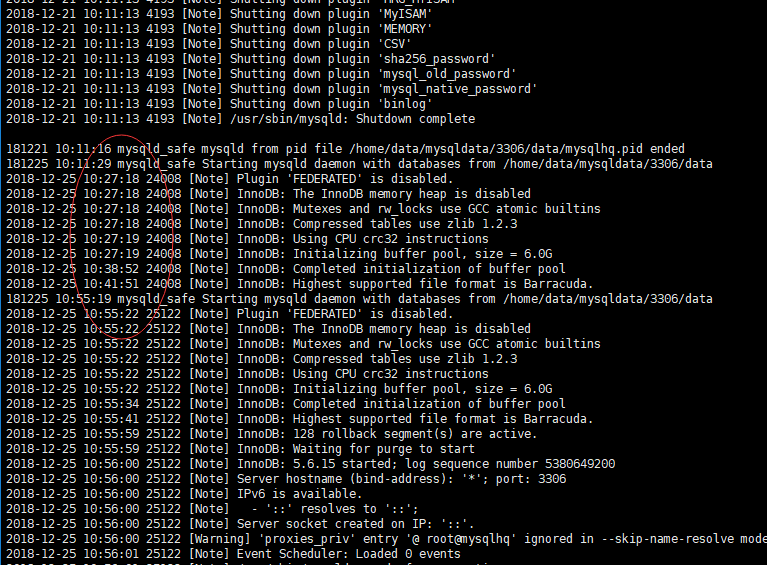
然后一直卡主,查询errorlog,没有什么有用的信息
2018-12-21 10:11:13 4193 [Note] Shutting down plugin 'binlog'
2018-12-21 10:11:13 4193 [Note] /usr/sbin/mysqld: Shutdown complete
181221 10:11:16 mysqld_safe mysqld from pid file /home/data/mysqldata/3306/data/mysqlhq.pid ended
181225 10:11:29 mysqld_safe Starting mysqld daemon with databases from /home/data/mysqldata/3306/data
2018-12-25 10:27:18 24008 [Note] Plugin 'FEDERATED' is disabled.
3 top
24008 mysql 20 0 7810972 1.264g 3764 R 48.7 8.1 21:50.02 mysqld
4 查询其他相关信息
[root@mysqlhq scripts]# vmstat 1

procs -----------memory---------- ---swap-- -----io---- -system-- ------cpu-----

 r  b   swpd   free   buff  cache   si   so    bi    bo   in   cs us sy id wa st

 3  0   8916 178104      0 7632784    0    0     6   104    3    4  0  0 99  0  0

 4  0   8916 177608      0 7632784    0    0     0     0  123   94  0 100  0  0  0

 3  0   8916 177112      0 7632784    0    0     0     0  113   67  0 100  0  0  0

 2  1   8916 176492      0 7632784    0    0     0     0  122   82  0 100  0  0  0

 4  0   8916 175996      0 7632784    0    0     0     0  134   93 10 90  0  0  0

 4  1   8916 175376      0 7632784    0    0     0     0  137   71  8 92  0  0  0

sy 系统CPU时间,如果太高,表示系统调用时间长,例如是IO操作频繁

[root@mysqlhq ~]# pidstat -w -u 1

Linux 3.10.0-514.ky3.kb3.x86_64 (mysqlhq)     12/25/2018     _x86_64_    (1 CPU)

10:26:50 AM   UID       PID    %usr %system  %guest   %wait    %CPU   CPU  Command

10:27:02 AM     0        26    0.00   40.48    0.00   83.33   40.48     0  kswapd0

10:27:02 AM     0       654    0.00    0.79    0.00   19.84    0.79     0  vmtoolsd

10:27:02 AM    42      2276    0.79    0.00    0.00    2.38    0.79     0  gnome-shell

10:27:02 AM  1000     24008    1.59  100.00    0.00  100.00  100.00     0  mysqld

10:27:02 AM     0     24028    0.00    0.79    0.00    3.97    0.79     0  top

10:27:02 AM     0     24072    3.17  100.00    0.00  100.00  100.00     0  pidstat

[root@mysqlhq ~]# pidstat -wt 1

Linux 3.10.0-514.ky3.kb3.x86_64 (mysqlhq)     12/25/2018     _x86_64_    (1 CPU)

10:28:19 AM   UID      TGID       TID   cswch/s nvcswch/s  Command

10:28:44 AM     0         1         -      1.12      0.37  systemd

10:28:44 AM     0         -         1      1.12      0.37  |__systemd

10:28:44 AM     0         2         -      0.37      0.00  kthreadd

10:28:44 AM     0         -         2      0.37      0.00  |__kthreadd

10:28:44 AM     0         3         -    108.55      0.00  ksoftirqd/0

10:28:44 AM     0         -         3    108.92      0.00  |__ksoftirqd/0

10:28:44 AM     0         9         -    268.77      0.00  rcu_sched

10:28:44 AM     0         -         9    268.77      0.00  |__rcu_sched

10:28:44 AM   UID      TGID       TID   cswch/s nvcswch/s  Command

10:28:49 AM  1000     24008         -      0.00     77.97  mysqld

10:28:49 AM  1000         -     24008      0.00     77.97  |__mysqld

10:28:50 AM     0         -     23104     16.67      0.00  |__kworker/0:1

10:28:50 AM  1000     24008         -      0.00    216.67  mysqld

10:28:50 AM  1000         -     24008      0.00    216.67  |__mysqld

10:40:39 AM   UID      TGID       TID   cswch/s nvcswch/s  Command

10:40:40 AM     0         3         -     57.14      0.00  ksoftirqd/0

10:40:40 AM     0         -         3     57.14      0.00  |__ksoftirqd/0

10:40:40 AM     0         9         -     78.57      0.00  rcu_sched

10:40:40 AM     0         -         9     78.57      0.00  |__rcu_sched

10:40:40 AM     0        26         -      0.00    192.86  kswapd0

10:40:40 AM     0         -        26      0.00    192.86  |__kswapd0

10:40:40 AM     0       401         -    114.29      0.00  xfsaild/dm-0

10:40:40 AM     0         -       401    114.29      0.00  |__xfsaild/dm-0

10:40:40 AM     0       654         -     78.57      0.00  vmtoolsd

10:40:40 AM     0         -       654     78.57      0.00  |__vmtoolsd

10:40:40 AM    26      6735         -     57.14      0.00  postgres

10:40:40 AM    26         -      6735     57.14      0.00  |__postgres

10:40:40 AM     0     23104         -     35.71      0.00  kworker/0:1

10:40:40 AM     0         -     23104     35.71      0.00  |__kworker/0:1

10:40:40 AM  1000     24008         -      0.00     92.86  mysqld

10:40:40 AM  1000         -     24008      0.00     92.86  |__mysqld

10:40:40 AM     0     24029         -      7.14      0.00  sshd

Every 2.0s: cat /proc/interrupts                                                                                                                                                            Tue Dec 25 10:31:54 2018

           CPU0

  0:         24   IO-APIC-edge      timer

  1:         10   IO-APIC-edge      i8042

  6:          2   IO-APIC-edge      floppy

  8:          1   IO-APIC-edge      rtc0

  9:          0   IO-APIC-fasteoi   acpi

 12:         16   IO-APIC-edge      i8042

 14:          0   IO-APIC-edge      ata_piix

 15:    7165685   IO-APIC-edge      ata_piix

 16:         10   IO-APIC-fasteoi   vmwgfx

 17:  107832584   IO-APIC-fasteoi   ioc0

 24:          0   PCI-MSI-edge      PCIe PME, pciehp

 25:          0   PCI-MSI-edge      PCIe PME, pciehp

 26:          0   PCI-MSI-edge      PCIe PME, pciehp

 27:          0   PCI-MSI-edge      PCIe PME, pciehp

 28:          0   PCI-MSI-edge      PCIe PME, pciehp

 29:          0   PCI-MSI-edge      PCIe PME, pciehp

 30:          0   PCI-MSI-edge      PCIe PME, pciehp

 31:          0   PCI-MSI-edge      PCIe PME, pciehp

 32:          0   PCI-MSI-edge      PCIe PME, pciehp

 33:          0   PCI-MSI-edge      PCIe PME, pciehp

 34:          0   PCI-MSI-edge      PCIe PME, pciehp

 35:          0   PCI-MSI-edge      PCIe PME, pciehp

 36:          0   PCI-MSI-edge      PCIe PME, pciehp

 37:          0   PCI-MSI-edge      PCIe PME, pciehp

 38:          0   PCI-MSI-edge      PCIe PME, pciehp

 39:          0   PCI-MSI-edge      PCIe PME, pciehp

 40:          0   PCI-MSI-edge      PCIe PME, pciehp

 41:          0   PCI-MSI-edge      PCIe PME, pciehp

 42:          0   PCI-MSI-edge      PCIe PME, pciehp

 43:          0   PCI-MSI-edge      PCIe PME, pciehp

 44:          0   PCI-MSI-edge      PCIe PME, pciehp

 45:          0   PCI-MSI-edge      PCIe PME, pciehp

 46:          0   PCI-MSI-edge      PCIe PME, pciehp

 47:          0   PCI-MSI-edge      PCIe PME, pciehp

 48:          0   PCI-MSI-edge      PCIe PME, pciehp

 49:          0   PCI-MSI-edge      PCIe PME, pciehp

 50:          0   PCI-MSI-edge      PCIe PME, pciehp

 51:          0   PCI-MSI-edge      PCIe PME, pciehp

 52:          0   PCI-MSI-edge      PCIe PME, pciehp

 53:          0   PCI-MSI-edge      PCIe PME, pciehp

 54:          0   PCI-MSI-edge      PCIe PME, pciehp

 55:          0   PCI-MSI-edge      PCIe PME, pciehp

 56:  273909732   PCI-MSI-edge      ens160-rxtx-0

 57:          0   PCI-MSI-edge      ens160-event-1

[root@mysqlhq ~]# cat /proc/stat |grep ^cpu

cpu  3582623 1829 3424656 721469270 1429046 0 193839 0 0 0

cpu0 3582623 1829 3424656 721469270 1429046 0 193839 0 0 0

[root@mysqlhq scripts]#  perf top

clear_page  /proc/kcore

Percent│

       │

       │

       │    Disassembly of section load0:

       │

       │    ffffffff813250e0 <load0>:

       │      xor    %eax,%eax

       │      mov    $0x40,%ecx

       │      nop

       │10:   dec    %ecx

100.00 │      mov    %rax,(%rdi)

       │      mov    %rax,0x8(%rdi)

       │      mov    %rax,0x10(%rdi)

       │      mov    %rax,0x18(%rdi)

       │      mov    %rax,0x20(%rdi)

       │      mov    %rax,0x28(%rdi)

       │      mov    %rax,0x30(%rdi)

       │      mov    %rax,0x38(%rdi)

       │      lea    0x40(%rdi),%rdi

       │    ↑ jne    10

       │      nop

       │    ← retq

Reading /proc/2243/task/2243/maps time out. You may want to increase the time limit by --proc-map-timeout

Samples: 14K of event 'cpu-clock', Event count (approx.): 58122788

Overhead  Shared Object                         Symbol

  69.91%  [kernel]                              [k] clear_page

   3.71%  [kernel]                              [k] copy_page

   1.17%  [kernel]                              [k] kallsyms_expand_symbol.constprop.1

   1.08%  [kernel]                              [k] module_get_kallsym

   0.83%  perf                                  [.] __symbols__insert

   0.77%  [kernel]                              [k] __do_softirq

   0.77%  ld-2.17.so                            [.] _dl_relocate_object

   0.76%  [kernel]                              [k] strlcpy

   0.66%  [kernel]                              [k] _raw_spin_unlock_irqrestore

   0.58%  [kernel]                              [k] finish_task_switch

   0.55%  libelf-0.166.so                       [.] gelf_getsym

   0.52%  libc-2.17.so                          [.] _IO_vfscanf

   0.44%  [kernel]                              [k] __do_page_fault
[root@mysqlhq ~]# top

top - 10:37:02 up 85 days, 29 min,  4 users,  load average: 2.25, 1.78, 1.38

Tasks: 158 total,   5 running, 153 sleeping,   0 stopped,   0 zombie

%Cpu(s): 10.0 us, 90.0 sy,  0.0 ni,  0.0 id,  0.0 wa,  0.0 hi,  0.0 si,  0.0 st

KiB Mem : 16268752 total,   171688 free,  8890204 used,  7206860 buff/cache

KiB Swap:  8257532 total,  8248616 free,     8916 used.  6885876 avail Mem

  PID USER      PR  NI    VIRT    RES    SHR S %CPU %MEM     TIME+ COMMAND

24181 root      20   0  213132  20072   3752 R 49.0  0.1   0:26.26 perf

24008 mysql     20   0 7810972 1.264g   3764 R 48.7  8.1  21:50.02 mysqld

  401 root      20   0       0      0      0 S  1.7  0.0  27:49.84 xfsaild/dm-0

 2276 gdm       20   0 1374896  66280   8652 S  0.7  0.4  31:39.73 gnome-shell

  654 root      20   0  323576  25444   3304 S  0.3  0.2  80:59.69 vmtoolsd
这时候找不到原因,只好kill -9 mysql
然后又启动mysql,发现秒启
情况不能复现。
在上面情况下, 忘记使用iostat和ifstat查看磁盘和网络的情况。。-----
mysql 启动卡主,cpu 100%的更多相关文章
- mysql hang and srv_error_monitor_thread using 100% cpu
昨天晚上,运维过来说有台生产服务器的mysql cpu一直100%,新的客户端登录不了,但是已经在运行的应用都正常可用. 登录服务器后,top -H看了下,其中一个线程的cpu 一直100%,其他的几 ...
- paip.navicat form mysql导入文本文件时CPU占用100%的解决
paip.navicat form mysql导入文本文件时CPU占用100%的解决 作者Attilax , EMAIL:1466519819@qq.com 来源:attilax的专栏 地址:h ...
- mysql hang and srv_error_monitor_thread using 100% cpu(已解决)
昨天晚上,运维过来说有台生产服务器的mysql cpu一直100%,新的客户端登录不了,但是已经在运行的应用都正常可用. 登录服务器后,top -H看了下,其中一个线程的cpu 一直100%,其他的几 ...
- MySQL 调优/优化的 100 个建议
MySQL 调优/优化的 100 个建议 MySQL是一个强大的开源数据库.随着MySQL上的应用越来越多,MySQL逐渐遇到了瓶颈.这里提供 101 条优化 MySQL 的建议.有些技巧适合特定 ...
- MySQL高可用性之Keepalived+MySQL(双主热备)
环境描述:OS:CentOS6.5_X64MASTER:192.168.0.202BACKUP:192.168.0.203VIP:192.168.0.204 1.配置两台Mysql主主同步[root@ ...
- MySQL keepalived 双主.md
MySQL keepalived 双主搭建 环境说明 系统 IP 主机名 mysql keepalived VIP CentOS 6.8 192.168.197.61 C6-node1 5.6.36 ...
- MySQL备份与主备配置
MySQL备份与主备配置 数据备份类型 全量备份:备份整个数据库 增量备份:备份自上一次备份以来(增量或完全)以来变化的数据 差异备份:备份自上一次完全备份以来变化的数据 全量备份 全量备份的方法有 ...
- 基于Docker Compose搭建mysql主从复制(1主2从)
系统环境 * 3 Ubuntu 16.04 mysql 8.0.12 docker 18.06.1-ce docker-compose 1.23.0-rc3 *3 ==> PS ###我用的是 ...
- 数据库CPU 100%处理记录
问题描述 2020年7月13日一大早收到告警,测试环境数据库CPU告警. 登录aws查看监控如下图 问题分析 出现这种cpu 100%的问题,都是因为sql性能问题导致的, 主要表现于 cpu 消 ...
随机推荐
- react 文章
1.http://www.ruanyifeng.com/blog/2016/09/react-technology-stack.html (React 技术栈系列教程) 2.http://www.ru ...
- python基础之网络基础
一.操作系统基础 操作系统:(Operating System,简称OS)是管理和控制计算机硬件与软件资源的计算机程序,是直接运行在“裸机”上的最基本的系统软件,任何其他软件都必须在操作系统的支持下才 ...
- react login page demo
1. login form import React from "react"; import {Row, Col} from "antd"; import { ...
- 单链表删除(Delete)或者去除(Remove)节点面试题总结
(尊重劳动成果,转载请注明出处:http://blog.csdn.net/qq_25827845/article/details/76061004冷血之心的博客) 关于单链表反转的多种形式请参见本博文 ...
- Handling CLIK AS3 Compile Error 1152 & 5000
Handling CLIK AS3 Compile Error 1152 & 5000 Action You add a CLIK AS3 component from CLIK_Compon ...
- 【MFC】mfc控件位置调整和坐标确定 .
摘自DoubleLi: http://www.cnblogs.com/lidabo/archive/2012/08/24/2654678.html mfc控件位置调整和坐标确定 http://my ...
- windows服务是如何被调用的?
1.服务介绍 操作系统在启动的时候,会启动一些不需要用户交互的进程.这些进程被称为服务.当操作系统启动后它就自动被运行. 2.组成 服务程序.服务控制程序(SCP,service control pr ...
- Python学习-数据运算
在Python中有丰富的算术运算,这使得Python在科学计算领域有着很高的地位,Python可以提供包括四则运算在内的各种算术运算. a = 10 b = 20 print(a-b) #-10 pr ...
- 剑指offer-第五章总结
优化时间和空间效率的方法: 1,时间换空间. 2,动态规划. 3,找规律.
- 【spring源码学习】spring的远程调用实现源码分析
[一]spring的远程调用提供的基础类 (1)org.springframework.remoting.support.RemotingSupport ===>spring提供实现的远程调用客 ...