
python+turtle 笔记
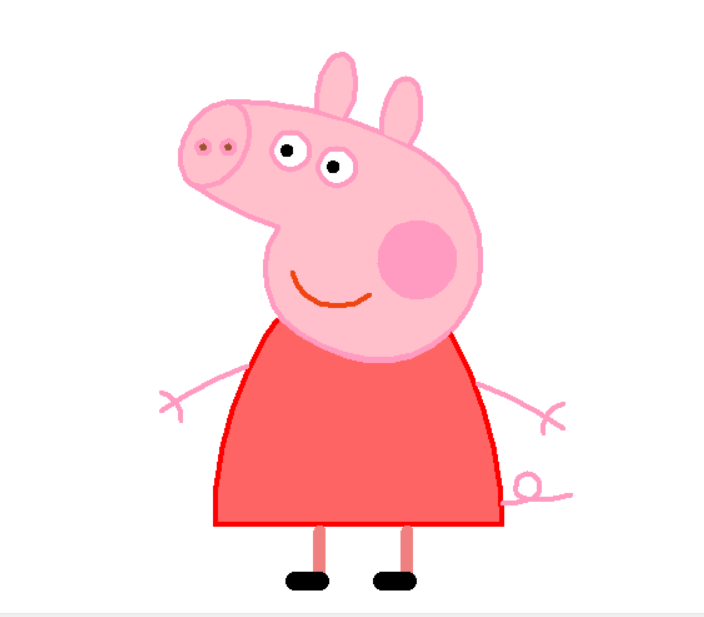
用Python+turtle绘制佩琪:
from turtle import *

def nose(x,y):#鼻子

    penup()#提起笔

    goto(x,y)#定位

    pendown()#落笔,开始画

    setheading(-30)#将乌龟的方向设置为to_angle/为数字(0-东、90-北、180-西、270-南)

    begin_fill()#准备开始填充图形

    a=0.4

    for i in range(120):

        if 0<=i<30 or 60<=i<90:

            a=a+0.08

            left(3) #向左转3度

            forward(a) #向前走a的步长

        else:

            a=a-0.08

            left(3)

            forward(a)

    end_fill()#填充完成

    penup()

    setheading(90)

    forward(25)

    setheading(0)

    forward(10)

    pendown()

    pencolor(255,155,192)#画笔颜色

    setheading(10)

    begin_fill()

    circle(5)

    color(160,82,45)#返回或设置pencolor和fillcolor

    end_fill()

    penup()

    setheading(0)

    forward(20)

    pendown()

    pencolor(255,155,192)

    setheading(10)

    begin_fill()

    circle(5)

    color(160,82,45)

    end_fill()

def head(x,y):#头

    color((255,155,192),"pink")

    penup()

    goto(x,y)

    setheading(0)

    pendown()

    begin_fill()

    setheading(180)

    circle(300,-30)

    circle(100,-60)

    circle(80,-100)

    circle(150,-20)

    circle(60,-95)

    setheading(161)

    circle(-300,15)

    penup()

    goto(-100,100)

    pendown()

    setheading(-30)

    a=0.4

    for i in range(60):

        if 0<=i<30 or 60<=i<90:

            a=a+0.08

            lt(3) #向左转3度

            fd(a) #向前走a的步长

        else:

            a=a-0.08

            lt(3)

            fd(a)

    end_fill()

def ears(x,y): #耳朵

    color((255,155,192),"pink")

    penup()

    goto(x,y)

    pendown()

    begin_fill()

    setheading(100)

    circle(-50,50)

    circle(-10,120)

    circle(-50,54)

    end_fill()

    penup()

    setheading(90)

    forward(-12)

    setheading(0)

    forward(30)

    pendown()

    begin_fill()

    setheading(100)

    circle(-50,50)

    circle(-10,120)

    circle(-50,56)

    end_fill()

def eyes(x,y):#眼睛

    color((255,155,192),"white")

    penup()

    setheading(90)

    forward(-20)

    setheading(0)

    forward(-95)

    pendown()

    begin_fill()

    circle(15)

    end_fill()

    color("black")

    penup()

    setheading(90)

    forward(12)

    setheading(0)

    forward(-3)

    pendown()

    begin_fill()

    circle(3)

    end_fill()

    color((255,155,192),"white")

    penup()

    seth(90)

    forward(-25)

    seth(0)

    forward(40)

    pendown()

    begin_fill()

    circle(15)

    end_fill()

    color("black")

    penup()

    setheading(90)

    forward(12)

    setheading(0)

    forward(-3)

    pendown()

    begin_fill()

    circle(3)

    end_fill()

def cheek(x,y):#腮

    color((255,155,192))

    penup()

    goto(x,y)

    pendown()

    setheading(0)

    begin_fill()

    circle(30)

    end_fill()

def mouth(x,y): #嘴

    color(239,69,19)

    penup()

    goto(x,y)

    pendown()

    setheading(-80)

    circle(30,40)

    circle(40,80)

def body(x,y):#身体

    color("red",(255,99,71))

    penup()

    goto(x,y)

    pendown()

    begin_fill()

    setheading(-130)

    circle(100,10)

    circle(300,30)

    setheading(0)

    forward(230)

    setheading(90)

    circle(300,30)

    circle(100,3)

    color((255,155,192),(255,100,100))

    setheading(-135)

    circle(-80,63)

    circle(-150,24)

    end_fill()

def hands(x,y):#手

    color((255,155,192))

    penup()

    goto(x,y)

    pendown()

    setheading(-160)

    circle(300,15)

    penup()

    setheading(90)

    forward(15)

    setheading(0)

    forward(0)

    pendown()

    setheading(-10)

    circle(-20,90)

    penup()

    setheading(90)

    forward(30)

    setheading(0)

    forward(237)

    pendown()

    setheading(-20)

    circle(-300,15)

    penup()

    setheading(90)

    forward(20)

    setheading(0)

    forward(0)

    pendown()

    setheading(-170)

    circle(20,90)

def foot(x,y):#脚

    pensize(10)

    color((240,128,128))

    penup()

    goto(x,y)

    pendown()

    setheading(-90)

    forward(40)

    setheading(-180)

    color("black")

    pensize(15)

    fd(20)

    pensize(10)

    color((240,128,128))

    penup()

    setheading(90)

    forward(40)

    setheading(0)

    forward(90)

    pendown()

    setheading(-90)

    forward(40)

    setheading(-180)

    color("black")

    pensize(15)

    fd(20)

def tail(x,y):#尾巴

    pensize(4)

    color((255,155,192))

    penup()

    goto(x,y)

    pendown()

    seth(0)

    circle(70,20)

    circle(10,330)

    circle(70,30)

def setting():          #参数设置

    pensize(4)

    hideturtle()        #使乌龟无形(隐藏)

    colormode(255)      #将其设置为1.0或255.随后 颜色三元组的r,g,b值必须在0 .. cmode范围内

    color((255,155,192),"pink")

    setup(840,500)

    speed(10)

def main():

    setting()           #画布、画笔设置

    nose(-100,100)      #鼻子

    head(-69,167)       #头

    ears(0,160)         #耳朵

    eyes(0,140)         #眼睛

    cheek(80,10)        #腮

    mouth(-20,30)       #嘴

    body(-32,-8)        #身体

    hands(-56,-45)      #手

    foot(2,-177)        #脚

    tail(148,-155)      #尾巴

    done()

if __name__ == '__main__':

    main()
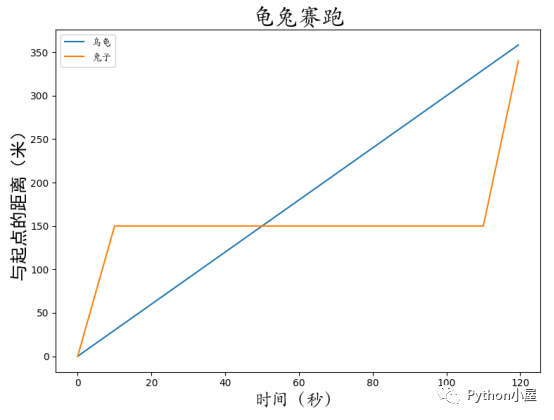
用Python+turtle库绘制动画重现龟兔赛跑现场:
import numpy as np

import matplotlib.pyplot as plt

import matplotlib.font_manager as fm

t=np.arange(0,120,0.5)

rabbit=np.piecewise(t,

                    [t<10,t>110],

                    [lambda x:15*x,

                     lambda x:20*(x-110)+150,

                     lambda x:150]

                    )

tortoise=3*t

plt.plot(t,tortoise,label='乌龟')

plt.plot(t,rabbit,label='兔子')

plt.title('龟兔赛跑',fontpropertise='STKAITI',fontsize=24)

plt.xlabel('时间(秒)',fontpropertise='STKAITI',fontsize=18)

plt.ylabel('与起点的距离(米)',fontpropertise='simbei',fontsize=18)

plt.show()
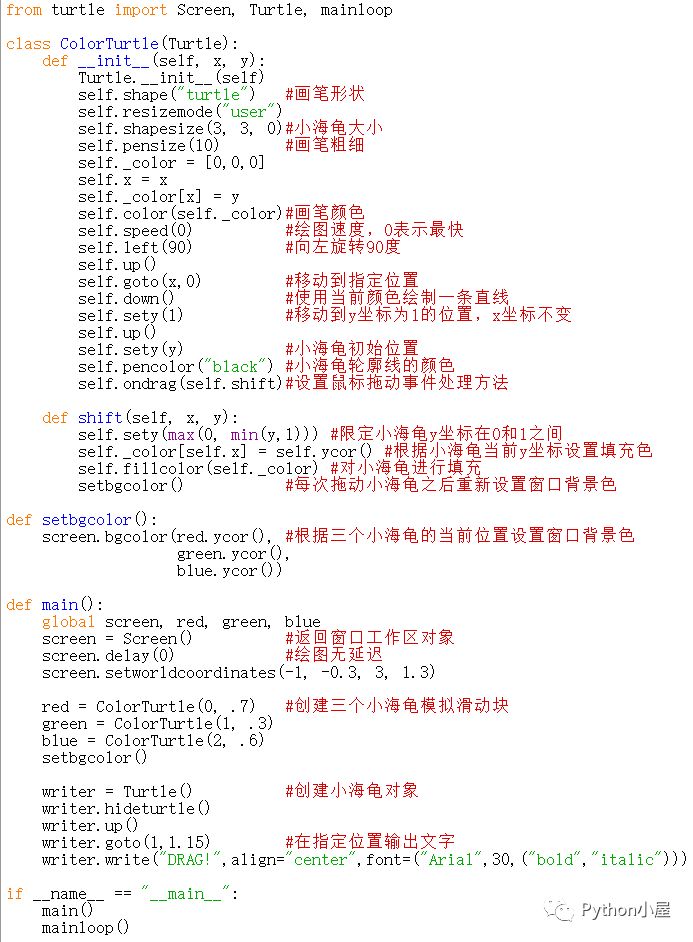
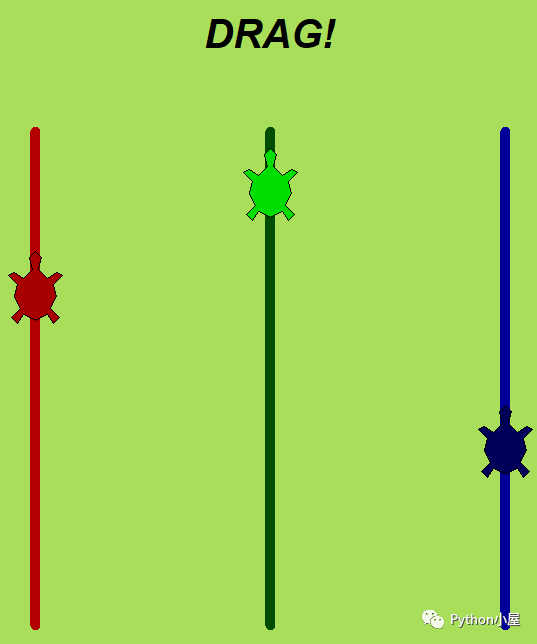
绘制交互式绘图小海龟:
绘制玫瑰花 :
:
from turtle import *

#global pen and speed

pencolor("black")

fillcolor("red")

speed(50)

s=0.15

#init poistion

penup()

goto(0,600*s)

pendown()

begin_fill()

circle(200*s,30)

for i in range(60):

    lt(1)

    circle(50*s,1)

circle(200*s,30)

for i in range(4):

    lt(1)

    circle(100*s,1)

circle(200*s,50)

for i in range(50):

    lt(1)

    circle(50*s,1)

circle(350*s,65)

for i in range(40):

    lt(1)

    circle(70*s,1)

circle(150*s,50)

for i in range(20):

    rt(1)

    circle(50*s,1)

circle(400*s,60)

for i in range(18):

    lt(1)

    circle(50*s,1)

fd(250*s)

rt(150)

circle(-500*s,12)

lt(140)

circle(550*s,110)

lt(27)

circle(650*s,100)

lt(130)

circle(-300*s,20)

rt(123)

circle(220*s,57)

end_fill()

lt(120)

fd(280*s)

lt(115)

circle(300*s,33)

lt(180)

circle(-300*s,33)

for i in range(70):

    rt(1)

    circle(225*s,1)

circle(350*s,104)

lt(90)

circle(200*s,105)

circle(-500*s,63)

penup()

goto(170*s,-330*s)

pendown()

lt(160)

for i in range(20):

    lt(1)

    circle(2500*s,1)

for i in range(220):

    rt(1)

    circle(250*s,1)

fillcolor('green')

penup()

goto(670*s,-480*s)

pendown()

rt(140)

begin_fill()

circle(300*s,120)

lt(60)

circle(300*s,120)

end_fill()

penup()

goto(180*s,-850*s)

pendown()

rt(85)

circle(600*s,40)

penup()

goto(-150*s,-1300*s)

pendown()

begin_fill()

rt(120)

circle(300*s,115)

lt(75)

circle(300*s,100)

end_fill()

penup()

goto(430*s,-1370*s)

pendown()

rt(30)

circle(-600*s,35)

done()

画太阳花:
from turtle import *

color('red','yellow')

begin_fill()

while True:

    forward(200)

    left(170)

    if abs(pos())<1:

        break

end_fill()

done()

python+turtle 笔记的更多相关文章
- python turtle笔记
Turtle库是Python语言中一个很流行的绘制图像的函数库,想象一个小乌龟,在一个横轴为x.纵轴为y的坐标系原点,(0,0)位置开始,它根据一组函数指令的控制,在这个平面坐标系中移动,从而在它 ...
- Web Scraping with Python读书笔记及思考
Web Scraping with Python读书笔记 标签(空格分隔): web scraping ,python 做数据抓取一定一定要明确:抓取\解析数据不是目的,目的是对数据的利用 一般的数据 ...
- python学习笔记整理——字典
python学习笔记整理 数据结构--字典 无序的 {键:值} 对集合 用于查询的方法 len(d) Return the number of items in the dictionary d. 返 ...
- VS2013中Python学习笔记[Django Web的第一个网页]
前言 前面我简单介绍了Python的Hello World.看到有人问我搞搞Python的Web,一时兴起,就来试试看. 第一篇 VS2013中Python学习笔记[环境搭建] 简单介绍Python环 ...
- python学习笔记之module && package
个人总结: import module,module就是文件名,导入那个python文件 import package,package就是一个文件夹,导入的文件夹下有一个__init__.py的文件, ...
- python datetime笔记
python datetime笔记 http://mint-green.diandian.com/post/2011-09-09/4892024 获取当前时间,并通过字符串输出. 格式为:%Y-%m- ...
- python学习笔记(六)文件夹遍历,异常处理
python学习笔记(六) 文件夹遍历 1.递归遍历 import os allfile = [] def dirList(path): filelist = os.listdir(path) for ...
- python学习笔记--Django入门四 管理站点--二
接上一节 python学习笔记--Django入门四 管理站点 设置字段可选 编辑Book模块在email字段上加上blank=True,指定email字段为可选,代码如下: class Autho ...
- python学习笔记--Django入门0 安装dangjo
经过这几天的折腾,经历了Django的各种报错,翻译的内容虽然不错,但是与实际的版本有差别,会出现各种奇葩的错误.现在终于找到了解决方法:查看英文原版内容:http://djangobook.com/ ...
随机推荐
- Docker 创建 Confluence6.12.2 中文版
目录 目录 1.介绍 1.1.什么是Confluence? 2.Confluence的官网在哪里? 3.如何下载安装? 4.对 Confluence 进行配置 4.1.设置 Confluence 4. ...
- Linux中 SonarQube代码质量管理平台以及C++插件安装
SonarQube是管理代码质量一个开源平台,可以快速的定位代码中潜在的或者明显的错误. SonarQube安装 1.环境准备 (1)sonarQube 下载地址https://www.sonarqu ...
- 用 Weave Scope 监控集群 - 每天5分钟玩转 Docker 容器技术(175)
创建 Kubernetes 集群并部署容器化应用只是第一步.一旦集群运行起来,我们需要确保一起正常,所有必要组件就位并各司其职,有足够的资源满足应用的需求.Kubernetes 是一个复杂系统,运维团 ...
- 使用VsCode自带的Emmet语法
新建html文件,保存之后,输入"!",按Tap(或Enter)键,自动生成HTML结构 标签只要直接输入标签名(不要输入<>),按Tap(或Enter)键自动生成完整 ...
- Python字典、集合之高山流水
字典dict字典是由大括号{键:值}组成.字典是无序的.字典的键必须是不可变数据类型.不能使用列表作为键,但可以使用元祖作为字典的键.例如: dict_ = {"test":&qu ...
- Jenkins+git+gitlab实现持续自动集成部署
1 实验环境 三台服务器 gitlab 192.168.7.139 Jenkins 192.168.7.140 java 192.168.7.141 [root ...
- 《精通Spring+4.x++企业应用开发实战》读后感
引言 还记得大三时上培训班的是时候,当时的培训老师说自己是本地讲解spring最好的讲师,但是后来等我实习了看了<Spring 3.x 企业应用开发实战>以及后续版本<精通Sprin ...
- 监控redis
[4ajr@redis1 scripts]$ cat redismonitor.sh #!/bin/bash #想要什么监控项再添加 rediscli="/soft/redis/bin/re ...
- Axios
axios 是一个基于Promise 用于浏览器和 nodejs 的 HTTP 客户端.简单的理解就是ajax的封装 它本身具有以下特征: a.从浏览器中创建 XMLHttpRequest b ...
- 使用BigQuery分析GitHub上的C#代码
一年多以前,Google 在GitHub中提供了BigQuery用于查询的GitHub上的开源代码(open source code on GitHub available for querying) ...