
Mybatis+Mysql逆向工程
目录结构:

pom文件:
<?xml version="1.0" encoding="UTF-8"?>

<project xmlns="http://maven.apache.org/POM/4.0.0" xmlns:xsi="http://www.w3.org/2001/XMLSchema-instance"

         xsi:schemaLocation="http://maven.apache.org/POM/4.0.0 http://maven.apache.org/xsd/maven-4.0.0.xsd">

    <modelVersion>4.0.0</modelVersion>

    <parent>

        <groupId>org.springframework.boot</groupId>

        <artifactId>spring-boot-starter-parent</artifactId>

        <version>1.5.18.RELEASE</version>

        <relativePath/> <!-- lookup parent from repository -->

    </parent>

    <groupId>com.atyss</groupId>

    <artifactId>springboot-mybatis</artifactId>

    <version>0.0.1-SNAPSHOT</version>

    <name>springboot-mybatis</name>

    <description>Demo project for Spring Boot</description>

    <properties>

        <java.version>1.8</java.version>

    </properties>

    <dependencies>

        <dependency>

            <groupId>org.springframework.boot</groupId>

            <artifactId>spring-boot-starter-jdbc</artifactId>

        </dependency>

        <dependency>

            <groupId>org.springframework.boot</groupId>

            <artifactId>spring-boot-starter-web</artifactId>

        </dependency>

        <dependency>

            <groupId>org.mybatis.spring.boot</groupId>

            <artifactId>mybatis-spring-boot-starter</artifactId>

            <version>1.3.2</version>

        </dependency>

        <dependency>

            <groupId>mysql</groupId>

            <artifactId>mysql-connector-java</artifactId>

            <scope>runtime</scope>

        </dependency>

        <!--引入druid-->

        <!-- https://mvnrepository.com/artifact/com.alibaba/druid -->

        <dependency>

            <groupId>com.alibaba</groupId>

            <artifactId>druid</artifactId>

            <version>1.1.8</version>

        </dependency>

        <dependency>

            <groupId>org.springframework.boot</groupId>

            <artifactId>spring-boot-starter-test</artifactId>

            <scope>test</scope>

        </dependency>

    </dependencies>

    <build>

        <plugins>

            <plugin>

                <groupId>org.springframework.boot</groupId>

                <artifactId>spring-boot-maven-plugin</artifactId>

            </plugin>

        </plugins>

    </build>

</project>
yml配置文件:
spring:

  datasource:

#   数据源基本配置

    username: root

    password: 123456

    driver-class-name: com.mysql.jdbc.Driver

    url: jdbc:mysql://localhost:3306/mybatis

    type: com.alibaba.druid.pool.DruidDataSource

#   数据源其他配置

    initialSize: 5

    minIdle: 5

    maxActive: 20

    maxWait: 60000

    timeBetweenEvictionRunsMillis: 60000

    minEvictableIdleTimeMillis: 300000

    validationQuery: SELECT 1 FROM DUAL

    testWhileIdle: true

    testOnBorrow: false

    testOnReturn: false

    poolPreparedStatements: true

#   配置监控统计拦截的filters,去掉后监控界面sql无法统计,'wall'用于防火墙

    filters: stat,wall,log4j

    maxPoolPreparedStatementPerConnectionSize: 20

    useGlobalDataSourceStat: true

    connectionProperties: druid.stat.mergeSql=true;druid.stat.slowSqlMillis=500

mybatis:

  # 指定全局配置文件位置

  config-location: classpath:mybatis/mybatis-config.xml

  # 指定sql映射文件位置

  mapper-locations: classpath:mybatis/mapper/*.xml
druid配置文件:
package com.mybatisbgm.demo.config;

import com.alibaba.druid.pool.DruidDataSource;
import com.alibaba.druid.support.http.StatViewServlet;
import com.alibaba.druid.support.http.WebStatFilter;
import org.springframework.boot.context.properties.ConfigurationProperties;
import org.springframework.boot.web.servlet.FilterRegistrationBean;
import org.springframework.boot.web.servlet.ServletRegistrationBean;
import org.springframework.context.annotation.Bean;
import org.springframework.context.annotation.Configuration;

import javax.sql.DataSource;
import java.util.Arrays;
import java.util.HashMap;
import java.util.Map;

@Configuration
public class DruidConfig {

    @ConfigurationProperties(prefix = "spring.datasource")
    @Bean
    public DataSource druid(){
        return  new DruidDataSource();
    }

    //配置Druid的监控
    //1、配置一个管理后台的Servlet
    @Bean
    public ServletRegistrationBean statViewServlet(){
        ServletRegistrationBean bean = new ServletRegistrationBean(new StatViewServlet(), "/druid/*");
        Map<String,String> initParams = new HashMap<>();

        initParams.put("loginUsername","admin");
        initParams.put("loginPassword","123456");
        //initParams.put("allow","");//默认就是允许所有访问
        //initParams.put("deny","192.168.56.1");

        bean.setInitParameters(initParams);
        return bean;
    }

    //2、配置一个web监控的filter
    @Bean
    public FilterRegistrationBean webStatFilter(){
        FilterRegistrationBean bean = new FilterRegistrationBean();
        bean.setFilter(new WebStatFilter());

        Map<String,String> initParams = new HashMap<>();
        initParams.put("exclusions","*.js,*.css,/druid/*");

        bean.setInitParameters(initParams);

        bean.setUrlPatterns(Arrays.asList("/*"));

        return  bean;
    }
}
最主要的bgm.xml
<?xml version="1.0" encoding="UTF-8"?>

<!DOCTYPE generatorConfiguration

  PUBLIC "-//mybatis.org//DTD MyBatis Generator Configuration 1.0//EN"

  "http://mybatis.org/dtd/mybatis-generator-config_1_0.dtd">

<generatorConfiguration>

    <!-- context:环境

        id="DB2Tables":唯一标示

        MyBatis3Simple:生成的简单版

     -->

  <context id="DB2Tables" targetRuntime="MyBatis3Simple">

      <!-- jdbcConnection:jdbc连接 -->

    <jdbcConnection driverClass="com.mysql.jdbc.Driver"

        connectionURL="jdbc:mysql://localhost:3306/javabean"

        userId="root"

        password="123456">

    </jdbcConnection>

    <javaTypeResolver >

      <property name="forceBigDecimals" value="false" />

    </javaTypeResolver>

    <!--javaModelGenerator:生成java模型的配置。(javaBean)

    targetPackage:生成的javaBean放在哪个包下

    targetProject:放在哪个工程下

      -->

    <javaModelGenerator targetPackage="com.mybatisbgm.demo.bean"

        targetProject=".\src\main\java">

      <property name="enableSubPackages" value="true" />

      <property name="trimStrings" value="true" />

    </javaModelGenerator>

    <!-- sqlMapGenerator:SQL映射生成器(UserDao.xml  mapper文件) -->

    <sqlMapGenerator targetPackage="mybatis.mapper"

        targetProject=".\src\main\resources">

      <property name="enableSubPackages" value="true" />

    </sqlMapGenerator>

    <!-- javaClientGenerator:java客户端生成:

        UserDao接口 -->

    <javaClientGenerator type="XMLMAPPER"

        targetPackage="com.mybatisbgm.demo.mapper"

        targetProject=".\src\main\java">

      <property name="enableSubPackages" value="true" />

    </javaClientGenerator>

    <!--  数据库表

    tableName:表、名

    domainObjectName:对应javaBean名

    -->

    <table tableName="animals" domainObjectName="Animal"></table>

  </context>

</generatorConfiguration>
test运行文件:
public static void main(String[] args) throws Exception {

        List<String> warnings = new ArrayList<String>();

        boolean overwrite = true;

        //1、获取mbg文件

        File configFile = new File("mbg.xml");

        ConfigurationParser cp = new ConfigurationParser(warnings);

        Configuration config = cp.parseConfiguration(configFile);

        DefaultShellCallback callback = new DefaultShellCallback(overwrite);

        MyBatisGenerator myBatisGenerator = new MyBatisGenerator(config,

                callback, warnings);

        myBatisGenerator.generate(null);

        System.out.println("运行完成....");

    }
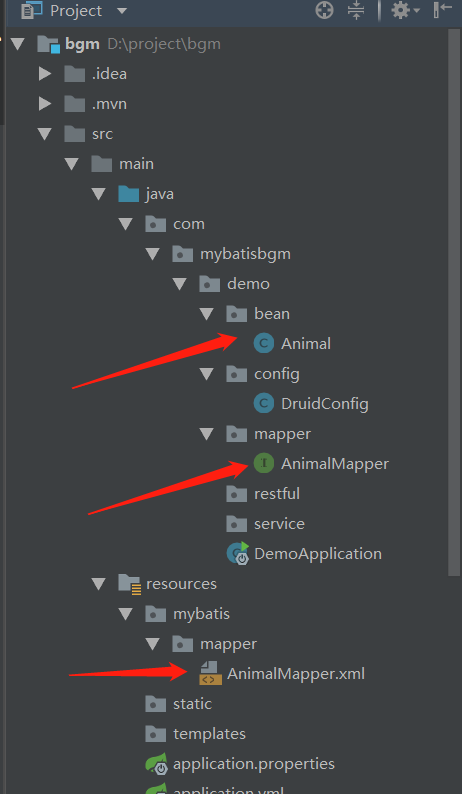
生成的文件:
Mybatis+Mysql逆向工程的更多相关文章
- SpringBoot+Mybatis+Maven+MySQL逆向工程实现增删改查
SpringBoot+Mybatis+MySQL+MAVEN逆向工程实现增删改查 这两天简单学习了下SpringBoot,发现这玩意配置起来是真的方便,相比于SpringMVC+Spring的配置简直 ...
- mybatis的逆向工程
mybatis的逆向工程是很大的减少了程序员对代码的编写工作,由于mybatis是半自动的sql语句使用,我们在项目中一般都是采用逆向工程来生成mybatis的文件,mapper接口相当于我们平常所说 ...
- Mybatis(七) mybatis的逆向工程的配置详解
还是觉得看书学习有意思~嘿嘿.今天把mybatis给结束掉. --WH 一.什么是逆向工程? 简单点说,就是通过数据库中的单表,自动生成java代码. Mybatis官方提供了逆向工程,可以针对单表自 ...
- SpringMVC+Mybatis+MySQL配置Redis缓存
SpringMVC+Mybatis+MySQL配置Redis缓存 1.准备环境: SpringMVC:spring-framework-4.3.5.RELEASE-dist Mybatis:3.4.2 ...
- Mybatis【逆向工程,缓存,代理】知识要点
前言 本文主要讲解Mybatis的以下知识点: Mybatis缓存 一级缓存 二级缓存 与Ehcache整合 Mapper代理 使用Mapper代理就不用写实现类了 逆向工程 自动生成代码 Mybat ...
- Mybatis学习(七)————— mybatis的逆向工程的配置详解
一.什么是逆向工程? 简单点说,就是通过数据库中的单表,自动生成java代码. Mybatis官方提供了逆向工程,可以针对单表自动生成mybatis代码(mapper.java\mapper.xml\ ...
- SpringBoot+Mybatis+Generator 逆向工程使用(二)
Mybatis-Genarator 逆向工程使用 个人开发环境 java环境:Jdk1.8.0_60 编译器:IntelliJ IDEA 2017.1.4 mysql驱动:mysql-connecto ...
- 【MyBatis学习15】MyBatis的逆向工程生成代码
1. 什么是逆向工程 mybatis的一个主要的特点就是需要程序员自己编写sql,那么如果表太多的话,难免会很麻烦,所以mybatis官方提供了一个逆向工程,可以针对单表自动生成mybatis执行所需 ...
- 利用Intellij+MAVEN搭建Spring+Mybatis+MySql+SpringMVC项目详解
http://blog.csdn.net/noaman_wgs/article/details/53893948 利用Intellij+MAVEN搭建Spring+Mybatis+MySql+Spri ...
随机推荐
- org.hibernate.boot.MappingNotFoundException: Mapping (RESOURCE) not found :
可能原因: hibernate映射文件hibernate.cfg.xml中mapping中resource写错了文件名或者路径
- asp.net MVC路由配置总结
URL构造 命名参数规范+匿名对象 routes.MapRoute(name: "Default",url: "{controller}/{action}/{id}&qu ...
- 27)django-form操作示例(动态Select数据,自定义字段验证,全局验证等)
1)普通传递select数据 # -*- coding:utf-8 -*- __author__ = 'shisanjun' from django import forms from django. ...
- 爬虫框架 Scrapy
一 介绍 crapy一个开源和协作的框架,其最初是为了页面抓取 (更确切来说, 网络抓取 )所设计的,使用它可以以快速.简单.可扩展的方式从网站中提取所需的数据.但目前Scrapy的用途十分广泛,可用 ...
- excel导出导入通用方法
/** * 方法说明:批量导出通用方法 * 创建时间:2018年8月24日 *** * @param filePath 文件地址 * @param sheetName 分页名称 * @param ti ...
- vmware安装centOs操作系统配置网络的一系列问题
1:最近公司在测试项目,需要在linux操作系统上面测试,可惜自己之前学linux操作系统不是很深,配置网络也不是很熟练,网上方法太多,但是不是很好用,确实难为了自己一把,在这里自己总结一下配置网络的 ...
- vs 2012 更新update4 后出现问题
Could not load file or assembly 'file:///C:\Program Files (x86)\Microsoft Visual Studio 11.0\Common7 ...
- js隐藏元素、jquery隐藏、css隐藏
$("#yh").css("display","none");//隐藏元素 $("#yh").css("dis ...
- Unix历史及相关概念回顾
欢迎来到Unix的世界 很多人都用了很多年的Unix(其实更熟悉的是叫Linux),也接触到Unix世界中的各种概念,比如GCC.GNU.BSD.POSIX.GPL等等,也大都知道一些传奇的如雷贯耳的 ...
- GG的文化课
attack大神退役后,我连文化课都被吊打了 attack:我要回来虐你们了 attack:怎么感觉能裸分清北呢 attack:我稳了 attack:你们个菜鸡,连bed和bad怎么读都不知道