
Vue Baidu Map局部注册实现和地图绘点
需求:在vue项目中,实现用户选择地图绘点或者通过搜索关键字选点
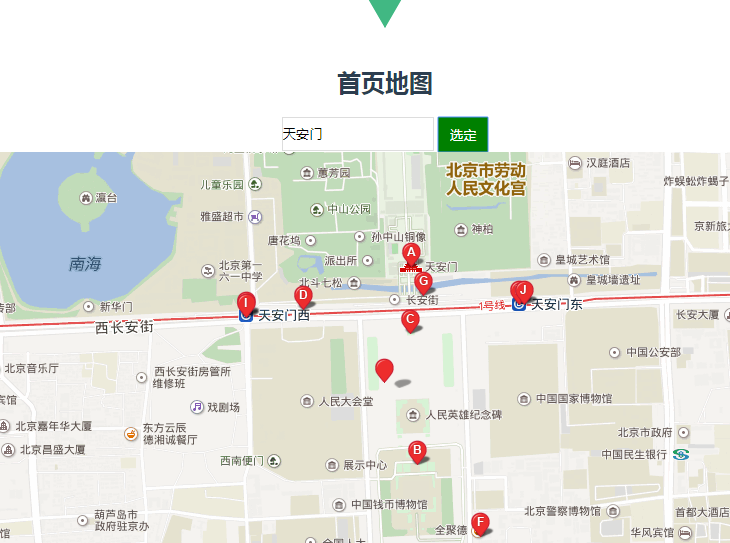
<template>

    <div id="home">

        <h2>首页地图</h2>

        <div>

          <input type="text" v-model="city" class="city">

          <input type="button" v-model="cityBtn" class="cityBtn" value="选定" @click="mapBtn">

        </div>

        <div id="allmap">

          <baidu-map v-bind:style="mapStyle" class="bm-view" ak="GPO8jLk2SoDXF5nnaOdDudHxIsMVEK6V"

          :center="center" :zoom="zoom" :scroll-wheel-zoom="true" @click="getClickInfo"

          @moving="syncCenterAndZoom"

          @moveend="syncCenterAndZoom"

          @zoomend="syncCenterAndZoom">

            <bm-view style="width: 100%; height:500px;"></bm-view>

            <bm-marker :position="{lng: center.lng, lat: center.lat}" :dragging="true"

            animation="BMAP_ANIMATION_BOUNCE"></bm-marker>  <!-- 红点 -->

            <bm-control :offset="{width: '10px', height: '10px'}">

              <bm-auto-complete v-model="keyword" :sugStyle="{zIndex: 999999}">

                <!-- <input type="text" placeholder="请输入搜索关键字" class="serachinput"> -->

              </bm-auto-complete>

            </bm-control>

            <bm-local-search :keyword="keyword" :auto-viewport="true" style="width:0px;height:0px;overflow: hidden;"></bm-local-search>

          </baidu-map>

        </div>

    </div>

</template>

<script>

import {BaiduMap, BmControl, BmView, BmAutoComplete, BmLocalSearch, BmMarker} from 'vue-baidu-map'

export default {

  components: {

    BaiduMap,

    BmControl,

    BmView,

    BmAutoComplete,

    BmLocalSearch,

    BmMarker

  },

  data() {

    return {

      city:'',

      cityBtn:'选定',

      keyword: '',//填写选择的地址

      mapStyle: {

          width: '100%',

          height: this.mapHeight + 'px'

        },

      center: {lng: 110, lat: 39.915},

      zoom: 11

    };

  },

  methods:{

    getClickInfo(e){

      // debugger

      this.center.lng = e.point.lng

      this.center.lat = e.point.lat

      console.log(e.point.lng,e.point.lat)

    },

    syncCenterAndZoom (e) {

      // debugger

        const {lng, lat} = e.target.getCenter()//地图当前的经纬度

        this.center.lng = lng

        this.center.lat = lat

        this.zoom = e.target.getZoom()//地图当前的缩放比例

    },

    mapBtn(){

      this.keyword = this.city

    }

  }

};

</script>

<style>

.bm-view {

  margin: 0 auto;

  width: 800px;

  height: 500px;

}

.city{

    width: 150px;

    height: 30px;

    border: 1px solid #dddddd;

}

.cityBtn{

  width: 50px;

  height: 35px;

  background-color:green;

  color: #ffffff;

  border:1px solid green;

  vertical-align: top;

}

</style>
Vue Baidu Map局部注册实现和地图绘点的更多相关文章
- vue2.0之Vue Baidu Map 局部注册使用
文档地址:https://dafrok.github.io/vue-baidu-map/#/zh/start/usage 局部注册 <template> <baidu-map id= ...
- vue Baidu Map --- vue百度地图插件
vue Baidu Map 官网:https://dafrok.github.io/vue-baidu-map/#/zh/start/installation javascript 官网:http:/ ...
- Vue组件全局/局部注册
全局注册 main.js中创建 Vue.component('button-counter', { data: function () { return { count: 0 } }, templat ...
- Vue Baidu Map 插件的使用
最近在做一个项目,技术采用的是Vue.js套餐,有个百度地图的需求,当时,大脑宕机,立马去引入百度地图API,当时想到两种方法,一种是在index.html中全局引入js,此法吾不喜,就采用了第二种异 ...
- 使用Vue Baidu Map对百度地图实现输入框搜索定位
前端时间需要在页面的输入框输入地址,搜索并在百度地图上获取选定结果的坐标,前端使用了Vue + Element-ui,地图方面直接使用了封装好的百度地图vue组件-vue-baidu-map ...
- Vue 全局注册逐渐 和 局部注册组件
//定义一个名为 button-counter 的新组件 Script: Vue.component('button-counter',{//button-counter 这个是组件的名字 data: ...
- vue 组件 全局注册和局部注册
全局注册,注册的组件需要在初始化根实例之前注册了组件: 局部注册,通过使用组件实例选项注册,可以使组件仅在另一个组件或者实例的作用域中可用: 全局组件 js Vue.component('tab-ti ...
- vue全局注册与局部注册的写法
vue全局注册是每个实例化的vue都可以使用,而局部则是实例化注册的那个可以用.举个例子,看看写法: <div id="app"> <p>页面载入时,inp ...
- 百度地图实现车辆轨迹移动播放(baidu map api)
开发技术:jquery,js baidu map api,json,ajax QQ1310651206
随机推荐
- background——背景属性
一.背景属性 1.1.背景颜色background-color <style> /*浮动,横向排列*/ div{float: left;} /*background-color属性值支持三 ...
- PHP的json_encode()函数与JSON对象
一.问题描述 这周搬砖的时候,前端通过ajax获取后端的数据后,照例用 对象.属性 的方式取值,然而结果总是总是不能如预期般展示在页面上. 先写个 demo 还原下场景:选中一个下拉框列表选项后,会在 ...
- 数据库 ACID
ACID是指一个事务本质上有四个特点: Atomicity:原子性 Consistency:一致性 Isolation:隔离性 Durablilty:耐久性 原子性 原子性是指事务是一个不可分割的工作 ...
- 【调试基础】Part 2 文本字符
01 字节存储顺序 大端:低字节存在高地址,高字节存在低地址.eg:IBM: 小端:低字节存在低地址,高字节存在高地址.eg:INTEL: 02 字符集 ASCII:128=26小写 + 26大写 + ...
- .NET反射简单应用———遍历枚举字段
反射(Reflection)是一个非常强大的工具,可以用来查看和遍历类型和类型成员的元数据:动态创建类型实例,动态调用所创建的实例方法.字段.属性:迟绑定方法和属性.此次要介绍的是使用反射查看类型成员 ...
- dubbo服务暴露
想熟悉dubbo源码,首先要知道dubbo extensionLoader,而dubbo的这种扩展机制,是根据java spi衍生而来. 这是基础,但是我放在后面说明. 一:dubbo demo pr ...
- Angular2 之父子组件交互方式
父子组件交互方式,这里介绍主要的三种方式 1.事件传值 下面以列表页和分页组件举例. list.component.html <pagination *ngIf="pageParams ...
- 二进制转base64
一. 以fetch的获取数据 1. response(后台返回): const buffer = response.arrayBuffer(),将二级制转成arrayBuffer类型 2. buffe ...
- Android反编译apk并重新打包签名(Mac环境)
工具下载 apktool :https://ibotpeaches.github.io/Apktool/install dex2jar:https://github.com/pxb1988/dex2j ...
- JS-3
运算符 数学运算符 + - * / %(取模运算符) js内置一个对象叫Math,Math提供了很多关于计算的方法,常见的 // 随机数 console.log(Math.random()); // ...