
background——背景属性
一、背景属性
1.1、背景颜色background-color
    <style>

        /*浮动,横向排列*/

        div{float: left;}

/*background-color属性值支持三种形式:

 name - 指定颜色的名称,如 "red" ;

RGB - 指定 RGB 值, 如 "rgb(255,0,0)"  ;

Hex - 指定16进制值, 如 "#ff0000"。*/

        .one{

            width: 100px;

            height: 100px;

            background-color: red;

        }

        .two{

            width: 100px;

            height: 100px;

            background-color: rgb(0,277,0);

        }

        .three{

            width: 100px;

            height: 100px;

            background-color:#66FFFF;

        }

    </style>

    <body>

        <div class="one"></div>

        <div class="two"></div>

        <div class="three"></div>

    </body>
代码执行如下图:

1.2、背景图片background-iamge
    <style>

        div{

            width: 200px;

            height: 200px;

            border: 3px solid red;

            background-image: url(img/love.jpg);

        }

    </style>

    <body>

        <div></div>

    </body>
代码执行如下图:

1.3、背景是否重复background-repeat
    <style>

        div{

            width: 490px;

            height: 200px;

            border: 3px solid red;

            background-image: url(img/love.jpg);

            /*默认 重复repeat*/

            background-repeat:no-repeat;

        }

    </style>
代码执行如下图:

1.4、背景是否固定background-attachmen(属性值默认为scroll)
    <style>

        body{

            width: 490px;

            height: 200px;

            background-image: url(img/love.jpg);

            background-repeat:no-repeat;

            background-attachment:fixed;

        }

    </style>
默认scroll效果图:
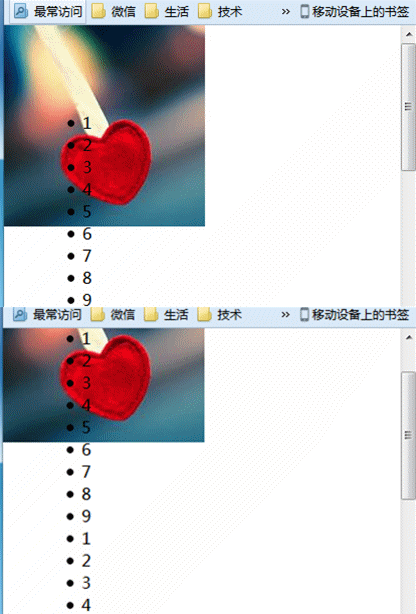
设置fixed运行效果图:

1.5、背景图像的开始位置background-position

    <style>

        div{

            float: left;

            width: 300px;

            height: 300px;

            border: 3px solid red;

            margin: 10px;

            background-image: url(img/love.jpg);

            background-repeat:no-repeat;

        }

        .one{

            background-position: center;

        }

        .two{

            background-position: bottom right;

        }

        .three{

            background-position: 10% 40%;

        }

        .four{

            background-position: 40px 10px;

        }

    </style>

    <body>

        <div class="one"></div>

        <div class="two"></div>

        <div class="three"></div>

        <div class="four"></div>

    </body>
代码执行效果图:

二、背景复合样式background(颜色可以写在最前面|最后面)
    <style>

            /*复合样式下设置fixed后position位置根据可视区域设置

          复合样式下设置scroll后position位置根据元素自身设置*/

        div.one{

            width: 700px;

            height: 300px;

            border: 3px solid #000;

            background:pink url(img/love.jpg) no-repeat scroll center;

        }

    </style>


第三、兼容

所有浏览器都支持 background 属性。
注意:inherit:IE7 以及更早的浏览器不支持 "inherit"。IE8 需要声明 !DOCTYPE。IE9 支持 "inherit"。
background——背景属性的更多相关文章
- css中background背景属性概
css中background背景属性概 background:url(背景图片路径) no-repeat;/*不重复默认在左上方*/background:url(背景图片路径) no-repeat ...
- CSS探案之 background背景属性剖析
首先,我们先来看看两个css属性:background和background-color,对!就是这两位,相信大家在平时应该没少 麻烦人家把,反正我是这样,几乎也少会用到背景图,原因很简单:就是有点害 ...
- css中background背景属性概述
background:url(背景图片路径) no-repeat;/*不重复默认在左上方*/ background:url(背景图片路径) no-repeat center;/*不重复背景图片中间显示 ...
- css background 背景知识详解
background 背景属性 我们知道元素有前景色color,与之对应的还有背景色,通过background我们可以为元素添加实色(background-color)和任意多个背景图片(backgr ...
- background的属性和背景图片定位的实例
本文内容: 1.背景图片定位示例 2.background常用的属性值 3.background-repeat新增的round.space属性 4.background-size的属性值(着重介绍co ...
- CSS背景属性Background详解
[转] 本文详解了CSS的背景属性Background,包括CSS3中新增的背景属性.如果你是个CSS初学者,还可以查看之前介绍的CSS浮动属性和CSS透明属性详解. CSS2 中有5个主要的背景(b ...
- CSS下背景属性background的使用方法
背景颜色(background-color) CSS可以用纯色来作为背景,也可以将背景设置为透明,background相当于xhtml中的bgcolor. 它的两个值: transparent(默认值 ...
- CSS背景属性background
background属性是所有背景属性的缩写: 以下是这些背景属性: background-color:背景颜色 你可以通过颜色名称(red/green/blue)来设置 也可以用十六进制(#fff/ ...
- background 背景类八大属性
background 背景类八大属性 背景颜色(当同时定义了背景颜色和背景图像时,背景图像覆盖在背景颜色之上) background-image:背景图像 background-repeat:背景图像 ...
随机推荐
- Docker 构建 RabbitMQ 集群
刚开始,关于RabbitMQ集群的搭建,我找到了这篇文章:Docker 安装 RabbitMQ 集群 从而找到了第三方的RabbitMQ集群容器 rabbitmq-server 但是这个容器只有3.6 ...
- ss命令详解
ss是Socket Statistics的缩写.顾名思义,ss命令可以用来获取socket统计信息,它可以显示和netstat类似的内容.ss的优势在于它能够显示更多更详细的有关TCP和连接状态的信息 ...
- Supervisor的作用与配置
supervisor supervisor管理进程,是通过fork/exec的方式将这些被管理的进程当作supervisor的子进程来启动,所以我们只需要将要管理进程的可执行文件的路径添加到super ...
- Mac 虚拟打印机PDFWriter on Sierra
之前就装过PdfWriter,第一次装的时候失败了,后来在app store 装了PDF Printer,好像挺好用的,但是升级有点贵.又回去研究了一下PDFWriter. 和PDFWriter在so ...
- android TextView描边
前言 上一篇已经讲了如何实现textView中粗字体效果,里面主要重写了onDraw方法. 这一边讲一个进阶功能,实现textView的描边效果. 上效果图. 上代码: public class St ...
- Bootstrap3基础 栅格系统 页面布局随 浏览器大小的变化而变化
内容 参数 OS Windows 10 x64 browser Firefox 65.0.2 framework Bootstrap 3.3.7 editor ...
- Git访问远程出现错误
错误示例 remote: HTTP Basic: Access denied fatal: Authentication failed for "xxx" 错误原因 由于修改了公司 ...
- Python玩转Arduino——简单介绍
关于Python语言的介绍安装请参考廖雪峰的Python教程 Python是一门解释型语言,虽然不能够像c语言一样编译上传到Arduino--什么你说MicroPython,我们再说Arduino呢- ...
- poj2528 Mayor's posters (线段树+离散化)
恩,这区间范围挺大的,需要离散化.如果TLE,还需要优化一下常数. AC代码 #include <stdio.h> #include <string.h> #include & ...
- springboot(一)
@Configuration:声明当前类是一个配置类==等同于 spring的xml文件,如果使用了改注解意味着该类里可能有0个或者多个@bean注解,此处没有使用包扫描,是因为所有的@bean 都在 ...