
Python菜鸟快乐游戏编程_pygame(4)
Python菜鸟快乐游戏编程_pygame(博主录制,2K分辨率,超高清)
https://study.163.com/course/courseMain.htm?courseId=1006188025&share=2&shareId=400000000398149
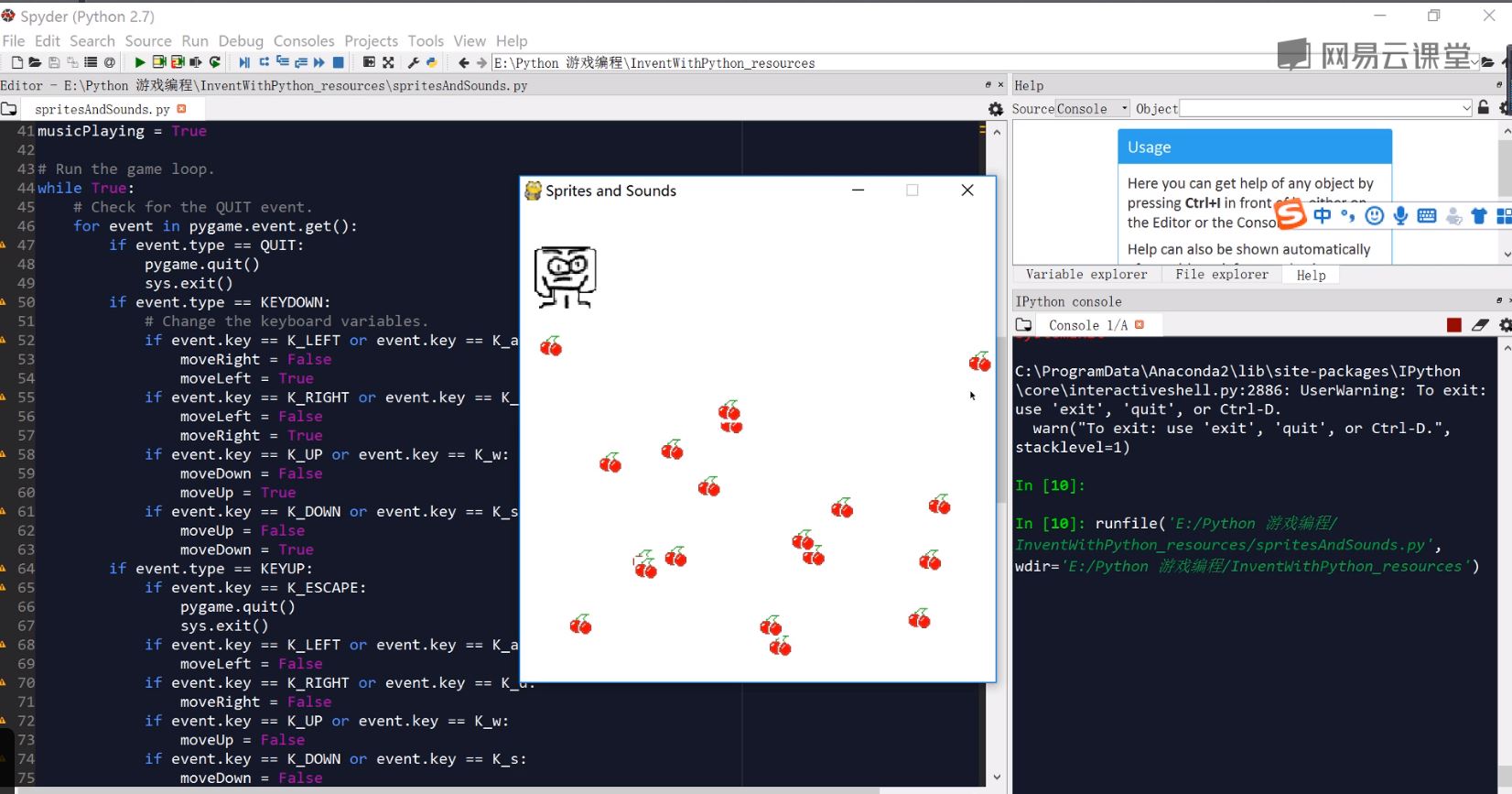
为了熟悉键盘,鼠标,颜色参数,屏幕参数,我为大家准备了一个最简单的游戏sprite and sounds
import pygame, sys, time, random

from pygame.locals import *

# Set up pygame.

pygame.init()

mainClock = pygame.time.Clock()

# Set up the window.

WINDOWWIDTH = 400

WINDOWHEIGHT = 400

windowSurface = pygame.display.set_mode((WINDOWWIDTH, WINDOWHEIGHT), 0, 32)

pygame.display.set_caption('Sprites and Sounds')

# Set up the colors.

WHITE = (255, 255, 255)

# Set up the block data structure.

player = pygame.Rect(300, 100, 40, 40)

playerImage = pygame.image.load('player.png')

playerStretchedImage = pygame.transform.scale(playerImage, (40, 40))

foodImage = pygame.image.load('cherry.png')

foods = []

for i in range(20):

    foods.append(pygame.Rect(random.randint(0, WINDOWWIDTH - 20), random.randint(0, WINDOWHEIGHT - 20), 20, 20))

foodCounter = 0

NEWFOOD = 40

# Set up keyboard variables.

moveLeft = False

moveRight = False

moveUp = False

moveDown = False

MOVESPEED = 6

# Set up the music.

pickUpSound = pygame.mixer.Sound('pickup.wav')

pygame.mixer.music.load('background.mid')

pygame.mixer.music.play(-1, 0.0)

musicPlaying = True

# Run the game loop.

while True:

    # Check for the QUIT event.

    for event in pygame.event.get():

        if event.type == QUIT:

            pygame.quit()

            sys.exit()

        if event.type == KEYDOWN:

            # Change the keyboard variables.

            if event.key == K_LEFT or event.key == K_a:

                moveRight = False

                moveLeft = True

            if event.key == K_RIGHT or event.key == K_d:

                moveLeft = False

                moveRight = True

            if event.key == K_UP or event.key == K_w:

                moveDown = False

                moveUp = True

            if event.key == K_DOWN or event.key == K_s:

                moveUp = False

                moveDown = True

        if event.type == KEYUP:

            if event.key == K_ESCAPE:

                pygame.quit()

                sys.exit()

            if event.key == K_LEFT or event.key == K_a:

                moveLeft = False

            if event.key == K_RIGHT or event.key == K_d:

                moveRight = False

            if event.key == K_UP or event.key == K_w:

                moveUp = False

            if event.key == K_DOWN or event.key == K_s:

                moveDown = False

            if event.key == K_x:

                player.top = random.randint(0, WINDOWHEIGHT - player.height)

                player.left = random.randint(0, WINDOWWIDTH - player.width)

            if event.key == K_m:

                if musicPlaying:

                    pygame.mixer.music.stop()

                else:

                    pygame.mixer.music.play(-1, 0.0)

                musicPlaying = not musicPlaying

        if event.type == MOUSEBUTTONUP:

            foods.append(pygame.Rect(event.pos[0] - 10, event.pos[1] - 10, 20, 20))

    foodCounter += 1

    if foodCounter >= NEWFOOD:

        # Add new food.

        foodCounter = 0

        foods.append(pygame.Rect(random.randint(0, WINDOWWIDTH - 20), random.randint(0, WINDOWHEIGHT - 20), 20, 20))

    # Draw the white background onto the surface.

    windowSurface.fill(WHITE)

    # Move the player.

    if moveDown and player.bottom < WINDOWHEIGHT:

        player.top += MOVESPEED

    if moveUp and player.top > 0:

        player.top -= MOVESPEED

    if moveLeft and player.left > 0:

        player.left -= MOVESPEED

    if moveRight and player.right < WINDOWWIDTH:

        player.right += MOVESPEED

    # Draw the block onto the surface.

    windowSurface.blit(playerStretchedImage, player)

    # Check whether the block has intersected with any food squares.

    for food in foods[:]:

        if player.colliderect(food):

            foods.remove(food)

            player = pygame.Rect(player.left, player.top, player.width + 2, player.height + 2)

            playerStretchedImage = pygame.transform.scale(playerImage, (player.width, player.height))

            if musicPlaying:

                pickUpSound.play()

    # Draw the food.

    for food in foods:

        windowSurface.blit(foodImage, food)

    # Draw the window onto the screen.

    pygame.display.update()

    mainClock.tick(40 )
如下图,生成一个游戏,小怪物吃樱桃。游戏随机生成若干樱桃,玩家通过操作键盘移动小怪物,吃的樱桃越多,小怪物就会越大。
https://study.163.com/provider/400000000398149/index.htm?share=2&shareId=400000000398149(博主视频教学主页)
Python菜鸟快乐游戏编程_pygame(4)的更多相关文章
- Python菜鸟快乐游戏编程_pygame(6)
Python菜鸟快乐游戏编程_pygame(博主录制,2K分辨率,超高清) https://study.163.com/course/courseMain.htm?courseId=100618802 ...
- Python菜鸟快乐游戏编程_pygame(5)
Python菜鸟快乐游戏编程_pygame(博主录制,2K分辨率,超高清) https://study.163.com/course/courseMain.htm?courseId=100618802 ...
- Python菜鸟快乐游戏编程_pygame(3)
Python菜鸟快乐游戏编程_pygame(博主录制,2K分辨率,超高清) https://study.163.com/course/courseMain.htm?courseId=100618802 ...
- Python菜鸟快乐游戏编程_pygame(2)
Python菜鸟快乐游戏编程_pygame(博主录制,2K分辨率,超高清) https://study.163.com/course/courseMain.htm?courseId=100618802 ...
- Python菜鸟快乐游戏编程_pygame(1)
Python菜鸟快乐游戏编程_pygame(博主录制,2K分辨率,超高清) https://study.163.com/course/courseMain.htm?courseId=100618802 ...
- python游戏编程——跟13岁儿童学编程
python爬虫基本告一段落,琢磨搞点其他的,正好在网上看到一个帖子,一个外国13岁小朋友用python写的下棋程序,内容详细,也有意思,拿来练手. 13岁啊.. 我这年纪还在敲 dir啥的吧 想到原 ...
- Python游戏编程入门
<Python游戏编程入门>这些文章负责整理在这本书中的知识点.注意事项和课后习题的尝试实现.并且对每一个章节给出的最终实例进行分析和注释. 初识pygame:pie游戏pygame游戏库 ...
- 分享《Python 游戏编程快速上手(第3版)》高清中文版PDF+高清英文版PDF+源代码
通过编写一个个小巧.有趣的游戏来学习Python,通过实例来解释编程的原理的方式.14个游戏程序和示例,介绍了Python基础知识.数据类型.函数.流程控制.程序调试.流程图设计.字符串操作.列表和字 ...
- 《Python游戏编程快速上手》——1.3 如何使用本书
本节书摘来自异步社区<Python游戏编程快速上手>一书中的第1章,第1.3节,作者[美] Al Sweigart(斯维加特),李强 译,更多章节内容可以访问云栖社区"异步社区& ...
随机推荐
- google zxing android扫描优化&解析
这里先给出zxing包的源码地址 zip包:https://codeload.github.com/zxing/zxing/zip/master Github:https://github.com/z ...
- vivo7.0以上系统如何无需Root激活Xposed框架的方法
在较多公司的引流或者业务操作中,基本都需要使用安卓的黑高科技术Xposed框架,几天前我们公司购买了一批新的vivo7.0以上系统,基本都都是基于7.0以上版本,基本都不能够获取Root的su超级权限 ...
- rocketmq延时消息
rocketmq提供一种延时消息的解决方案,就是在特定的时间到了,消息才会被投递出去供consumer消费. 总体来是简单的场景是满足了,但是需要注意的是延时的时间是需要按照默认配置的延时级别去配置的 ...
- Django教程01-全流程
目录 1.Django简介 1.1. Django安装 2. 创建一个基础的Django项目 2.1. 初始化项目 2.2. 设计数据库 2.2.1. 设计目标表 2.2.1. 创建一个数据库 2.2 ...
- 弱网测试-Network Emulator 网络模拟工具使用
参考链接 https://www.jianshu.com/p/6a3d38aafac1
- php将字符串转为二进制数据串
/** * 将字符串转换成二进制 * @param type $str * @return type */ function StrToBin($str){ //1.列出每个字符 $arr = pre ...
- Colorful Bricks CodeForces - 1081C ( 组合数学 或 DP )
On his free time, Chouti likes doing some housework. He has got one new task, paint some bricks in t ...
- 正则表达式和re模块
目录 re的元字符 字符集[ ] 转义符 分组 ( ) |符号 re下的常用方法 分组 re的元字符 import re ret = re.findall("e..a", &quo ...
- vue填坑指南之模板的使用
坑提示:"The template root requires exactly one element" Src下面有个App.vue文件,在index里引用了这个文件以后,我在. ...
- 每次用 selenium 操作浏览器都还原了 (比如没有浏览器历史记录)
每次用 selenium 操作浏览器都还原了 (比如没有浏览器历史记录)