
Python菜鸟快乐游戏编程_pygame(5)
Python菜鸟快乐游戏编程_pygame(博主录制,2K分辨率,超高清)
https://study.163.com/course/courseMain.htm?courseId=1006188025&share=2&shareId=400000000398149
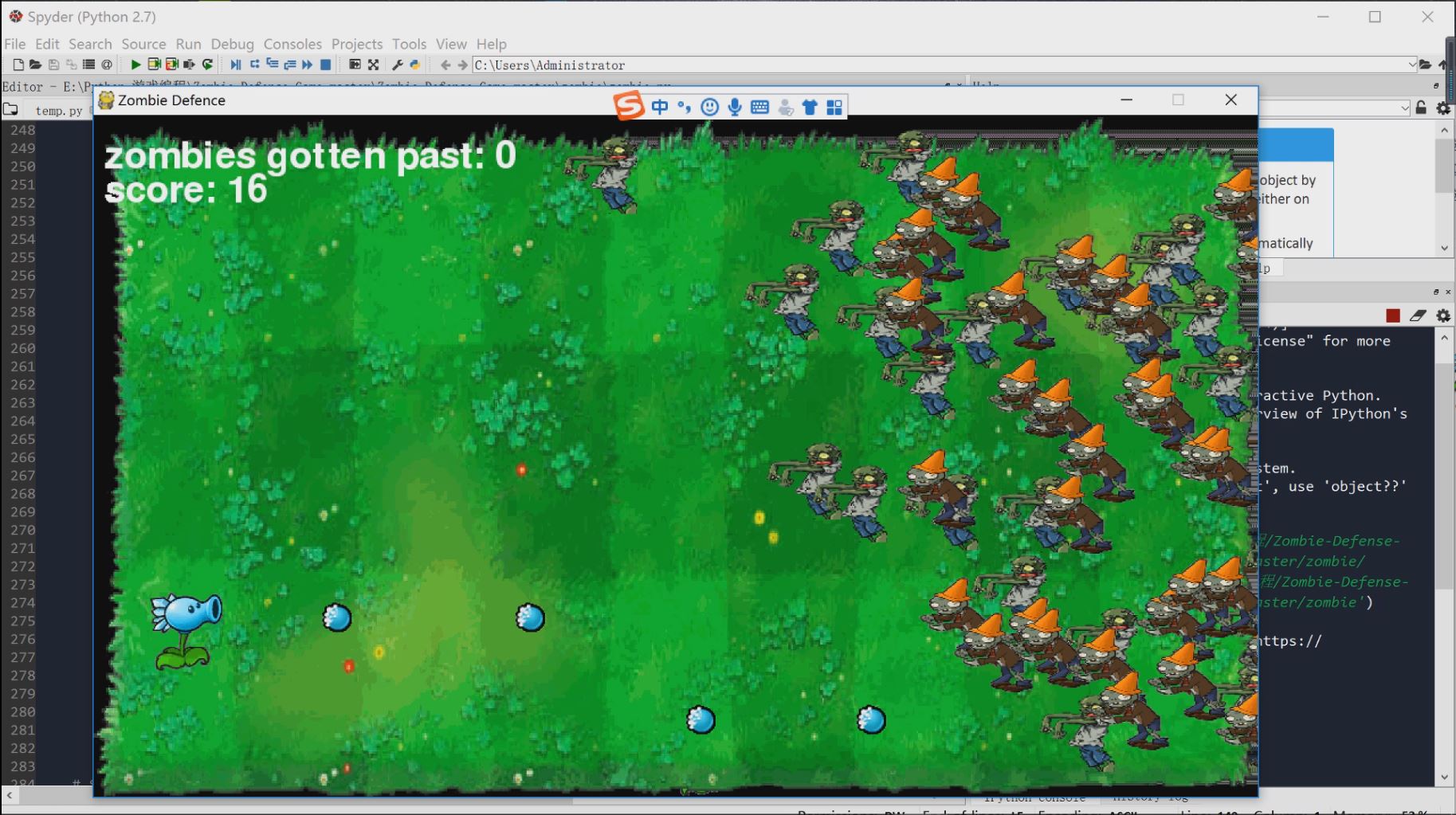
前面介绍了pygame的一些基础知识,这节课我们来个复杂点游戏,DIY植物大战僵尸。当然不是复现原款游戏所有功能,而是简单模拟一下其中乐趣。
打开zombie文件夹,我们可以看到游戏需要很多素材,包括人物,背景,配音等等,我们可以替换这些图片。比如我用川普替换了主角,音乐也可以改为你喜欢的。

运行脚本zombie.py
运行环境anaconda2(Python2版本)
# -*- coding: utf-8 -*-

"""

Created on Sun Oct  7 10:16:24 2018

作者邮件:231469242@qq.com

作者微信公众号:PythonEducation

"""

############################################################################################

###                                                                                      ###

###   PyGame with a SnowPea shoot bullet for defensing the zombie army coming            ###

###                                                                                      ###

###   Author: Junjie Shi                                                                 ###

###   Email : handsomestone@gmail.com                                                    ###

###                                                                                      ###

###   Do Enjoy the game!                                                                 ###

###   You need to have Python and PyGame installed to run it.                            ###

###   Run it by typing "python zombie.py" in the terminal                                ###

###                                                                                      ###

###   This program is free software: you can redistribute it and/or modify               ###

###   it under the terms of the GNU General Public License as published by               ###

###   the Free Software Foundation, either version 3 of the License, or                  ###

###   (at your option) any later version.                                                ###

###                                                                                      ###

###   This program is distributed in the hope that it will be useful,                    ###

###   but WITHOUT ANY WARRANTY; without even the implied warranty of                     ###

###   MERCHANTABILITY or FITNESS FOR A PARTICULAR PURPOSE.  See the                      ###

###   GNU General Public License for more details.                                       ###

###                                                                                      ###

###   You should have received a copy of the GNU General Public License                  ###

###   along with this program.  If not, see <http://www.gnu.org/licenses/>.              ###                                                                              ###

###                                                                                      ###

############################################################################################

import pygame, random, sys, time

from pygame.locals import *

#set up some variables

WINDOWWIDTH = 1024

WINDOWHEIGHT = 600

FPS = 30

MAXGOTTENPASS = 10

ZOMBIESIZE = 70 #includes newKindZombies

ADDNEWZOMBIERATE = 10

ADDNEWKINDZOMBIE = ADDNEWZOMBIERATE

NORMALZOMBIESPEED = 2

NEWKINDZOMBIESPEED = NORMALZOMBIESPEED / 2

PLAYERMOVERATE = 15

BULLETSPEED = 10

ADDNEWBULLETRATE = 15

TEXTCOLOR = (255, 255, 255)

RED = (255, 0, 0)

def terminate():

    pygame.quit()

    sys.exit()

def waitForPlayerToPressKey():

    while True:

        for event in pygame.event.get():

            if event.type == QUIT:

                terminate()

            if event.type == KEYDOWN:

                if event.key == K_ESCAPE: # pressing escape quits

                    terminate()

                if event.key == K_RETURN:

                    return

def playerHasHitZombie(playerRect, zombies):

    for z in zombies:

        if playerRect.colliderect(z['rect']):

            return True

    return False

def bulletHasHitZombie(bullets, zombies):

    for b in bullets:

        if b['rect'].colliderect(z['rect']):

            bullets.remove(b)

            return True

    return False

def bulletHasHitCrawler(bullets, newKindZombies):

    for b in bullets:

        if b['rect'].colliderect(c['rect']):

            bullets.remove(b)

            return True

    return False

def drawText(text, font, surface, x, y):

    textobj = font.render(text, 1, TEXTCOLOR)

    textrect = textobj.get_rect()

    textrect.topleft = (x, y)

    surface.blit(textobj, textrect)

# set up pygame, the window, and the mouse cursor

pygame.init()

mainClock = pygame.time.Clock()

windowSurface = pygame.display.set_mode((WINDOWWIDTH, WINDOWHEIGHT))#, pygame.FULLSCREEN)

pygame.display.set_caption('Zombie Defence')

pygame.mouse.set_visible(False)

# set up fonts

font = pygame.font.SysFont(None, 48)

# set up sounds

gameOverSound = pygame.mixer.Sound('gameover.wav')

pygame.mixer.music.load('grasswalk.mp3')

# set up images

playerImage = pygame.image.load('SnowPea.gif')

playerRect = playerImage.get_rect()

bulletImage = pygame.image.load('SnowPeashooterBullet.gif')

bulletRect = bulletImage.get_rect()

zombieImage = pygame.image.load('tree.png')

newKindZombieImage = pygame.image.load('ConeheadZombieAttack.gif')

backgroundImage = pygame.image.load('background.png')

rescaledBackground = pygame.transform.scale(backgroundImage, (WINDOWWIDTH, WINDOWHEIGHT))

# show the "Start" screen

windowSurface.blit(rescaledBackground, (0, 0))

windowSurface.blit(playerImage, (WINDOWWIDTH / 2, WINDOWHEIGHT - 70))

drawText('Zombie Defence By handsomestone', font, windowSurface, (WINDOWWIDTH / 4), (WINDOWHEIGHT / 4))

drawText('Press Enter to start', font, windowSurface, (WINDOWWIDTH / 3) - 10, (WINDOWHEIGHT / 3) + 50)

pygame.display.update()

waitForPlayerToPressKey()

while True:

    # set up the start of the game

    zombies = []

    newKindZombies = []

    bullets = []

    zombiesGottenPast = 0

    score = 0

    playerRect.topleft = (50, WINDOWHEIGHT /2)

    moveLeft = moveRight = False

    moveUp=moveDown = False

    shoot = False

    zombieAddCounter = 0

    newKindZombieAddCounter = 0

    bulletAddCounter = 40

    pygame.mixer.music.play(-1, 0.0)

    while True: # the game loop runs while the game part is playing

        for event in pygame.event.get():

            if event.type == QUIT:

                terminate()

            if event.type == KEYDOWN:

                if event.key == K_UP or event.key == ord('w'):

                    moveDown = False

                    moveUp = True

                if event.key == K_DOWN or event.key == ord('s'):

                    moveUp = False

                    moveDown = True

                if event.key == K_SPACE:

                    shoot = True

            if event.type == KEYUP:

                if event.key == K_ESCAPE:

                        terminate()

                if event.key == K_UP or event.key == ord('w'):

                    moveUp = False

                if event.key == K_DOWN or event.key == ord('s'):

                    moveDown = False

                if event.key == K_SPACE:

                    shoot = False

        # Add new zombies at the top of the screen, if needed.

        zombieAddCounter += 1

        if zombieAddCounter == ADDNEWKINDZOMBIE:

            zombieAddCounter = 0

            zombieSize = ZOMBIESIZE

            newZombie = {'rect': pygame.Rect(WINDOWWIDTH, random.randint(10,WINDOWHEIGHT-zombieSize-10), zombieSize, zombieSize),

                        'surface':pygame.transform.scale(zombieImage, (zombieSize, zombieSize)),

                        }

            zombies.append(newZombie)

        # Add new newKindZombies at the top of the screen, if needed.

        newKindZombieAddCounter += 1

        if newKindZombieAddCounter == ADDNEWZOMBIERATE:

            newKindZombieAddCounter = 0

            newKindZombiesize = ZOMBIESIZE

            newCrawler = {'rect': pygame.Rect(WINDOWWIDTH, random.randint(10,WINDOWHEIGHT-newKindZombiesize-10), newKindZombiesize, newKindZombiesize),

                        'surface':pygame.transform.scale(newKindZombieImage, (newKindZombiesize, newKindZombiesize)),

                        }

            newKindZombies.append(newCrawler)

        # add new bullet

        bulletAddCounter += 1

        if bulletAddCounter >= ADDNEWBULLETRATE and shoot == True:

            bulletAddCounter = 0

            newBullet = {'rect':pygame.Rect(playerRect.centerx+10, playerRect.centery-25, bulletRect.width, bulletRect.height),

						 'surface':pygame.transform.scale(bulletImage, (bulletRect.width, bulletRect.height)),

						}

            bullets.append(newBullet)

        # Move the player around.

        if moveUp and playerRect.top > 30:

            playerRect.move_ip(0,-1 * PLAYERMOVERATE)

        if moveDown and playerRect.bottom < WINDOWHEIGHT-10:

            playerRect.move_ip(0,PLAYERMOVERATE)

        # Move the zombies down.

        for z in zombies:

            z['rect'].move_ip(-1*NORMALZOMBIESPEED, 0)

        # Move the newKindZombies down.

        for c in newKindZombies:

            c['rect'].move_ip(-1*NEWKINDZOMBIESPEED,0)

        # move the bullet

        for b in bullets:

            b['rect'].move_ip(1 * BULLETSPEED, 0)

        # Delete zombies that have fallen past the bottom.

        for z in zombies[:]:

            if z['rect'].left < 0:

                zombies.remove(z)

                zombiesGottenPast += 1

        # Delete newKindZombies that have fallen past the bottom.

        for c in newKindZombies[:]:

            if c['rect'].left <0:

                newKindZombies.remove(c)

                zombiesGottenPast += 1

		for b in bullets[:]:

			if b['rect'].right>WINDOWWIDTH:

				bullets.remove(b)

        # check if the bullet has hit the zombie

        for z in zombies:

            if bulletHasHitZombie(bullets, zombies):

                score += 1

                zombies.remove(z)

        for c in newKindZombies:

            if bulletHasHitCrawler(bullets, newKindZombies):

                score += 1

                newKindZombies.remove(c)

        # Draw the game world on the window.

        windowSurface.blit(rescaledBackground, (0, 0))

        # Draw the player's rectangle, rails

        windowSurface.blit(playerImage, playerRect)

        # Draw each baddie

        for z in zombies:

            windowSurface.blit(z['surface'], z['rect'])

        for c in newKindZombies:

            windowSurface.blit(c['surface'], c['rect'])

        # draw each bullet

        for b in bullets:

            windowSurface.blit(b['surface'], b['rect'])

        # Draw the score and how many zombies got past

        drawText('zombies gotten past: %s' % (zombiesGottenPast), font, windowSurface, 10, 20)

        drawText('score: %s' % (score), font, windowSurface, 10, 50)

        # update the display

        pygame.display.update()

        # Check if any of the zombies has hit the player.

        if playerHasHitZombie(playerRect, zombies):

            break

        if playerHasHitZombie(playerRect, newKindZombies):

           break

        # check if score is over MAXGOTTENPASS which means game over

        if zombiesGottenPast >= MAXGOTTENPASS:

            break

        mainClock.tick(FPS)

    # Stop the game and show the "Game Over" screen.

    pygame.mixer.music.stop()

    gameOverSound.play()

    time.sleep(1)

    if zombiesGottenPast >= MAXGOTTENPASS:

        windowSurface.blit(rescaledBackground, (0, 0))

        windowSurface.blit(playerImage, (WINDOWWIDTH / 2, WINDOWHEIGHT - 70))

        drawText('score: %s' % (score), font, windowSurface, 10, 30)

        drawText('GAME OVER', font, windowSurface, (WINDOWWIDTH / 3), (WINDOWHEIGHT / 3))

        drawText('YOUR COUNTRY HAS BEEN DESTROIED', font, windowSurface, (WINDOWWIDTH / 4)- 80, (WINDOWHEIGHT / 3) + 100)

        drawText('Press enter to play again or escape to exit', font, windowSurface, (WINDOWWIDTH / 4) - 80, (WINDOWHEIGHT / 3) + 150)

        pygame.display.update()

        waitForPlayerToPressKey()

    if playerHasHitZombie(playerRect, zombies):

        windowSurface.blit(rescaledBackground, (0, 0))

        windowSurface.blit(playerImage, (WINDOWWIDTH / 2, WINDOWHEIGHT - 70))

        drawText('score: %s' % (score), font, windowSurface, 10, 30)

        drawText('GAME OVER', font, windowSurface, (WINDOWWIDTH / 3), (WINDOWHEIGHT / 3))

        drawText('YOU HAVE BEEN KISSED BY THE ZOMMBIE', font, windowSurface, (WINDOWWIDTH / 4) - 80, (WINDOWHEIGHT / 3) +100)

        drawText('Press enter to play again or escape to exit', font, windowSurface, (WINDOWWIDTH / 4) - 80, (WINDOWHEIGHT / 3) + 150)

        pygame.display.update()

        waitForPlayerToPressKey()

    gameOverSound.stop()
最后畅玩游戏,啊啊啊僵尸太多了,我们要把僵尸参数设置少一些。。
https://study.163.com/provider/400000000398149/index.htm?share=2&shareId=400000000398149(博主视频教学主页)

Python菜鸟快乐游戏编程_pygame(5)的更多相关文章
- Python菜鸟快乐游戏编程_pygame(6)
Python菜鸟快乐游戏编程_pygame(博主录制,2K分辨率,超高清) https://study.163.com/course/courseMain.htm?courseId=100618802 ...
- Python菜鸟快乐游戏编程_pygame(4)
Python菜鸟快乐游戏编程_pygame(博主录制,2K分辨率,超高清) https://study.163.com/course/courseMain.htm?courseId=100618802 ...
- Python菜鸟快乐游戏编程_pygame(3)
Python菜鸟快乐游戏编程_pygame(博主录制,2K分辨率,超高清) https://study.163.com/course/courseMain.htm?courseId=100618802 ...
- Python菜鸟快乐游戏编程_pygame(2)
Python菜鸟快乐游戏编程_pygame(博主录制,2K分辨率,超高清) https://study.163.com/course/courseMain.htm?courseId=100618802 ...
- Python菜鸟快乐游戏编程_pygame(1)
Python菜鸟快乐游戏编程_pygame(博主录制,2K分辨率,超高清) https://study.163.com/course/courseMain.htm?courseId=100618802 ...
- python游戏编程——跟13岁儿童学编程
python爬虫基本告一段落,琢磨搞点其他的,正好在网上看到一个帖子,一个外国13岁小朋友用python写的下棋程序,内容详细,也有意思,拿来练手. 13岁啊.. 我这年纪还在敲 dir啥的吧 想到原 ...
- Python游戏编程入门
<Python游戏编程入门>这些文章负责整理在这本书中的知识点.注意事项和课后习题的尝试实现.并且对每一个章节给出的最终实例进行分析和注释. 初识pygame:pie游戏pygame游戏库 ...
- 分享《Python 游戏编程快速上手(第3版)》高清中文版PDF+高清英文版PDF+源代码
通过编写一个个小巧.有趣的游戏来学习Python,通过实例来解释编程的原理的方式.14个游戏程序和示例,介绍了Python基础知识.数据类型.函数.流程控制.程序调试.流程图设计.字符串操作.列表和字 ...
- 《Python游戏编程快速上手》——1.3 如何使用本书
本节书摘来自异步社区<Python游戏编程快速上手>一书中的第1章,第1.3节,作者[美] Al Sweigart(斯维加特),李强 译,更多章节内容可以访问云栖社区"异步社区& ...
随机推荐
- 源码浅谈(二):java中的 Integer.parseInt(String str)方法
这个方法是将字符串转换为整型 一.parseInt方法 ,可以看到默认又调用了parseInt(s,10) , 第二个参数为基数,默认10 ,当然也可以自己设置 public static int ...
- MyBatis学习---整合SpringMVC
[目录]
- USB_ModeSwitch for Android 7
USB_ModeSwitch官网: USB_ModeSwitch - Handling Mode-Switching USB Devices on Linux USB_ModeSwitch for A ...
- Testlink1.9.17使用方法( 第四章 测试需求管理 )
第四章 测试需求管理 QQ交流群:585499566 需求规格说明书是我们开展测试的依据.首先,我们可以对项目(产品)的需求规格说明书进行分解和整理,将其拆分为多个需求,一个项目可以包含多个需求,一个 ...
- compaTtelrunner 和win7补丁的那些事
win7 KB2952664的补丁,卸载即可,无关大碍.该进程严重影响磁盘性能.
- SQL Server系统视图sys.master_files不能正确显示数据库脱机状态
最近发现在SQL Server数据库(目前测试过SQL Server 2008, 2012,2014,2016各个版本)中,即使数据库处于脱机(OFFLINE)状态,但是sys.master_file ...
- 将Windows Server 2016 打造成工作站(20161030更新)
将Windows Server 2016 打造成工作站(20161030更新) 一.基础设置 1.1.关闭自动弹窗: 「开始菜单」 - 「服务器管理器」 - 「仪表板」(或 Win + R或CMD ...
- ubuntu18.04从零开始配置环境(jdk+tomcat+idea)到使用idea开发web应用和servlet
昨天吃了亏,搞了一下午才把环境配置好,故此将整个过程记录一下以防日后需要. 注意:因为我的博客模块的原因,所以我把图片压缩了一些,如果有看不清的, 可以 右键图片->在新标签页打开图片 目录: ...
- Codeforces #541 (Div2) - D. Gourmet choice(拓扑排序+并查集)
Problem Codeforces #541 (Div2) - D. Gourmet choice Time Limit: 2000 mSec Problem Description Input ...
- [POI2015]PUS
嘟嘟嘟 这题只要往正确的方面想,就很简单. 首先,这是一道图论题! 想到这,这题就简单了.对于两个数\(i\)和\(j\),如果\(i\)比\(j\)大,就从\(i\)向\(j\)连边.然后如果图中存 ...