
java集成微软的ad域,实现单点登录
1.ad域介绍:
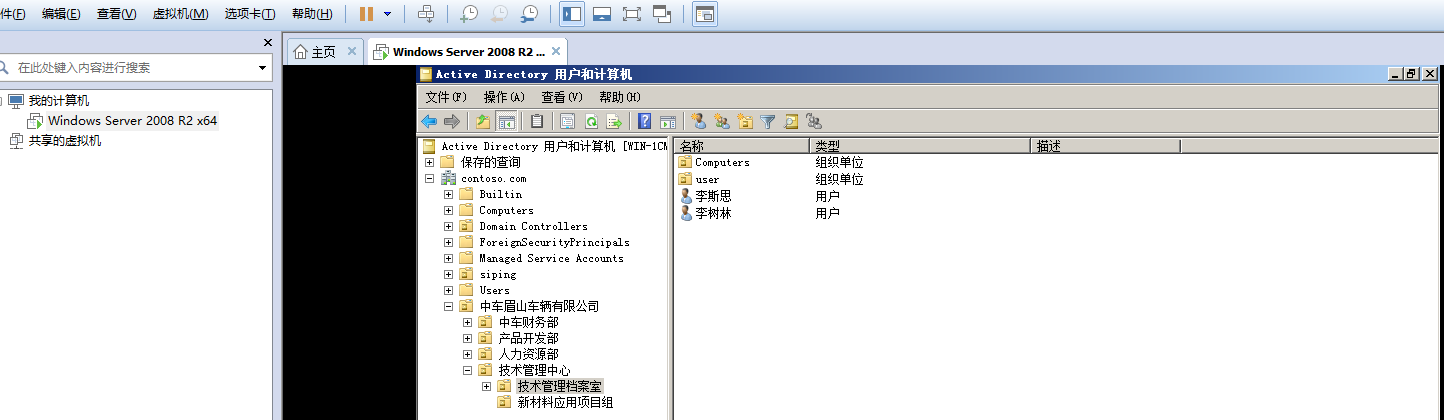
windos server 2008R2服务器下的ad域,见下图(我是在虚拟机安装到windos server)
2.连接ad域代码:(里面代码自行修改)
public ResultMsg<User> loginAd(User user) throws Exception {

        ResultMsg<User> msg;

        //通过ad域登录

        Hashtable env = new Hashtable();

        env.put(Context.INITIAL_CONTEXT_FACTORY, "com.sun.jndi.ldap.LdapCtxFactory");

        //ad域地址:windos server上输入ipconfig查看,369是固定端口,dc=contoso,dc=com是域的范围

        env.put(Context.PROVIDER_URL, "ldap://192.168.153.160:389/dc=contoso,dc=com");

        //ad域里面的用户

        env.put(Context.SECURITY_PRINCIPAL, "admin@contoso.com");

        //ad域里面的密码

        env.put(Context.SECURITY_CREDENTIALS, "Ai123456");

        DirContext ctx = null;

        NamingEnumeration results = null;

        User u1 = null;

        String st="";

        try {

            //登录验证

            ctx = new InitialDirContext(env);

            SearchControls controls = new SearchControls();

            controls.setSearchScope(SearchControls.SUBTREE_SCOPE);

            //根据用户名查看ad域中是否存在当前用户

            results = ctx.search("", "(&(objectclass=person)(userprincipalname=" + user.getUsername()+domainName + "))", controls);

            SearchResult searchResult = (SearchResult) results.next();

            Attributes attributes = searchResult.getAttributes();

            if (attributes != null) {

                //查询数据库用户

                User userByName = userService.getUserByName(user.getUsername());

                if(userByName==null)

                {

                    //设置唯一id

                    try {

                        for (NamingEnumeration ne=attributes.getAll();ne.hasMore();)

                        {

                            Attribute Attr = (Attribute) ne.next();

                            if ("objectGUID".equals(Attr.getID()))

                            {

                                st = DeptServiceImpl.getGUID(Attr.get().toString().getBytes());

                            }

                        }

                    }catch (Exception e)

                    {

                        e.printStackTrace();

                    }

                    //查询员工是否存在,若存在返回id编号不存在就插入

                    EmpBasic empBasicByUserPrincipalName = empMapper.getObjectGuid(st);

                    Integer integer;

                    if(empBasicByUserPrincipalName==null)

                    {

                        //添加员工

                        EmpBasic empBasic=new EmpBasic();

                        empBasic.setLastName(attributes.get("sn")==null?"":attributes.get("sn").get().toString());

                        empBasic.setFirstName(attributes.get("givenName")==null?"":attributes.get("givenName").get().toString());

                        empBasic.setNickName(attributes.get("displayname")==null?"":attributes.get("displayname").get().toString());

                        empBasic.setUserName(attributes.get("userprincipalname")==null?"":attributes.get("userprincipalname").get().toString().split("@")[0]);

                        SimpleDateFormat df = new SimpleDateFormat("yyyy-MM-dd");

                        empBasic.setHireDate(df.format(new Date()));

                        empBasic.setEmail(attributes.get("mail")==null?"":attributes.get("mail").get().toString());

                        empBasic.setCellphone(attributes.get("mobile")==null?"":attributes.get("mobile").get().toString());

                        empBasic.setObjectGuid(st);

                        String dateRq= attributes.get("whenCreated").get().toString().substring(0,8);

                        SimpleDateFormat df1 = new SimpleDateFormat("yyyyMMdd");

                        Date date=df1.parse(dateRq);

                        empBasic.setHireDate(df.format(date));

                        //查询部门编号

                        String str = attributes.get("distinguishedName").get().toString().substring(

                                attributes.get("distinguishedName").get().toString().indexOf("O"));

                        Department department = deptMapper.getDistinguiName(str);

                        empBasic.setDeptNo(department.getDeptNo());

                        //返回插入的id

                        integer = empService.addAdEmp(empBasic);

                    }else

                        {

                            integer=empBasicByUserPrincipalName.getEmpNo();

                        }

                    //添加用户

                    User u = new User();

                    u.setUsername(attributes.get("userprincipalname").get().toString().split("@")[0]);

                    u.setLastName(attributes.get("sn")==null?"":attributes.get("sn").get().toString());

                    u.setFirstName(attributes.get("givenName")==null?"":attributes.get("givenName").get().toString());

                    u.setNickName(attributes.get("displayname")==null?"":attributes.get("displayname").get().toString());

                    u.setUserNo(integer.toString());

                    //添加用户时,用户类型默认为1,

                    u.setUserType(1);//?

                    //添加用户时,用户默认启用

                    u.setEnabled(1);

                    u.setIsAd(1);

                    userService.addAdUser(u);

                    u1= userService.getUserByName(u.getUsername());

                }else

                {

                    u1=userByName;

                    //查询部门

                    if (u1.getUserType().equals(1)) { //用户类型为员工时才查询其部门

                        u1.setDepartment(userService.getDeptInfoByUsername(user.getUsername()));

                    };

                }

            }

        } catch (AuthenticationException e) {

            String erroMsg=  e.getMessage();

            if (erroMsg.contains("701"))

            {

                msg = new ResultMsg<User>(false, "该账户已过期");

            }else if (erroMsg.contains("52e"))

            {

                msg = new ResultMsg<User>(false, "用户或密码错误");

            }else if (erroMsg.contains("525"))

            {

                msg = new ResultMsg<User>(false, "用户或密码错误");

            }else if (erroMsg.contains("773"))

            {

                msg = new ResultMsg<User>(false, "用户必须重置密码");

            } else if (erroMsg.contains("533"))

            {

                msg = new ResultMsg<User>(false, "用户账户禁用");

            }else

            {

                msg = new ResultMsg<User>(false, "用户登录失败");

            }

            return msg;

        } catch (NameNotFoundException e)//沒有对象

        {

            e.printStackTrace();

            msg = new ResultMsg<User>(false, "登录发生异常");

            return msg;

        } catch (NamingException e) {

            e.printStackTrace();

            msg = new ResultMsg<User>(false, "登录发生异常");

            return msg;

        } finally {

            if (results != null) {

                try {

                    results.close();

                } catch (Exception e) {

                }

            }

            if (ctx != null) {

                try {

                    ctx.close();

                } catch (Exception e) {

                }

            }

        }

        return msg = new ResultMsg<User>(true, "登录验证成功", "", u1);

    }
java集成微软的ad域,实现单点登录的更多相关文章
- 可跨域的单点登录(SSO)实现方案
可跨域的单点登录(SSO)实现方案 SSO简介 定义: 传统的单站点登录访问授权机制是:登录成功后将用户信息保存在session中,sessionId保存在cookie中,每次访问需要登录访问的资源( ...
- 跨域分布式系统单点登录的实现(CAS单点登录)
1. 概述 上一次我们聊了一下<使用Redis实现分布式会话>,原理就是使用 客户端Cookie + Redis 的方式来验证用户是否登录. 如果分布式系统中,只是对Tomcat做了负载均 ...
- 深入理解跨域SSO(单点登录)原理与技术
一:SSO体系结构 SSO SSO英文全称Single Sign On,单点登录.SSO是在多个应用系统中,用户只需要登录一次就可以访问所有相互信任的应用系统.它包括可以将这次主要的登录映射到其他 ...
- 深入理解跨域SSO单点登录原理与技术
[本文版权归微信公众号"代码艺术"(ID:onblog)所有,若是转载请务必保留本段原创声明,违者必究.若是文章有不足之处,欢迎关注微信公众号私信与我进行交流!] 一:SSO体系结 ...
- JAVA 通过LDAP获取AD域用户及组织信息
因为工作需求近期做过一个从客户AD域获取数据实现单点登录的功能,在此整理分享. 前提:用户可能有很多系统的情况下,为了方便账号的统一管理使用AD域验证登录,所以不需要我们的系统登录,就需要获取用户的A ...
- springboot整合微软的ad域,采用ldap的api来整合,实现用户登录验证、
流程: 1.用户调登录接口,传用户名和密码2.用户名和密码在ad验证,验证通过后,返回当前用户的相关信息.(注:ldap为java自带的api不需要maven引入其他的)3.根据返回的用户信息,实现自 ...
- JAVA使用Ldap操作AD域
项目上遇到的需要在集成 操作域用户的信息的功能,第一次接触ad域,因为不了解而且网上其他介绍不明确,比较费时,这里记录下. 说明: (1). 特别注意:Java操作查询域用户信息获取到的数据和域管理员 ...
- Java使用LdAP获取AD域用户
随着我们的习大大上台后,国家在网络信息安全方面就有了非常明显的改变!所以如今好多做网络信息安全产品的公司和须要网络信息安全的公司都会提到用AD域server来验证,这里就简单的研究了一下! 先简单的讲 ...
- 可跨域的单点登录(SSO)实现方案【附.net代码】
SSO简介 定义: 传统的单站点登录访问授权机制是:登录成功后将用户信息保存在session中,sessionId保存在cookie中,每次访问需要登录访问的资源(url)时判断当前session是否 ...
随机推荐
- 主机服务绑定IP
在用 netstat -na 查看当前主机提供的服务,例如显示如下结果: tcp 0 0 127.0.0.1:9000 0.0.0.0:* ...
- VUE 多页面配置(二)
1. 概述 1.1 说明 项目开发过程中会遇到需要多个主页展示情况,故在vue单页面的基础上进行配置多页面开发以满足此需求,此记录为统一配置出入口. 2. 实例 2.1 页面配置 使用vue脚手架搭建 ...
- Python-Django-BBS
一个项目从无到有 1 需求分析 -登录ajax,图形验证码 -注册forms和ajax,上传头像,头像预览 -博客首页 -个人站点 -点赞,点踩 -评论 -根评论 -子评论 -后台展示 -添加文章 - ...
- win10 激活工具 Re-LoaderByR@1n.exe
名字叫 Re-LoaderByR@1n.exe 无广告, https://pan.baidu.com/s/1MBix1cZxKpUTA6MUgL7uLQ 如果变成教育版,可以用以下激活码变成专业版:W ...
- 浏览器兼容html头部<meta>标签主要内容详情
<!DOCTYPE html> <head> <meta http-equiv="X-UA-Compatible" content="IE= ...
- java学习 之 操作符
操作符介绍 java语言操作符 1.赋值操作符 = 2.计算操作符 + .- (减.负号).*(乘)./(除) 3.递增递减 --(递减).++(递增) 4.关系操作符 ==.!= ...
- 经测试,foreach循环比linq的效率高
- NOIP2017普及组初赛试题及答案
普及组C++语言试题 一.单项选择题(共 20 题,每题 1.5 分,共计 30 分:每题有且仅有一个正确选项) 1.在 8 位二进制补码中,10101011 表示的数是十进制下的( ). A. 43 ...
- [原创]SVN使用
在企业中,SVN环境,由企业已经搭建好,并提供相关技术支持.对于个人,如果想在个人PC上实现版本管理,亦可以实现.安装Visual SVN及其相关工具 如何使用,可见下链接 http://www.cn ...
- Resharper 详细教程
前言 注:本文部分内容转载自:http://www.cnblogs.com/luminji/p/3285505.html 原文中部分快捷键在8.2版本中不适用,我已改正,并用红色标注出来 在线API: ...