
C# Retrieving the COM class factory for component with CLSID {00024500-0000-0000-C000-000000000046} failed due to the following error: 80070005
环境说明: Win2008 R2(中文版) x64 、IIS 7.0
功能说明:上传Excel到服务器,并在服务器端读取Excel中的数据;
异常信息:Retrieving the COM class factory for component with CLSID {00024500-0000-0000-C000-000000000046} failed due to the following error: 80070005 拒绝访问。 (Exception from HRESULT: 0x80070005 (E_ACCESSDENIED)).
处理过程
1.服务器端安装Office Excel软件;
2. 【开始】--【运行】--输入“Dcomcnfg”--【确定】,打开【组件服务】窗口
3.【组件服务】--【计算机】--【我的电脑】--【DCOM配置】--【Microsoft Excel Application】(x64为系统需要按照下面的方法配置,才能找到)
若找不到【Microsoft Excel Application】,请参照以下方法:
①【开始】--【运行】--输入“mmc -32”--【确定】,打开【控制台】窗口;
② 选择【文件】—【添加/删除管理单元】--在“可用的管理单元”中选择【组件服务】--单击【添加】--【确定】;
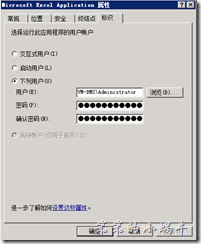
4. 右键--【属性】,在【标识】选项卡中选择“下列用户”,填入用户的用户名和密码(Administrator即可),如图:
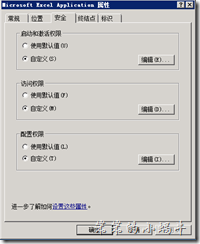
5. 【安全】选项卡中,“启动和激活权限”、“访问权限”都选择【自定义】,如图:
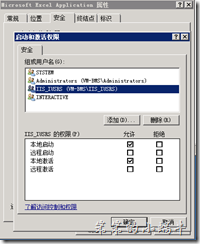
”启动和激活权限“中,点击【编辑】--【添加】—“IIS_IUSRS”用户,并在权限中选择【本地启动】、【本地激活】,如图:
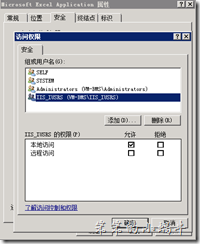
”访问权限”中,点击【编辑】--【添加】—“IIS_IUSRS”用户,并在权限中选择【本地访问】,如图:
点击【确定】,即可。
转载地址:http://blog.csdn.net/lllljz/article/details/44917545
C# Retrieving the COM class factory for component with CLSID {00024500-0000-0000-C000-000000000046} failed due to the following error: 80070005的更多相关文章
- Retrieving the COM class factory for component with CLSID {00024500-0000-0000-C000-000000000046} failed due to the following error: 80070005.
Retrieving the COM class factory for component with CLSID {00024500-0000-0000-C000-000000000046} fai ...
- 【Excel】Retrieving the COM class factory for component with CLSID {00024500-0000-0000-C000-000000000046}:
[Excel]Retrieving the COM class factory for component with CLSID {00024500-0000-0000-C000-0000000000 ...
- C# - (0x80040154): Retrieving the COM class factory for component with CLSID {877AA945-1CB2-411C-ACD7-C70B1F9E2E32} failed
1. Exeption Error: System.Runtime.InteropServices.COMException (0x80040154): Retrieving the COM clas ...
- 使用Gird++打印出现“Retrieving the COM class factory for component with CLSID”的解决办法
我们的接口需要返回一个gird++生成PDF文件的二进制数据,在本地测试都很好,发布到服务器上一直出现“Retrieving the COM class factory for component w ...
- Retrieving the COM class factory for component with CLSID XX failed due to the following error: 80070005 拒绝访问。
环境及异常信息说明 环境说明: Win2008 R2 企业版 x64 .IIS 7.0 功能说明:服务端操作Excel,(上传Excel到服务器,并在服务器端读取Excel中的数据) 异常信息:Ret ...
- Retrieving the COM class factory for component with CLSID {00024500-0000-0000-C000-000000000046} failed due to the following error: 80070005 拒绝访问
异常信息:Retrieving the COM class factory for component with CLSID {00024500-0000-0000-C000-000000000046 ...
- 异常:Retrieving the COM class factory for component with CLSID {00024500-0000-0000-C000-000000000046} failed due to the following error: 80070005.
异常:Retrieving the COM class factory for component with CLSID {00024500-0000-0000-C000-000000000046} ...
- C#-Retrieving the COM class factory for component with CLSID {00024500-0000-0000-C000-000000000046}
异常信息如下 捕获到执行这句时异常: Excel.Application ep = new Excel.ApplicationClass(); Retrieving the COM class fac ...
- 错误:Retrieving the COM class factory for component with CLSID {000209FF-0000-0000-C000-000000000046} failed due to the following error: 80070005 拒绝访问。
最近,把一个网站部署到另一个服务器上,网站中一个功能word转pdf报下面错误: 在此附上解决方案: 方法1:配置Web.Config文件,在每次请求时模拟本地系统的账户. 具体操作:在Web.Con ...
随机推荐
- 【Bootloader】探究bootloader,分析u-boot源码
Preface 之前也发表过关于<Bootloader启动过程分析>的文章,但是内容表达得比较抽象,大多是文字叙述,所以这里从系统和代码的角度来深入分析bootloader的启动过程. 工 ...
- 解决chrome extension无法下载的问题
由于GFW把谷歌应用商店给屏蔽了,下载chrome扩展变得很困难. 我使用的是版本30.0.1599.101 m. 那么你需要做的第一个处理是,修改host文件,保证chrome应用商店可以登录.如下 ...
- HP管理工具System Management Homepage安装配置
如果用HP的启动光盘进行系统安装时,HP SMH 及相关组件会自动安装完成,但如果是用操作系统光盘进行系统安装,则HP SMH相关组件需要手动进行安装及相关设置!HP SMH由三部分组成:HP Sys ...
- debian下创建新用户useradd
1.使用sudo: sudo useradd -m abc -g sudo -s /bin/bash -d /home/abc sudo passwd abc 2.直接在root用户下: groupa ...
- hibernate特殊的映射
<property name="update_date" column="update_date" type="java.sql.Timesta ...
- JAVA-JSP内置对象之pageContext对象
相关资料:<21天学通Java Web开发> pageContext对象1.pageContext对象不但可以用来设置page范围的属性,同样也可以用来设置其他范围属性,不过需要指定范围参 ...
- myeclipse 10 +Axis2 1.62 开发WebService手记
由于临时需求,不得不用java来开发一个webservice,之前对java webservice一片空白.临时查资料,耗费近一天,终于搞定,效率是慢了点.呵呵. 首先 配置Tomcat 中WebSe ...
- iOS录制视频
随着每一代 iPhone 处理能力和相机硬件配置的提高,使用它来捕获视频也变得更加有意思.它们小巧,轻便,低调,而且与专业摄像机之间的差距已经变得非常小,小到在某些情况下,iPhone 可以真正替代它 ...
- Android基础——Fragment控制切换多个页面
今天接着上一篇文章,讲解一下Fragment的控制,主要是切换View和页面替换等操作.还有就是如何获取Fragment的管理对象,以及与Activity的通信方式. (PS:新建的QQ群,有兴趣可以 ...
- 【微信小程序】使用setTimeout制作定时器的思路
setTimeout(func, time)可以使得每隔time毫秒就执行一次func函数,常用来做计时器/时钟. 下面是在微信小程序中的使用思路,只截取了关键部分代码. var timer; // ...