
windows 2012授权模型
转自:http://www.aidanfinn.com/?p=13090
Remember that Microsoft licenses its servers at the physical level, not the VM level, so no matter what hypervisor you are using, the licensing is exactly the same.
I am not answering any more questions on this post - to be honest, there have been too many for me to have the time to deal with them. Don’t bother asking – I’ll ignore/delete it. My recommendations are:
- Re-read this post if you do not understand it after the first or second reads. To be honest, most of the questions have been from people who are just trying to make things complicated. Just license the hosts for the maximum number of Windows Server VMs that can ever run on that host, even for 1 second. It is that simple!
- Ask your LAR/distributor/reseller – that’s their job and that’s why you pay them
This post follows my dissertation on Windows Server 2012 licensing, which is essential reading before proceeding with this post.
I’m putting Hyper-V aside for just a few minutes to talk about how you will license virtualisation of Windows Server 2012 in virtual machines no matter what virtualisation you use, be it vSphere, Hyper-V, XenServer, or whatever tickles your fancy. BTW, the counting here also applies to:
- System Center 2012
- Core Infrastructure Suite (CIS)
- Enrolment for Core Infrastructure (ECI – minimum of 25 hosts)
Please read this post s-l-o-w-l-y and let it sink in. Then read it again. If you have been eating bowls full of VMware FUD then read it a third time – slowly.
FAQ
- VOSE or virtual operating system environment is a licensing term for virtual machine (VM). It is used when talking about licensing a VM for Windows Server.
- When you buy a license for virtualisation you legally buy and assign it to hardware, not to VMs. The virtualisation rights of Windows Server licenses the VMs on the licensed host for Windows Server.
- There is no mobility with OEM.
- You can move a volume license and it’s virtualisation rights once every 90 days. If you want to use HA (clustering), Live Migration/vMotion, DRS/Dynamic Optimization/PRO, then you need sufficient virtualisation rights on each host to support the maximum number of VMs that is possible on that host, even for 1 second.
- You cannot split a license or it’s virtualisation rights across hosts.
- Virtualisation rights are 2 VOSEs for a host licensed by Windows Server 2012 Standard and unlimited VOSEs for a host licensed for Windows Server 2012 Datacenter.
- Virtualisation rights covers the host for the assigned edition of Windows Server 2012 and lower versions/editions of Windows Server. It does not include Windows 8/7/Vista.
- You can assign more than 1 license to a host
In other words, you license a host for the maximum number of Windows Server VMs that it could host.
1 Host, 1 CPU, 2 VMs
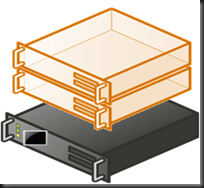
Here you want to run a single host that has 1 CPU. The host will run 2 Windows Server virtual machines. You will assign a single Windows Server 2012 license to this host. The license covers 2 CPUs (there is only 1) and provides virtualisation rights for 2 virtual operating system environments (VOSEs). In other words, you get rights to install Windows Server 2012 Standard (or previous versions) in 2 VMs on this host.
1 Host, 2 CPUs, 4 VMs
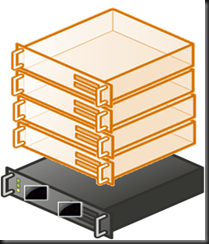
The Standard edition covers 2 VOSEs, but the customer wants 4 VMs running Windows Server Standard 2008 R2. A single copy of WS2012 Standard will not suffice. 2 copies are bought to provide the 4 (2 * 2 VOSEs) VMs with licensing.
1 Host, 2 CPUs, 10 VMs
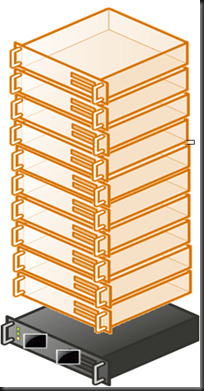
There are two options; do you go with the Standard or Datacenter editions of Windows Server 2012?
The Standard edition covers 2 VOSEs, but the customer wants 10 VMs running Windows Server Standard 2008 R2. A single copy of WS2012 Standard will not suffice. 5 copies are bought to provide the 10 (5 * 2 VOSEs) VMs with licensing. Based on USA Open NL pricing the licensing of these VMs will cost $882 * 5 = $4,410.
The Datacenter edition of WS2012 gives unlimited VOSEs and covers 2 CPUs in the host. This solution will require a single Windows Server 2012 Datacenter license which will cost $4,809.
Decision: If you will not go over 10 VMs on this host then Windows Server 2012 Standard edition is the way to go. If you estimate that there is a good chance of the VM numbers growing then spend an extra $399 and pick up the easier to account-for Windows Server 2012 Datacenter with it’s unlimited VOSE rights.
10 is the magic number using USA Open NL pricing. Once you reach 10 VOSEs on a 1 or 2 CPU host, you need to consider the Datacenter edition because it is cheaper once you hit 11 VOSEs.
1 Host, 4 CPUs, 4 VMs

It’s an unusual configuration but a valid one for the demonstration. The WS2012 Standard/Datacenter SKUs cover 2 CPUs each. In this case there are 4 CPUs. This will require 2 copies of Windows Server 2012 Standard, which also covers the 4 VMs.
Let’s pretend that 300 VMs will run on this host with 4 physical CPUs. Then we would assign 2 copies of Windows Server Datacenter on it. 2 copies will cover 2 CPUs each (4 CPUs) and unlimited VOSEs.
That Host with 320 Logical Processors – 10 CPUs with 16 Cores with Hyperthreading
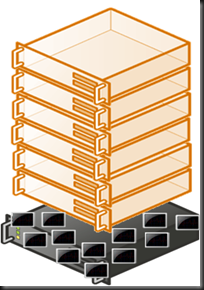
The maximum specification for Windows Server 2012 Hyper-V is 320 logical processors in the host. That could be 10 Intel CPUs, each with 16 cores, with Hyperthreading enabled. We don’t count cores or logical processors when we license. We count CPUs, sockets, or plain old processors – pick the term you prefer. There are 10 CPUs/sockets/processors in this server. That requires 5 copies of either Windows Server 2012 Standard or Datacenter, depending on the required number of VOSEs.
Clusters
Let’s move on to the clusters, where people usually get things wrong because they don’t understand (or don’t want to understand) the mobility rights. VOSEs licensed by OEM cannot move. VOSEs licensed by VL can move once every 90 days. The correct solution is to license each host for the maximum number of VOSEs that it can have for even one second. And when I say “correct” I mean legal. Software Asset Management professionals (auditors) are not stupid and the “tricks” I hear people proposing are neither original or unknown to these auditors.
Reminder: This applies even to you non-Hyper-V folks.
2 Hosts, 1 CPU each, 4 VMs
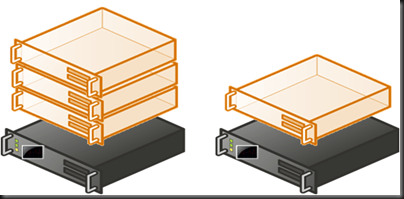
Don’t get fooled! This is not one host with 3 VMs and 1 host with 1 VM. This is 2 hosts, each of which can have up to 4 VMs. In the past we would have used Enterprise edition on each host. That has been replaced by Windows Server 2012 Standard edition, that now has all the features and scalability of the Datacenter edition.
Take each host and size it for 4 VOSEs. That means we need to assign 2 copies of Windows Server 2012 Standard edition to each host. That’s 4 copies of WS2012 Standard.
2 Hosts, 2 CPUs each, 10 VMs
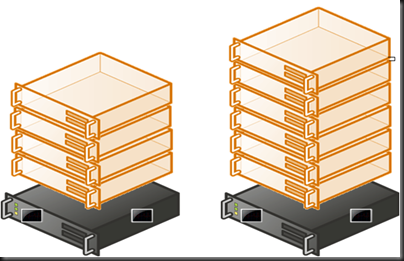
10 VMs with 2 hosts means that it is possible to have all 10 VMs on a single host. You have two options to license each host for up to 10 VOSEs.
Firstly you could license each of the hosts with 5 copies of Windows Server 2012 Standard. That will give you 10 (5 * 2) VOSEs. This requires 10 (5 * 2 hosts ) copies of Standard at a cost of $8,820 using USA Open NL.
Alternatively you could license each host with 1 copy of Windows Server 2012 Datacenter, at a cost of $9,618. The extra $798 will allow you to burst beyond 10 VOSEs to unlimited VOSEs. Switching to licensing hosts using the Datacenter edition means we don’t have to count VOSEs and we have unrestricted mobility between hosts.
2 Hosts, 2 CPUs each, 20 VMs
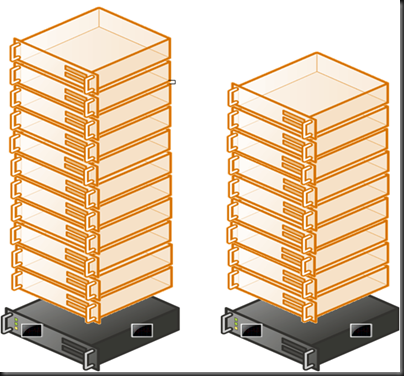
We have exceed the magic number of 10, and now it is cheaper to license with the Datacenter edition with it’s unlimited VOSEs per host. Each host has 2 CPUs, so each host requires 1 copy of Datacenter. There are 2 hosts so we require 2 copies of Windows Server 2012 Datacenter.
You could add more hosts to this cluster and each could have unlimited VMs. As long as the hosts have 1 or 2 CPUs each, each additional host requires only 1 copy of Windows Server 2012 Datacenter to license it for unlimited installs of Windows Server for the VMs on that host.
Lots of Hosts, Lots of VMs, 4 CPUs per Host
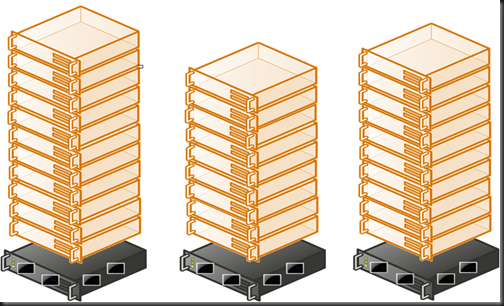
The magic number of 10 VOSEs is a dot in the rear view mirror. We now have lots of hosts with lots of VMs flying all over the place. Each host has 4 CPUs. To license the VOSEs on each host, we will require licensing for 4 CPUs. This will require 2 copies of Windows Server 2012 Datacenter per host, each covering 2 CPUs.
Live Migration Outside the Cluster
And new for WS2012 thanks to Live Migration living outside the cluster: you must ensure that the destination host is adequately licensed for VOSEs to accommodate the new VM. If this is an infrequent move then you could avail of the VL 90 day mobility right to reassign a license, ensuring the the old host is sufficiently licensed for remaining VOSEs and physical CPUs.
Hyper-V Server 2012
Hyper-V Server has no virtualisation rights and includes no free licensing for VOSEs. Therefore it is irrelevant in this conversation.
Economically Speaking – Why Hyper-V Makes Sense
If you buy Windows Server licensing for a host to license your VMs, then you are a tickbox (or PowerShell cmdlet) and a reboot away from having Hyper-V. Buying another product is just more money spent. And let’s be honest,Windows Server 2012 Hyper-V is not what you might have used/looked at before.
Technorati Tags: Windows Server 2012,Virtualisation,Licensing,Hyper-V,Xen,VMware
Copyright Warning
This blog post is the property of Aidan Finn (@joe_elway / http://www.aidanfinn.com) and may not be reused in any manner without prior consent of Aidan Finn. You may quote one paragraph from this blog post if you link to the original blog post.
Related posts:
- Windows Server 2012 Licensing In Detail
- Reminder of Windows Server 2012 and Windows 8 Licensing For VL Purchases
- Volume Licensing for Windows Server 2012 And Windows 8 Are Now Available
- How To Buy Windows 8 For Different Scenarios
- Windows Server 2012–Won’t Somebody Think Of The CALs?!?!
windows 2012授权模型的更多相关文章
- 在工作组的环境中配置Windows 2012 R2的远程桌面服务
在工作组的环境中配置Windows 2012 R2的远程桌面服务 How to configure Remote Desktop Service in Windows 2012 R2 workgrou ...
- windows 2012 r2下安装sharepoint 2013错误解决
日前,我在安装sharepoint 2013时,需要预部署一些软件,我们知道运行产品准备工具“prerequisiteinstaller”后就可以自动下载安装配置这些软件,但是使用系统为windows ...
- [转载]Windows 2012 R2安装SharePoint 2013 手动安装工具软件
之前介绍过在window 2012中安装SharePoint 2013,这次,借着SharePoint 2013 sp1补丁发布之际,介绍下在window 2012 r2中安装SharePoint 2 ...
- Windows 2012 R2中安装SharePoint 2013 sp1参考
之前介绍过在window 2012中安装SharePoint 2013,这次,借着SharePoint 2013 sp1补丁发布之际,介绍下在window 2012 r2中安装SharePoint 2 ...
- Windows Phone 执行模型概述
Windows Phone 执行模型控制在 Windows Phone 上运行的应用程序的生命周期,该过程从启动应用程序开始,直至应用程序终止. 该执行模型旨在始终为最终用户提供快速响应的体验.为此, ...
- 网件无线网卡在windows 2012支持问题
网件的无线网卡的驱动是支持windows 8.1的,但是安装了驱动后,却没法启动网卡.网上搜索后发现,service里面网件有一进程没法启动:而2012年忘记官方论坛技术支持答复咨询居然说,网件驱动不 ...
- windows 2012 服务器打开ping端口,开通远程连接
windows 2012 服务器打开ping端口,开通远程桌面连接 控制面板->系统与安全->高级防火墙->入站规则 找到:windows 远程桌面 (http in ) 右键启用 ...
- SVN二次开发——让SVN、TSVN(TortoiseSVN)支持windows的访问控制模型、NTFS ADS(可选数据流、NTFS的安全属性)
SVN二次开发 ——让SVN.TSVN(TortoiseSVN)支持windows的访问控制模型.NTFS ADS (可选数据流.NTFS的安全属性) SVN secondary developmen ...
- jenkins集群加入Windows 2012 server作为slave
必须安装.net framework 3.5, 參考: http://technet.microsoft.com/en-us/library/dn482071.aspx 不要在windows 2012 ...
随机推荐
- Linux安装ImageMagick与JMagick完成过程及配置
原文地址:http://www.iitshare.com/linux-install-imagemagick-jmagick.html 一.安装背景 最近在服务器上部署了HapiCMS的产品,因为其对 ...
- iOS内存管理策略和实践
转:http://www.cocoachina.com/applenews/devnews/2013/1126/7418.html 内存管理策略(memory Management Policy) N ...
- Android上的单元测试
Android上的单元测试 http://www.sina.com.cn 2009年12月04日 16:07 IT168.com [IT168 技术文档]任何程序的开发都离不开单元测试来保证其健壮 ...
- WordPress主题开发:实现分页功能
注意的是这个受后台这里的文章篇数设置所影响~ 一.使用内置方法 (WordPress 4.1以前无效) the_posts_pagination 输出分页式导航,用法: <?php the_po ...
- Java获取URL链接的文件类型
问题发生: Java从网络批量读取图片并保存至本网站服务器后再插入文章中 今天转入一篇文章 http://news.qq.com/a/20170605/045860.htm 发现图片未能成功上传 查看 ...
- com.mysql.jdbc.exceptions.jdbc4.MySQLNonTransientConnectionException: No operations allowed after connection closed. 解决
ERROR - No operations allowed after connection closed. 2011-12-07 11:36:09 - ERROR - query failed or ...
- 广告狂人第一至七季/全集Mad Men迅雷下载
广告狂人 第一季 Mad Men Season 1 (2007) 本季看点:你是谁?你想要什么?你爱乾什么?这些都不重要,重要的是你怎么把东西卖出去.凡是了解纽约的人都知道,今天,在麦迪逊大道(Mad ...
- GDCPC 2008:B Reading books
Problem B Reading books (Input File: book.in / Standard Output) In the summer vacation, LRJ wants to ...
- Java多线程之Callable接口与Runnable的实现以及选择
通过实现Runnable接口的实现 package Thread; import java.util.concurrent.ExecutorService;import java.util.concu ...
- 常用sql备份
统计数据库中表格数据行数所占空间和索引情况 set nocount on exec sp_MSForEachTable @precommand=N' create table ##( id int i ...