
1.Netty入门
Netty入门
1.Netty介绍
(1)百度百科介绍:
Netty是由JBOSS提供的一个java开源框架。Netty提供异步的、事件驱动的网络应用程序框架和工具,用以快速开发高性能、高可靠性的网络服务器和客户端程序。
也就是说,Netty 是一个基于NIO的客户、服务器端编程框架,使用Netty 可以确保你快速和简单的开发出一个网络应用,例如实现了某种协议的客户、服务端应用。Netty相当于简化和流线化了网络应用的编程开发过程,例如:基于TCP和UDP的socket服务开发。
“快速”和“简单”并不用产生维护性或性能上的问题。Netty 是一个吸收了多种协议(包括FTP、SMTP、HTTP等各种二进制文本协议)的实现经验,并经过相当精心设计的项目。最终,Netty 成功的找到了一种方式,在保证易于开发的同时还保证了其应用的性能,稳定性和伸缩性。
(2)官网介绍:netty.io
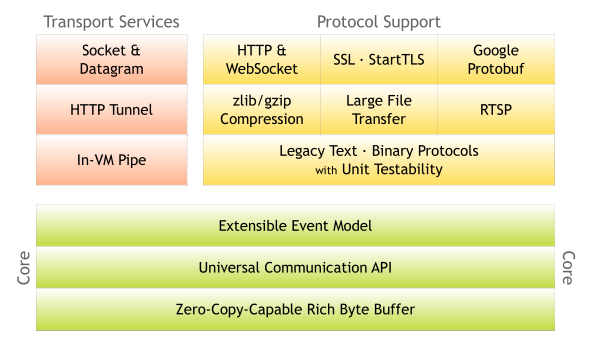
Netty is an asynchronous event-driven network application framework
for rapid development of maintainable high performance protocol servers & clients.
(3)参考资料:
- 参考书籍:Netty实战(Norman Maurer & Marvin Allen Wolfthal)
- 参考官方文档:https://netty.io/wiki/user-guide.html
- 参考网址:https://ifeve.com/tag/netty/
2.程序功能概述
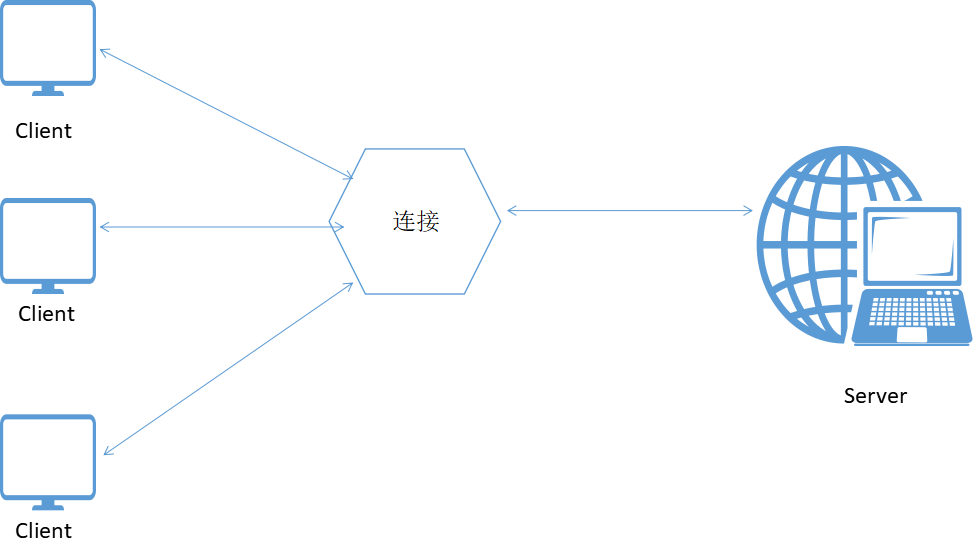
客户端向服务器发送HelloNetty-Server!服务器向客户端返回Hello Netty-Client!
3.程序实现
服务端ChannelHandler
package com.xm.netty;

import io.netty.buffer.ByteBuf;

import io.netty.buffer.Unpooled;

import io.netty.channel.ChannelFutureListener;

import io.netty.channel.ChannelHandlerContext;

import io.netty.channel.ChannelInboundHandlerAdapter;

import io.netty.util.CharsetUtil;

public class ServerHandler extends ChannelInboundHandlerAdapter {

	@Override

	public void channelRead(ChannelHandlerContext ctx, Object msg) throws Exception {

		ByteBuf in = (ByteBuf) msg;

		System.out.println("服务器接收:"+in.toString(CharsetUtil.UTF_8));

		in.clear();

		String str = "Hello Netty-Client!";

		in.writeBytes(str.getBytes());

		ctx.write(in);

	}

	@Override

	public void channelReadComplete(ChannelHandlerContext ctx) throws Exception {

		ctx.writeAndFlush(Unpooled.EMPTY_BUFFER).addListener(ChannelFutureListener.CLOSE);

	}

	@Override

	public void exceptionCaught(ChannelHandlerContext ctx, Throwable cause) throws Exception {

		cause.printStackTrace();

		ctx.close();

	}

}
服务端Server
package com.xm.netty;

import java.net.InetSocketAddress;

import io.netty.bootstrap.ServerBootstrap;

import io.netty.channel.Channel;

import io.netty.channel.ChannelFuture;

import io.netty.channel.ChannelInitializer;

import io.netty.channel.EventLoopGroup;

import io.netty.channel.nio.NioEventLoopGroup;

import io.netty.channel.socket.nio.NioServerSocketChannel;

public class Server {

	private final int port;

	public Server(int port) {

		this.port = port;

	}

	public static void main(String[] args) {

		int port = 8989;

		try {

			new Server(port).start();

		} catch (InterruptedException e) {

			// TODO Auto-generated catch block

			e.printStackTrace();

		}

	}

	private void start() throws InterruptedException {

		 final ServerHandler serverHandler = new ServerHandler();

		 EventLoopGroup group = new NioEventLoopGroup();

		 try {

			ServerBootstrap bootstrap = new ServerBootstrap();

			 bootstrap

			 		.group(group)

			 		.channel(NioServerSocketChannel.class)

			 		.localAddress(new InetSocketAddress( port))

			 		.childHandler(new ChannelInitializer() {

			 			@Override

			 			protected void initChannel(Channel ch) throws Exception {

			 				ch.pipeline().addLast(serverHandler);

			 			}

					});

			 ChannelFuture future = bootstrap.bind().sync();

			 future.channel().closeFuture().sync();

		} finally {

			group.shutdownGracefully().sync();

		}

	}

}
客户端ChannelHandler
package com.xm.netty;

import io.netty.buffer.ByteBuf;

import io.netty.buffer.Unpooled;

import io.netty.channel.ChannelHandlerContext;

import io.netty.channel.SimpleChannelInboundHandler;

import io.netty.util.CharsetUtil;

public class ClientHandler extends SimpleChannelInboundHandler<ByteBuf> {

	@Override

	public void channelActive(ChannelHandlerContext ctx) throws Exception {

		ctx.writeAndFlush(Unpooled.copiedBuffer("Hello Netty-Server!",CharsetUtil.UTF_8));

	}

	@Override

	protected void channelRead0(ChannelHandlerContext ctx, ByteBuf msg) throws Exception {

		System.out.println("客户端接收到消息:"+msg.toString(CharsetUtil.UTF_8));

	}

	@Override

	public void exceptionCaught(ChannelHandlerContext ctx, Throwable cause) throws Exception {

		cause.printStackTrace();

		ctx.close();

	}

}
客户端Client
package com.xm.netty;

import io.netty.bootstrap.Bootstrap;

import io.netty.channel.ChannelFuture;

import io.netty.channel.ChannelInitializer;

import io.netty.channel.EventLoopGroup;

import io.netty.channel.nio.NioEventLoopGroup;

import io.netty.channel.socket.SocketChannel;

import io.netty.channel.socket.nio.NioSocketChannel;

public class Client {

	private final int port;

	private final String host;

	public Client(int port, String host) {

		this.port = port;

		this.host = host;

	}

	public static void main(String[] args) {

		String host = "127.0.0.1";

		int port = 8989;

		try {

			new Client(port, host).start();

		} catch (InterruptedException e) {

			// TODO Auto-generated catch block

			e.printStackTrace();

		}

	}

	private void start() throws InterruptedException {

		EventLoopGroup group = new NioEventLoopGroup();

		try {

			Bootstrap bootstrap = new Bootstrap();

			bootstrap

					.group(group)

					.channel(NioSocketChannel.class)

					.remoteAddress(host, port)

					.handler(new ChannelInitializer<SocketChannel>() {

						@Override

						protected void initChannel(SocketChannel ch) throws Exception {

							ch.pipeline().addLast(new ClientHandler());

						}

					});

			ChannelFuture future = bootstrap.connect().sync();

			future.channel().closeFuture().sync();

		} finally {

			group.shutdownGracefully().sync();

		}

	}

}
导入依赖
<project xmlns="http://maven.apache.org/POM/4.0.0" xmlns:xsi="http://www.w3.org/2001/XMLSchema-instance" xsi:schemaLocation="http://maven.apache.org/POM/4.0.0 http://maven.apache.org/xsd/maven-4.0.0.xsd">

  <modelVersion>4.0.0</modelVersion>

  <groupId>com.xm</groupId>

  <artifactId>netty</artifactId>

  <version>0.0.1-SNAPSHOT</version>

  <dependencies>

<dependency>

    <groupId>io.netty</groupId>

    <artifactId>netty-all</artifactId>

    <version>4.1.16.Final</version>

</dependency>

  </dependencies>

</project>
4.运行结果:
服务端:
服务器接收:Hello Netty-Server!
客户端:
客户端接收到消息:Hello Netty-Client!
1.Netty入门的更多相关文章
- Netty入门之客户端与服务端通信(二)
Netty入门之客户端与服务端通信(二) 一.简介 在上一篇博文中笔者写了关于Netty入门级的Hello World程序.书接上回,本博文是关于客户端与服务端的通信,感觉也没什么好说的了,直接上代码 ...
- Netty入门之HelloWorld
Netty系列入门之HelloWorld(一) 一. 简介 Netty is a NIO client server framework which enables quick and easy de ...
- Netty入门
一.NIO Netty框架底层是对NIO的高度封装,所以想要更好的学习Netty之前,应先了解下什么是NIO - NIO是non-blocking的简称,在jdk1.4 里提供的新api,他的他的特性 ...
- netty入门(一)
1. netty入门(一) 1.1. 传统socket编程 在任何时候都可能有大量的线程处于休眠状态,只是等待输入或者输出数据就绪,这可能算是一种资源浪费. 需要为每个线程的调用栈都分配内存,其默认值 ...
- Netty入门(三)之web服务器
Netty入门(三)之web服务器 阅读前请参考 Netty入门(一)之webSocket聊天室 Netty入门(二)之PC聊天室 有了前两篇的使用基础,学习本文也很简单!只需要在前两文的基础上稍微改 ...
- Netty入门(二)之PC聊天室
参看Netty入门(一):Netty入门(一)之webSocket聊天室 Netty4.X下载地址:http://netty.io/downloads.html 一:服务端 1.SimpleChatS ...
- Netty入门(一)之webSocket聊天室
一:简介 Netty 是一个提供 asynchronous event-driven (异步事件驱动)的网络应用框架,是一个用以快速开发高性能.高可靠性协议的服务器和客户端. 换句话说,Netty 是 ...
- netty同时做http和websocket(netty入门)
---恢复内容开始--- http://www.jianshu.com/p/5c29c6c6d28c ---恢复内容结束--- http://www.jianshu.com/p/5c29c6c6d28 ...
- Netty入门教程——认识Netty
什么是Netty? Netty 是一个利用 Java 的高级网络的能力,隐藏其背后的复杂性而提供一个易于使用的 API 的客户端/服务器框架. Netty 是一个广泛使用的 Java 网络编程框架(N ...
- Netty 系列(三)Netty 入门
Netty 系列(三)Netty 入门 Netty 是一个提供异步事件驱动的网络应用框架,用以快速开发高性能.高可靠性的网络服务器和客户端程序.更多请参考:Netty Github 和 Netty中文 ...
随机推荐
- CentOS7/Ubuntu Linux java jdk 环境变量配置
[root@localhost sony]# tar -zxvf jdk-8u121-linux-x64.tar.gz [root@localhost sony]# .0_121 /usr/local ...
- U盘中毒问题解决
背景: 最近在学校的打印店里打印东西,结果过了一段时间再使用的时候发现,U盘中的文件夹都成了快捷方式,只有一个pdf文件是好的,无奈,其中有比较重要的东西,所以寻求解决办法,最终解决,为方便以后查阅, ...
- JMeter远程分布式联机性能测试
测试环境 apache-jmeter-2.13 Java JDK版本:1.8 1. JMeter分布式测试简介 当一个JMeter客户端因网络限制等因素,无法模拟足够的用户对服务器施压时,需要用到J ...
- jQuery源代码学习_工具函数_type
jquery源代码学习_工具函数_type jquery里面有一个很重要的工具函数,$.type函数用来判断类型,今天写这篇文章,是来回顾type函数的设计思想,深入理解. 首先来看一下最终结果: 上 ...
- wampserver启动时图标不变绿的解决方法
有2种可能: 1.你安装wamp的时候安装路径中有中文,把路径全部改为英文. 2.其他软件占用了80端口号,解决方法是在服务中找微软的sql server或者其他服务,关掉服务后重启就行了.
- 未能解析引用的程序集......因为它对不在当前目标框架“.NETFramework,Version=v4.0,Profile=Client”中的
解决方法:资源管理器下点击项目名(右键)属性--将.NET Framework 4 Client Profile改成.NET Framework 4 . 传送门:http://bbs.csdn.net ...
- 启动和停止GlassFish Server
您可以使用NetBeans IDE或命令行启动和停止GlassFish Server. 使用NetBeans IDE启动GlassFish Server 单击“服务”选项卡. 展开服务器. 右键单 ...
- struts2分页实现
1.定义一个page类,里面包括每一个的数量,当前页码,总记录数,等 2.将page对象传入dao中,dao输出分页查询好的数据.返回到action中,action放到request中,jsp从req ...
- maven课程 项目管理利器-maven 3-2 maven自动建立目录骨架
使用cmd创建maven目录的两种方式: 使用archetype插件 1 按照提示进行选择 步骤: a 进入指定目录 b mvn archetype:generate --创建项目目录 c ente ...
- Linux 作业调度器 crond
linux缺省会启动crond进程,crond进程不需要用户启动.关闭. 需要启动/关闭cron /sbin/service crond start --启动服务 /sbin/service cro ...