
Android控件介绍
1. 介绍
Android控件大多位于android.widget, android.view.View为他们的父类
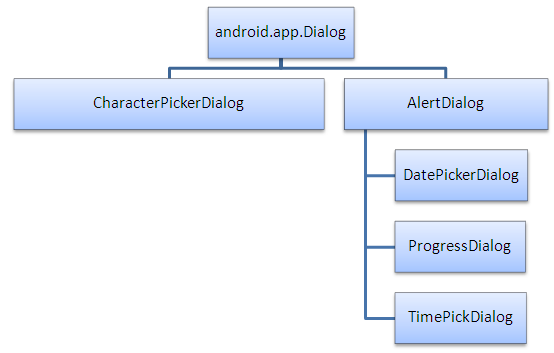
对于Dialog系列, android.app.Dialog为父类
Android的原生控件, 一般是在res/layout下的xml文件中声明
然后在Activity通过使用super.setContentView(R.layout.layout_name)来加载layout
在Activity中获取控件的引用使用super.findViewById(R.id.widget_id), 然后接可以使用这个引用对控件进行操作(添加监听, 设置内容).
值得提出的是, 上一篇文章中的Layout(LinearLayout, TableLayout, RelativeLayout, …)都是控件.
2. 控件关系
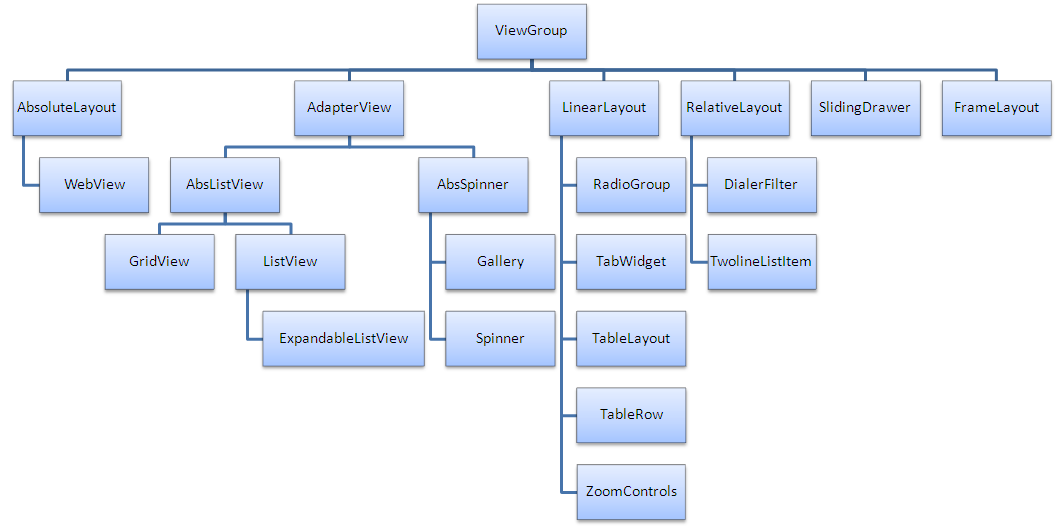
View子类结构图:
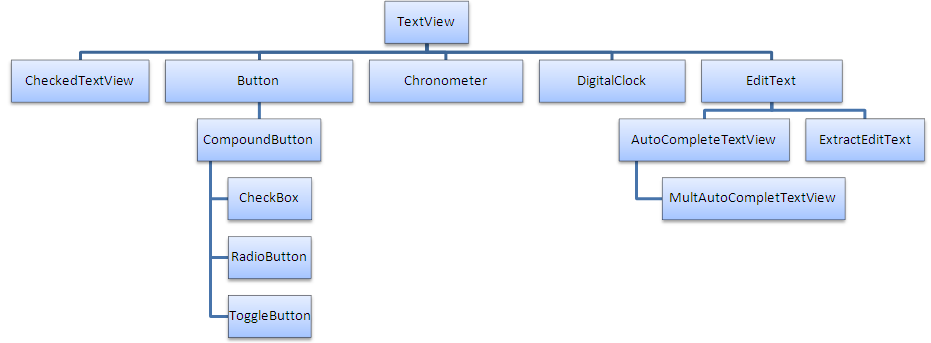
TextView子类结构:
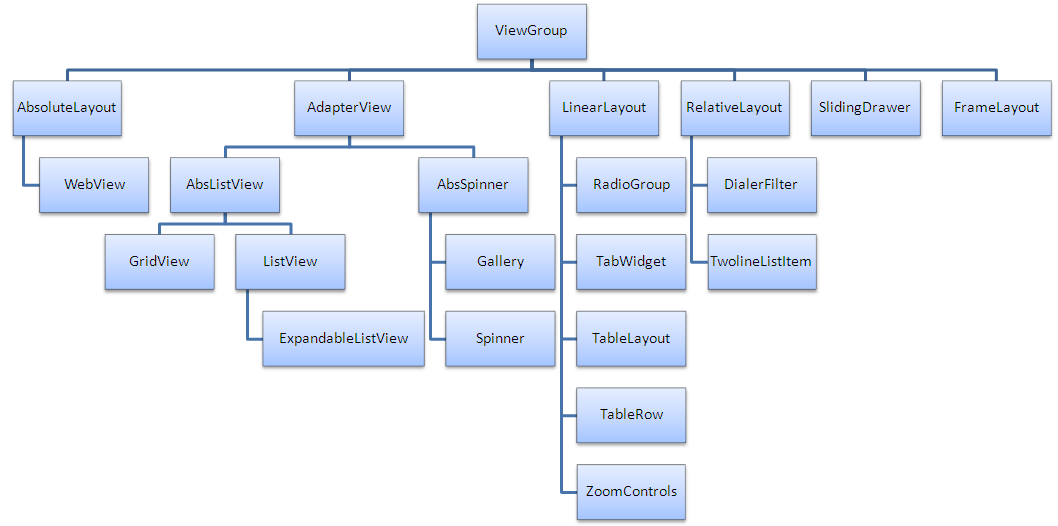
ViewGroup子类结构图:
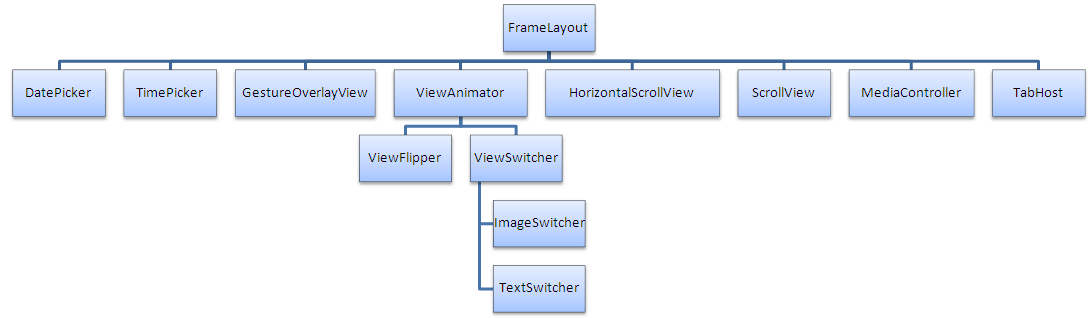
FrameLayout子类结构:
android.app.Dialog子类结构:
3. 基本控件
3.1 文本类控件
常用文本类控件如下:
3.2 按钮类控件
Button                   按钮

ImageButton              图片按钮
ToggleButton             开关按钮

RadioButton/RadioGroup   单选按钮

CheckBox                 复选按钮
3.3 图片类控件
ImageView 负责显示图片
3.4 进度条控件
ProgressBar              显示进度条, 不可拖动

SeekBar                  拖动条

RatingBar                星级评分条
3.5 时间类控件
TextClock                文本时钟

AnalogClock              模拟时钟

Chronometer              计时器

DatePicker               日期选择器

TimePicker               时间选择器

CalendarView             日期视图
3.6 提示&对话框控件
Toast                    消息提示框

Notification             状态栏通知

AlertDialog              对话框

ProgressDialog           进度条对话框
4. 布局类控件
4.1 基本布局类控件
详细信息参考<Activity布局>
4.2 适配器布局类控件
该类控件需要Adapter(BaseAdapter, ArrayAdapter, SimpleAdapter)来配合使用
ListView                 列表视图

ExpandableListView       可折叠的列表

GridView                 网格视图

Spinner                  列表选项框

ViewFlipper              翻转视图

Gallery                  画廊视图
下面是关于ListView的简单使用方法
<!-- activity_main.xml -->

<?xml version="1.0" encoding="utf-8"?>

<LinearLayout xmlns:android="http://schemas.android.com/apk/res/android"

    xmlns="http://schemas.android.com/apk/res-auto"

    xmlns:tools="http://schemas.android.com/tools"

    android:layout_width="match_parent"

    android:layout_height="match_parent"

    android:orientation="vertical"

    tools:context="com.lineto.testlistview.MainActivity">

    <ListView

        android:id="@+id/listview"

        android:layout_width="match_parent"

        android:layout_height="wrap_content">

    </ListView>

</LinearLayout>

<!-- layout_item,xml -->

<?xml version="1.0" encoding="utf-8"?>

<LinearLayout xmlns:android="http://schemas.android.com/apk/res/android"

    android:orientation="horizontal"

    android:paddingLeft="10dp"

    android:paddingTop="2dp"

    android:paddingRight="10dp"

    android:layout_width="match_parent"

    android:layout_height="match_parent">

    <TextView

        android:id="@+id/name"

        android:width="180dp"

        android:textSize="10pt"

        android:layout_width="wrap_content"

        android:layout_height="wrap_content"

        />

    <TextView

        android:id="@+id/ip"

        android:textSize="10pt"

        android:layout_width="wrap_content"

        android:layout_height="wrap_content"

        />

</LinearLayout>
/* MainActivity.java */
public class MainActivity extends AppCompatActivity {

    @Override

    protected void onCreate(Bundle savedInstanceState) {

        super.onCreate(savedInstanceState);

        setContentView(R.layout.activity_main);

        ListView listView = (ListView)findViewById(R.id.listview);

        ArrayList<HashMap<String, String>> list = new ArrayList<HashMap<String, String>>();

        String[] stringsName = {"Jerry", "Penny", "Jimmy"};

        String[] stringsIp   = {"192.169.0.1", "192.168.1.1", "192.168.2.1"};

        for (int i = 0; i < stringsName.length; i++) {

            HashMap<String, String> map = new HashMap<String, String>();

            map.put("name", stringsName[i]);

            map.put("ip",   stringsIp[i]);

            list.add(map);

        }

        SimpleAdapter simpleAdapter = new SimpleAdapter(this, list, R.layout.layout_item,

                new String[]{"name", "ip"},

                new int[]{R.id.name, R.id.ip});

        listView.setAdapter(simpleAdapter);

        listView.setOnItemClickListener(new AdapterView.OnItemClickListener() {

            @Override

            public void onItemClick(AdapterView<?> parent, View view, int position, long id) {

                Adapter adapter = parent.getAdapter();

                HashMap<String, String> map = (HashMap<String, String>) adapter.getItem(position);

                Toast toast = Toast.makeText(MainActivity.this, map.get("name") + "-" + map.get("ip"), Toast.LENGTH_SHORT);

                toast.show();

            }

        });

    }

}
4.3 滚动条控件
ScrollView 可滚动的布局容器
参考:
<Android笔记-常用控件以及用法>
<Android开发学习之五、基本界面控件>
Android控件介绍的更多相关文章
- Android自定义控件1--自定义控件介绍
Android控件基本介绍 Android本身提供了很多控件比如我们常用的有文本控件TextView和EditText:按钮控件Button和ImageButton状态开关按钮ToggleButton ...
- android xml 常用控件介绍
android常用控件介绍 ------文本框(TextView) ------列表(ListView) ------提示(Toast) ------编辑框(EditText) ...
- Android support library支持包常用控件介绍(二)
谷歌官方推出Material Design 设计理念已经有段时间了,为支持更方便的实现 Material Design设计效果,官方给出了Android support design library ...
- Android控件系列之RadioButton&RadioGroup(转)
学习目的: 1.掌握在Android中如何建立RadioGroup和RadioButton 2.掌握RadioGroup的常用属性 3.理解RadioButton和CheckBox的区别 4.掌握Ra ...
- android控件的属性
android控件的属性 本节描述android空间的位置,内容等相关属性及属性的含义 第一类:属性值为true或false android:layout_centerHrizontal 水平居中 ( ...
- Android控件TextView的实现原理分析
文章转载至CSDN社区罗升阳的安卓之旅,原文地址:http://blog.csdn.net/luoshengyang/article/details/8636153 在前面一个系列的文章中,我们以窗口 ...
- Android控件之ImageSwticher
Android控件之ImageSwticher 1. ImageSwticher介绍 ImageSwitcher是图片切换的控件,它能实现图片切换时的动画效果,包括图片导入效果.图片消失效果等等.An ...
- 一步一步学android控件(之六) —— MultiAutoCompleteTextView
今天学习的控件是MultiAutoCompleteTextView . 提到MultiAutoCompleteTextView 我们就自然而然地想到AutoCompleteTextView ,就想知道 ...
- Android控件点击事件
1. 介绍 本文介绍了Android控件的点击事件 Android控件点击(onClick)事件可以用如下三种方式来实现 2. 实现onClick方法 在layout的xml中指定onClick方法, ...
随机推荐
- hasattr() & getattr() & setattr()
Python的hasattr() getattr() setattr() 函数使用方法详解 感谢作者 ---> 原文链接 hasattr(object, name) 判断一个对象里面是否有n ...
- 一行代码将两个列表拼接出第三个列表(两个可迭代对象相加产生第三个可迭代对象)--map()方法
map()方法 map(func, *iterables) --> map object lambda方法: lambda 参数 :返回值 a = map(',7]) print(list(a ...
- zookeeper: web ui工具的安装
zookeeper官方没有提供web用户界面,这使很多人在使用zookeeper(动物管理员)同时,并不是很容易的理解zookeeper的数据结构,还好淘宝有位大神用Nodejs写了一个web的ui工 ...
- Android Studio的Log日志调试
本人菜鸟一枚,极大发挥了搜索的功能.现记录一番,以备后患. 用断点真的很烦,因为之前写linux的时候,就是用最蠢但是也是挺有帮助的printf()来进行调试. 其实用Log输出日志的原理也是差不多的 ...
- Android字体大小怎么自适应不同分辨率?
今天有人问我,android系统不同分辨率,不同大小的手机,字体大小怎么去适应呢?其实字体的适应和图片的适应是一个道理的. 一. 原理如下: 假设需要适应320x240,480x320分辨率.在res ...
- USACO Section2.1 Ordered Fractions 解题报告
frac1解题报告 —— icedream61 博客园(转载请注明出处)---------------------------------------------------------------- ...
- MQ消息中间件
MQ是什么? MQ是Message Queue消息队列的缩写.消息队列是一种应用程序对应用程序的通信方法.应用程序通过写和检索入列队的针对应用程序的数据(消息)来进行通信,而不需要专用连接来链接它们. ...
- 一个初学者的辛酸路程-jQuery
前言: 主要概要: 1.HTML+CSS补充 2.DOM事件 3.jQuery示例 内容概要: 1.布局 代码如下 <!DOCTYPE html> <html lang=" ...
- (笔记) RealTimeRender[实时渲染] C3
@author: 白袍小道 转载表明,查看随缘 前言: 从历史上看,图形加速始于每个像素扫描线上的插值颜色重叠一个三角形,然后显示这些值.包括访问图像数据允许纹理应用于表面.添加硬件 插入和测试z深度 ...
- (原)Unreal 渲染模块引言Temp
@author:白袍小道 引言 本文只在对Unreal渲染模块做一些详细的理解,务求能分析出个大概. 其中框架的思想和实现的过程,是非常值得学习和推敲一二的. 涉及资源系统,材 ...