
TouTiao开源项目 分析笔记14 段子评论
1.段子页面详情
1.1.先看看预览界面吧
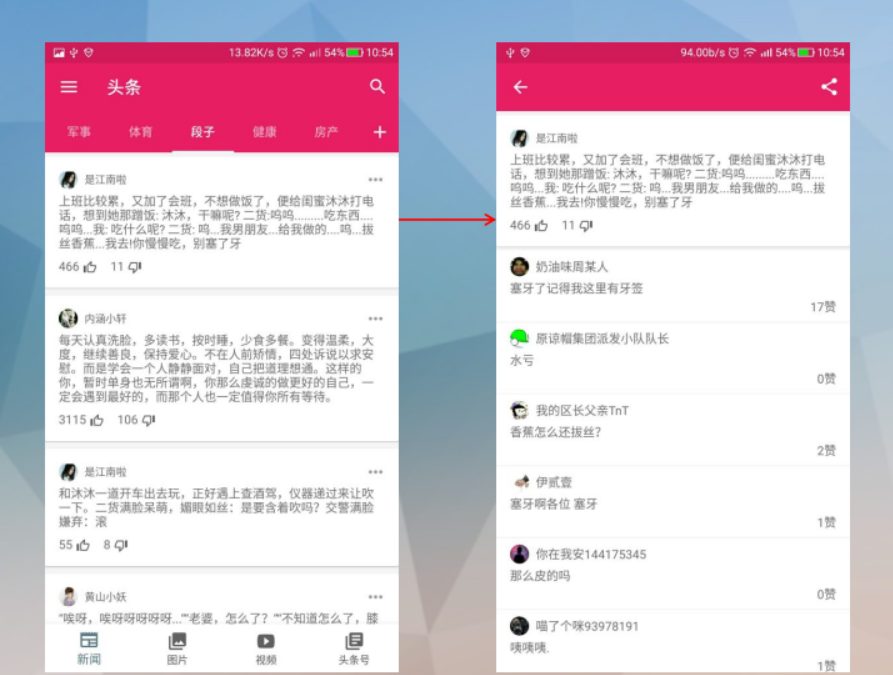
左边的页面已经实现了,现在的目的就是要实现点击左侧的每一个item
然后跳转到右边相应的段子详情页面。
1.2.首先肯定有右侧这个活动==>JokeCommentActivity。
外部如何启动?
fun launch(bean: JokeContentBean.DataBean.GroupBean) {

        InitApp.AppContext.startActivity(Intent(InitApp.AppContext, JokeCommentActivity::class.java)

                .putExtra(TAG, bean)

                .addFlags(Intent.FLAG_ACTIVITY_NEW_TASK))

    }
这个Intent.FLAG_ACTIVITY_NEW_TASK是什么意思?
——在这里的意思,从Activity A到Activity B的过程中,将Activity B加到Activity A的任务堆栈中。
然后按返回键,即回退到Activity A中了。
更多详解参见这篇文章:Android Intent.FLAG_ACTIVITY_NEW_TASK详解。
1.3.这个JokeCommentActivity布局是怎么的呢?
<FrameLayout

xmlns:android="http://schemas.android.com/apk/res/android"

xmlns:app="http://schemas.android.com/apk/res-auto"

xmlns:tools="http://schemas.android.com/tools"

android:id="@+id/container"

android:layout_width="match_parent"

android:layout_height="match_parent"

android:background="@color/viewBackground"

app:layout_behavior="@string/appbar_scrolling_view_behavior"

tools:layout="@layout/fragment_news_tab"/>
so easy!
just a FrameLayout.
1.4.然后用什么来替换这个FrameLayout呢?
 override fun onCreate(savedInstanceState: Bundle?) {

        super.onCreate(savedInstanceState)

        setContentView(R.layout.container)

        supportFragmentManager.beginTransaction().replace(R.id.container,一个片段来代替).commit()

    }
1.5.紧接着,就是来构造这个片段了。
段子评论接口:
public interface IJokeComment {

    interface View extends IBaseListView<Presenter> {

        /**

         * 请求数据

         */

        void onLoadData();

    }

    interface Presenter extends IBasePresenter {

        /**

         * 请求数据

         */

        void doLoadData(String... jokeId_Count);

        /**

         * 再起请求数据

         */

        void doLoadMoreData();

        /**

         * 设置适配器

         */

        void doSetAdapter(List<JokeCommentBean.DataBean.RecentCommentsBean> commentsBeanList);

        /**

         * 加载完毕

         */

        void doShowNoMore();

    }

}
一个用于视图方面的函数。
一个用于处理器方面的函数。
1.6.这个段子详情的布局是怎样的呢?
<?xml version="1.0" encoding="utf-8"?>

<android.support.design.widget.CoordinatorLayout

    xmlns:android="http://schemas.android.com/apk/res/android"

    xmlns:app="http://schemas.android.com/apk/res-auto"

    android:layout_width="match_parent"

    android:layout_height="match_parent"

    android:background="@color/windowBackground"

    android:fitsSystemWindows="true"

    android:orientation="vertical">

    <include layout="@layout/toolbar"/>

    <android.support.v4.widget.SwipeRefreshLayout

        android:id="@+id/refresh_layout"

        android:layout_width="match_parent"

        android:layout_height="match_parent"

        app:layout_behavior="@string/appbar_scrolling_view_behavior">

        <android.support.v7.widget.RecyclerView

            android:id="@+id/recycler_view"

            android:layout_width="match_parent"

            android:layout_height="match_parent"

            android:fadeScrollbars="true"

            android:scrollbarFadeDuration="1"

            android:scrollbars="vertical"

            app:layoutManager="LinearLayoutManager">

        </android.support.v7.widget.RecyclerView>

    </android.support.v4.widget.SwipeRefreshLayout>

</android.support.design.widget.CoordinatorLayout>
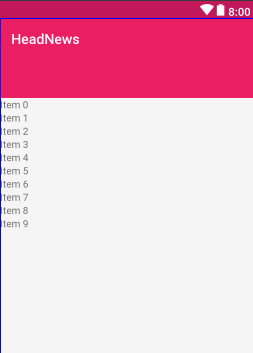
预览页面是这样的:
1.7.Intent.createChooser(intent)应用选择器的理解
一般用于分享的时候,可以用这样方法,用来选择哪个应用来分享。
Intent intent=new Intent();
startActivity(Intent.createChooser(intent));
可以弹出一个小框,然后进行相应的选择即可。
2.定义段子详情片段
2.1.源代码==>JokeCommentFragment
package com.jasonjan.headnews.module.joke.comment;

import android.content.Intent;

import android.os.Bundle;

import android.os.Parcelable;

import android.support.v7.widget.Toolbar;

import android.view.Menu;

import android.view.MenuInflater;

import android.view.MenuItem;

import android.view.View;

import com.jasonjan.headnews.R;

import com.jasonjan.headnews.adapter.DiffCallback;

import com.jasonjan.headnews.bean.common.LoadingBean;

import com.jasonjan.headnews.bean.joke.JokeContentBean;

import com.jasonjan.headnews.main.Register;

import com.jasonjan.headnews.module.base.BaseListFragment;

import com.jasonjan.headnews.util.OnLoadMoreListener;

import java.util.List;

import me.drakeet.multitype.Items;

import me.drakeet.multitype.MultiTypeAdapter;

/**

 * Created by JasonJan on 2018/1/7.

 */

public class JokeCommentFragment extends BaseListFragment<IJokeComment.Presenter> implements IJokeComment.View {

    public static final String TAG = "JokeCommentFragment";

    private String jokeId;

    private String jokeCommentCount;

    private String jokeText;

    private JokeContentBean.DataBean.GroupBean jokeCommentHeaderBean;

    public static JokeCommentFragment newInstance(Parcelable data) {

        Bundle args = new Bundle();

        args.putParcelable(TAG, data);

        JokeCommentFragment fragment = new JokeCommentFragment();

        fragment.setArguments(args);

        return fragment;

    }

    @Override

    protected int attachLayoutId() {

        return R.layout.fragment_list_toolbar;

    }

    @Override

    protected void initView(View view) {

        super.initView(view);

        Toolbar toolbar = view.findViewById(R.id.toolbar);

        initToolBar(toolbar, true, "");

        toolbar.setOnClickListener(new View.OnClickListener() {

            @Override

            public void onClick(View view) {

                recyclerView.smoothScrollToPosition(0);

            }

        });

        adapter = new MultiTypeAdapter(oldItems);

        Register.registerJokeCommentItem(adapter);

        recyclerView.setAdapter(adapter);

        recyclerView.addOnScrollListener(new OnLoadMoreListener() {

            @Override

            public void onLoadMore() {

                if (canLoadMore) {

                    canLoadMore = false;

                    presenter.doLoadMoreData();

                }

            }

        });

        setHasOptionsMenu(true);

    }

    @Override

    protected void initData() {

        Bundle bundle = getArguments();

        try {

            jokeCommentHeaderBean = bundle.getParcelable(TAG);

            jokeId = jokeCommentHeaderBean.getId() + "";

            jokeCommentCount = jokeCommentHeaderBean.getComment_count() + "";

            jokeText = jokeCommentHeaderBean.getText();

            oldItems.add(jokeCommentHeaderBean);

        } catch (Exception e) {

        }

        onLoadData();

    }

    @Override

    public void onLoadData() {

        presenter.doLoadData(jokeId, jokeCommentCount);

    }

    @Override

    public void onCreateOptionsMenu(Menu menu, MenuInflater inflater) {

        inflater.inflate(R.menu.menu_joke_comment, menu);

        super.onCreateOptionsMenu(menu, inflater);

    }

    @Override

    public boolean onOptionsItemSelected(MenuItem item) {

        switch (item.getItemId()) {

            case R.id.action_comment_share:

                Intent shareIntent = new Intent()

                        .setAction(Intent.ACTION_SEND)

                        .setType("text/plain")

                        .putExtra(Intent.EXTRA_TEXT, jokeText);

                startActivity(Intent.createChooser(shareIntent, getString(R.string.share_to)));

                break;

        }

        return super.onOptionsItemSelected(item);

    }

    @Override

    public void onRefresh() {

        presenter.doRefresh();

    }

    @Override

    public void onSetAdapter(final List<?> list) {

        Items newItems = new Items();

        newItems.add(jokeCommentHeaderBean);

        newItems.addAll(list);

        newItems.add(new LoadingBean());

        DiffCallback.notifyDataSetChanged(oldItems, newItems, DiffCallback.JOKE_COMMENT, adapter);

        oldItems.clear();

        oldItems.addAll(newItems);

        canLoadMore = true;

    }

    @Override

    public void setPresenter(IJokeComment.Presenter presenter) {

        if (null == presenter) {

            this.presenter = new JokeCommentPresenter(this);

        }

    }

    @Override

    public void fetchData() {

    }

}
2.2.定义了外部新建这个实例的一个静态方法。
2.3.实现抽象方法,返回这个片段的整体布局,包括toolbar。
2.4.初始化视图,定义适配器+recyclerView滑动监听事件+分享菜单。
2.5.初始化数据,在最开始新建的实例中,传递了一个序列化,
这里将这个序列化的数据加到oldItems中。
然后调用onLoadData方法来加载数据。
2.6. 定义onLoadData方法,调用处理器的doLoadData方法。
2.7.定义分享菜单的布局,自定义一个图标即可。
2.8.实现分享菜单的点击事件。
2.9.定义刷新事件,调用处理器的doRefresh()。
2.10.设置处理器,这里需要一个自定义的处理器。
3.自定义处理器
3.1.源代码
package com.jasonjan.headnews.module.joke.comment;

import com.jasonjan.headnews.api.IJokeApi;

import com.jasonjan.headnews.bean.joke.JokeCommentBean;

import com.jasonjan.headnews.main.ErrorAction;

import com.jasonjan.headnews.main.RetrofitFactory;

import java.util.ArrayList;

import java.util.List;

import io.reactivex.annotations.NonNull;

import io.reactivex.functions.Consumer;

import io.reactivex.functions.Function;

import io.reactivex.schedulers.Schedulers;

/**

 * Created by JasonJan on 2018/1/7.

 */

public class JokeCommentPresenter implements IJokeComment.Presenter{

    private IJokeComment.View view;

    private String jokeId;

    private int count = -1;

    private int offset = 0;

    private List<JokeCommentBean.DataBean.RecentCommentsBean> commentsList = new ArrayList<>();

    JokeCommentPresenter(IJokeComment.View view) {

        this.view = view;

    }

    @Override

    public void doLoadMoreData() {

        offset += 10;

        doLoadData();

    }

    @Override

    public void doLoadData(String... jokeId_Count) {

        try {

            if (null == this.jokeId) {

                this.jokeId = jokeId_Count[0];

            }

            if (-1 == this.count) {

                this.count = Integer.parseInt(jokeId_Count[1]);

            }

        } catch (Exception e) {

            ErrorAction.print(e);

        }

        RetrofitFactory.getRetrofit().create(IJokeApi.class).getJokeComment(jokeId, offset)

                .subscribeOn(Schedulers.io())

                .observeOn(Schedulers.io())

                .map(new Function<JokeCommentBean, List<JokeCommentBean.DataBean.RecentCommentsBean>>() {

                    @Override

                    public List<JokeCommentBean.DataBean.RecentCommentsBean> apply(@NonNull JokeCommentBean jokeCommentBean) throws Exception {

                        return jokeCommentBean.getData().getRecent_comments();

                    }

                })

                .compose(view.<List<JokeCommentBean.DataBean.RecentCommentsBean>>bindToLife())

                .subscribe(new Consumer<List<JokeCommentBean.DataBean.RecentCommentsBean>>() {

                    @Override

                    public void accept(@NonNull List<JokeCommentBean.DataBean.RecentCommentsBean> recentCommentsBeen) throws Exception {

                        if (recentCommentsBeen.size() > 0) {

                            doSetAdapter(recentCommentsBeen);

                        } else {

                            doShowNoMore();

                        }

                    }

                }, new Consumer<Throwable>() {

                    @Override

                    public void accept(@NonNull Throwable throwable) throws Exception {

                        doShowNetError();

                        ErrorAction.print(throwable);

                    }

                });

    }

    @Override

    public void doSetAdapter(List<JokeCommentBean.DataBean.RecentCommentsBean> commentsBeanList) {

        commentsList.addAll(commentsBeanList);

        view.onSetAdapter(commentsList);

        view.onHideLoading();

    }

    @Override

    public void doRefresh() {

        if (commentsList.size() != 0) {

            commentsList.clear();

            offset = 0;

        }

        doLoadData();

    }

    @Override

    public void doShowNetError() {

        view.onHideLoading();

        view.onShowNetError();

    }

    @Override

    public void doShowNoMore() {

        view.onHideLoading();

        if (commentsList.size() > 0) {

            view.onShowNoMore();

        }

    }

}
3.2.首先一个构造函数,传递一个视图类型进去。
3.3.重写加载更多doLoadMoreData()。
3.4.重写加载数据doLoadData(String... jokeId_Count)。
3.5.重写设置适配器,交给视图的onSetAdapter来完成。
3.6.重写刷新函数doRefresh()函数,调用了doLoadData()函数。
3.7.重写显示网络错误,交给视图的onShowNetError来完成。
3.8.重写显示没有更多了,交给视图的onShowNoMore来完成。
4.注册数据类型
4.1.首先在Register中定义一个静态函数。
 /**

     * 段子评论

     * @param adapter

     */

    public static void registerJokeCommentItem(@NonNull MultiTypeAdapter adapter) {

        adapter.register(JokeContentBean.DataBean.GroupBean.class, new JokeCommentHeaderViewBinder());

        adapter.register(JokeCommentBean.DataBean.RecentCommentsBean.class, new JokeCommentViewBinder());

        adapter.register(LoadingBean.class, new LoadingViewBinder());

        adapter.register(LoadingEndBean.class, new LoadingEndViewBinder());

    }
4.2.定义JokeCommentHeaderViewBinder
定义头部视图绑定。
public class JokeCommentHeaderViewBinder extends ItemViewBinder<JokeContentBean.DataBean.GroupBean,JokeCommentHeaderViewBinder.ViewHolder>{

    @NonNull

    @Override

    protected JokeCommentHeaderViewBinder.ViewHolder onCreateViewHolder(@NonNull LayoutInflater inflater, @NonNull ViewGroup parent) {

        View view = inflater.inflate(R.layout.item_joke_content, parent, false);

        return new ViewHolder(view);

    }

    @Override

    protected void onBindViewHolder(@NonNull final ViewHolder holder, @NonNull final JokeContentBean.DataBean.GroupBean item) {

        final Context context = holder.itemView.getContext();

        try {

            String avatar_url = item.getUser().getAvatar_url();

            String name = item.getUser().getName();

            String text = item.getText();

            String digg_count = item.getDigg_count() + "";

            String bury_count = item.getBury_count() + "";

            int comment_count = item.getComment_count();

            ImageLoader.loadCenterCrop(context, avatar_url, holder.iv_avatar, R.color.viewBackground);

            holder.tv_username.setText(name);

            holder.tv_text.setText(text);

            holder.tv_digg_count.setText(digg_count);

            holder.tv_bury_count.setText(bury_count);

            if (comment_count > 0) {

                holder.tv_comment_count.setText(comment_count + "评论");

            } else {

                holder.tv_comment_count.setVisibility(View.GONE);

            }

            holder.iv_dots.setVisibility(View.GONE);

            holder.itemView.setOnClickListener(new View.OnClickListener() {

                @Override

                public void onClick(View v) {

                    final String content = item.getText();

                    final BottomSheetDialogFixed dialog = new BottomSheetDialogFixed(context);

                    dialog.setOwnerActivity((BaseActivity) context);

                    View view = ((BaseActivity) context).getLayoutInflater().inflate(R.layout.item_comment_action_sheet, null);

                    view.findViewById(R.id.layout_copy_text).setOnClickListener(new View.OnClickListener() {

                        @Override

                        public void onClick(View view) {

                            ClipboardManager copy = (ClipboardManager) context.getSystemService(Context.CLIPBOARD_SERVICE);

                            ClipData clipData = ClipData.newPlainText("text", content);

                            copy.setPrimaryClip(clipData);

                            Snackbar.make(holder.itemView, R.string.copied_to_clipboard, Snackbar.LENGTH_SHORT).show();

                            dialog.dismiss();

                        }

                    });

                    view.findViewById(R.id.layout_share_text).setOnClickListener(new View.OnClickListener() {

                        @Override

                        public void onClick(View view) {

                            IntentAction.send(context, content);

                            dialog.dismiss();

                        }

                    });

                    dialog.setContentView(view);

                    dialog.show();

                }

            });

        } catch (Exception e) {

            ErrorAction.print(e);

        }

    }

    class ViewHolder extends RecyclerView.ViewHolder {

        private CircleImageView iv_avatar;

        private TextView tv_username;

        private TextView tv_text;

        private TextView tv_digg_count;

        private TextView tv_bury_count;

        private TextView tv_comment_count;

        private ImageView iv_dots;

        ViewHolder(View itemView) {

            super(itemView);

            this.iv_avatar = itemView.findViewById(R.id.iv_avatar);

            this.tv_username = itemView.findViewById(R.id.tv_username);

            this.tv_text = itemView.findViewById(R.id.tv_text);

            this.tv_digg_count = itemView.findViewById(R.id.tv_digg_count);

            this.tv_bury_count = itemView.findViewById(R.id.tv_bury_count);

            this.tv_comment_count = itemView.findViewById(R.id.tv_comment_count);

            this.iv_dots = itemView.findViewById(R.id.iv_dots);

        }

    }

}
每个item的样式==>item_joke_content
<?xml version="1.0" encoding="utf-8"?>

<android.support.v7.widget.CardView

    xmlns:android="http://schemas.android.com/apk/res/android"

    xmlns:app="http://schemas.android.com/apk/res-auto"

    xmlns:tools="http://schemas.android.com/tools"

    android:layout_width="match_parent"

    android:layout_height="wrap_content"

    android:layout_marginBottom="4dp"

    android:layout_marginTop="4dp"

    android:background="@color/viewBackground"

    app:cardElevation="1dp">

    <RelativeLayout

        android:layout_width="match_parent"

        android:layout_height="match_parent"

        android:background="?attr/selectableItemBackground"

        android:foreground="?attr/selectableItemBackground"

        android:orientation="vertical"

        android:padding="16dp">

        <LinearLayout

            android:id="@+id/header"

            android:layout_width="match_parent"

            android:layout_height="wrap_content"

            android:orientation="horizontal">

            <com.jasonjan.headnews.widget.CircleImageView

                android:id="@+id/iv_avatar"

                android:layout_width="22dp"

                android:layout_height="22dp"

                android:layout_gravity="center"/>

            <TextView

                android:id="@+id/tv_username"

                android:layout_width="wrap_content"

                android:layout_height="wrap_content"

                android:layout_gravity="center"

                android:layout_marginLeft="8dp"

                android:layout_marginStart="8dp"

                android:ellipsize="end"

                android:maxLength="30"

                android:maxLines="1"

                android:textAppearance="@style/TextAppearance.AppCompat.Caption"

                tools:text="小恢恢的帽子"/>

            <RelativeLayout

                android:layout_width="match_parent"

                android:layout_height="wrap_content">

                <ImageView

                    android:id="@+id/iv_dots"

                    android:layout_width="22dp"

                    android:layout_height="22dp"

                    android:layout_alignParentEnd="true"

                    android:layout_alignParentRight="true"

                    android:layout_centerVertical="true"

                    android:padding="4dp"

                    android:scaleType="center"

                    app:srcCompat="@drawable/ic_dots_horizontal_grey500_24dp"

                    tools:ignore="ContentDescription"/>

            </RelativeLayout>

        </LinearLayout>

        <LinearLayout

            android:layout_width="match_parent"

            android:layout_height="wrap_content"

            android:layout_below="@+id/header"

            android:layout_marginTop="4dp"

            android:orientation="vertical">

            <TextView

                android:id="@+id/tv_text"

                android:layout_width="wrap_content"

                android:layout_height="wrap_content"

                tools:text="昨天和闺蜜出去逛街,闺密问她老公要钱,她老公坐在沙发上,翘着二郎腿抽着烟问:“20行吗?”闺密想了想,温柔的点点头,我正惊讶她老公能把她管制的服服贴贴,只见她老公从钱包里掏出20,然后把钱包递给了媳妇……"/>

            <LinearLayout

                android:layout_width="match_parent"

                android:layout_height="20dp"

                android:layout_gravity="bottom"

                android:layout_marginTop="6dp"

                android:gravity="bottom"

                android:orientation="horizontal">

                <TextView

                    android:id="@+id/tv_digg_count"

                    android:layout_width="wrap_content"

                    android:layout_height="wrap_content"

                    tools:text="53"/>

                <ImageView

                    android:layout_width="16dp"

                    android:layout_height="16dp"

                    android:layout_marginLeft="4dp"

                    android:layout_marginStart="4dp"

                    app:srcCompat="@drawable/ic_like_gray_24dp"

                    tools:ignore="ContentDescription"/>

                <TextView

                    android:id="@+id/tv_bury_count"

                    android:layout_width="wrap_content"

                    android:layout_height="wrap_content"

                    android:layout_marginLeft="16dp"

                    android:layout_marginStart="16dp"

                    tools:text="11"/>

                <ImageView

                    android:layout_width="16dp"

                    android:layout_height="16dp"

                    android:layout_marginLeft="4dp"

                    android:layout_marginStart="4dp"

                    app:srcCompat="@drawable/ic_dislike_gray_24dp"

                    tools:ignore="ContentDescription"/>

                <TextView

                    android:id="@+id/tv_comment_count"

                    android:layout_width="0dp"

                    android:layout_height="wrap_content"

                    android:layout_weight="1"

                    android:gravity="end"

                    tools:text="48评论"/>

            </LinearLayout>

        </LinearLayout>

    </RelativeLayout>

</android.support.v7.widget.CardView>
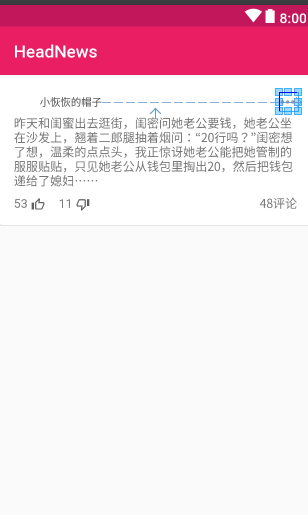
预览图片:
4.3.定义评论的视图绑定==>JokeCommentViewBinder
package com.jasonjan.headnews.binder.joke;

import android.content.ClipData;

import android.content.ClipboardManager;

import android.content.Context;

import android.support.annotation.NonNull;

import android.support.design.widget.Snackbar;

import android.support.v7.widget.RecyclerView;

import android.view.LayoutInflater;

import android.view.View;

import android.view.ViewGroup;

import android.widget.TextView;

import com.jasonjan.headnews.R;

import com.jasonjan.headnews.bean.joke.JokeCommentBean;

import com.jasonjan.headnews.main.ErrorAction;

import com.jasonjan.headnews.main.IntentAction;

import com.jasonjan.headnews.module.base.BaseActivity;

import com.jasonjan.headnews.util.ImageLoader;

import com.jasonjan.headnews.widget.BottomSheetDialogFixed;

import com.jasonjan.headnews.widget.CircleImageView;

import me.drakeet.multitype.ItemViewBinder;

/**

 * Created by Meiji on 2017/6/10.

 */

public class JokeCommentViewBinder extends ItemViewBinder<JokeCommentBean.DataBean.RecentCommentsBean, JokeCommentViewBinder.ViewHolder> {

    @NonNull

    @Override

    protected JokeCommentViewBinder.ViewHolder onCreateViewHolder(@NonNull LayoutInflater inflater, @NonNull ViewGroup parent) {

        View view = inflater.inflate(R.layout.item_joke_comment, parent, false);

        return new ViewHolder(view);

    }

    @Override

    protected void onBindViewHolder(@NonNull final ViewHolder holder, @NonNull final JokeCommentBean.DataBean.RecentCommentsBean item) {

        final Context context = holder.itemView.getContext();

        try {

            String iv_avatar = item.getUser_profile_image_url();

            String tv_username = item.getUser_name();

            String tv_text = item.getText();

            String tv_likes = item.getDigg_count() + "赞";

            ImageLoader.loadCenterCrop(context, iv_avatar, holder.iv_avatar, R.color.viewBackground);

            holder.tv_username.setText(tv_username);

            holder.tv_text.setText(tv_text);

            holder.tv_likes.setText(tv_likes);

            holder.itemView.setOnClickListener(new View.OnClickListener() {

                @Override

                public void onClick(View v) {

                    final String content = item.getText();

                    final BottomSheetDialogFixed dialog = new BottomSheetDialogFixed(context);

                    dialog.setOwnerActivity((BaseActivity) context);

                    View view = ((BaseActivity) context).getLayoutInflater().inflate(R.layout.item_comment_action_sheet, null);

                    view.findViewById(R.id.layout_copy_text).setOnClickListener(new View.OnClickListener() {

                        @Override

                        public void onClick(View view) {

                            ClipboardManager copy = (ClipboardManager) context.getSystemService(Context.CLIPBOARD_SERVICE);

                            ClipData clipData = ClipData.newPlainText("text", content);

                            copy.setPrimaryClip(clipData);

                            Snackbar.make(holder.itemView, R.string.copied_to_clipboard, Snackbar.LENGTH_SHORT).show();

                            dialog.dismiss();

                        }

                    });

                    view.findViewById(R.id.layout_share_text).setOnClickListener(new View.OnClickListener() {

                        @Override

                        public void onClick(View view) {

                            IntentAction.send(context, content);

                            dialog.dismiss();

                        }

                    });

                    dialog.setContentView(view);

                    dialog.show();

                }

            });

        } catch (Exception e) {

            ErrorAction.print(e);

        }

    }

    class ViewHolder extends RecyclerView.ViewHolder {

        private CircleImageView iv_avatar;

        private TextView tv_username;

        private TextView tv_text;

        private TextView tv_likes;

        ViewHolder(View itemView) {

            super(itemView);

            this.iv_avatar = itemView.findViewById(R.id.iv_avatar);

            this.tv_username = itemView.findViewById(R.id.tv_username);

            this.tv_text = itemView.findViewById(R.id.tv_text);

            this.tv_likes = itemView.findViewById(R.id.tv_likes);

        }

    }

}
每个item的视图布局==>item_joke_comment
<?xml version="1.0" encoding="utf-8"?>

<RelativeLayout

    xmlns:android="http://schemas.android.com/apk/res/android"

    xmlns:tools="http://schemas.android.com/tools"

    android:layout_width="match_parent"

    android:layout_height="wrap_content"

    android:background="@color/viewBackground">

    <LinearLayout

        android:id="@+id/content"

        android:layout_width="match_parent"

        android:layout_height="wrap_content"

        android:background="?attr/selectableItemBackground"

        android:foreground="?attr/selectableItemBackground"

        android:orientation="vertical"

        android:paddingBottom="8dp"

        android:paddingLeft="16dp"

        android:paddingRight="16dp"

        android:paddingTop="8dp">

        <LinearLayout

            android:layout_width="match_parent"

            android:layout_height="wrap_content"

            android:orientation="horizontal">

            <com.jasonjan.headnews.widget.CircleImageView

                android:id="@+id/iv_avatar"

                android:layout_width="22dp"

                android:layout_height="22dp"

                android:layout_gravity="center"/>

            <TextView

                android:id="@+id/tv_username"

                android:layout_width="wrap_content"

                android:layout_height="wrap_content"

                android:layout_gravity="center"

                android:layout_marginLeft="8dp"

                android:layout_marginStart="8dp"

                android:ellipsize="end"

                tools:text="小恢恢的帽子"/>

        </LinearLayout>

        <LinearLayout

            android:layout_width="match_parent"

            android:layout_height="wrap_content"

            android:layout_marginTop="4dp"

            android:orientation="vertical">

            <TextView

                android:id="@+id/tv_text"

                android:layout_width="wrap_content"

                android:layout_height="wrap_content"

                tools:text="最恨公共场所吸烟的。特别是在饭店。电梯等一些空气不流通的环境"/>

            <TextView

                android:id="@+id/tv_likes"

                android:layout_width="match_parent"

                android:layout_height="wrap_content"

                android:layout_marginTop="2dp"

                android:gravity="end"

                android:maxLines="1"

                tools:text="4832赞"/>

        </LinearLayout>

    </LinearLayout>

    <View

        android:id="@+id/divider"

        android:layout_width="match_parent"

        android:layout_height="1px"

        android:layout_below="@+id/content"

        android:background="@color/line_divider"/>

</RelativeLayout>
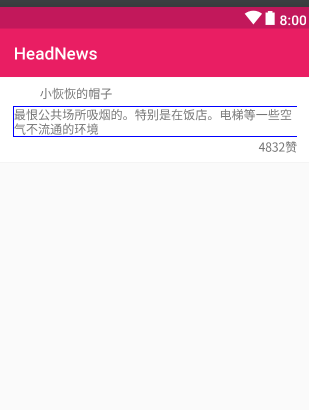
预览图片:
5.处理API
5.1.在处理器中怎么调用的呢?
 RetrofitFactory.getRetrofit().create(IJokeApi.class)
                  .getJokeComment(jokeId, offset)
                  ....
5.2.所以在实际的API中是怎样的呢?
public interface IJokeApi {

    /**

     * 获取段子正文内容

     * http://www.toutiao.com/api/article/feed/?category=essay_joke&as=A115C8457F69B85&cp=585F294B8845EE1

     */

    @GET("api/article/feed/?category=essay_joke")

    Observable<JokeContentBean> getJokeContent(

            @Query("max_behot_time") String maxBehotTime,

            @Query("as") String as,

            @Query("cp") String cp);

    /**

     * 获取段子评论

     * http://m.neihanshequ.com/api/get_essay_comments/?group_id=编号&count=数量&offset=偏移量

     */

    @GET("http://m.neihanshequ.com/api/get_essay_comments/?count=20")

    @Headers({"User-Agent:" + Constant.USER_AGENT_MOBILE})

    Observable<JokeCommentBean> getJokeComment(

            @Query("group_id") String groupId,

            @Query("offset") int offset);

}
groupId==>段子的唯一标识符。
offset==>评论的分页处理
6.新老数据处理
6.1.在JokeCommentFragmentsh中设置适配器的时候
要进行新老数据处理。
这里调用方式很简单。
 @Override

    public void onSetAdapter(final List<?> list) {

        Items newItems = new Items();

        newItems.add(jokeCommentHeaderBean);

        newItems.addAll(list);

        newItems.add(new LoadingBean());

        DiffCallback.notifyDataSetChanged(oldItems, newItems, DiffCallback.JOKE_COMMENT, adapter);

        oldItems.clear();

        oldItems.addAll(newItems);

        canLoadMore = true;

    }
6.2.所以在自定义DiffCallback中注册这种类型即可。
在areItemsTheSame函数中,加一个JOKE_COMMENT
  case JOKE_COMMENT:

                    return ((JokeCommentBean.DataBean.RecentCommentsBean) oldList.get(oldItemPosition)).getText().equals(

                            ((JokeCommentBean.DataBean.RecentCommentsBean) newList.get(newItemPosition)).getText());
6.3.在areContentsTheSame函数中,加一个JOKE_COMMENT
 case JOKE_COMMENT:

                    return ((JokeCommentBean.DataBean.RecentCommentsBean) oldList.get(oldItemPosition)).getId() ==

                            ((JokeCommentBean.DataBean.RecentCommentsBean) newList.get(newItemPosition)).getId();
6.4.因为这个API不稳定,这里就不进行实际页面展示了。
TouTiao开源项目 分析笔记14 段子评论的更多相关文章
- TouTiao开源项目 分析笔记16 新闻评论
1.要达到的效果 1.1.主要效果图 点击了标题栏的消息图标后,然后会跳转到评论详情的页面. 1.2.触发的点击事件 在新闻详情的片段中的菜单点击事件中 设置上方标题栏的消息标的监听事件 case R ...
- TouTiao开源项目 分析笔记2
1.Constant常量定义类 1.1.源代码 public class Constant { public static final String USER_AGENT_MOBILE = " ...
- TouTiao开源项目 分析笔记10 实现通用普通文章片段页面
1.RxJava的Observable数据操作符总结 1.1.Map操作符 Map操作符对原始Observable发射的没一项数据应用一个你选择的函数, 然后返回一个发射这些结果的Observable ...
- TouTiao开源项目 分析笔记12 从总体到局部 构建视频主页面
1.构建视频主列表的整体碎片VideoTabLayout 1.1.首先创建一个VideoTabLayout package com.jasonjan.headnews.module.video; im ...
- TouTiao开源项目 分析笔记6
1.NewsChannelBean简单类笔记 1.1.Comparable接口的实现和使用 参考文章:Comparable接口的实现和使用. 因为NewsChannelBean实现了Comparabl ...
- TouTiao开源项目 分析笔记4==>一个简单APP 整体常用框架
1.效果预览 1.1.如下图所以,到目前为止所有的功能. 2.从InitApp开始->SplashActivity->MainActivity 2.1.InitApp源代码.这是整个项目的 ...
- TouTiao开源项目 分析笔记18 视频详情页面
1.效果预览 1.1.需要做到的真实效果 1.2.触发的点击事件 在MediaArticleVideoViewBinder的每一个item点击事件中: VideoContentActivity.lau ...
- TouTiao开源项目 分析笔记17 新闻媒体专栏
1.效果预览 1.1.要实现的效果 1.2.如何调转到新闻媒体专栏 点击右上角的用户图标. 在新闻详情页面的Fragment的菜单点击事件中触发. case R.id.action_open_medi ...
- TouTiao开源项目 分析笔记15 新闻详情之两种类型的实现
1.预览效果 1.1.首先看一下需要实现的效果. 第一种,文字类型新闻. 第二种,图片类型新闻. 1.2.在NewsArticleTextViewBinder中设置了点击事件 RxView.click ...
随机推荐
- [UnityShader]点染队列、ZWrite和ZTest
转载自:http://www.myexception.cn/mobile/1902628.html [UnityShader]渲染队列.ZWrite和ZTest 参考链接:http://blog.cs ...
- http相关文章目录
四种常见的 POST 提交数据方式 https://imququ.com/post/four-ways-to-post-data-in-http.html
- win10下各种问题的解决办法
本来申请这个博客是为了写一些Java学习笔记的,但是鉴于我半年内无数次重装系统的惨痛经历,所以把win10系统的一些问题总结一下. 此账号密码:1994llz. 1.win10取消开机密码: http ...
- C#调用C++的dll存在的问题
C#调用C++写的DLL时,在C#程序中,使用DllImport定义C++导出函数的定义信息,之前在C++中定义导出函数时,使用了long作为参数类型,使用C#调用时,开始在64位版本是哪个测试,一切 ...
- "COM Surrogate 已停止工作"解决方案(windows7 64位及32位)
根据图示步骤,将以下文件添加至“数据执行保护”的例外列表中. 64位:C:Windows\SysWOW64\dllhost.exe 32位:C:\Windows\System32\dllhost.ex ...
- 【js基础修炼之路】- 手把手教你实现bind
手写bind前我们先回顾一下bind有哪些特性,以便更好的理解bind和实现bind. bind的特性 var obj = { a: 100, say(one, two) { console.log( ...
- sublime打开txt文件乱码的问题
我们使用Sublime打开TXT文件的时候,会经常因为编码的问题造成乱码. 这是因为TXT记事本的默认保存编码格式是GBK,而Sublime text不支持GB2312和GBK编码. 我们可以通过安装 ...
- UESTC 757 棋盘
虽然是水题,但是还是很interesting的.(大概就是我最晚出这个题了... 博弈感觉就是靠yy能力啊.这题是对称性. 最后的必败态是白色格子对称的,一旦对称形成,对手怎么选,跟随就好,对手无法摆 ...
- Netbackup-Oracle数据库恢复演练(上)
目录 第一章NBU实施内容 1 第二章 环境准备 1 2.1添加LICENSE: 1 2.2安装配置NBU客户端(linux,unix相同) 2 2.3配置并验证oracle备份脚本 3 2.4添加备 ...
- Java8函数之旅 (二) --Java8中的流
流与集合 众所周知,日常开发与操作中涉及到集合的操作相当频繁,而java中对于集合的操作又是相当麻烦.这里你可能就有疑问了,我感觉平常开发的时候操作集合时不麻烦呀?那下面我们从一个例子说起. 计 ...