
Can Microsoft’s exFAT file system bridge the gap between OSes?
转自:http://arstechnica.com/information-technology/2013/06/review-is-microsofts-new-data-sharing-system-a-cross-platform-savior/
With Apple's licensing of Microsoft's exFAT file system, it seems like we finally have a good option for OS X and Windows disk swapping. Dave Girard spent some time investigating the appeal, the limitations, and the alternatives to exFAT.
One of the more painful areas of cross-platform computing is data sharing. While networking between Mac OS X, Windows, and Linux has gotten a lot easier thanks to SAMBA, disk sharing still feels like it’s in its infancy thanks to proprietary file systems and the unique legacy needs of the respective operating systems they run on. There are options for cross-platform file sharing—plenty actually—it’s just that each one presents its own limitations and appeals. With Apple’s licensing of Microsoft’s exFAT file system, it seemed like the main problem with FAT32—the 4GB file size limit—was put to rest, and many people are probably now using it to swap video libraries between their MacBooks and HTPCs or share downloads between OS X and Boot Camped Windows. But exFAT has its own issues and limitations that few people are probably aware of—and considering how few people even know about exFAT, we thought this was a good opportunity to cover it, along with the various alternatives.
exFAT: The savior of cross-platform file sharing?
First, a brief history of exFAT for those unfamiliar with it. exFAT is a proprietary Microsoft file system that was designed to bridge the gap between the NTFS file system and the more dated FAT32 file system. Its main advantages are that it can store files over 4GB since it is a 64-bit file system. Its max file size limitation is 16 EiB (Exbibyte) and its theoretical max capacity is 64 ZiB (Zebibyte), which our people in the lab have called “stupidly huge.” You won’t have any issues with hitting file size or capacity ceilings with exFAT. Since exFAT is a closed format, Apple had to license it to integrate it into OS X 10.6.5 and later. You can format a volume as exFAT within Disk Utility. I’ve read about people having issues with exFAT disks that were formatted using Snow Leopard’s (10.6.x) Disk Utility showing up in Windows. Apparently, Apple’s block size was correct according to the standard, but different enough from Windows’ default to cause it not to be recognized on the Windows side. So Snow Leopard users were forced to use Windows to format the drive as exFAT, and then it would show up fine in OS X. This seems to be fixed in Mountain Lion (10.8) since I didn’t have any issues getting the Mountain Lion-formatted exFAT partitions to show up in Windows 7. On the Windows side, native exFAT support is built into Windows as of Vista SP1, and exFAT drivers are available for older builds like XP. Since it’s a relatively new and proprietary format, Linux exFAT support is definitely lackluster, but there is an implementation of exFAT as a FUSE user-space level file system. I haven’t personally tried it.
exFAT limitations and things to keep in mind
Before you run out and format everything as exFAT, you should understand its limitations—and they aren’t insignificant. exFAT has no file system-level encryption or compression support, and, like FAT32 before it, there is no journaling built into the exFAT file system. This means it has a much higher probability of data loss than with NTFS or HFS+. Since FAT32 and exFAT are common USB stick file systems, TFAT and TexFAT are driver-level additions to FAT32 and exFAT volumes that address the lack of journaling in much the same way that Apple has with HFS+ in OS X. But those are currently only implemented in mobile OSes. That's not it. exFAT also isn’t supported by Time Machine in OS X, which requires an HFS+ volume. Another odd limitation of exFAT support in OS X is that you can’t create a software RAID array in exFAT format, but you can do it with the FAT32 format. It also has very limited permission and ACL support for those who need to isolate different users from certain files. If you're just planning on sharing a video or music library, this isn't a problem. Still, the lack of journaling could be problematic. In the limited testing I did, bundled OS X applications launched fine from an exFAT volume. I wouldn’t recommend installing apps to a non-HFS+ volume, though, since the lack of permissions support could probably cause issues with larger applications. For content developers and designers looking to share files between Macs and PCs, you should have no issues using exFAT as a bridge format. You should be careful when copying older Mac fonts to an exFAT-formatted disk, though. Older Mac PostScript font suitcases have resource fork data that is not retained when copied to non-HFS or HFS+ volumes (HFS is the older pre-OS X file system, for those wondering). So if you’re using anything other than HFS+ disks, it’s best practice to use the Finder to zip your fonts if you’re transferring older suitcase-based PostScript fonts. The OS X Finder’s zip supports resource forks—that’s one of the reasons it creates the __MACOSX folder in zip archives. Newer font formats like OpenType don’t use resource forks, so newly purchased fonts won’t be an issue on non-HFS+ volumes.
A brief look at some exFAT alternatives
Some NTFS options
Since the NTFS file system has been around for a while, it is now well supported across all OSes with some free and commercial options. As a cross-platform file system, NTFS’s major appeal is that it supports journaling across all OSes—without any driver-level fixes or workarounds. By default, OS X reads NTFS volumes but can’t write to them. You need additional software to get write access to these NTFS disks. The FUSE-based NTFS-3G was the most appealing option since it was free, but it hasn’t been updated since 2011 so I wouldn’t recommend it. Two popular Mac options are Tuxera NTFS, which is a FUSE-based implementation, and Paragon NTFS for Mac. Both packages offer control over volume caching, NTFS-specific options, and some handy additions for full Mac OS X compatibility: ?
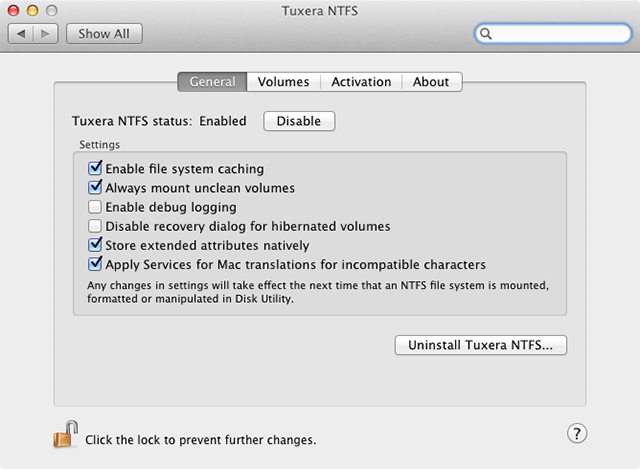
Both Paragon and Tuxera let you format NTFS right from within Disk Utility, but Paragon is the only one that supports formatting of NTFS compressed volumes and full journaling of NTFS disks. At $20, it’s also currently $10 cheaper than Tuxera. After you see the benchmark results, it should be pretty clear which is the choice to go with.
The HFS+ options
Apple’s Boot Camp drivers install read-only support of HFS+ volumes by default so you can access those Mac partitions within Windows. Early versions were very unstable and caused frequent BSODs, but the latest version seems to work fine. The lack of write support is the real drawback, so you’ll need MacDrive for that. As the best-known HFS+ driver for Windows, Mediafour’s MacDrive has been around for a while now. I’ve used MacDrive for years and have always liked its feature set. Apart from the basic read/write features, it lets you set volumes to read-only in case you don’t want Windows messing with your volumes. If you format a partition on a Mac OS X volume within Windows, MacDrive will protect the main partition info so that your other Mac volume data is unaffected. This frequently came in handy when formatting the test partition for the benchmarks in Windows 7 SP1. The Pro version of MacDrive adds support for OS X HFS+ software RAID volumes, secure delete, and auto-defragmentation, which could be a boon to multimedia users who prefer to keep large media files from being fragmented. MacDrive has partial support of journaling—if your machine lost power or the drive was removed while copying in OS X, it will read the journal entry and try to complete the copy. But if you're in Windows, MacDrive does not edit the journal, so you get no journaling support for file system operations done within Windows. At $49.99 for MacDrive Standard and $69.99 for the Pro option, that makes MacDrive a harder sell given the slight handicap when compared to Paragon in OS X. Obviously, if you have an external HFS+ software RAID you need to share, MacDrive Pro is the only option. But if you are starting with disks from scratch, NTFS is the cheaper option.
Can Microsoft’s exFAT file system bridge the gap between OSes?的更多相关文章
- Common Internet File System
CIFS (Common Internet File System) is a protocol that gained popularity around the year 2000, as ven ...
- Low-overhead enhancement of reliability of journaled file system using solid state storage and de-duplication
A mechanism is provided in a data processing system for reliable asynchronous solid-state device bas ...
- Design and Implementation of the Sun Network File System
Introduction The network file system(NFS) is a client/service application that provides shared file ...
- 解决 docker 报错: Error starting daemon: error initializing graphdriver: backing file system is unsupported for this graph driver
CentOS 7.5 x64下 sudo yum install docker -y systemctl enable docker systemctl start docker 发现启动失败 jou ...
- android-problem——remount of /system failed: Read-only file system
adb remount后仍旧不能对system进行读写.需要进行adb disable-verity 在Android6.0 (Android M)userdebug版本上(eng版本不存在该问题), ...
- File System Design Case Studies
SRC=http://www.cs.rutgers.edu/~pxk/416/notes/13-fs-studies.html Paul Krzyzanowski April 24, 2014 Int ...
- 【Azure 存储服务】如何把开启NFS 3.0协议的Azure Blob挂载在Linux VM中呢?(NFS: Network File System 网络文件系统)
问题描述 如何把开启NFS协议的Azure Blob挂载到Linux虚拟机中呢? [答案]:可以使用 NFS 3.0 协议从基于 Linux 的 Azure 虚拟机 (VM) 或在本地运行的 Linu ...
- 乌版图 read-only file system
今天在启动虚拟机的时候,运行命令svn up的时候,提示lock,并且read-only file system,这个....我是小白啊,怎么办?前辈在专心写代码,不好打扰,果断找度娘啊 于是乎,折腾 ...
- File system needs to be upgraded. You have version null and I want version 7
安装hbase时候报错: File system needs to be upgraded. You have version null and I want version 7 注: 我安装的hba ...
随机推荐
- windows 7 下安装VMWARE 和 red-hat 7 64bit
按F2 进入BIOS: 在inter virtualization technology 选择YES 就可以安装linux 64bit 操作系统了 https://blog.csdn.net/coco ...
- C# 利用ADO.NET导出大批量数据
2015年12月,XX项目中需要做一个数据导出功能,当时所有页面的到处功能均已经实现,但有个页面数据量太大,导出过程中导出页面直接卡死.不得已我准备选用ADO.NET来重新完成这个功能,因为考虑到越偏 ...
- [转]jQuery的.live()和.die()
本文转自:http://www.cnblogs.com/dumuqiao/archive/2011/09/09/2172513.html 翻译原文地址:http://www.alfajango.com ...
- H903
Metadata-Version: 2.0Name: hackingVersion: 0.10.2Summary: OpenStack Hacking Guideline EnforcementHom ...
- jenkins自动打IOS包(转发)
投稿文章,作者:一缕殇流化隐半边冰霜(@halfrost) 前言 众所周知,现在App的竞争已经到了用户体验为王,质量为上的白热化阶段.用户们都是很挑剔的.如果一个公司的推广团队好不容易砸了重金推广了 ...
- dos文件格式转换为Unix文件格式
做linux开发的,一般还是在windows上装个虚拟机,在windows上开发, 所以就会出现dos文件与unix文件格式不一致,当windows上的文件在linux上用的时候,经常在每行的末尾会出 ...
- MongoDB 搭建Node.js开发环境
理解Mongoose Elegant MongoDB object modeling for Node.js 安装Mongoose $ cnpm install --save mongoose ...
- 随机练习:C#实现维吉尼亚加密与解密(解密前提为已知密匙)
using System; using System.Collections.Generic; using System.ComponentModel; using System.Data; usin ...
- hdu 3586 最小代价切断根与叶子联系
题目链接:http://acm.hdu.edu.cn/showproblem.php?pid=3586 http://blog.csdn.net/woshi250hua/article/details ...
- MySQL慢查询分析工具pt-query-digest详解
一.简介 pt-query-digest是用于分析mysql慢查询的一个工具,它可以分析binlog.General log.slowlog,也可以通过SHOWPROCESSLIST或者通过tcpdu ...