
【Azure 存储服务】如何把开启NFS 3.0协议的Azure Blob挂载在Linux VM中呢?(NFS: Network File System 网络文件系统)
问题描述
如何把开启NFS协议的Azure Blob挂载到Linux虚拟机中呢?
【答案】:可以使用 NFS 3.0 协议从基于 Linux 的 Azure 虚拟机 (VM) 或在本地运行的 Linux 系统,在 Blob 存储中装载容器
操作步骤
参考官方文档(Mount Blob storage by using the Network File System (NFS) 3.0 protocol: https://docs.microsoft.com/en-us/azure/storage/blobs/network-file-system-protocol-support-how-to)可以成功的让 NFS 3.0的Blob Mount到VM中。

准备条件:
1) 开启NFS的Azure Storage Account
2) Linux 虚拟机(本示例中使用的为 UbuntuServer 18.04-LTS)
3) Storage Account与Linux 处于同一虚拟网络中,并且在Storage Account中设置允许访问的子网。
注意事项:
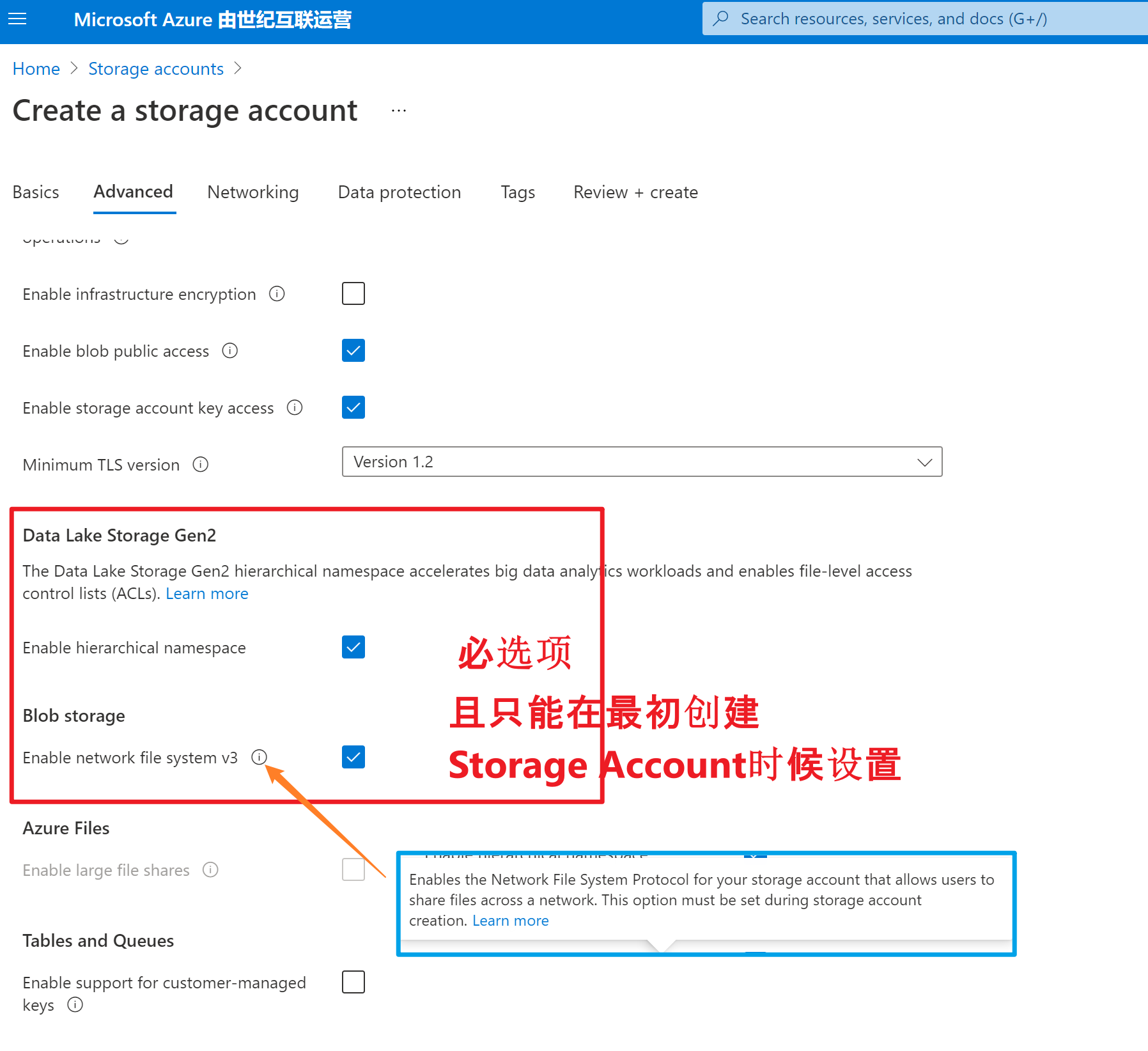
1)在创建Storage Account的时候要先开启ADLS Gen 2.0 (即Enable Hierarchical namespace 和 Enable network file system v3)
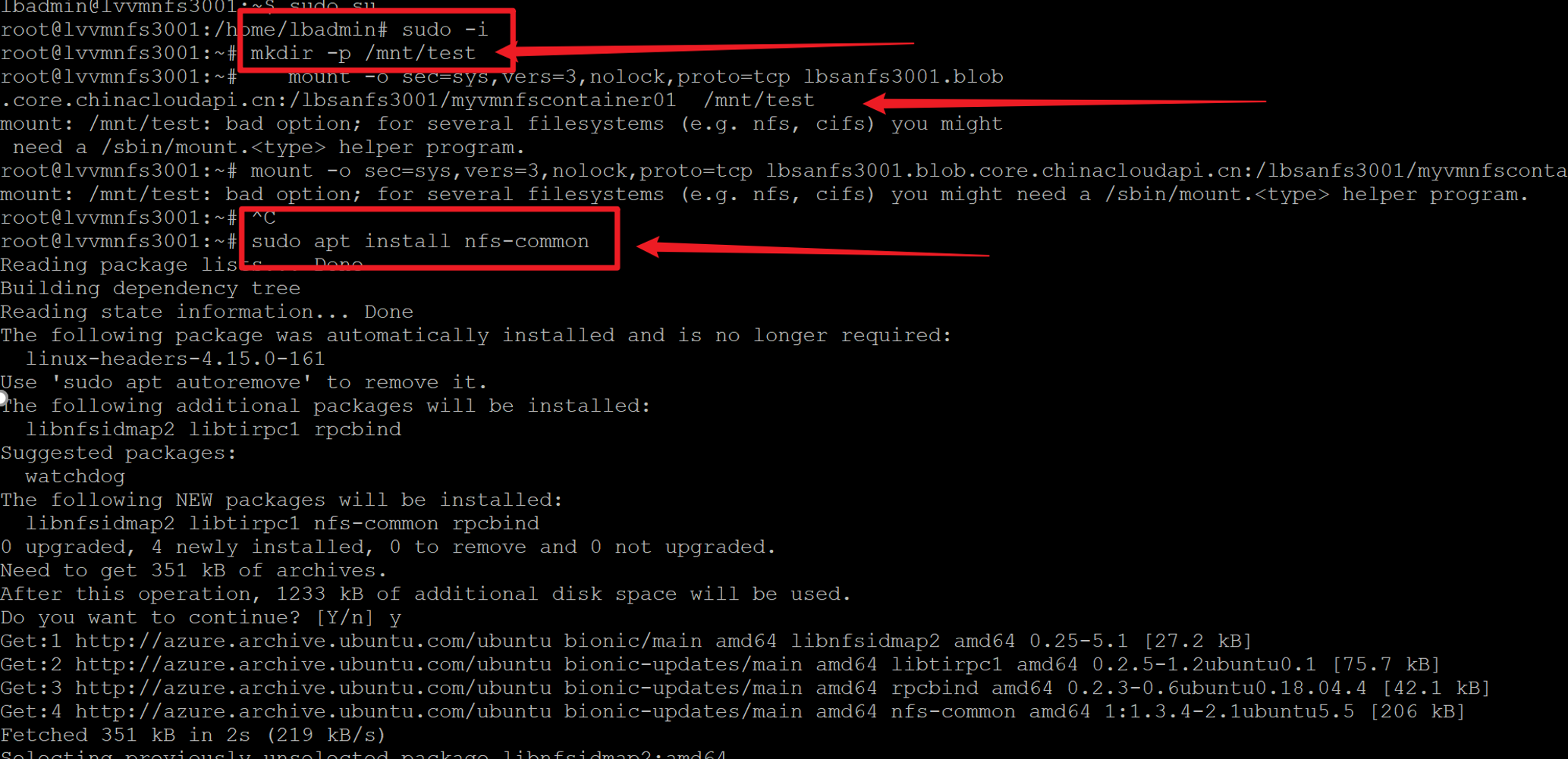
2) 使用PuTTy,SSH登录到VM后,需要使用用root权限执行mount命令。 使用 sudo -i 切换到root目录中。同时,如果没有安装nfs helper会提示bad option消息。只需使用 sudo apt install nfs-common 安装nfs helper。
3)最终,使用正确的 Storage Account 和 Container 名称替换下面指令中的信息。
mkdir -p /mnt/test

mount -o sec=sys,vers=3,nolock,proto=tcp <storage-account-name>.blob.core.chinacloudapi.cn:/<storage-account-name>/<container-name>  /mnt/test

#1: Replace the <storage-account-name> placeholder that appears in this command with the name of your storage account.

#2:Replace the <container-name> placeholder with the name of your container.

如果遇见错误,可以参考文档后面的常见错误部分,在本次的实验中,就先后遇见了 Access denied by server while mounting 和 mount: /mnt/test: bad option;错误。
| Error | Cause / resolution |
|---|---|
Access denied by server while mounting |
Ensure that your client is running within a supported subnet. See the Supported network locations. |
No such file or directory |
Make sure to type the mount command and it's parameters directly into the terminal. If you copy and paste any part of this command into the terminal from another application, hidden characters in the pasted information might cause this error to appear. This error also might appear if the account isn't enabled for NFS 3.0. |
Permision denied |
The default mode of a newly created NFS v3 container is 0750. Non-root users do not have access to the volume. If access from non-root users is required, root user must change the mode to 0755. Sample command: sudo chmod 0755 /mnt/<newcontainer> |
EINVAL ("Invalid argument") |
This error can appear when a client attempts to:
|
EROFS ("Read-only file system") |
This error can appear when a client attempts to:
|
NFS3ERR_IO/EIO ("Input/output error") |
This error can appear when a client attempts to read, write, or set attributes on blobs that are stored in the archive access tier. |
OperationNotSupportedOnSymLink error |
This error can be returned during a write operation via a Blob or Azure Data Lake Storage Gen2 API. Using these APIs to write or delete symbolic links that are created by using NFS 3.0 is not allowed. Make sure to use the NFS v3 endpoint to work with symbolic links. |
mount: /mnt/test: bad option; |
Install the nfs helper program using sudo apt install nfs-common. |
参考文档
Mount Blob storage by using the Network File System (NFS) 3.0 protocol:https://docs.microsoft.com/en-us/azure/storage/blobs/network-file-system-protocol-support-how-to
【Azure 存储服务】如何把开启NFS 3.0协议的Azure Blob挂载在Linux VM中呢?(NFS: Network File System 网络文件系统)的更多相关文章
- NFS - Network File System网络文件系统
NFS(Network File System/网络文件系统): 设置Linux系统之间的文件共享(Linux与Windows中间文件共享采用SAMBA服务): NFS只是一种文件系统,本身没有传输功 ...
- nfs 是Network File System 网络文件系统
NFS的基本原刚是容许不同的客户端及服务通过一组PRC分享相同的文件系统,它是独立于操作系统,容许不同硬件及操作系统的系统共同进行文件的分享.NFS在文件传送过程中依赖于RPC协议.远程过程调用Rem ...
- 玩转Windows Azure存储服务——网盘
存储服务是除了计算服务之外最重要的云服务之一.说到云存储,大家可以想到很多产品,例如:AWS S3,Google Drive,百度云盘...而在Windows Azure中,存储服务却是在默默无闻的工 ...
- 解读 Windows Azure 存储服务的账单 – 带宽、事务数量,以及容量
经常有人询问我们,如何估算 Windows Azure 存储服务的成本,以便了解如何更好地构建一个经济有效的应用程序.本文我们将从带宽.事务数量,以及容量这三种存储成本的角度探讨这一问题. 在使用 W ...
- 【Azure 存储服务】代码版 Azure Storage Blob 生成 SAS (Shared Access Signature: 共享访问签名)
问题描述 在使用Azure存储服务,为了有效的保护Storage的Access Keys.可以使用另一种授权方式访问资源(Shared Access Signature: 共享访问签名), 它的好处可 ...
- NFS(Network File System)服务配置和使用
Sun公司开发NFS (Network File System)之初就是为了在不同linux/Unix系统之间共享文件或者文件夹.可以在本地通过网络挂载远程主机的共享文件,和远程主机交互.NFS共享存 ...
- Centos7——NFS(Network File System)服务
NFS(Network File System)即网络文件系统,允许计算机之间通过网络共享资源:在NFS客户端即可NFS服务端所共享的目录挂载到本地,此时即可像读写本地目录一样读写远程计算机的目录与文 ...
- NFS(Network File System)即网络文件系统 (转)
第1章 NFS介绍 1.1 NFS服务内容的概述 □ RPC服务知识概念介绍说明,以及RPC服务存在价值(必须理解掌握) □ NFS服务工作原理讲解(必须理解掌握) □ NFS共享文件系统使用原理讲解 ...
- CentOS7.5搭建NFS(Network File System)
NFS(Network File System)即网络文件系统,是由Sun公司开发的一种通过网络方式共享文件系统的通用共享解决方案.可以将远程Linux系统上的文件共享资源挂载到本地主机(Linux客 ...
随机推荐
- mysql数据库备份参数
我用来实现自动全备份的脚本(可以满足一般有前后版本兼容要求的导出导入操作,我的字符集是latin1): mysqldump.exe -umyusername -pmypass -h localhost ...
- Java项目常用的统一返回跟统一异常处理
先创建一个crud的项目. controller调用service调用mapper 以下以简单代码代替 controller @GetMapping("/getUserById") ...
- three.js 材质翻转
刚学.这个鸟玩意儿卡了半天,记录一下. var skyBox = new THREE.Mesh(skyGeometry, skyMaterial); //创建一个完整的天空盒,填入几何模型和材质的参数 ...
- VMware虚拟机常见问题(针对目前我所学的而言,还会不断更新)
VMware虚拟机常见问题(针对目前我所学的而言,还会不断更新) 自己电脑的telnet Client是否打开 在控制面板->程序->打开或关闭Windows功能 虚拟机的telnet是否 ...
- 国庆总结:echarts自定义颜色主题,保证你看的明明白白
为什么需要使用颜色主题 随着用户审美越来越高,不再是过去那样只注重功能. 所以对界面的颜色样式都具有一定的审美要求 此时颜色是否好看就非常重要了 因为人都是视觉动物 对界面的第一印象肯定都是颜色. 如 ...
- 初探计算机网络之HTTPS请求
HTTPS自诞生以来,我们总是对它充满着很多的疑问,HTTPS到底是啥?HTTPS多出来的S指的是什么?HTTPS安全可靠吗?访问一个HTTPS的网站的流程等等,带着这些疑问,我们一起来揭开HTT ...
- bzoj1341 名次排序问题rank sorting(dp,考虑到对未来的贡献)
QWQ啊 这个题可以说是我目前碰到过的最难理解的dp之一了. 题目大意: 已知参赛选手的得分,你的任务是按照得分从高到底给出选手的排名.遗憾的是,保存选手信息的数据结构只支持 一种操作,即将一个选手从 ...
- SpringBoot使用注解进行分页
分页使用可以说非常普遍了,有时候会需要非常灵活的方式去开启或关闭分页,尝试使用一下注解的方式来进行分页. 依赖安装 需要使用的依赖: Mybatis-Plus PageHelper SpringBoo ...
- PAT (Basic Level) Practice (中文)1086 就不告诉你 (15分)
1086 就不告诉你 (15分) 做作业的时候,邻座的小盆友问你:"五乘以七等于多少?"你应该不失礼貌地围笑着告诉他:"五十三."本题就要求你,对任何一对给定的 ...
- windows右键菜单自动打包发布nuget,没有CI/CD一样方便!
构建现代的 .Net 应用离不开 Nuget 的支持,而快速打包 Nuget 成了提高生产率的有效方法.没有CI/CD?来试试使用windows右键菜单吧 先看右键效果图 有时候我们可能没有CI/CD ...