
python图形库(1)
python有很好图形库cv2(包含很多图形处理的算法),pylab(绘图工具模块)
这两个“模块”是肯定要配置的。
安装这两个模块可用了我不少时间。
pylab它不是一个包,而是 numpy, scipy 和 matplotlab 的合体,要安装这3个部分。
 import pylab as pl

 listOfInt = []

 for c in range():

     listOfInt.append(c*)

 print listOfInt

 pl.plot(listOfInt)

 pl.show()
出现效果: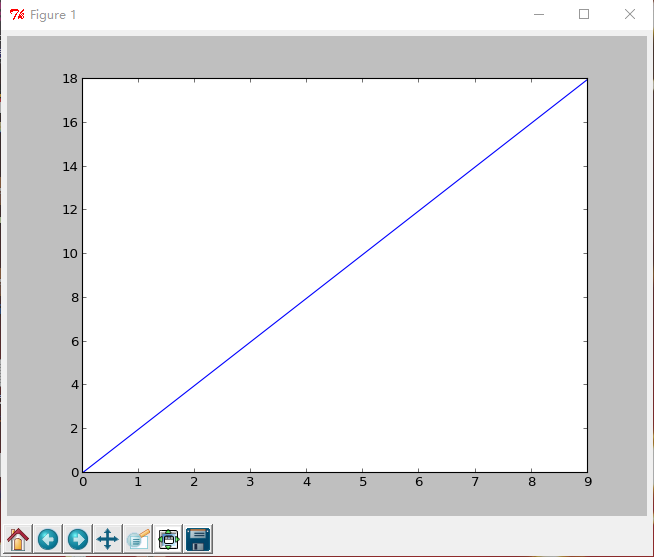 就成功了pylab模块的安装.
然后就是cv2了,找了好多资料,python库那里面下载东西,目录结构刚开始没搞清楚,不知道粘贴哪个。
http://blog.csdn.net/qq_14845119/article/details/52354394这篇文章有很详细的讲解。说的比较多。只要看一部分就ok了
opencv2.4.12 http://opencv.org/downloads.html下载地址。
点击下载的opencv-2.4.12.exe,一路next下去,例如本人安装到E盘根目录下。安装完成后,将E:\opencv2_4_12\build\python\2.7\x64下的cv2.pyd拷贝到你的Lib文件夹下就可以了。
然后测试一下
 import cv2

 import numpy as np

 img = cv2.imread("1.jpg")

 emptyImage = np.zeros(img.shape, np.uint8)

 emptyImage2 = img.copy()

 emptyImage3=cv2.cvtColor(img,cv2.COLOR_BGR2GRAY)

 cv2.imshow("EmptyImage3", emptyImage3)

 cv2.waitKey (0)

 cv2.destroyAllWindows()
显示效果即可:
注意:scipy:http://sourceforge.net/projects/scipy/files/scipy/0.12.0/
里面是没有64位操作系统的exe文件的,解决方案有很多,但是有效的不多,改注册表麻烦。
写一个register.py的脚本,我试了一下是没有用的。可以去尝试一下。
 #

 # script to register Python 2.0 or later for use with win32all

 # and other extensions that require Python registry settings

 #

 # written by Joakim Loew for Secret Labs AB / PythonWare

 #

 # source:

 # http://www.pythonware.com/products/works/articles/regpy20.htm

 #

 # modified by Valentine Gogichashvili as described in http://www.mail-archive.com/distutils-sig@python.org/msg10512.html

 import sys

 from _winreg import *

 # tweak as necessary

 version = sys.version[:3]

 installpath = sys.prefix

 regpath = "SOFTWARE\\Python\\Pythoncore\\%s\\" % (version)

 installkey = "InstallPath"

 pythonkey = "PythonPath"

 pythonpath = "%s;%s\\Lib\\;%s\\DLLs\\" % (

     installpath, installpath, installpath

 )

 def RegisterPy():

     try:

         reg = OpenKey(HKEY_CURRENT_USER, regpath)

     except EnvironmentError as e:

         try:

             reg = CreateKey(HKEY_CURRENT_USER, regpath)

             SetValue(reg, installkey, REG_SZ, installpath)

             SetValue(reg, pythonkey, REG_SZ, pythonpath)

             CloseKey(reg)

         except:

             print "*** Unable to register!"

             return

         print "--- Python", version, "is now registered!"

         return

     if (QueryValue(reg, installkey) == installpath and

         QueryValue(reg, pythonkey) == pythonpath):

         CloseKey(reg)

         print "=== Python", version, "is already registered!"

         return

     CloseKey(reg)

     print "*** Unable to register!"

     print "*** You probably have another Python installation!"

 if __name__ == "__main__":

     RegisterPy()

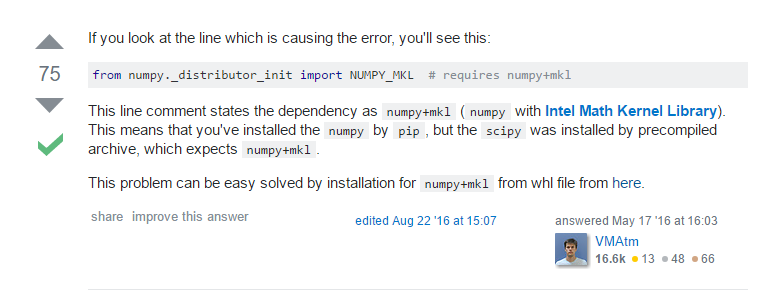
大致意思说的是scipy需要numpy不是上面的那种,而是numpy+mkl
python图形库(1)的更多相关文章
- 13个Python图形库
By Django中国社区 at 2013-04-27 07:49 Python的13大图形库,matplotlib功能最强大,Cairoplot最漂亮,django-chartit与Django集成 ...
- Python图形库Turtle
画笔绘制状态函数 函数 描述 pendown() 放下画笔 penup() 提起画笔,与pendown()配合使用 pensize(width) 设置画笔线条的粗细为指定大小 画笔运动函数 函数 描述 ...
- Python 图形库
1. 总体介绍 http://www.cnblogs.com/Vito2008/p/5264291.html 2.pygal http://rfyiamcool.blog.51cto.com/1030 ...
- 用Python实现QQ找茬游戏外挂工具
源地址:http://cpiz.net/blog/2012/03/a_qq_zhaocha_assistant_by_python/ (原创作品,转载请注明出处)好久没写技术相关的博文,这次写篇有意思 ...
- Python 面试中可能会被问到的30个问题
第一家公司问的题目 1 简述解释型和编译型编程语言? 解释型语言编写的程序不需要编译,在执行的时候,专门有一个解释器能够将VB语言翻译成机器语言,每个语句都是执行的时候才翻译.这样解释型语言每执行一次 ...
- 20个必不可少的Python库
转载:http://www.python123.org/tutorials/58b41f2a28c8f30100bd41dc 读者们好.今天我将介绍20个属于我常用工具的Python库,我相信你看完之 ...
- python 有趣的库练习
这里会将看到别人玩过有趣的实践并记录下来,会是一个长期更新的过程... 以下大部分均非原创变化自网络,只是觉得有趣便记录下来了,如有侵权,请告知删除... 自动化脚本... 20个必不可少的Pytho ...
- Python模块笔记
__name__属性 一个模块被另一个程序第一次引入时,其主程序将运行.如果我们想在模块被引入时,模块中的某一程序块不执行,我们可以用__name__属性来使该程序块仅在该模块自身运行时执行. #!/ ...
- python 包详解
包 包是一种管理 Python 模块命名空间的形式,采用"点模块名称". 比如一个模块的名称是 A.B, 那么他表示一个包 A中的子模块 B . 就好像使用模块的时候,你不用担心不 ...
随机推荐
- nginx + uwsgi 配置参考
参考 http://www.runoob.com/django/django-nginx-uwsgi.html ####### 20181029 cd ~wget http://python.org/ ...
- docker+ bind mount 部署复杂flask应用
报错如下: [root@test-wenqiang flask-skeleton]# docker run -d -p 80:5000 -v $(pwd):/skeleton --name flask ...
- IIS 配置asp.net 环境
打开Internet信息服务管理器,在左侧点击“应用程序池”,下面将以asp.net v4.0 程序池为例 在中间的“ASP.NET V4.0”上右键“高级选项”,展开“进程模型”,找“标识”选项,然 ...
- 2019.03.21 读书笔记 ==与Equals
首先得出一个结论:==是比较变量内存的数据,Equals是值比较.但是他们都能被重写,所以object又增加了一个RefrenceEquals不可被重写,只比较数据: [ReliabilityCont ...
- suau 公约公倍
8619 公约公倍 时间限制:500MS 内存限制:1000K 提交次数:475 通过次数:108 题型: 编程题 语言: G++;GCC Description 给定六个正整数a,b,c,d ...
- 微信web开发者工具 && 微信调试页面
微信开发者工具 做微信公众号的过程中,自然避免不了登录账号然后进行调试,但是在chrome上我们没有办法登录,这是一个令人头疼的问题,比如这个公众号网页,只会提示出错,因为开发者限制了公众号网页的登录 ...
- 导出csv文件时韩文乱码解决方法
从asp.net导出csv这样配置可以防止韩文等乱码,在头部加上0xEF, 0xBB, 0xBF: string fileName = "attachment;filename=" ...
- git 基础教程
git 提交 全部文件 git add . git add xx命令可以将xx文件添加到暂存区,如果有很多改动可以通过 git add -A .来一次添加所有改变的文件.注意 -A 选项后面还有一个 ...
- 关闭ubuntu讨厌的内部错误提示
修改/etc/default/apport 浏览下/etc/init/apport.conf 内容你会发现,控制此服务是否启动的是/etc/default/apport 所以把/etc/default ...
- 使用taobao的npm镜像源,同时安装nrm镜像工具
身在天朝.你面临的一个问题就是网络 安装好Nodejs 控制台 执行 npm config set registry https://registry.npm.taobao.org //配置指向源 然 ...