
.net跨平台运行实践
一个偶然的机会,一个朋友想做一个程序,同时支持windows和linux,本来想用go来写,奈何不太熟练,突然想到.net不是也支持跨平台了吗,还没有操作过,刚好可以试验一下。
最新的.net 6已经跨平台了,从.net core 3.0后,不再叫.net core 4.0了,而是统一为.net 5,.net 6等。
演示程序如下:
using System;

using System.IO;

using System.Net;

using System.Net.Sockets;

using System.Text;

using System.Threading.Tasks;

namespace ConsoleApp1

{

    class Program

    {

        static void Main(string[] args)

        {

            Console.WriteLine("Hello World!输入Q退出。");

            while (true)

            {

                string str = Console.ReadLine();

                if (str.ToLower() == "q")

                {

                    break;

                }

                else

                {

                    Console.WriteLine("输入Q退出。");

                }

            }

        }

    }

}
以下为生成文件
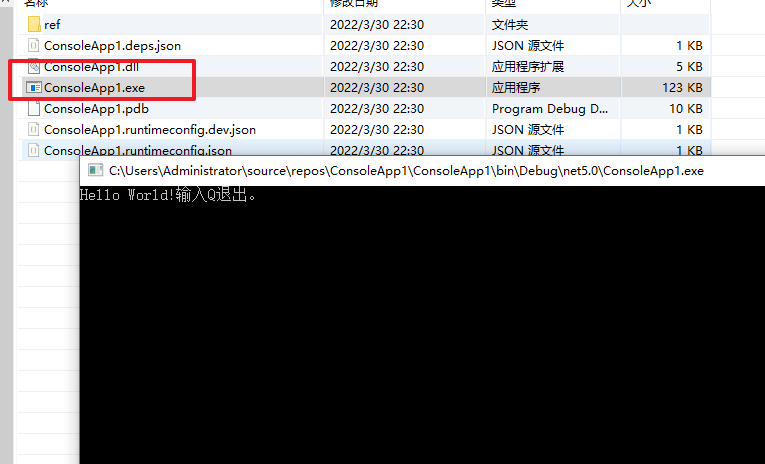
在windows上运行就不用说了,直接编译,点击exe就可以了。
那么在linux上怎么运行呢,这里以debian为例演示
先安装运行时环境
官方安装教程
https://docs.microsoft.com/en-us/dotnet/core/install/linux-debian
根据操作系统版本,选择相应的教程,我这里操作系统是用和debian 10
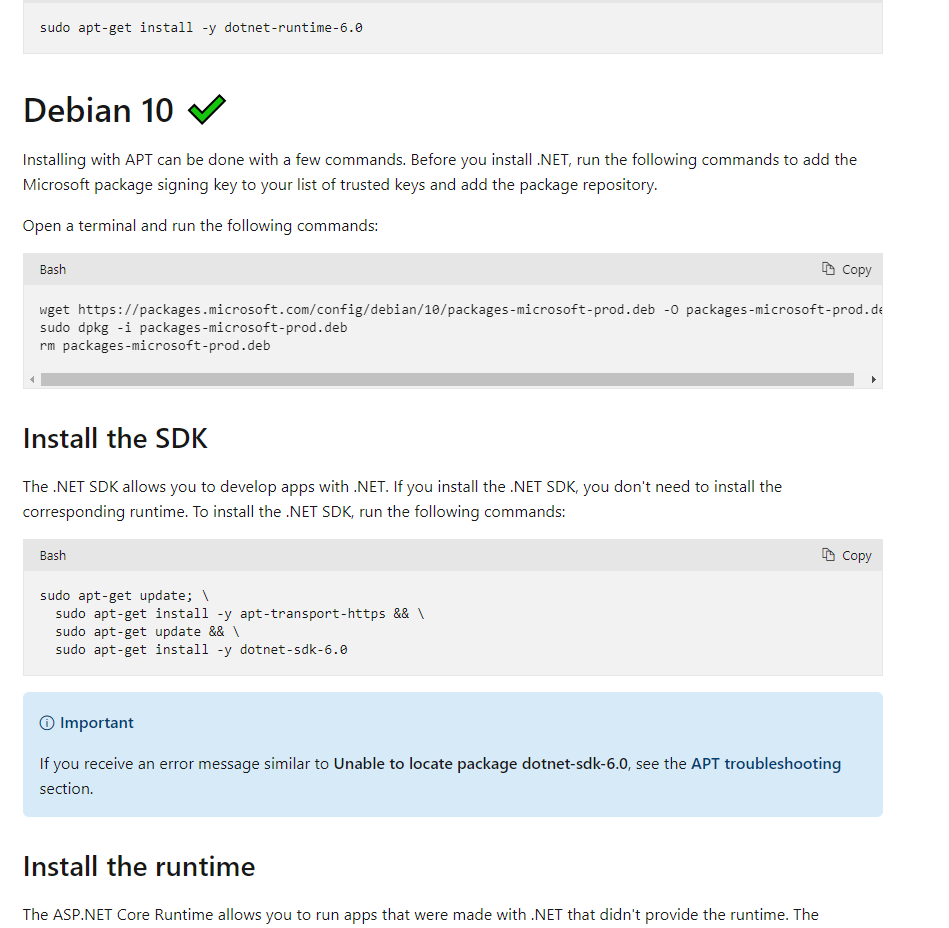
上面是安装SDK和安装运行时的,一般开发人员可以安装SDK,用于开发使用。
普通用户,仅仅是使用的话,就用运行时就可以了。SDK是包含运行时的。
sudo apt-get update; \

  sudo apt-get install -y apt-transport-https && \

  sudo apt-get update && \

  sudo apt-get install -y aspnetcore-runtime-6.0
下面有一个提示,大概意思就是说你也可以安装.net运行时,.net运行时不包含asp.net core(从这句话理解,好像是说dotnet-runtime比aspnetcore-runtime要小),安装方式就是
sudo apt-get update; \

  sudo apt-get install -y apt-transport-https && \

  sudo apt-get update && \

  sudo apt-get install -y dotnet-runtime-6.0
安装过程,注意我实际安装的是.net5.0,因为我用VS2019默认是.net5.0
root@debiantest1:/etc/apt/sources.list.d# sudo apt-get update;   sudo apt-get install -y apt-transport-https &&   sudo apt-get update &&   sudo apt-get install -y dotnet-runtime-5.0

Hit:1 http://mirrors.ustc.edu.cn/debian stretch-updates InRelease

Hit:2 http://mirrors.ustc.edu.cn/debian stretch-backports InRelease

Ign:3 http://mirrors.ustc.edu.cn/debian stretch InRelease

Hit:4 http://mirrors.ustc.edu.cn/debian-security stretch/updates InRelease

Hit:5 http://mirrors.ustc.edu.cn/debian stretch Release

Hit:6 http://security.debian.org/debian-security buster/updates InRelease

Hit:8 http://mirrors.huaweicloud.com/debian buster InRelease

Hit:9 http://mirrors.huaweicloud.com/debian buster-updates InRelease

Hit:10 https://download.docker.com/linux/debian buster InRelease

Hit:11 https://packages.microsoft.com/debian/10/prod buster InRelease

Hit:12 http://deb.nodesource.com/node_13.x buster InRelease

Reading package lists... Done

Reading package lists... Done

Building dependency tree

Reading state information... Done

apt-transport-https is already the newest version (1.8.2.3).

0 upgraded, 0 newly installed, 0 to remove and 141 not upgraded.

Hit:1 http://mirrors.ustc.edu.cn/debian stretch-updates InRelease

Hit:2 http://mirrors.ustc.edu.cn/debian stretch-backports InRelease

Ign:3 http://mirrors.ustc.edu.cn/debian stretch InRelease

Hit:4 http://mirrors.ustc.edu.cn/debian-security stretch/updates InRelease

Hit:5 http://mirrors.ustc.edu.cn/debian stretch Release

Hit:7 http://mirrors.huaweicloud.com/debian buster InRelease

Hit:8 http://mirrors.huaweicloud.com/debian buster-updates InRelease

Hit:9 https://download.docker.com/linux/debian buster InRelease

Hit:10 https://packages.microsoft.com/debian/10/prod buster InRelease

Hit:11 http://deb.nodesource.com/node_13.x buster InRelease

Hit:12 http://security.debian.org/debian-security buster/updates InRelease

Reading package lists... Done

Reading package lists... Done

Building dependency tree

Reading state information... Done

The following additional packages will be installed:

  dotnet-host dotnet-hostfxr-5.0 dotnet-runtime-deps-5.0

The following NEW packages will be installed:

  dotnet-host dotnet-hostfxr-5.0 dotnet-runtime-5.0 dotnet-runtime-deps-5.0

0 upgraded, 4 newly installed, 0 to remove and 141 not upgraded.

Need to get 22.2 MB of archives.

After this operation, 70.8 MB of additional disk space will be used.

Get:1 https://packages.microsoft.com/debian/10/prod buster/main amd64 dotnet-host amd64 6.0.3-1 [55.7 kB]

Get:2 https://packages.microsoft.com/debian/10/prod buster/main amd64 dotnet-hostfxr-5.0 amd64 5.0.15-1 [140 kB]

Get:3 https://packages.microsoft.com/debian/10/prod buster/main amd64 dotnet-runtime-deps-5.0 amd64 5.0.15-1 [2,648 B]

Get:4 https://packages.microsoft.com/debian/10/prod buster/main amd64 dotnet-runtime-5.0 amd64 5.0.15-1 [22.0 MB]

Fetched 22.2 MB in 12s (1,849 kB/s)

Selecting previously unselected package dotnet-host.

(Reading database ... 59387 files and directories currently installed.)

Preparing to unpack .../dotnet-host_6.0.3-1_amd64.deb ...

Unpacking dotnet-host (6.0.3-1) ...

Selecting previously unselected package dotnet-hostfxr-5.0.

Preparing to unpack .../dotnet-hostfxr-5.0_5.0.15-1_amd64.deb ...

Unpacking dotnet-hostfxr-5.0 (5.0.15-1) ...

Selecting previously unselected package dotnet-runtime-deps-5.0.

Preparing to unpack .../dotnet-runtime-deps-5.0_5.0.15-1_amd64.deb ...

Unpacking dotnet-runtime-deps-5.0 (5.0.15-1) ...

Selecting previously unselected package dotnet-runtime-5.0.

Preparing to unpack .../dotnet-runtime-5.0_5.0.15-1_amd64.deb ...

Unpacking dotnet-runtime-5.0 (5.0.15-1) ...

Setting up dotnet-host (6.0.3-1) ...

Setting up dotnet-runtime-deps-5.0 (5.0.15-1) ...

Setting up dotnet-hostfxr-5.0 (5.0.15-1) ...

Setting up dotnet-runtime-5.0 (5.0.15-1) ...

Processing triggers for man-db (2.8.5-2) ...
安装后验证
root@debiantest1:/etc/apt/sources.list.d# dotnet --info

Host (useful for support):

  Version: 5.0.15

  Commit:  3065735be7

.NET SDKs installed:

  No SDKs were found.

.NET runtimes installed:

  Microsoft.NETCore.App 5.0.15 [/usr/share/dotnet/shared/Microsoft.NETCore.App]

To install additional .NET runtimes or SDKs:

  https://aka.ms/dotnet-download
运行程序
root@debiantest1:/data/demo1# dotnet ConsoleApp1.dll

Hello World!输入Q退出。

输入Q退出。

输入Q退出。

输入Q退出。

输入Q退出。

输入Q退出。

q
可以看到已经运行成功了。和windows的效果一样。
.net跨平台运行实践的更多相关文章
- ASP.NET跨平台最佳实践
前言 八年的坚持敌不过领导的固执,最终还是不得不阔别已经成为我第二语言的C#,转战Java阵营.有过短暂的失落和迷茫,但技术转型真的没有想象中那么难.回头审视,其实单从语言本身来看,C#确实比Java ...
- 开源一个跨平台运行的服务插件 - TaskCore.MainForm
本次将要很大家分享的是一个跨平台运行的服务插件 - TaskCore.MainForm,此框架是使用.netcore来写的,现在netcore已经支持很多系统平台运行了,所以将以前的Task.Main ...
- cross-env 兼容跨平台运行脚本
https://www.npmjs.com/package/cross-env 跨平台运行脚本 The problem Most Windows command prompts will choke ...
- 物联网框架ServerSuperIO在.NetCore实现跨平台的实践路线
正所谓天下大势,不跟风不行.你不跨平台,很low嘛.java说:你们能跨嘛,跨给我看看.C#说:不要强人所难嘛.java说:能部署在云上吗?docker?微服务?C#说:不要强人所难嘛.java说:你 ...
- Flutter 实现原理及在马蜂窝的跨平台开发实践
一直以来,跨平台开发都是困扰移动客户端开发的难题. 在马蜂窝旅游 App 很多业务场景里,我们尝试过一些主流的跨平台开发解决方案, 比如 WebView 和 React Native,来提升开发效率和 ...
- 跨平台技术实践案例: 用 reactxp 重写墨刀的移动端
Authors: Gao Cong, Perry Poon Illustrators: Shena Bian April 20, 2019 重新编写,又一次,我们又一次重新编写了移动端应用和移动端 ...
- 跨平台运行 Rafy 首次部署记录
一直想在 Linux 上使用 MONO 试试运行 Rafy,最近因为业务需要,总算是真正地试验了一次.下面是本次部署记录的一些要点. Linux 这次部署,我是和两位同事一起来试验的.由于我们对 Li ...
- 跨平台运行ASP.NET Core 1.0
前言 首先提一下微软更名后的叫法: ASP.NET 5 更名为 ASP.NET Core 1.0 .NET Core 更名为 .NET Core 1.0 Entity Framework 7 更名为 ...
- Java为什么能跨平台运行
因为它有虚拟机(JVM),JAVA程序不是直接在电脑上运行的,是在虚拟机上进行的,每个系统平台都是有自己的虚拟机(JVM),所以JAVA语言能跨平台. 1, java代码不是直接运行在CPU上,而是运 ...
- 跨平台运行ASP.NET Core 1.0(转载)
前言 首先提一下微软更名后的叫法: ASP.NET 5 更名为 ASP.NET Core 1.0 .NET Core 更名为 .NET Core 1.0 Entity Framework 7 更名为 ...
随机推荐
- Vmware中Linux通过NAT设置静态IP实现上网
1.设置虚拟机上网方式为NAT 2.修改centos网络配置文件,我的是centos7.4,主要网关不能和主机设置的一致 [root@dylan-centos ~]# vi /etc/sysconfi ...
- 多线程系列(九) -ReentrantLock常用方法详解
一.简介 在上一篇文章中,我们介绍了ReentrantLock类的一些基本用法,今天我们重点来介绍一下ReentrantLock其它的常用方法,以便对ReentrantLock类的使用有更深入的理解. ...
- 产品分享:Qt鸿图电子智慧白板(适合会议机、电子黑板、电子笔记、电子阅读器等场景),当前版本v1.0.0
产品 鸿途电子智慧白板. 原理 使用Qt技术为基础,开发的windows/ubuntu/arm电子绘图板,主要为windows,支持触摸鼠标,可以定制跨平台. 适合场景 1.会议机 ...
- django中如果不是第一次迁移的时候就配置AUTH_USER_MODEL(用来告知django认证系统识别我们自定义的模型类),那么该如何解决才能让django的认证系统识别且不会报未知错误?
Django认证系统中提供的用户模型类及方法很方便,我们可以使用这个模型类,但是字段有些无法满足项目需求,如还需要保存用户的手机号,需要给模型类添加额外的字段. Django提供了django.con ...
- django中从你的代码运行管理命令call_command
# 主要用法就是调用django自定义的Command命令 # 语法 django.core.management.call_command(name,*args,**options) - name ...
- centos8.x阿里源配置
>>> cd /etc/yum.repo.d >>> mkdir bak >>> mv *.repo bak/ >>> cd b ...
- vue 前端自动打开文件地址进行下载
最近在做异步导出的功能,导出的过程中前端另外启动一个查询导出进度的线程接口.如果导出完成后,把生成的文件上传到服务器,返回给前端一个文件的下载地址:前端自动打开这个地址进行跳转下载. 有两种方式 1. ...
- 【LeetCode二叉树#19】有序数组转换为二叉搜索树(构造二叉树)
将有序数组转换为二叉搜索树 力扣题目链接(opens new window) 将一个按照升序排列的有序数组,转换为一棵高度平衡二叉搜索树. 本题中,一个高度平衡二叉树是指一个二叉树每个节点 的左右两个 ...
- 【Flink入门修炼】2-1 Flink 四大基石
前一章我们对 Flink 进行了总体的介绍.对 Flink 是什么.能做什么.入门 demo.架构等进行了讲解. 本章我们将学习 Flink 重点概念.核心特性等. 本篇对 Flink 四大基石进行概 ...
- Android drawable与mipmap的区别(android资源文件放置位置)
1.Drawable Android 把可绘制的对象抽象为Drawable,不同的图形图像代表着不同的darwable类型, 通常我们在代码中不会直接接触drawable实现类的,是由android ...