
【Azure Function】开启Azure Function输出详细Debug日志 ( --verbose)
When func.exe is run from VS, it suggests "For detailed output, run func with --verbose flag."
问题描述
在本地调式Azure Function时候,默认输出的日志都是比较简洁的。如果需要详细的日志输出,可以在启动func命令中添加--verbose参数。那如何来添加呢?
日志输出对比:
| 开启前日志 | 开启后日志 |
|
|
开启方式
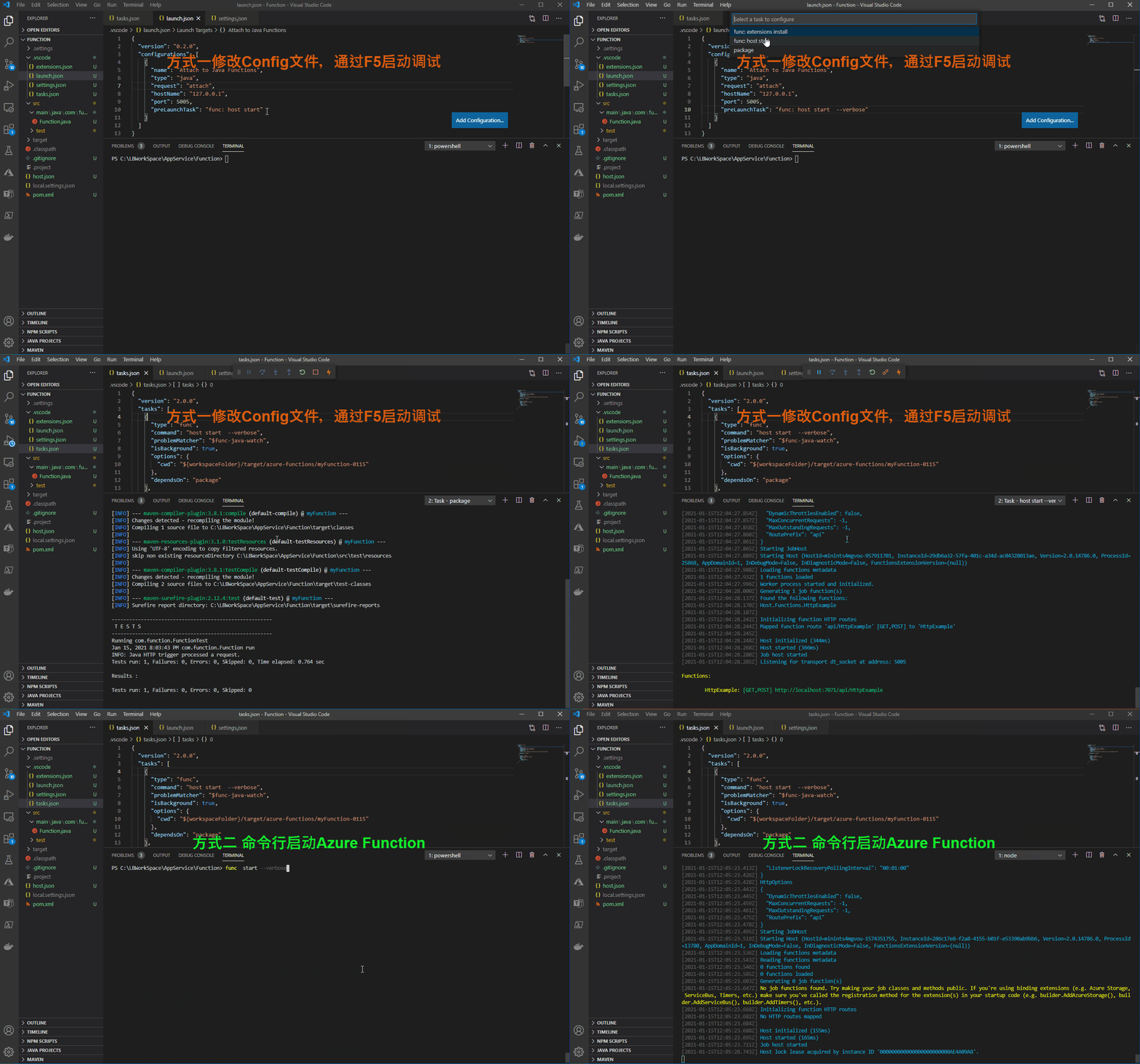
方式一:在VS Code中修改.vscode\launch.json文件中的启动命令
默认通过VS Code创建一个Java Azure Function的文件目录结构为:
PS C:\Function>  tree /f

Folder PATH listing for volume OSDisk

Volume serial number is 4A75-5D11

C:.

│   .classpath

│   .gitignore

│   .project

│   host.json

│   local.settings.json

│   pom.xml

│

├───.settings

│       org.eclipse.core.resources.prefs

│       org.eclipse.jdt.apt.core.prefs

│       org.eclipse.jdt.core.prefs

│       org.eclipse.m2e.core.prefs

│

├───.vscode

│       extensions.json

│       launch.json

│       settings.json

│       tasks.json

│

├───src

│   ├───main

│   │   └───java

│   │       └───com

│   │           └───function

│   │                   Function.java

│   │

│   └───test

│       └───java

│           └───com

│               └───function

│                       FunctionTest.java

│                       HttpResponseMessageMock.java
在launch.json文件中,添加启动参数 --verbose
{

  "version": "0.2.0",

  "configurations": [

    {

      "name": "Attach to Java Functions",

      "type": "java",

      "request": "attach",

      "hostName": "127.0.0.1",

      "port": 5005,

      "preLaunchTask": "func: host start --verbose"

    }

  ]

}
点击F5,从VS Code中启动Azure Function,根据提示,在tasks.json也需要添加--verbose参数
{

  "version": "2.0.0",

  "tasks": [

    {

      "type": "func",

      "command": "host start --verbose",

      "problemMatcher": "$func-java-watch",

      "isBackground": true,

      "options": {

        "cwd": "${workspaceFolder}/target/azure-functions/myFunction-0115"

      },

      "dependsOn": "package"

    },

    {

      "label": "package",

      "command": "mvn clean package",

      "type": "shell",

      "group": {

        "kind": "build",

        "isDefault": true

      }

    }

  ]

}
方式二:直接通过命令行启动Azure Funciton,使用完整命令: func host --verbose
PS C:\Function> func start --verbose
效果展示:
参考资料:
Value cannot be null. (Parameter 'provider'): https://github.com/Azure/azure-functions-core-tools/issues/2232
在 Azure 中使用 Visual Studio Code 创建 Java 函数: https://docs.azure.cn/zh-cn/azure-functions/create-first-function-vs-code-java
【Azure Function】开启Azure Function输出详细Debug日志 ( --verbose)的更多相关文章
- 【Azure 应用服务】Azure Function HTTP 触发后, 230秒就超时。而其他方式触发的Function, 执行5分钟后也超时,如何调整超时时间?
问题描述 Azure Function HTTP 触发后, 230秒就超时,而其他方式触发的Function, 执行5分钟后也超时,如何调整超时时间? 问题分析 查阅官方文档,对函数应用超时持续时间有 ...
- Azure - Create your first function using Visual Studio
Azure Functions lets you execute your code in a serverless environment without having to first creat ...
- 【Azure 应用服务】Azure Function集成虚拟网络,设置被同在虚拟网络中的Storage Account触发,遇见Function无法触发的问题
一切为了安全,所有的云上资源如支持内网资源访问,则都可以加入虚拟网络 问题描述 使用Azure Function处理Storage Account中Blob 新增,更新,删除等情况.Storage A ...
- 【Azure 应用服务】Azure Function 启用 Managed Identity后, Powershell Funciton出现 ERROR: ManagedIdentityCredential authentication failed
问题描述 编写Powershell Function,登录到China Azure并获取Azure AD User信息,但是发现遇见了 [Error] ERROR: ManagedIdentityCr ...
- 【Azure Developer】在Github Action中使用Azure/functions-container-action@v1配置Function App并成功部署Function Image
问题描述 使用Github Action,通过 Azure/functions-container-action@v1 插件来完成 yaml 文件的配置,并成功部署Function Image 的过程 ...
- Azure VM开启资源监控
目前China的Azure VM资源监控默认是不打开的.本文将介绍如何开启VM的监控功能. 一 Azure VM 打开Azure的Portal页面https://portal.azure.cn,登录后 ...
- 使用 Azure CLI 在 Azure China Cloud 云平台上手动部署一套 Cloud Foundry
这篇文章将介绍如何使用 Azure CLI 在 Azure China Cloud 云平台上手动部署一套 Cloud Foundry.本文的目的在于: 了解作为 PaaS 的 Cloud Foundr ...
- Azure资源管理工具Azure PowerShell介绍
什么是 Azure PowerShell? Azure PowerShell 是一组模块,提供用于通过 Windows PowerShell 管理 Azure 的 cmdlet.你可以使用 cmdle ...
- 【Azure Redis 缓存 Azure Cache For Redis】Azure Redis由低级别(C)升级到高级别(P)的步骤和注意事项, 及对用户现有应用的潜在影响,是否需要停机时间窗口,以及这个时间窗口需要多少的预估问题
问题描述 由于Azure Redis的性能在不同级别表现不同,当需要升级/缩放Redis的时候,从使用者的角度,需要知道有那些步骤? 注意事项? 潜在影响?停机事件窗口? 升级预估时间? 解决方案 从 ...
- Windows Azure HandBook (2) Azure China提供的服务
<Windows Azure Platform 系列文章目录> 对于传统的自建数据中心,从底层的Network,Storage,Servers,Virtualization,中间层的OS, ...
随机推荐
- Redis-rdb-tools与rdr工具学习与使用
Redis-rdb-tools与rdr工具学习与使用 简要说明 rdb工具是python写的一套工具,可以分析dump文件,获取key等信息. rdb其实有一套rdb-profiler工具, 能够导出 ...
- Raid卡在Write back 与Write through 时的性能差异
还是读姜老师的 mysql技术内核innodb存储引擎这本书里面的内容. 之前知道raid卡的设置会影响性能, 预计也是十几倍的性能差距, 但是从来没有用数据库进行过验证 书中有针对不通raid卡的设 ...
- Govulncheck v1.0.0 发布了!
原文在这里 原文作者:Julie Qiu, for the Go security team 发布于 13 July 2023 我们很高兴地宣布,govulncheck v1.0.0 已经发布,同时还 ...
- Python 使用sigthief签发证书
Windows 系统中的一些非常重要文件通常会被添加数字签名,其目的是用来防止被篡改,能确保用户通过互联网下载时能确信此代码没有被非法篡改和来源可信,从而保护了代码的完整性.保护了用户不会被病毒.恶意 ...
- idea右键没有run
最近用idea打开一个用Eclipse创建的项目,发现右键没有运行,这是一个很常见的问题,网上一大堆解决方案,试了一通都不行,最后在Event Log里的提示解决了问题. 首先我去配置jdk,发现已经 ...
- 3.4 CSP-J 补赛游寄
3.4 CSP-J 补赛游寄 Day -? 听说要去打比赛. Day -7 今天家长会,老师公布成绩 /fn/fn/fn.政治考废了,然后其他都挺好. 语文 $ 95 $,数学 $ 118 $,英语 ...
- HBase-HBase的特征、优缺点、应用场景
一.Hbase的概念 HBase是Hadoop的生态系统,是建立在Hadoop文件系统(HDFS)之上的分布式.面向列的数据库,通过利用Hadoop的文件系统提供容错能力.如果你需要进行实时读写或者随 ...
- Linux-MySQL导入示例数据库employees
1. 下载employees示例数据库employees是一个官方提供的简单数据库,在mysql的官方找到employees的说明页面,通过github下载该数据库. https://github.c ...
- Kubernetes 1.26.0实战:在本地配置k8s集群
阶段一:开发环境及版本 以下环境均来自官网: 本地宿主机环境:Windows 10 21H2 64位 虚拟机软件:VMware workstation 15.5 pro 虚拟机镜像版本:ubuntu- ...
- 程序员减少BUG的两个小妙招!
原创:陶朱公Boy(微信公众号ID:taozhugongboy),欢迎分享,转载请保留出处. 点评: 我们说衡量一个程序员水平的高低往往有很多因素,但有一个因素至关重要即代码质量. 如果程序员写的 ...