
【RabbitMQ】12 日志监控 & 消息追踪
一、日志和监控
RabbitMQ日志存放目录
[root@localhost ~]# ll /var/log/rabbitmq/

总用量 176

-rw-r-----. 1 rabbitmq rabbitmq 177947 10月 10 10:21 rabbit@localhost.log

-rw-r-----. 1 rabbitmq rabbitmq      0 10月  6 11:35 rabbit@localhost_upgrade.log

[root@localhost ~]#
其中 rabbit@localhost.log 是默认日志
就是跑了视频的一些案例,查看下这个日志大小:
[root@localhost ~]# ll -h /var/log/rabbitmq/rabbit@localhost.log

-rw-r-----. 1 rabbitmq rabbitmq 174K 10月 10 10:21 /var/log/rabbitmq/rabbit@localhost.log

[root@localhost ~]#
查看日志:
[root@localhost ~]# cat /var/log/rabbitmq/rabbit@localhost.log
一部分日志信息:
2021-10-10 09:14:29.123085+08:00 [info] <0.1360.0> accepting AMQP connection <0.1360.0> (192.168.2.209:59929 -> 192.168.2.121:5672)

2021-10-10 09:14:29.158177+08:00 [info] <0.1360.0> Connection <0.1360.0> (192.168.2.209:59929 -> 192.168.2.121:5672) has a client-provided name: connectionFactory#1fe41ea:0

2021-10-10 09:14:29.162086+08:00 [info] <0.1360.0> connection <0.1360.0> (192.168.2.209:59929 -> 192.168.2.121:5672 - connectionFactory#1fe41ea:0): user 'test' authenticated and granted access to vhost '/dzz'

2021-10-10 09:14:29.208515+08:00 [erro] <0.1369.0> Channel error on connection <0.1360.0> (192.168.2.209:59929 -> 192.168.2.121:5672, vhost: '/dzz', user: 'test'), channel 1:

2021-10-10 09:14:29.208515+08:00 [erro] <0.1369.0> operation basic.publish caused a channel exception not_found: no exchange 'test-dlx-normal-exchange' in vhost '/dzz'

2021-10-10 09:14:29.226656+08:00 [info] <0.1360.0> closing AMQP connection <0.1360.0> (192.168.2.209:59929 -> 192.168.2.121:5672 - connectionFactory#1fe41ea:0, vhost: '/dzz', user: 'test')

2021-10-10 09:15:33.293469+08:00 [info] <0.1460.0> accepting AMQP connection <0.1460.0> (192.168.2.209:59974 -> 192.168.2.121:5672)

2021-10-10 09:15:33.325804+08:00 [info] <0.1460.0> Connection <0.1460.0> (192.168.2.209:59974 -> 192.168.2.121:5672) has a client-provided name: connectionFactory#1fe41ea:0

2021-10-10 09:15:33.330105+08:00 [info] <0.1460.0> connection <0.1460.0> (192.168.2.209:59974 -> 192.168.2.121:5672 - connectionFactory#1fe41ea:0): user 'test' authenticated and granted access to vhost '/dzz'

2021-10-10 09:15:33.383151+08:00 [info] <0.1460.0> closing AMQP connection <0.1460.0> (192.168.2.209:59974 -> 192.168.2.121:5672 - connectionFactory#1fe41ea:0, vhost: '/dzz', user: 'test')

2021-10-10 09:23:32.352291+08:00 [info] <0.3080.0> accepting AMQP connection <0.3080.0> (192.168.2.209:49457 -> 192.168.2.121:5672)

2021-10-10 09:23:32.390842+08:00 [info] <0.3080.0> Connection <0.3080.0> (192.168.2.209:49457 -> 192.168.2.121:5672) has a client-provided name: connectionFactory#1fe41ea:0

2021-10-10 09:23:32.396644+08:00 [info] <0.3080.0> connection <0.3080.0> (192.168.2.209:49457 -> 192.168.2.121:5672 - connectionFactory#1fe41ea:0): user 'test' authenticated and granted access to vhost '/dzz'

2021-10-10 09:23:32.472165+08:00 [info] <0.3080.0> closing AMQP connection <0.3080.0> (192.168.2.209:49457 -> 192.168.2.121:5672 - connectionFactory#1fe41ea:0, vhost: '/dzz', user: 'test')

2021-10-10 09:28:56.310092+08:00 [info] <0.4273.0> accepting AMQP connection <0.4273.0> (192.168.2.209:63817 -> 192.168.2.121:5672)

2021-10-10 09:28:56.344023+08:00 [info] <0.4273.0> Connection <0.4273.0> (192.168.2.209:63817 -> 192.168.2.121:5672) has a client-provided name: connectionFactory#1fe41ea:0

2021-10-10 09:28:56.349675+08:00 [info] <0.4273.0> connection <0.4273.0> (192.168.2.209:63817 -> 192.168.2.121:5672 - connectionFactory#1fe41ea:0): user 'test' authenticated and granted access to vhost '/dzz'

2021-10-10 09:28:56.402577+08:00 [info] <0.4273.0> closing AMQP connection <0.4273.0> (192.168.2.209:63817 -> 192.168.2.121:5672 - connectionFactory#1fe41ea:0, vhost: '/dzz', user: 'test')

2021-10-10 10:08:57.351330+08:00 [info] <0.6109.0> accepting AMQP connection <0.6109.0> (192.168.2.209:60038 -> 192.168.2.121:5672)

2021-10-10 10:08:57.386253+08:00 [info] <0.6109.0> Connection <0.6109.0> (192.168.2.209:60038 -> 192.168.2.121:5672) has a client-provided name: connectionFactory#1fe41ea:0

2021-10-10 10:08:57.390659+08:00 [info] <0.6109.0> connection <0.6109.0> (192.168.2.209:60038 -> 192.168.2.121:5672 - connectionFactory#1fe41ea:0): user 'test' authenticated and granted access to vhost '/dzz'

2021-10-10 10:08:57.432633+08:00 [erro] <0.6118.0> Channel error on connection <0.6109.0> (192.168.2.209:60038 -> 192.168.2.121:5672, vhost: '/dzz', user: 'test'), channel 1:

2021-10-10 10:08:57.432633+08:00 [erro] <0.6118.0> operation basic.publish caused a channel exception not_found: no exchange 'test-dlx-normal-exchange' in vhost '/dzz'

2021-10-10 10:08:57.448887+08:00 [info] <0.6109.0> closing AMQP connection <0.6109.0> (192.168.2.209:60038 -> 192.168.2.121:5672 - connectionFactory#1fe41ea:0, vhost: '/dzz', user: 'test')

2021-10-10 10:09:07.558078+08:00 [info] <0.6150.0> accepting AMQP connection <0.6150.0> (192.168.2.209:60054 -> 192.168.2.121:5672)

2021-10-10 10:09:07.593389+08:00 [info] <0.6150.0> Connection <0.6150.0> (192.168.2.209:60054 -> 192.168.2.121:5672) has a client-provided name: connectionFactory#1fe41ea:0

2021-10-10 10:09:07.597556+08:00 [info] <0.6150.0> connection <0.6150.0> (192.168.2.209:60054 -> 192.168.2.121:5672 - connectionFactory#1fe41ea:0): user 'test' authenticated and granted access to vhost '/dzz'

2021-10-10 10:09:07.650262+08:00 [info] <0.6150.0> closing AMQP connection <0.6150.0> (192.168.2.209:60054 -> 192.168.2.121:5672 - connectionFactory#1fe41ea:0, vhost: '/dzz', user: 'test')

2021-10-10 10:10:00.327777+08:00 [info] <0.6373.0> accepting AMQP connection <0.6373.0> (192.168.2.209:55163 -> 192.168.2.121:5672)

2021-10-10 10:10:00.374144+08:00 [info] <0.6373.0> Connection <0.6373.0> (192.168.2.209:55163 -> 192.168.2.121:5672) has a client-provided name: connectionFactory#1fe41ea:0

2021-10-10 10:10:00.379347+08:00 [info] <0.6373.0> connection <0.6373.0> (192.168.2.209:55163 -> 192.168.2.121:5672 - connectionFactory#1fe41ea:0): user 'test' authenticated and granted access to vhost '/dzz'

2021-10-10 10:10:00.447322+08:00 [info] <0.6373.0> closing AMQP connection <0.6373.0> (192.168.2.209:55163 -> 192.168.2.121:5672 - connectionFactory#1fe41ea:0, vhost: '/dzz', user: 'test')

2021-10-10 10:21:06.128674+08:00 [info] <0.7521.0> accepting AMQP connection <0.7521.0> (192.168.2.209:63933 -> 192.168.2.121:5672)

2021-10-10 10:21:06.163503+08:00 [info] <0.7521.0> Connection <0.7521.0> (192.168.2.209:63933 -> 192.168.2.121:5672) has a client-provided name: connectionFactory#1d09a04:0

2021-10-10 10:21:06.167597+08:00 [info] <0.7521.0> connection <0.7521.0> (192.168.2.209:63933 -> 192.168.2.121:5672 - connectionFactory#1d09a04:0): user 'test' authenticated and granted access to vhost '/dzz'

2021-10-10 10:21:31.982845+08:00 [info] <0.7608.0> accepting AMQP connection <0.7608.0> (192.168.2.209:63964 -> 192.168.2.121:5672)

2021-10-10 10:21:32.031301+08:00 [info] <0.7608.0> Connection <0.7608.0> (192.168.2.209:63964 -> 192.168.2.121:5672) has a client-provided name: connectionFactory#1fe41ea:0

2021-10-10 10:21:32.035322+08:00 [info] <0.7608.0> connection <0.7608.0> (192.168.2.209:63964 -> 192.168.2.121:5672 - connectionFactory#1fe41ea:0): user 'test' authenticated and granted access to vhost '/dzz'

2021-10-10 10:21:32.091950+08:00 [info] <0.7608.0> closing AMQP connection <0.7608.0> (192.168.2.209:63964 -> 192.168.2.121:5672 - connectionFactory#1fe41ea:0, vhost: '/dzz', user: 'test')
监控面板:
http://服务器IP:15672/
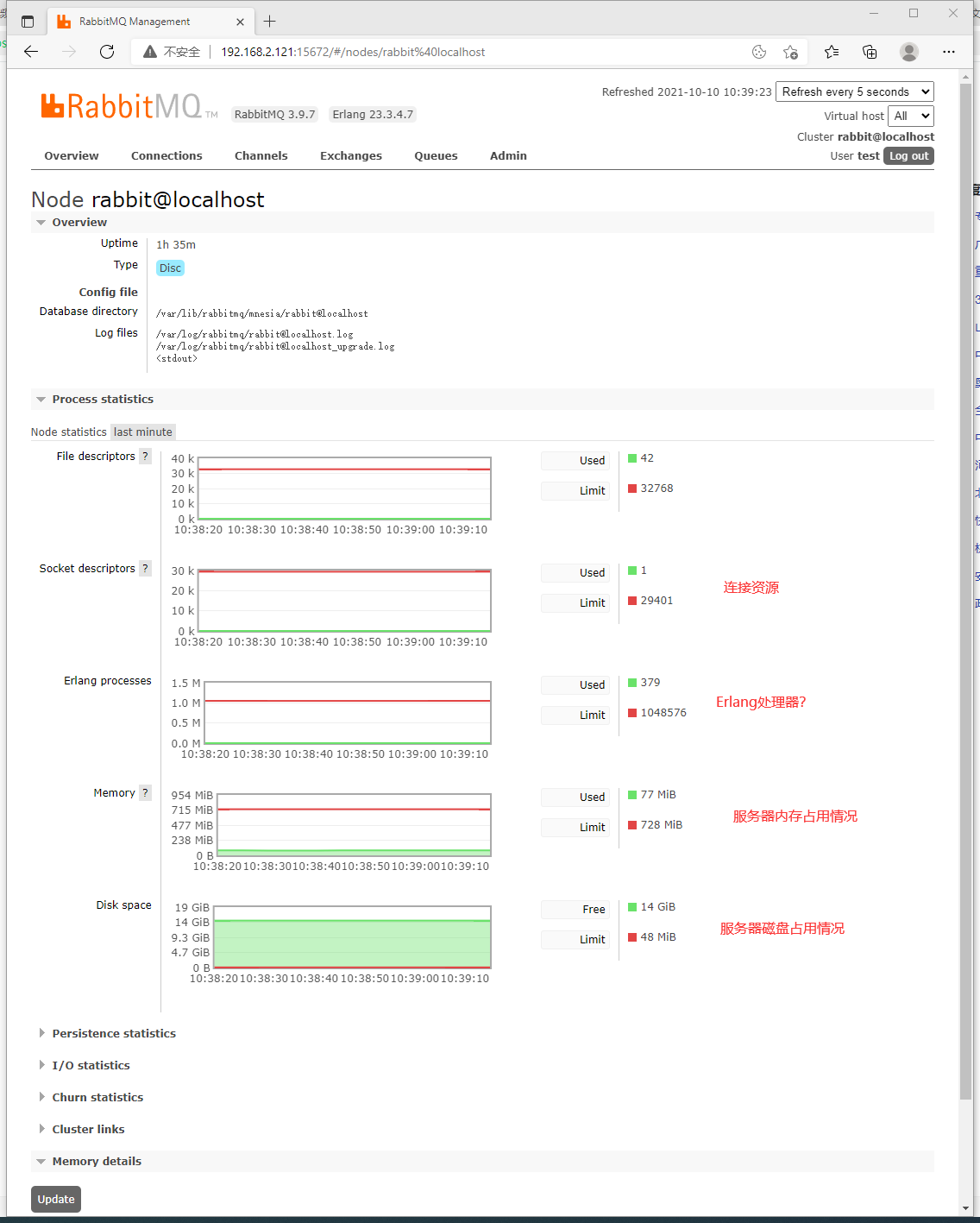
服务器概览情况:

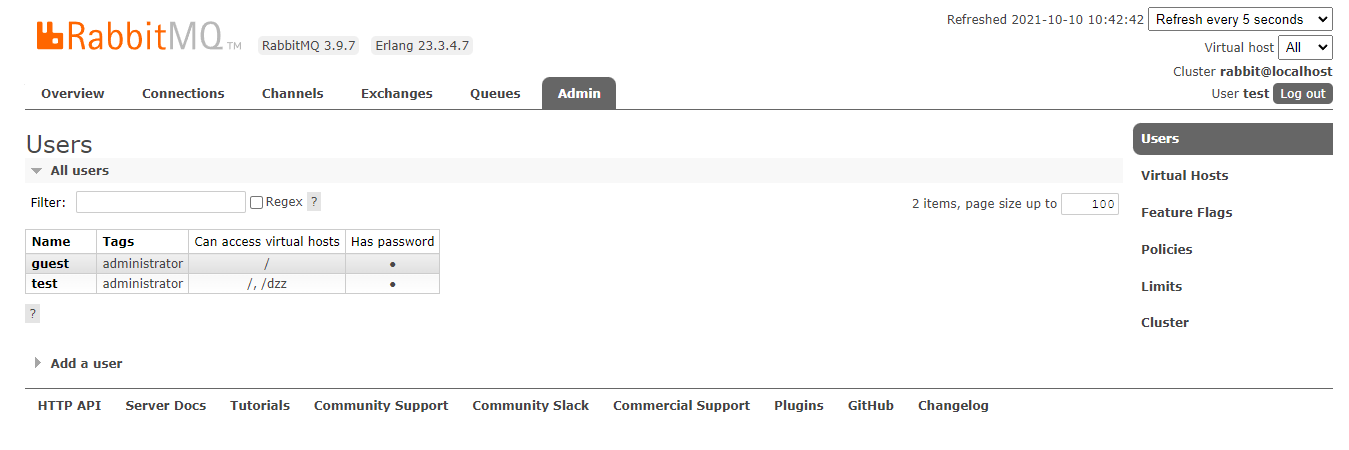
然后是一些用户信息:
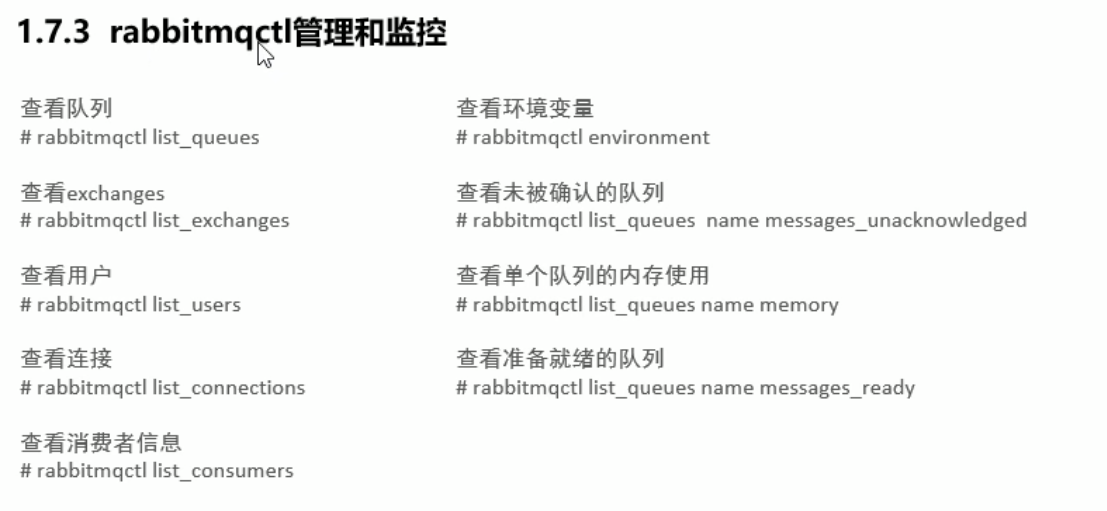
或者使用命令查看:
[root@localhost ~]# rabbitmqctl -help

Usage

rabbitmqctl [--node <node>] [--timeout <timeout>] [--longnames] [--quiet] <command> [<command options>]

Available commands:

Help:

   autocomplete                  Provides command name autocomplete variants

   help                          Displays usage information for a command

   version                       Displays CLI tools version

Nodes:

   await_startup                 Waits for the RabbitMQ application to start on the target node

   reset                         Instructs a RabbitMQ node to leave the cluster and return to its virgin state

   rotate_logs                   Does nothing [deprecated]

   shutdown                      Stops RabbitMQ and its runtime (Erlang VM). Monitors progress for local nodes. Does not require a PID file path.

   start_app                     Starts the RabbitMQ application but leaves the runtime (Erlang VM) running

   stop                          Stops RabbitMQ and its runtime (Erlang VM). Requires a local node pid file path to monitor progress.

   stop_app                      Stops the RabbitMQ application, leaving the runtime (Erlang VM) running

   wait                          Waits for RabbitMQ node startup by monitoring a local PID file. See also 'rabbitmqctl await_online_nodes'

Cluster:

   await_online_nodes            Waits for <count> nodes to join the cluster

   change_cluster_node_type      Changes the type of the cluster node

   cluster_status                Displays all the nodes in the cluster grouped by node type, together with the currently running nodes

   force_boot                    Forces node to start even if it cannot contact or rejoin any of its previously known peers

   force_reset                   Forcefully returns a RabbitMQ node to its virgin state

   forget_cluster_node           Removes a node from the cluster

   join_cluster                  Instructs the node to become a member of the cluster that the specified node is in

   rename_cluster_node           Renames cluster nodes in the local database

   update_cluster_nodes          Instructs a cluster member node to sync the list of known cluster members from <seed_node>

Replication:

   cancel_sync_queue             Instructs a synchronising mirrored queue to stop synchronising itself

   sync_queue                    Instructs a mirrored queue with unsynchronised mirrors (follower replicas) to synchronise them

Users:

   add_user                      Creates a new user in the internal database. This user will have no permissions for any virtual hosts by default.

   authenticate_user             Attempts to authenticate a user. Exits with a non-zero code if authentication fails.

   change_password               Changes the user password

   clear_password                Clears (resets) password and disables password login for a user

   clear_user_limits             Clears user connection/channel limits

   delete_user                   Removes a user from the internal database. Has no effect on users provided by external backends such as LDAP

   list_user_limits              Displays configured user limits

   list_users                    List user names and tags

   set_user_limits               Sets user limits

   set_user_tags                 Sets user tags

Access Control:

   clear_permissions             Revokes user permissions for a vhost

   clear_topic_permissions       Clears user topic permissions for a vhost or exchange

   list_permissions              Lists user permissions in a virtual host

   list_topic_permissions        Lists topic permissions in a virtual host

   list_user_permissions         Lists permissions of a user across all virtual hosts

   list_user_topic_permissions   Lists user topic permissions

   list_vhosts                   Lists virtual hosts

   set_permissions               Sets user permissions for a vhost

   set_topic_permissions         Sets user topic permissions for an exchange

Monitoring, observability and health checks:

   list_bindings                 Lists all bindings on a vhost

   list_channels                 Lists all channels in the node

   list_ciphers                  Lists cipher suites supported by encoding commands

   list_connections              Lists AMQP 0.9.1 connections for the node

   list_consumers                Lists all consumers for a vhost

   list_exchanges                Lists exchanges

   list_hashes                   Lists hash functions supported by encoding commands

   list_node_auth_attempt_stats  Lists authentication attempts on the target node

   list_queues                   Lists queues and their properties

   list_unresponsive_queues      Tests queues to respond within timeout. Lists those which did not respond

   ping                          Checks that the node OS process is up, registered with EPMD and CLI tools can authenticate with it

   report                        Generate a server status report containing a concatenation of all server status information for support purposes

   schema_info                   Lists schema database tables and their properties

   status                        Displays status of a node

Parameters:

   clear_global_parameter        Clears a global runtime parameter

   clear_parameter               Clears a runtime parameter.

   list_global_parameters        Lists global runtime parameters

   list_parameters               Lists runtime parameters for a virtual host

   set_global_parameter          Sets a runtime parameter.

   set_parameter                 Sets a runtime parameter.

Policies:

   clear_operator_policy         Clears an operator policy

   clear_policy                  Clears (removes) a policy

   list_operator_policies        Lists operator policy overrides for a virtual host

   list_policies                 Lists all policies in a virtual host

   set_operator_policy           Sets an operator policy that overrides a subset of arguments in user policies

   set_policy                    Sets or updates a policy

Virtual hosts:

   add_vhost                     Creates a virtual host

   clear_vhost_limits            Clears virtual host limits

   delete_vhost                  Deletes a virtual host

   list_vhost_limits             Displays configured virtual host limits

   restart_vhost                 Restarts a failed vhost data stores and queues

   set_vhost_limits              Sets virtual host limits

   set_vhost_tags                Sets virtual host tags

   trace_off

   trace_on

Configuration and Environment:

   decode                        Decrypts an encrypted configuration value

   encode                        Encrypts a sensitive configuration value

   environment                   Displays the name and value of each variable in the application environment for each running application

   set_cluster_name              Sets the cluster name

   set_disk_free_limit           Sets the disk_free_limit setting

   set_log_level                 Sets log level in the running node

   set_vm_memory_high_watermark  Sets the vm_memory_high_watermark setting

Definitions:

   export_definitions            Exports definitions in JSON or compressed Erlang Term Format.

   import_definitions            Imports definitions in JSON or compressed Erlang Term Format.

Feature flags:

   enable_feature_flag           Enables a feature flag or all supported feature flags on the target node

   list_feature_flags            Lists feature flags

Operations:

   close_all_connections         Instructs the broker to close all connections for the specified vhost or entire RabbitMQ node

   close_all_user_connections    Instructs the broker to close all connections of the specified user

   close_connection              Instructs the broker to close the connection associated with the Erlang process id

   eval                          Evaluates a snippet of Erlang code on the target node

   eval_file                     Evaluates a file that contains a snippet of Erlang code on the target node

   exec                          Evaluates a snippet of Elixir code on the CLI node

   force_gc                      Makes all Erlang processes on the target node perform/schedule a full sweep garbage collection

   resume_listeners              Resumes client connection listeners making them accept client connections again

   suspend_listeners             Suspends client connection listeners so that no new client connections are accepted

Queues:

   delete_queue                  Deletes a queue

   purge_queue                   Purges a queue (removes all messages in it)

Deprecated:

   hipe_compile                  DEPRECATED. This command is a no-op. HiPE is no longer supported by modern Erlang versions

   node_health_check             DEPRECATED. Performs intrusive, opinionated health checks on a fully booted node. See https://www.rabbitmq.com/monitoring.html#health-checks instead

Use 'rabbitmqctl help <command>' to learn more about a specific command

[root@localhost ~]#
二、消息追踪
一、追踪原理概述:
大概意思是,追踪的技术层面实现还是依靠这个队列和交换机,这个交换机和队列不是为了生产和业务应用
专门用于记录其他队列的工作情况。
Firehose功能
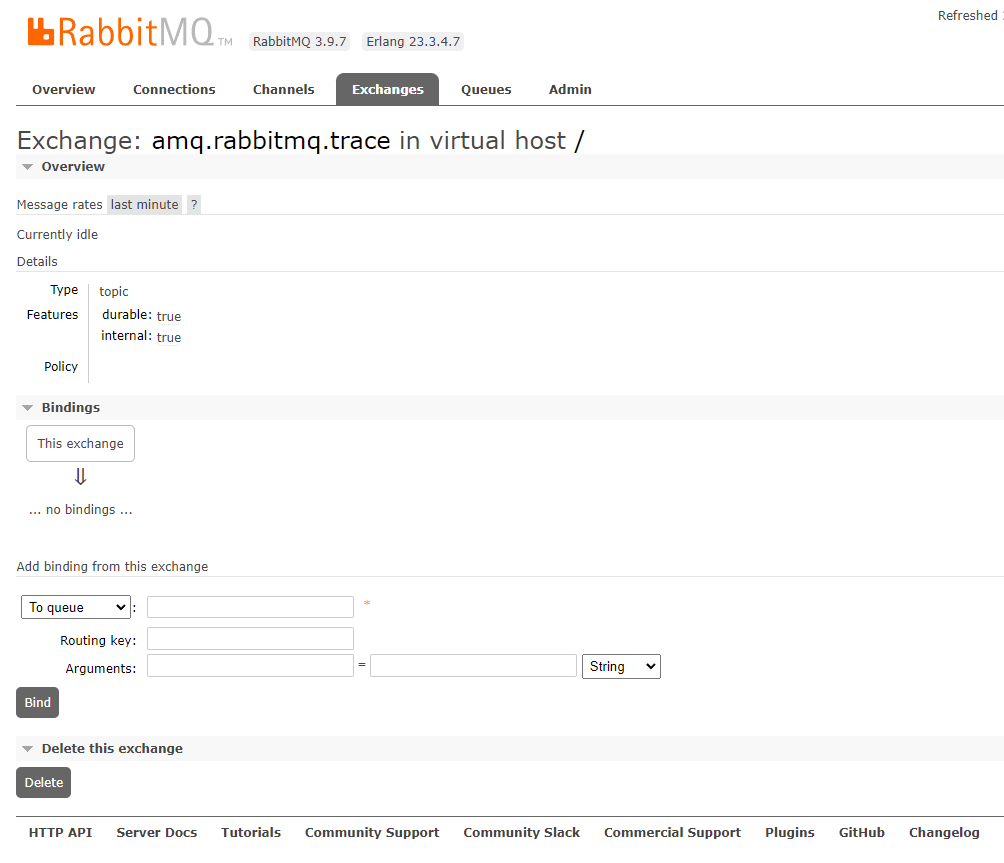
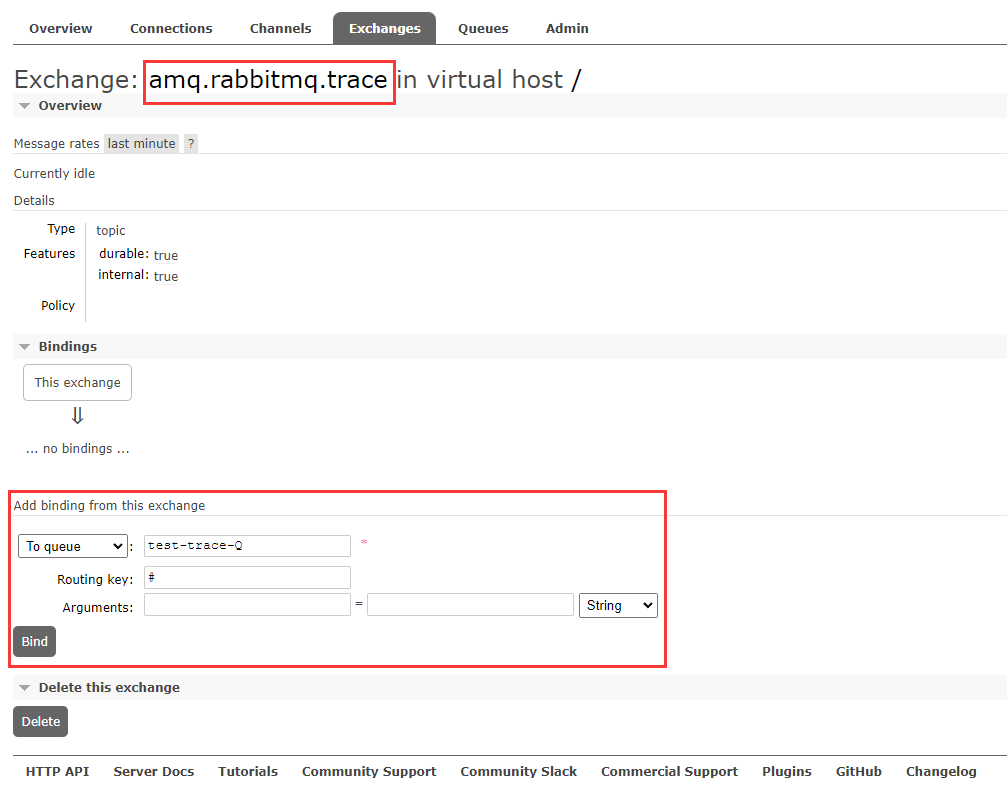
每个虚拟主机下的交换机都会默认创建一个Trace交换机:

交换机属性:
TOPIC通配符模式
持久化 是
内部使用 是
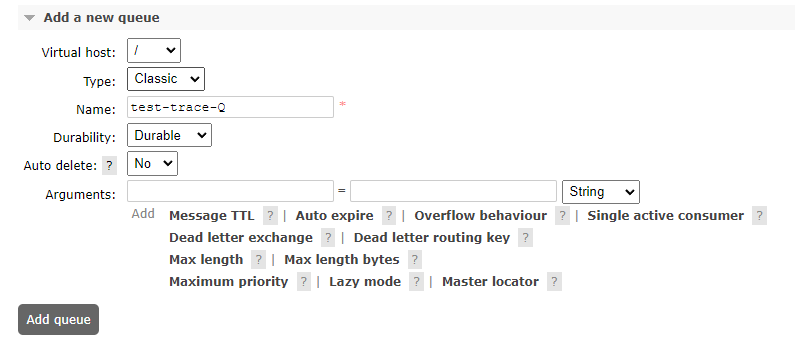
在 / 虚拟主机下创建一个监控队列(使用#路由分配 来监听所有队列)
将队列绑定到trace交换机上
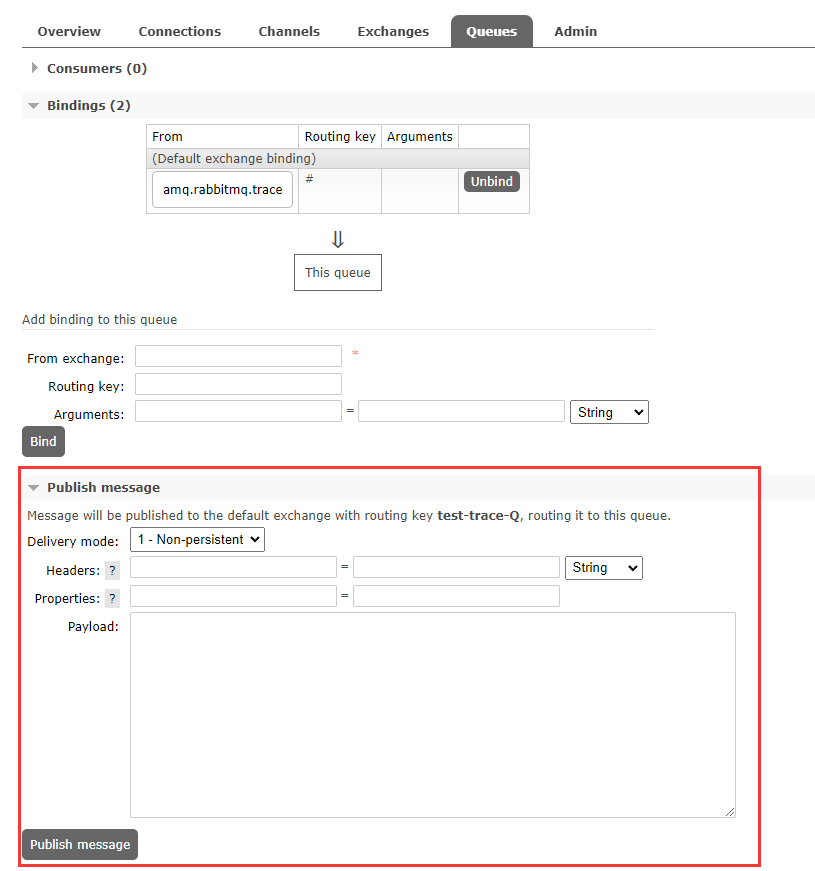
在队列中发送一条消息测试:
我这多点了2条

https://www.pianshen.com/article/50101743795/
这里可以先查看下Trace功能的状态:
[root@localhost ~]# rabbitmq-plugins list

Listing plugins with pattern ".*" ...

 Configured: E = explicitly enabled; e = implicitly enabled

 | Status: * = running on rabbit@localhost

 |/

[  ] rabbitmq_amqp1_0                  3.9.7

[  ] rabbitmq_auth_backend_cache       3.9.7

[  ] rabbitmq_auth_backend_http        3.9.7

[  ] rabbitmq_auth_backend_ldap        3.9.7

[  ] rabbitmq_auth_backend_oauth2      3.9.7

[  ] rabbitmq_auth_mechanism_ssl       3.9.7

[  ] rabbitmq_consistent_hash_exchange 3.9.7

[  ] rabbitmq_event_exchange           3.9.7

[  ] rabbitmq_federation               3.9.7

[  ] rabbitmq_federation_management    3.9.7

[  ] rabbitmq_jms_topic_exchange       3.9.7

[E*] rabbitmq_management               3.9.7

[e*] rabbitmq_management_agent         3.9.7

[  ] rabbitmq_mqtt                     3.9.7

[  ] rabbitmq_peer_discovery_aws       3.9.7

[  ] rabbitmq_peer_discovery_common    3.9.7

[  ] rabbitmq_peer_discovery_consul    3.9.7

[  ] rabbitmq_peer_discovery_etcd      3.9.7

[  ] rabbitmq_peer_discovery_k8s       3.9.7

[  ] rabbitmq_prometheus               3.9.7

[  ] rabbitmq_random_exchange          3.9.7

[  ] rabbitmq_recent_history_exchange  3.9.7

[  ] rabbitmq_sharding                 3.9.7

[  ] rabbitmq_shovel                   3.9.7

[  ] rabbitmq_shovel_management        3.9.7

[  ] rabbitmq_stomp                    3.9.7

[  ] rabbitmq_stream                   3.9.7

[  ] rabbitmq_stream_management        3.9.7

[  ] rabbitmq_top                      3.9.7

[  ] rabbitmq_tracing                  3.9.7

[  ] rabbitmq_trust_store              3.9.7

[e*] rabbitmq_web_dispatch             3.9.7

[  ] rabbitmq_web_mqtt                 3.9.7

[  ] rabbitmq_web_mqtt_examples        3.9.7

[  ] rabbitmq_web_stomp                3.9.7

[  ] rabbitmq_web_stomp_examples       3.9.7

[root@localhost ~]#
应该是这个tracing功能,可以看见标识为 未启用的状态
现在把他打开:
[root@localhost ~]# rabbitmq-plugins enable rabbitmq_tracing

Enabling plugins on node rabbit@localhost:

rabbitmq_tracing

The following plugins have been configured:

  rabbitmq_management

  rabbitmq_management_agent

  rabbitmq_tracing

  rabbitmq_web_dispatch

Applying plugin configuration to rabbit@localhost...

The following plugins have been enabled:

  rabbitmq_tracing

started 1 plugins.

[root@localhost ~]#
然后设置trace为on
注意下面的输出,它是默认给 / 的虚拟主机添加的
[root@localhost ~]# rabbitmqctl trace_on

Starting tracing for vhost "/" ...

Trace enabled for vhost /

[root@localhost ~]#
如果添加到其他虚拟主机,则是:
-p 参数前缀 加上你的虚拟主机名字
rabbitmqctl trace_on -p myhost
现在再次发送消息:
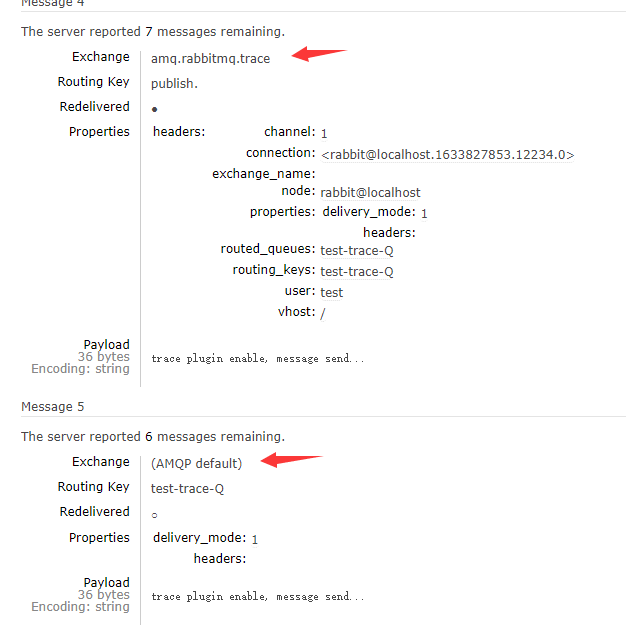
开启后的消息明显和之前的不一样,会提供详细的信息:

查询全部消息,会发现,会有其他交换机也发送消息:
原来上面的那条是trace帮我发送的,下面的才是我自己发送的
关闭trace功能:
同样如果是其他虚拟主机,加-p前缀 带上主机名称
[root@localhost ~]# rabbitmqctl trace_off

Stopping tracing for vhost "/" ...

Trace disabled for vhost /

[root@localhost ~]#
我发现是我眼睛瞎了???
从【Admin】标签点进去是找不到Tracing功能的
然后又从头上那个 【Cluster】集群主机名点进去,这个Tracing功能才给我展示出来
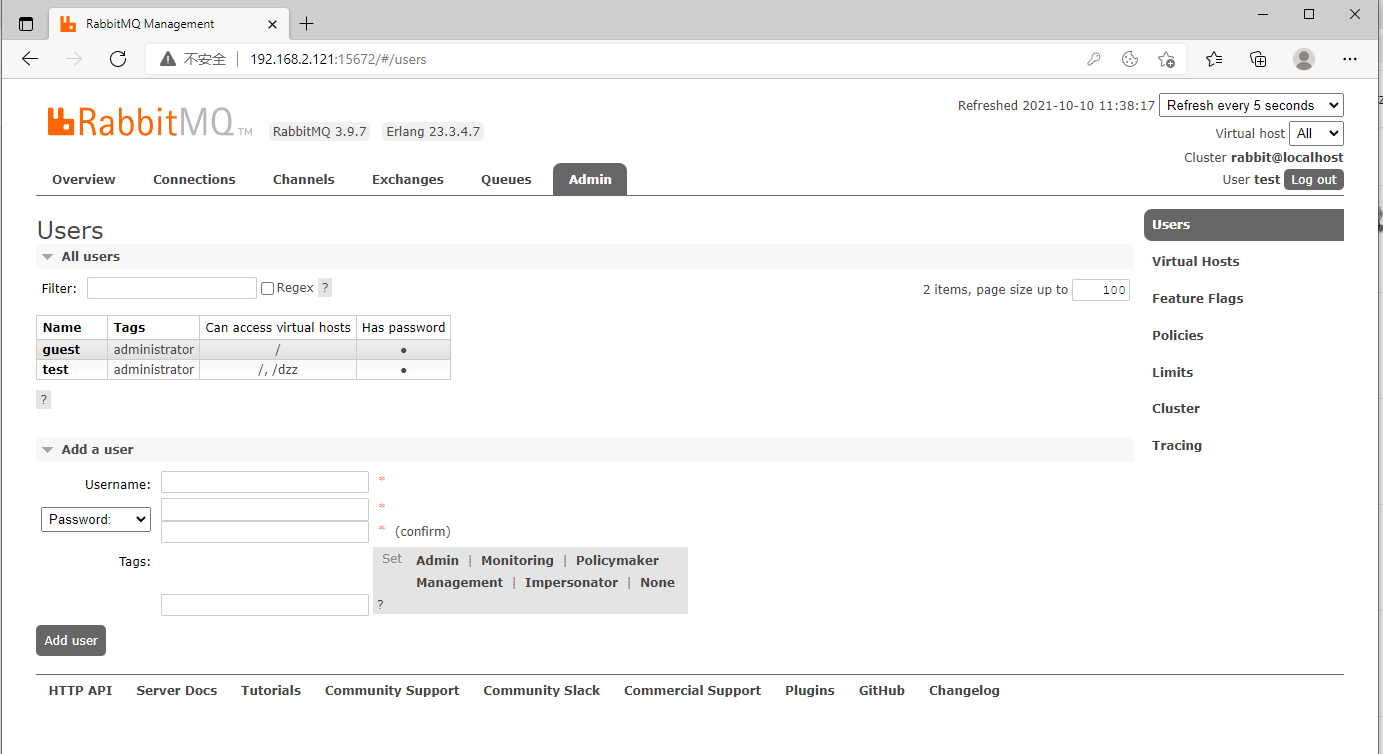
现在新增一个追踪队列(使用Trace面板):

添加之后,会生成一个队列和一个日志:
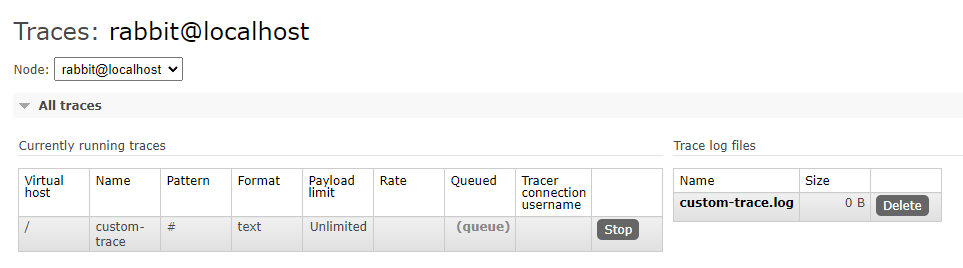
访问日志文件需要用户授权,输入账号密码访问:
队列是一个专门追踪的队列

现在在之前测试的队列中发送消息 (test-trace-Q):
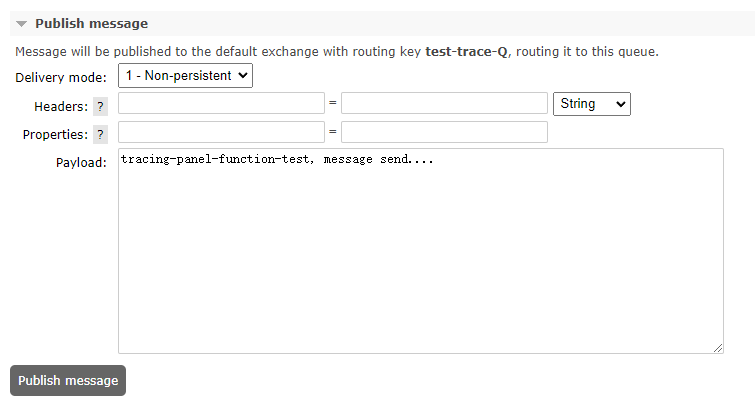
再回去看日志文件

日志信息:
================================================================================

2021-10-10 3:47:12:050: Message published

Node:         rabbit@localhost

Connection:   <rabbit@localhost.1633827853.14098.0>

Virtual host: /

User:         test

Channel:      1

Exchange:

Routing keys: [<<"test-trace-Q">>]

Routed queues: [<<"test-trace-Q">>]

Properties:   [{<<"delivery_mode">>,signedint,1},{<<"headers">>,table,[]}]

Payload:

tracing-panel-function-test, message send....

================================================================================

2021-10-10 3:49:10:117: Message published

Node:         rabbit@localhost

Connection:   <rabbit@localhost.1633827853.14360.0>

Virtual host: /

User:         test

Channel:      1

Exchange:

Routing keys: [<<"test-trace-Q">>]

Routed queues: [<<"test-trace-Q">>]

Properties:   [{<<"delivery_mode">>,signedint,1},{<<"headers">>,table,[]}]

Payload:

second message send...
Tracing面板上点击Stop,队列就会被移除,再点击Delete就删除了日志文件
【RabbitMQ】12 日志监控 & 消息追踪的更多相关文章
- 消息队列系列:Rabbitmq Trace 日志的使用
一.什么是Trace Trace是Rabbitmq用于记录每一次发送的消息,方便使用Rabbitmq的开发者调试.排错.可通过插件形式 提供可视化界面 二.Trace实现概 ...
- 分布式链路监控与追踪系统Zipkin
1.分布式链路监控与追踪产生背景2.SpringCloud Sleuth + Zipkin3.分布式服务追踪实现原理4.搭建Zipkin服务追踪系统5.搭建Zipkin集成RabbitMQ异步传输6. ...
- 基于SLF4J的MDC机制和Dubbo的Filter机制,实现分布式系统的日志全链路追踪
原文链接:基于SLF4J的MDC机制和Dubbo的Filter机制,实现分布式系统的日志全链路追踪 一.日志系统 1.日志框架 在每个系统应用中,我们都会使用日志系统,主要是为了记录必要的信息和方便排 ...
- rabbitmq trace 日志的使用以及其疑惑之处
RabbitMQ 默认日志里只有类似客户端"accpet/close"等信息,对于有异常或者跟踪消息内部结构就比较麻烦了. 不过MQ有个rabbitmq_tracing插件,安装该 ...
- rabbitmq 重复ACK导致消息丢失
rabbitmq 重复确认导致消息丢失 背景 rabbitmq 在应用场景中,大多采用工作队列 work-queue的模式. 在一个常见的工作队列模式中,消费者 worker 将不断的轮询从队列中拉取 ...
- [Asp.net]SignalR实现实时日志监控
摘要 昨天吃饭的时候,突然想起来一个好玩的事,如果能有个页面可以实时的监控网站或者其他类型的程序的日志,其实也不错.当然,网上也有很多成熟的类似的监控系统.就想着如果通过.net该如何实现?所以就在想 ...
- MySQL慢日志监控脚本实例剖析
公司线上的 MySQL 慢日志,之前一直没有做好监控.趁着上周空闲,我就把监控脚本写了下,今天特地把代码发出来与51博友分享一下. 针对脚本的注解和整体构思,我会放到脚本之后为大家详解. 1 2 3 ...
- SignalR实现实时日志监控
.net SignalR实现实时日志监控 摘要 昨天吃饭的时候,突然想起来一个好玩的事,如果能有个页面可以实时的监控网站或者其他类型的程序的日志,其实也不错.当然,网上也有很多成熟的类似的监控系统 ...
- 一种轻量级的微信小程序日志监控的方法
今天一个活动要写个H5,明天一个功能要用小程序,天天都在写bug.用户反馈小程序用起来有问题还特么还不知道到底出了啥bug,反馈多了,老板要扣工资了!看来挖了太多坑不填也不行,程序异常还是要主动追踪, ...
- 24 Zabbix系统配置日志监控告警--关键字触发
点击返回:自学Zabbix之路 点击返回:自学Zabbix4.0之路 点击返回:自学zabbix集锦 24 Zabbix系统配置日志监控告警--关键字触发 trapper是被监控主机主动发送数据给za ...
随机推荐
- 前端使用 Konva 实现可视化设计器(13)- 折线 - 最优路径应用【思路篇】
这一章把直线连接改为折线连接,沿用原来连接点的关系信息.关于折线的计算,使用的是开源的 AStar 算法进行路径规划,启发方式为 曼哈顿距离,且不允许对角线移动. 请大家动动小手,给我一个免费的 St ...
- Ubuntu 使用 SVN 管理 项目
背景 公司的项目需要在 Linux 环境进行开发,而都是使用 SVN 进行管理的.习惯了 SVN-GUI 的我,需要学习 SVN 的命令行. 准备 安装 SVN sudo apt-get apt-ge ...
- FFmpeg开发笔记(三十四)Linux环境给FFmpeg集成libsrt和librist
<FFmpeg开发实战:从零基础到短视频上线>一书的"10.2 FFmpeg推流和拉流"提到直播行业存在RTSP和RTMP两种常见的流媒体协议.除此以外,还有比较两 ...
- 使用explain优化慢查询的业务场景分析
问:你最害怕的事情是什么? 答:搓澡 问:为什么? 答:因为有些人一旦错过,就不在了 Explain 这个词在不同的上下文中有不同的含义.在数据库查询优化的上下文中,"EXPLAIN&quo ...
- 3568F-Linux-RT系统测试手册
- TI AM62x工业开发板规格书(单/双/四核ARM Cortex-A53 + 单核ARM Cortex-M4F,主频1.4GHz)
1 评估板简介 创龙科技TL62x-EVM是一款基于TI Sitara系列AM62x单/双/四核ARM Cortex-A53 + 单核ARM Cortex-M4F多核处理器设计的高性能低功耗工业评估板 ...
- (sql语句试题练习及 参考答案解题思路+个人解题思路)
SQL字段说明及数据 ======================================================================= 一.部门表字段描述:dp_no 部 ...
- 详解Web应用安全系列(6)安全配置错误
Web攻击中的安全配置错误漏洞是一个重要的安全问题,它涉及到对应用程序.框架.应用程序服务器.Web服务器.数据库服务器等组件的安全配置不当.这类漏洞往往由于配置过程中的疏忽或错误,使得攻击者能够未经 ...
- python3 socket 获取域名信息
可以当ping用,应用场景可以在一些没有安装ping工具的镜像容器中,诊断dns或域名的可用性. #-*- coding:utf-8 -*- import socket import tracebac ...
- css3 html5
vscode的使用 什么是HTML5? HTML5新增语义化标签 多媒体标签 <audio>音频标签 谷歌浏览器 把autoplay属性给我们禁用. 两种音频格式的播放 视频标签<v ...