
【应用服务 App Service】在Azure App Service中使用WebSocket - PHP的问题 - 如何使用和调用
问题描述
在Azure App Service中,有对.Net,Java的WebSocket支持的示例代码,但是没有成功的PHP代码。 以下的步骤则是如何基于Azure App Service实现PHP版的websocket。
实现步骤
参考PHP代码链接:(GitHub:https://github.com/ghedipunk/PHP-Websockets, 本地博客园:https://www.cnblogs.com/lulight/articles/13787309.html)。但由于这一示例代码中有些错误,所以需要修改部分代码
1) 新加 web.config 文件,配置httpplatformhandler及websocket的启动路径文件。


<?xml version="1.0" encoding="UTF-8"?>

<configuration>

  <system.webServer>

    <webSocket enabled="true" />

    <handlers>

      <add name="httpplatformhandler" path="*.php" verb="*" modules="httpPlatformHandler" resourceType="Unspecified"/>

    </handlers>

    <httpPlatform processPath="D:\Program Files (x86)\PHP\v7.4\php.exe"

                  arguments="D:\home\site\wwwroot\testwebsock.php"

                  stdoutLogEnabled="true"

                  stdoutLogFile="D:\home\LogFiles\php-log.txt">

    </httpPlatform>

  </system.webServer>

</configuration>
2)修改文件testwebsock.php中的内容,$echo = new echoServer("0.0.0.0",getenv("HTTP_PLATFORM_PORT"),1048576); 端口号设置在应用配置参数HTTP_PLATFORM_PORT中。
#!/usr/bin/env php

<?php

require_once('./websockets.php');

class echoServer extends WebSocketServer {

  function __construct($addr, $port, $bufferLength) {

    parent::__construct($addr, $port, $bufferLength);

    $this->userClass = 'MyUser';

  }

  //protected $maxBufferSize = 1048576; //1MB... overkill for an echo server, but potentially plausible for other applications.

  protected function process ($user, $message) {

    $this->send($user,$message);

  }

  protected function connected ($user) {

    // Do nothing: This is just an echo server, there's no need to track the user.

    // However, if we did care about the users, we would probably have a cookie to

    // parse at this step, would be looking them up in permanent storage, etc.

  }

  protected function closed ($user) {

    // Do nothing: This is where cleanup would go, in case the user had any sort of

    // open files or other objects associated with them.  This runs after the socket

    // has been closed, so there is no need to clean up the socket itself here.

  }

}

$echo = new echoServer("0.0.0.0",getenv("HTTP_PLATFORM_PORT"),1048576);

try {

  $echo->run();

}

catch (Exception $e) {

  $echo->stdout($e->getMessage());

}
3)将client.html 中server URL(var host = "ws://<your web site name>.chinacloudsites.cn/index.php";)改写为对应的website name。
<html><head><title>WebSocket</title>

<style type="text/css">

html,body {

    font:normal 0.9em arial,helvetica;

}

#log {

    width:600px;

    height:300px;

    border:1px solid #7F9DB9;

    overflow:auto;

}

#msg {

    width:400px;

}

</style>

<script type="text/javascript">

var socket;

function init() {

    var host = "ws://xxxxxxxx.chinacloudsites.cn/index.php"; // SET THIS TO YOUR SERVER

    try {

        socket = new WebSocket(host);

        log('WebSocket - status '+socket.readyState);

        socket.onopen    = function(msg) {

                               log("Welcome - status "+this.readyState);

                           };

        socket.onmessage = function(msg) {

                               log("Received: "+msg.data);

                           };

        socket.onclose   = function(msg) {

                               log("Disconnected - status "+this.readyState);

                           };

    }

    catch(ex){

        log(ex);

    }

    $("msg").focus();

}

function send(){

    var txt,msg;

    txt = $("msg");

    msg = txt.value;

    if(!msg) {

        alert("Message can not be empty");

        return;

    }

    txt.value="";

    txt.focus();

    try {

        socket.send(msg);

        log('Sent: '+msg);

    } catch(ex) {

        log(ex);

    }

}

function quit(){

    if (socket != null) {

        log("Goodbye!");

        socket.close();

        socket=null;

    }

}

function reconnect() {

    quit();

    init();

}

// Utilities

function $(id){ return document.getElementById(id); }

function log(msg){ $("log").innerHTML+="<br>"+msg; }

function onkey(event){ if(event.keyCode==13){ send(); } }

</script>

</head>

<body onload="init()">

<h3>WebSocket v2.00</h3>

<div id="log"></div>

<input id="msg" type="textbox" onkeypress="onkey(event)"/>

<button onclick="send()">Send</button>

<button onclick="quit()">Quit</button>

<button onclick="reconnect()">Reconnect</button>

</body>

</html>
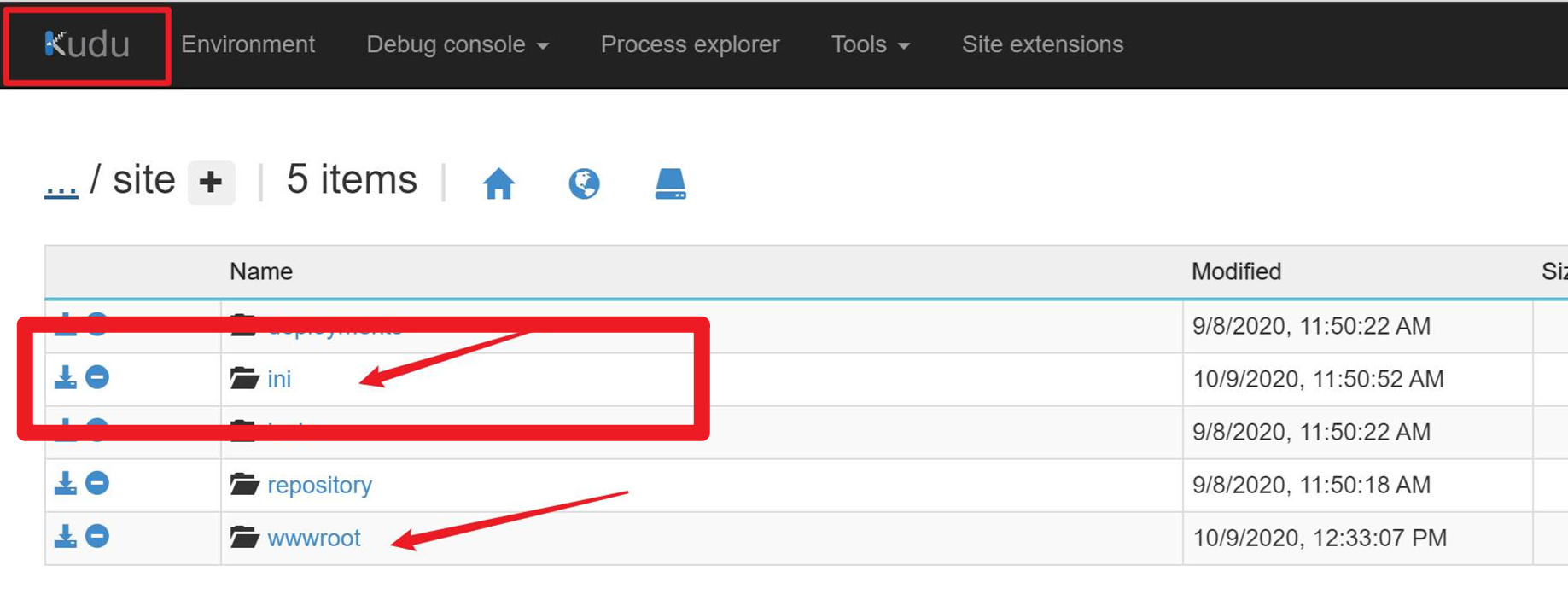
4) 添加websocket拓展,早D:\home\site 路径下添加ini文件夹,并在里面添加一个文件名为php.ini文件,内容如下:
[ExtensionList]

extension=sockets
然后,ini和wwwroot文件夹在kudu站点中的相对位置如下图所示:(必须步骤,非常重要)
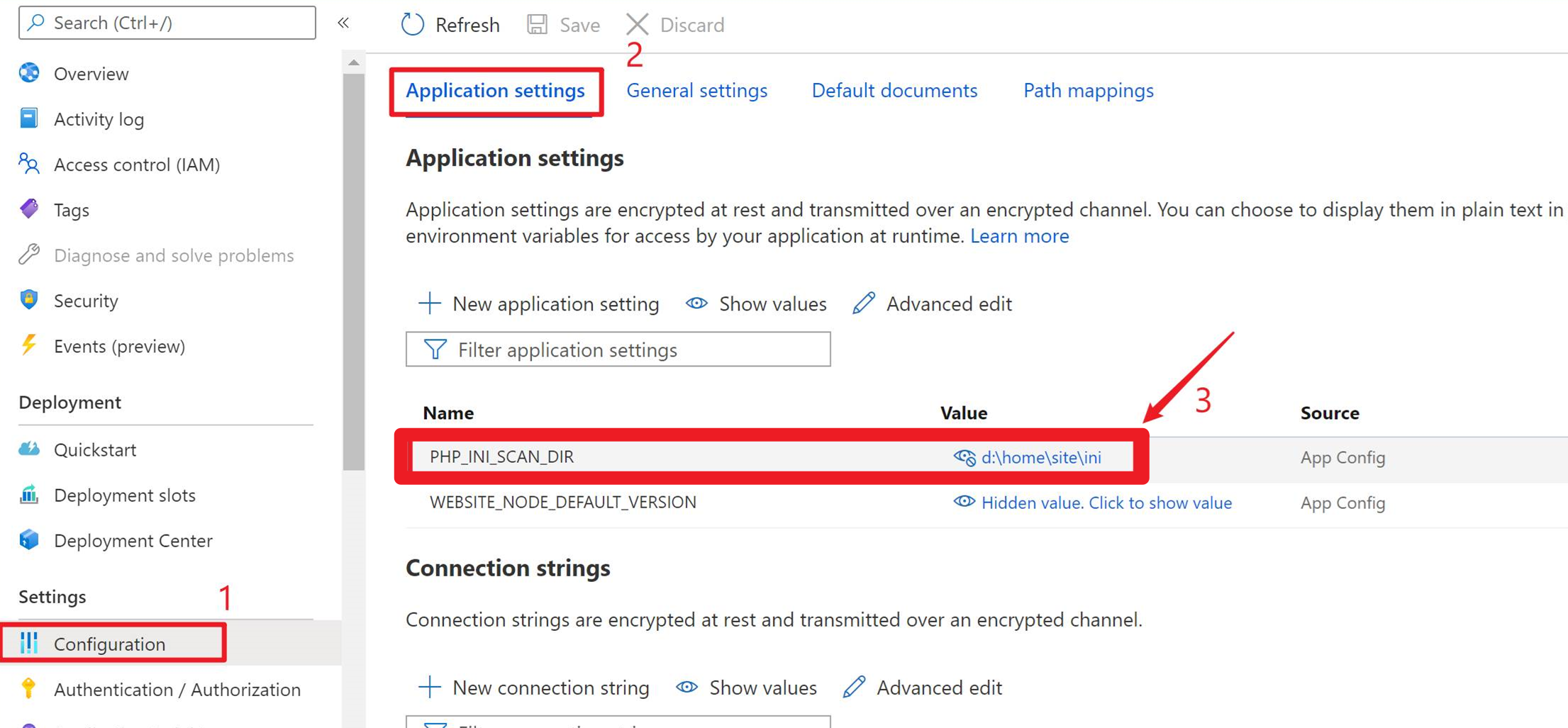
5)在App Service门户中配置应用参数,PHP_INI_SCAN_DIR="D:\home\site\ini"。 效果如下:
以上步骤完成后,就可以访问站点下的client.html测试页面,验证此次配置是否成功:
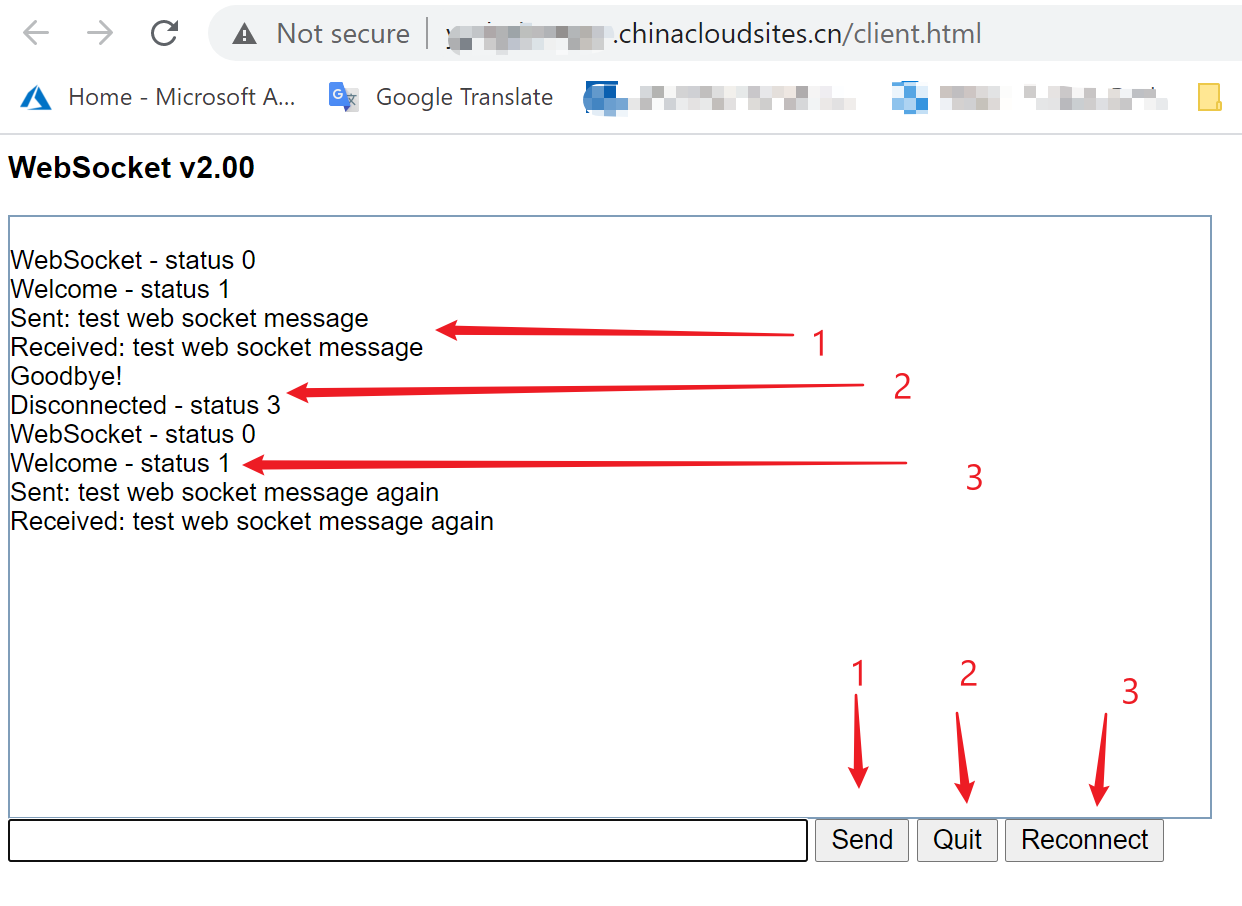
在以上的过程中,必须在App Service的配置页面中启用Web Socket功能。
参考资料
PHP WebSockets:https://github.com/ghedipunk/PHP-Websockets
【应用服务 App Service】在Azure App Service中使用WebSocket - PHP的问题 - 如何使用和调用的更多相关文章
- 【应用服务 App Service】Azure App Service 中如何安装mcrypt - PHP
问题描述 Azure App Service (应用服务)如何安装PHP的扩展 mcrypt(mcrypt 是php里面重要的加密支持扩展库) 准备条件 创建App Service, Runtime ...
- 【Azure媒体服务 Azure Media Service】Azure Media Service中Stream Endpoint 说明 (流式处理终结点)
Azure 媒体服务是一个基于云的媒体工作流平台,用于生成需要编码.打包.内容保护和直播活动广播的解决方案. 在视频的直播,点播方案中,媒体服务的架构主要由三部分构成: 推流端,把本地视频或直播内容推 ...
- 手把手:使用service principal连接Azure Media Service
在简书中查看,请点击我. 关于相关内容解释,请参考docs文档 https://docs.microsoft.com/en-us/azure/media-services/previous/media ...
- 利用VisualVM监测Azure云服务中的Java应用
在做Java开发的时候,我们需要在上线之前对程序进行压力测试,对程序的性能进行全面的监控,了解JVM的CPU,内存,GC,classes,线程等等信息,或者在程序上线运行的过程当中以便于诊断问题或者对 ...
- 【应用服务 App Service】当遇见某些域名在Azure App Service中无法解析的错误,可以通过设置指定DNS解析服务器来解决
问题情形 当访问部署在Azure App Service中的应用返回 "The remote name could not be resolved: ''xxxxxx.com'" ...
- 【Azure 应用服务】App Service for Linux 中实现 WebSocket 功能 (Python SocketIO)
问题描述 使用 python websockets 模块作为Socket的服务端,发布到App Service for Linux环境后,发现Docker Container无法启动.错误消息为: 2 ...
- 【应用服务 App Service】Azure 应用服务测试网络访问其他域名及请求超时限制(4分钟 ≈ 230秒)
测试App Service是否可以访问其他DNS 当应用服务(Azure App Service)创建完成后,想通过ping命令来查看是否可以访问其他站点或解析DNS,但是发现ping命令无法使用.这 ...
- 【Azure App Service For Container】创建ASP.NET Core Blazor项目并打包为Linux镜像发布到Azure应用服务
欢迎使用 Blazor!Blazor 是一个使用 .NET 生成交互式客户端 Web UI 的框架: 使用 C# 代替 JavaScript 来创建信息丰富的交互式 UI. 共享使用 .NET 编写的 ...
- 【Azure 应用服务】Azure App Service 自带 FTP服务
问题描述 Azure PaaS服务是否有FTP/S服务呢? 回答问题 应用服务(Web App/App Service)在创建时候,默认创建了FTP服务并自动开启,用于应用部署.但它不是适合作为FTP ...
随机推荐
- 第2课 - 初识makefile的结构
第2课 - 初识makefile的结构 1. makefile 的意义 (1)makefile 用于定义源文件之间的依赖关系 (在阅读开源软件源码时,可通过Makefile掌握源码中各个文件之间的关系 ...
- WeihanLi.Npoi 1.10.0 更新日志
WeihanLi.Npoi 1.10.0 更新日志 Intro 上周有个网友希望能够导入Excel时提供一个 EndRowIndex 来自己控制结束行和根据字段过滤的,周末找时间做了一下这个 feat ...
- MYsql添加用户、赋予权限
1.创建新用户 CREATE USER 'admin'@'%' IDENTIFIED BY '123456'; '%' 表示可以远程登录访问.操作 ‘localhost’ 表示只能本地登录访问.操作2 ...
- javac中不引人注目的编码小坑
来看下面这段java程序: public class Test{ public static void main(String[] args){ System.out.println("哈哈 ...
- yum 安装提示公钥安装失败,Public key for .x86_64.rpm is not instal 手动导入公钥方案
Linux 中yum 安装google-chrome-stable时,报错如下,提示公钥安装失败,原因是 GPG公钥获取失败,无法连接获取到 https://dl-ssl.google.com/lin ...
- openstack核心组件——nova计算服务(7)
云计算openstack核心组件——nova计算服务(7) 一.nova介绍: Nova 是 OpenStack 最核心的服务,负责维护和管理云环境的计算资源.OpenStack 作为 ...
- 本机浏览器无法访问linux的tomcat
原因:Centos7的防火墙拦截了tomcat访问的8080端口 Redhat 等等linux firewall-cmd --permanent --zone=public --add-port=8 ...
- python爬取酷狗音乐
url:https://www.kugou.com/yy/html/rank.html 我们随便访问一个歌曲可以看到url有个hash https://www.kugou.com/song/#hash ...
- 常见消息中间件之ActiveMQ
前言 消息队列是指利用高效可靠的消息传递机制进行与平台无关的数据交流,并基于数据通信来进行分布式系统的集成.目前消息队列已经逐渐成为企业IT系统内部通信的核心手段,它具有低耦合.可靠投递.广播.流量控 ...
- MySQL二进制备份恢复
一.开启二进制日志1.进入配置文件[mysqld]下添加配置 方案一 vim /etc/my.cnf log-bin = /usr/local/mysql/logs/mysql_binmax_binl ...