
ASP.NET Core WebApi版本控制
前言:
在日常项目开发中,随着项目需求不断的累加、不断的迭代;项目服务接口需要向下兼容历史版本;前些时候就因为Api接口为做版本管理导致接口对低版本兼容处理不友好。
最近就像了解下如何实现WebApi版本控制,那么版本控制有什么好处呢?
WebApi版本控制的好处
- 有助于及时推出功能, 而不会破坏现有系统,兼容性处理更友好。
- 它还可以帮助为选定的客户提供额外的功能。
接下来就来实现版本控制以及在Swagger UI中接入WebApi版本
一、WebApi版本控制实现
通过Microsoft.AspNetCore.Mvc.Versioning 实现webapi 版本控制
- 创建WebApi项目,添加Nuget包:Microsoft.AspNetCore.Mvc.Versioning
Install-Package Microsoft.AspNetCore.Mvc.Versioning
- 修改项目Startup文件,使用Microsoft.AspNetCore.Mvc.Versioning
public class Startup

{

    public Startup(IConfiguration configuration)

    {

        Configuration = configuration;

    }

    public IConfiguration Configuration { get; }

    // This method gets called by the runtime. Use this method to add services to the container.

    public void ConfigureServices(IServiceCollection services)

    {

        //根据需要设置,以下内容

        services.AddApiVersioning(apiOtions =>

        {

            //返回响应标头中支持的版本信息

            apiOtions.ReportApiVersions = true;

            //此选项将用于不提供版本的请求。默认情况下, 假定的 API 版本为1.0

            apiOtions.AssumeDefaultVersionWhenUnspecified = true;

            //缺省api版本号,支持时间或数字版本号

            apiOtions.DefaultApiVersion = new ApiVersion(1, 0);

            //支持MediaType、Header、QueryString 设置版本号;缺省为QueryString、UrlSegment设置版本号;后面会详细说明对于作用

            apiOtions.ApiVersionReader = ApiVersionReader.Combine(

                new MediaTypeApiVersionReader("api-version"),

                new HeaderApiVersionReader("api-version"),

                new QueryStringApiVersionReader("api-version"),

                new UrlSegmentApiVersionReader());

        });

        services.AddControllers();

    }

    // This method gets called by the runtime. Use this method to configure the HTTP request pipeline.

    public void Configure(IApplicationBuilder app, IWebHostEnvironment env)

    {

        if (env.IsDevelopment())

        {

            app.UseDeveloperExceptionPage();

        }

        app.UseHttpsRedirection();

        //使用ApiVersioning

        app.UseApiVersioning();


        app.UseRouting();

        app.UseAuthorization();

        app.UseEndpoints(endpoints =>

        {

            endpoints.MapControllers();

        });

    }

}
- WebApi设置版本:
a)通过ApiVersion标记指定指定控制器或方法的版本号;Url参数控制版本(QueryStringApiVersionReader),如下:
namespace WebAPIVersionDemo.Controllers

{

    [ApiController]

    [Route("[controller]")]

    //Deprecated=true:表示v1即将弃用,响应头中返回

    [ApiVersion("1.0", Deprecated = true)]

    [ApiVersion("2.0")]public class WeatherForecastController : ControllerBase

    {

        private static readonly string[] Summaries = new[]{"Freezing", "Bracing", "Chilly", "Cool", "Mild", "Warm", "Balmy", "Hot", "Sweltering", "Scorching"};

        [HttpGet]

        public IEnumerable<WeatherForecast> Get()

        {

            var rng = new Random();

            return Enumerable.Range(1, 5).Select(index => new WeatherForecast

            {

                Date = DateTime.Now.AddDays(index),

                TemperatureC = rng.Next(-20, 55),

                Summary = $"v1:{Summaries[rng.Next(Summaries.Length)]}"

            })

            .ToArray();

        }

    }

}
通过参数api-version参数指定版本号;调用结果:
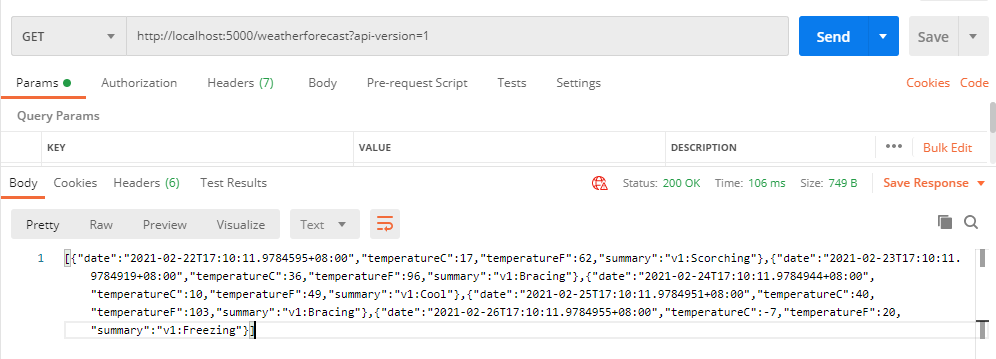

b)通过Url Path Segment控制版本号(UrlSegmentApiVersionReader):为控制器添加路由方式如下,apiVersion为固定格式
[Route("/api/v{version:apiVersion}/[controller]")]
调用方式:通过调用路径传入版本号,如:http://localhost:5000/api/v1/weatherforecast

c)通过Header头控制版本号:在Startup中设置(HeaderApiVersionReader、MediaTypeApiVersionReader)
apiOtions.ApiVersionReader = ApiVersionReader.Combine(

                new MediaTypeApiVersionReader("api-version"),

                new HeaderApiVersionReader("api-version"));
调用方式,在请求头或中MediaType中传递api版本,如下:

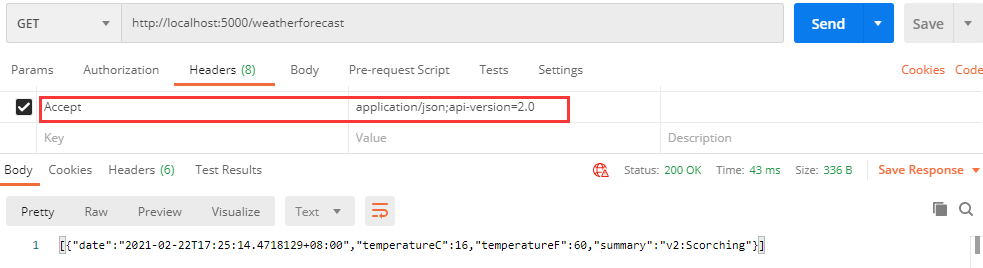
- 其他说明:
a)ReportApiVersions设置为true时, 返回当前支持版本号(api-supported-versions);Deprecated 参数设置为true表示已弃用,在响应头中也有显示(api-deprecated-versions):
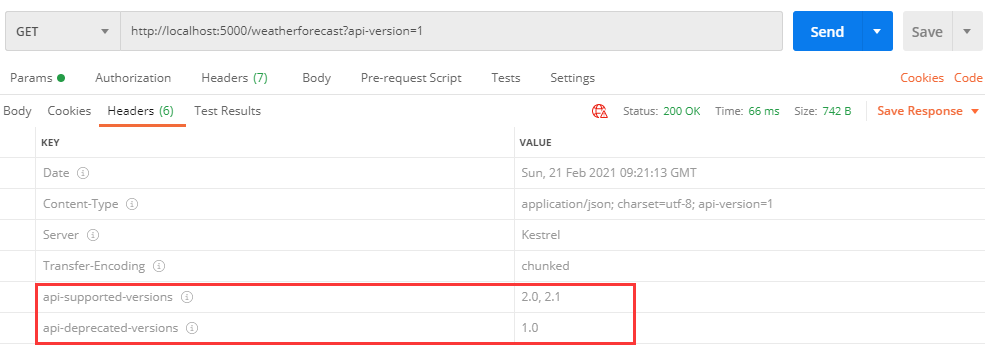
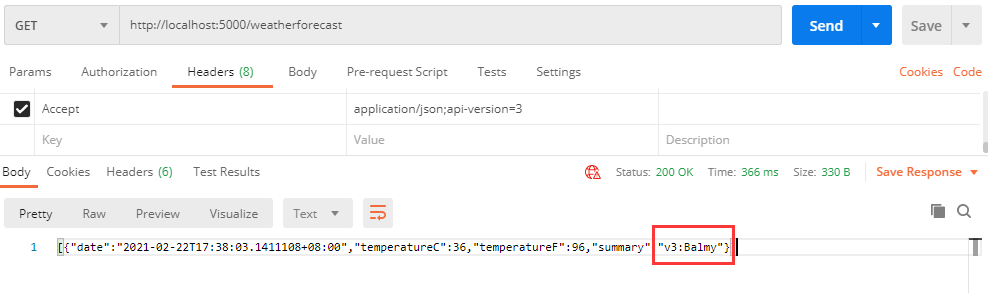
b)MapToApiVersion标记:允许将单个 API 操作映射到任何版本(可以在v1的控制器中添加v3的方法);在上面控制器中添加以下代码,访问v3版本方法
[HttpGet]

[MapToApiVersion("3.0")]

public IEnumerable<WeatherForecast> GetV3()

{

    //获取版本

    string v = HttpContext.GetRequestedApiVersion().ToString();

    var rng = new Random();

    return Enumerable.Range(1, 1).Select(index => new WeatherForecast

    {

        Date = DateTime.Now.AddDays(index),

        TemperatureC = rng.Next(-20, 55),

        Summary = $"v{v}:{Summaries[rng.Next(Summaries.Length)]}"

    })

    .ToArray();

}
c)注意事项:
1、路径中参数版本高于,其他方式设置版本
2、多种方式传递版本,只能采用一种方式传递版本号
3、SwaggerUI中MapToApiVersion设置版本不会单独显示
二、Swagger UI中版本接入
1、添加包:Swashbuckle.AspNetCore、Microsoft.AspNetCore.Mvc.Versioning.ApiExplorer
//swaggerui 包

Install-Package Swashbuckle.AspNetCore

//api版本

Install-Package Microsoft.AspNetCore.Mvc.Versioning.ApiExplorer
2、修改Startup代码:
public class Startup

{

    /// <summary>

    /// Api版本提者信息

    /// </summary>

    private IApiVersionDescriptionProvider provider;

    // This method gets called by the runtime. Use this method to add services to the container.

    public void ConfigureServices(IServiceCollection services)

    {

        services.AddControllers();

        //根据需要设置,以下内容

        services.AddApiVersioning(apiOtions =>

        {

            //返回响应标头中支持的版本信息

            apiOtions.ReportApiVersions = true;

            //此选项将用于不提供版本的请求。默认情况下, 假定的 API 版本为1.0

            apiOtions.AssumeDefaultVersionWhenUnspecified = true;

            //缺省api版本号,支持时间或数字版本号

            apiOtions.DefaultApiVersion = new ApiVersion(1, 0);

            //支持MediaType、Header、QueryString 设置版本号;缺省为QueryString设置版本号

            apiOtions.ApiVersionReader = ApiVersionReader.Combine(

                    new MediaTypeApiVersionReader("api-version"),

                    new HeaderApiVersionReader("api-version"),

                    new QueryStringApiVersionReader("api-version"),

                    new UrlSegmentApiVersionReader());

        });

        services.AddVersionedApiExplorer(option =>

        {

            option.GroupNameFormat = "接口:'v'VVV";

            option.AssumeDefaultVersionWhenUnspecified = true;

        });

        this.provider = services.BuildServiceProvider().GetRequiredService<IApiVersionDescriptionProvider>();

        services.AddSwaggerGen(options =>

        {

            foreach (var description in provider.ApiVersionDescriptions)

            {

                options.SwaggerDoc(description.GroupName,

                        new Microsoft.OpenApi.Models.OpenApiInfo()

                        {

                            Title = $"接口 v{description.ApiVersion}",

                            Version = description.ApiVersion.ToString(),

                            Description = "切换版本请点右上角版本切换"

                        }

                );

            }

            options.IncludeXmlComments(this.GetType().Assembly.Location.Replace(".dll", ".xml"), true);

        });

    }

    // This method gets called by the runtime. Use this method to configure the HTTP request pipeline.

    public void Configure(IApplicationBuilder app, IWebHostEnvironment env)

    {

        //……

        //使用ApiVersioning

        app.UseApiVersioning();

        //启用swaggerui,绑定api版本信息

        app.UseSwagger();

        app.UseSwaggerUI(c =>

        {

            foreach (var description in provider.ApiVersionDescriptions)

            {

                c.SwaggerEndpoint($"/swagger/{description.GroupName}/swagger.json", description.GroupName.ToUpperInvariant());

            }

        });

        //……

    }

}
3、运行效果:

其他:
示例地址:https://github.com/cwsheng/WebAPIVersionDemo
ASP.NET Core WebApi版本控制的更多相关文章
- Asp.Net.Core WebApi 版本控制
前言 在后端Api的开发过程中,无法避免的会遇到接口迭代的过程,如何保证新老接口的共存和接口的向前的兼容呢,这时候就需要对Api进行版本的控制,那如何优雅的控制Api的版本呢? 开始 Microsof ...
- ASP.Net Core WebApi几种版本控制对比
版本控制的好处: (1)助于及时推出功能, 而不会破坏现有系统. (2)它还可以帮助为选定的客户提供额外的功能. API 版本控制可以采用不同的方式进行控制,方法如下: (1)在 URL 中追加版本或 ...
- 零基础ASP.NET Core WebAPI团队协作开发
零基础ASP.NET Core WebAPI团队协作开发 相信大家对“前后端分离”和“微服务”这两个词应该是耳熟能详了.网上也有很多介绍这方面的文章,写的都很好.我这里提这个是因为接下来我要分享的内容 ...
- ASP.NET Core WebApi构建API接口服务实战演练
一.ASP.NET Core WebApi课程介绍 人生苦短,我用.NET Core!提到Api接口,一般会想到以前用到的WebService和WCF服务,这三个技术都是用来创建服务接口,只不过Web ...
- asp.net core webapi之跨域(Cors)访问
这里说的跨域是指通过js在不同的域之间进行数据传输或通信,比如用ajax向一个不同的域请求数据,或者通过js获取页面中不同域的框架中(iframe)的数据.只要协议.域名.端口有任何一个不同,都被当作 ...
- ASP.NET Core WebAPI 开发-新建WebAPI项目
ASP.NET Core WebAPI 开发-新建WebAPI项目, ASP.NET Core 1.0 RC2 即将发布,我们现在来学习一下 ASP.NET Core WebAPI开发. 网上已经有泄 ...
- Asp.net Core WebApi 使用Swagger做帮助文档,并且自定义Swagger的UI
WebApi写好之后,在线帮助文档以及能够在线调试的工具是专业化的表现,而Swagger毫无疑问是做Docs的最佳工具,自动生成每个Controller的接口说明,自动将参数解析成json,并且能够在 ...
- Asp.Net Core WebApi学习笔记(四)-- Middleware
Asp.Net Core WebApi学习笔记(四)-- Middleware 本文记录了Asp.Net管道模型和Asp.Net Core的Middleware模型的对比,并在上一篇的基础上增加Mid ...
- Asp.net core WebApi 使用Swagger生成帮助页
最近我们团队一直进行.net core的转型,web开发向着前后端分离的技术架构演进,我们后台主要是采用了asp.net core webapi来进行开发,开始每次调试以及与前端人员的沟通上都存在这效 ...
随机推荐
- msf+cobaltstrike联动(一):把msf的session发给cobaltstrike
前提:MFS已经获取到session,可以进入metepreter,现在需要使用cobaltstrike进行图形化管理或团队协作. cobaltstrike起一个beacon监听,如使用:window ...
- hive-2.2.0 伪分布式环境搭建
一,实验环境: 1, ubuntu server 16.04 2, jdk,1.8 3, hadoop 2.7.4 伪分布式环境或者集群模式 4, apache-hive-2.2.0-bin.tar. ...
- 1.Centos7修改主机名
1.在CentOS7中,有三种定义的主机名: 静态的(Static hostname):也称为内核主机名,是系统在启动时从/etc/hostname自动初始化的主机名. 瞬态的(Tansient ho ...
- kafka 通俗
把broker比作是一幢摩天大楼,一个10节点的kafka集群就是10幢摩天大楼,而且这些大楼都长得一模一样.分区就相当于大楼里的一层.一个分区就相当于一整层哦.原先大楼是空的.现在用户创建了一个to ...
- 图片轮播展示效果-2D实现
图片的轮播展示效果如果使用2D实现,需要将3D中存在的近大远小效果使用图片的缩放呈现,因此需要存储和计算图片的位置同时还要计算存储图片的缩放信息.将所有图片的位置连线看作是一个椭圆,就可以根据图片的个 ...
- Educational Codeforces Round 90 (Rated for Div. 2) C. Pluses and Minuses(差分)
题目链接:https://codeforces.com/contest/1373/problem/C 题意 给出一个只含有 $+$ 或 $-$ 的字符串 $s$,按如下伪代码进行操作: res = 0 ...
- 2019牛客多校 Round7
Solved:5 Rank:296 E Find the median (线段树) 题意:最开始一个空的数组 4e5次操作 每次把Li,Ri中的每个数插入进来 问当前的中位数 题解:把这n个区间离散化 ...
- Codeforces Round #660 (Div. 2) Captain Flint and Treasure 拓扑排序(按照出度、入读两边拓扑排序)
题目链接:Captain Flint and Treasure 题意: 一种操作为 选一个下标 使得ans+=a[i] 且 把a[b[i]]+a[i] 要求每个下标都进行一种这样的操作,问怎么样的 ...
- 放苹果 POJ - 1664 递推
把M个同样的苹果放在N个同样的盘子里,允许有的盘子空着不放,问共有多少种不同的分法?(用K表示)5,1,1和1,5,1 是同一种分法. Input 第一行是测试数据的数目t(0 <= t < ...
- Python 是什么语言
Python 是 解释型语言,强类型定义语言,动态类型定义语言 编译型语言 & 解释型语言 编译型语言:代码在执行前,需要编译(成机器语言文件,如 .exe 文件):以后再运行时,直接使用编译 ...