
QT串口助手(五):文件操作
作者:zzssdd2
E-mail:zzssdd2@foxmail.com
一、前言
开发环境:Qt5.12.10 + MinGW
功能
- 文件的发送
- 数据的保存
知识点
QFile类的使用QTimer类的使用- 文本的转码与编码识别
QPushButton、QProgressBar控件的使用
二、功能实现
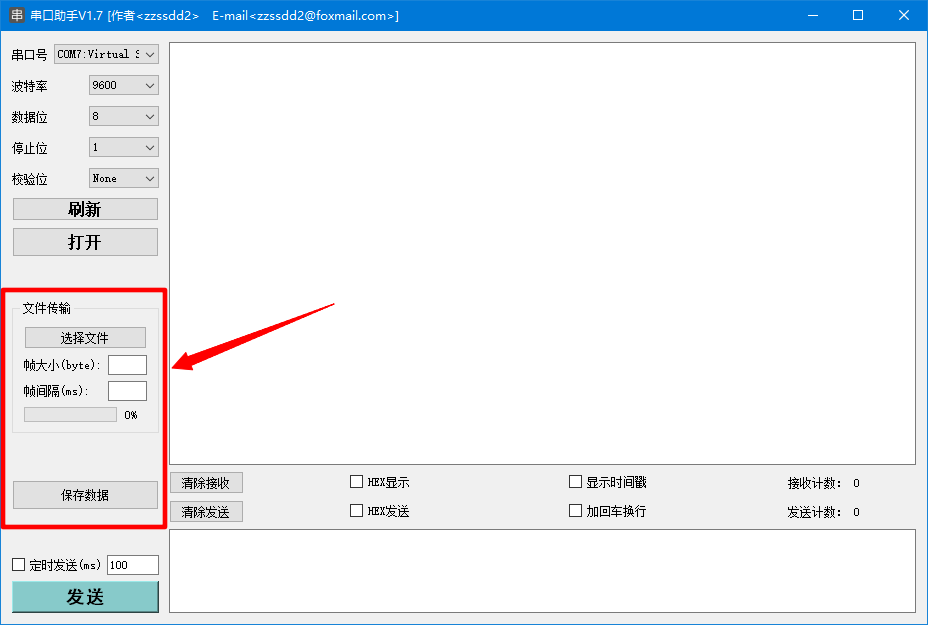
本章功能主要包含两个方面,一是通过串口发送选定的文本文件,二是将接收的数据保存为本地文本文件。最后还有对《QT串口助手(三):数据接收》章节内容进行一个补充扩展。
2.1、文件打开
当选择文件按钮点击后,触发点击信号对应的槽函数,在槽函数中进行文件的打开与读取:
/*选择并打开文件*/

QString curPath = QDir::currentPath();  //系统当前目录

QString dlgTitle = "打开文件";  //对话框标题

QString filter = "文本文件(*.txt);;二进制文件(*.bin *.dat);;所有文件(*.*)"; //文件过滤器

QString filepath = QFileDialog::getOpenFileName(this,dlgTitle,curPath,filter);

QFileInfo fileinfo(filepath);

if (filepath.isEmpty())

{

    QMessageBox::warning(this,"警告","文件为空");

    return;

}

//文件路径显示到发送框

ui->Send_TextEdit->clear();

ui->Send_TextEdit->appendPlainText(filepath);

QFile file(filepath);

if (!file.exists())

{

    QMessageBox::warning(this,"警告","文件不存在");

    return;

}

if (!file.open(QIODevice::ReadOnly))

{

    QMessageBox::warning(this,"警告","文件打开失败");

    return;

}
2.2、编码判断
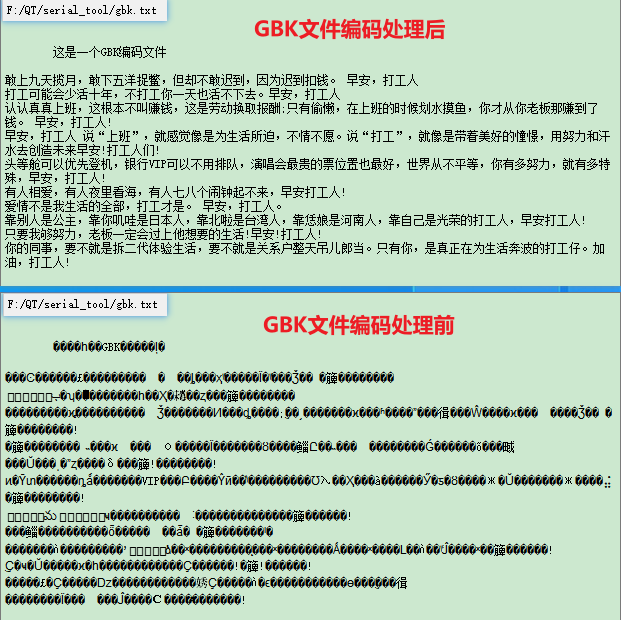
因为应用程序默认使用的编码为UTF-8,如果打开GBK格式编码的文件就会乱码,所以需要判断文件的编码,如果不是UTF-8则需要对文件进行编码转换。
/* 设置应用程序的编码解码器 */

QTextCodec *codec = QTextCodec::codecForName("UTF-8");

QTextCodec::setCodecForLocale(codec);
[static] QTextCodec *QTextCodec::codecForName(const char *name)
Searches all installed QTextCodec objects and returns the one which best matches name; the match is case-insensitive. Returns 0 if no codec matching the name name could be found.
[static] void QTextCodec::setCodecForLocale(QTextCodec **c*)
Set the codec to c; this will be returned by codecForLocale(). If c is a null pointer, the codec is reset to the default.
This might be needed for some applications that want to use their own mechanism for setting the locale.
Warning: This function is not reentrant.
/* 判断编码 */

QTextCodec::ConverterState state;

QTextCodec *codec = QTextCodec::codecForName("UTF-8");

FileText = codec->toUnicode(data.constData(),data.size(),&state);

//若有无效字符则是GBK编码

if (state.invalidChars > 0)

{

    //转码后返回

    FileText = QTextCodec::codecForName("GBK")->toUnicode(data);

}

else

{

    FileText =  data;

}
对文件进行上述的处理后,如果是GBK编码则也能够正确的读取了。
QString QTextCodec::toUnicode(const char *input, int size, QTextCodec::ConverterState *state = nullptr) const
Converts the first size characters from the input from the encoding of this codec to Unicode, and returns the result in a QString.
The state of the convertor used is updated.
QString QTextCodec::toUnicode(const QByteArray &a) const
Converts a from the encoding of this codec to Unicode, and returns the result in a QString.
2.3、文件读取
文件打开后,需要对文件类型进行判断,然后进行文件数据的读取:
/*判断文件类型*/

int type = 0;

QMimeDatabase db;

QMimeType mime = db.mimeTypeForFile(filepath);

if (mime.name().startsWith("text/"))

{

    type = 1;	//文本文件

}

else if (mime.name().startsWith("application/"))

{

    type = 2;	//二进制文件

}
QMimeType QMimeDatabase::mimeTypeForFile(const QString&fileName, QMimeDatabase::MatchMode mode = MatchDefault) const
Returns a MIME type for the file named fileName using mode.
This is an overloaded function.
QMimeType 类描述文件或数据的类型,由 MIME 类型字符串表示,获取到文件类型后接下来就知道应该使用什么方法读取文件内容了。常见文件类型如下:
描述(startsWith) 类型 示例 text 普通文本 text/plain, text/html, text/css, text/javascript image 图像文件(包含动态gif) image/gif, image/png, image/jpeg, image/bmp, image/webp audio 音频文件 audio/wav, audio/mpeg, audio/midi, audio/webm, audio/ogg video 视频文件 video/mp4, video/x-flv, video/webm, video/ogg application 二进制数据 application/xml, application/pdf
/*读取文件*/

switch(type)

{

    case 1:

    {

        //QIODevice读取普通文本

        QByteArray data = file.readAll();

        file.close();

        if (data.isEmpty())

        {

            QMessageBox::information(this, "提示", "文件内容空");

            return;

        }

        /* 判断编码 */

    }

    break;

    case 2:

    {

        int filelen = fileinfo.size();

        QVector<char> cBuf(filelen);//储存读出数据

        //使用QDataStream读取二进制文件

        QDataStream datain(&file);

        datain.readRawData(&cBuf[0],filelen);

        file.close();

        //char数组转QString

        FileText = QString::fromLocal8Bit(&cBuf[0],filelen);

    }

    break;

}
QByteArray QIODevice::readAll()
Reads all remaining data from the device, and returns it as a byte array.
This function has no way of reporting errors; returning an empty QByteArray can mean either that no data was currently available for reading, or that an error occurred.
int QDataStream::readRawData(char **s*, int len)
Reads at most len bytes from the stream into s and returns the number of bytes read. If an error occurs, this function returns -1.
The buffer s must be preallocated. The data is not decoded.
关于QVector:QVector类是一个提供动态数组的模板类。QVector是Qt的通用容器类之一,它将其项存储在相邻的内存位置并提供基于索引的快速访问。例如上面代码定义了一个大小为filelen的char类型的数组用来储存读取的二进制数据(相对与普通数组而言,QVector数组项可以动态增加,能够避免访问越界等问题)。
QT中使用QTextStream或QIODevice类读写普通文本文件,使用QDataStream类读写二进制文本文件
最后将读取到的文件大小信息和内容显示到接收框并标记有待发送文件:
//显示文件大小信息

QString info = QString("%1%2").arg("文件大小为:").arg(FileText.length());

ui->Receive_TextEdit->clear();

ui->Receive_TextEdit->append(info);

//显示文件内容

if (ui->HexDisp_checkBox->isChecked())

{

    ui->Receive_TextEdit->setPlainText(FileText.toUtf8().toHex(' ').toUpper());

}

else

{

    ui->Receive_TextEdit->setPlainText(FileText);

}

//设置显示焦点在最顶部

ui->Receive_TextEdit->moveCursor(QTextCursor::Start,QTextCursor::MoveAnchor);

/*标记有文件发送*/

isSendFile = true;

FrameCount = 0;

ProgressBarValue = 0;
2.4、文件发送
此时在标记了有文件发送的情况下,点击发送按钮则是发送文件:
/*

    函   数:on_Send_Bt_clicked

    描   述:发送按键点击信号槽

    输   入:无

    输   出:无

*/

void Widget::on_Send_Bt_clicked()

{

    if (isSerialOpen != false)

    {

        if (isSendFile)	//发送文件数据

        {

            if (ui->Send_Bt->text() == "发送")

            {

                ui->Send_Bt->setText("停止");

                SendFile();

            }

            else

            {

                ui->Send_Bt->setText("发送");

                FileSendTimer->stop();

            }

        }

        else	//发送发送框数据

        {

            SerialSendData(SendTextEditBa);

        }

    }

    else

    {

        QMessageBox::information(this, "提示", "串口未打开");

    }

}

/*

    函   数:SendData

    描   述:定时器发送文件

    输   入:无

    输   出:无

*/

void Widget::SendFile(void)

{

    /*按设置参数发送*/

    FrameLen = ui->PackLen_lineEdit->text().toInt(); // 帧大小

    FrameGap = ui->GapTim_lineEdit->text().toInt();  // 帧间隔

    int textlen = Widget::FileText.size();           // 文件大小

    if (FrameGap <= 0 || textlen <= FrameLen)

    {

        //时间间隔为0 或 帧大小≥文件大小 则直接一次发送

        serial->write(FileText.toUtf8());

        ui->Send_Bt->setText("发送");

    }

    else

    {

        //按设定时间和长度发送

        FrameNumber = textlen / FrameLen; // 包数量

        LastFrameLen = textlen % FrameLen; // 最后一包数据长度

        //进度条步进值

        if (FrameNumber >= 100)

        {

            ProgressBarStep = FrameNumber / 100;

        }

        else

        {

            ProgressBarStep = 100 / FrameNumber;

        }

        //设置定时器

        FileSendTimer->start(FrameGap);

    }

}
设置一个定时器,将文件按照设定的帧大小和帧间隔来发送:
/*文件帧发送定时器信号槽*/

FileSendTimer = new QTimer(this);

connect(FileSendTimer,SIGNAL(timeout()),this,SLOT(File_TimerSend()));

/*

    函   数:File_TimerSend

    描   述:发送文件定时器槽函数

    输   入:无

    输   出:无

*/

void Widget::File_TimerSend(void)

{

    if (FrameCount < FrameNumber)

    {

        serial->write(FileText.mid(FrameCount * FrameLen, FrameLen).toUtf8());

        FrameCount++;

        //更新进度条

        ui->progressBar->setValue(ProgressBarValue += ProgressBarStep);

    }

    else

    {

        if (LastFrameLen > 0)

        {

            serial->write(FileText.mid(FrameCount * FrameLen, LastFrameLen).toUtf8());

            ui->progressBar->setValue(100);

        }

        /*发送完毕*/

        FileSendTimer->stop();

        FrameCount = 0;

        ProgressBarValue = 0;

        FrameNumber = 0;

        LastFrameLen = 0;

        QMessageBox::information(this, "提示", "发送完成");

        ui->progressBar->setValue(0);

        ui->Send_Bt->setText("发送");

    }

}
QString QString::mid(int position, int n = -1) const
Returns a string that contains n characters of this string, starting at the specified position index.
Returns a null string if the position index exceeds the length of the string. If there are less than n characters available in the string starting at the given position, or if n is -1 (default), the function returns all characters that are available from the specified position.
Example:
 QString x = "Nine pineapples";

 QString y = x.mid(5, 4);            // y == "pine"

 QString z = x.mid(5);               // z == "pineapples"
2.5、数据保存
当保存数据按钮按下时,将接收框数据按文本方式进行保存:
/*

    函   数:on_SaveData_Button_clicked

    描   述:保存数据按钮点击槽函数

    输   入:无

    输   出:无

*/

void Widget::on_SaveData_Button_clicked()

{

    QString data = ui->Receive_TextEdit->toPlainText();

    if (data.isEmpty())

    {

        QMessageBox::information(this, "提示", "数据内容空");

        return;

    }

    QString curPath = QDir::currentPath();            //获取系统当前目录

    QString dlgTitle = "保存文件";                     //对话框标题

    QString filter = "文本文件(*.txt);;所有文件(*.*)";  //文件过滤器

    QString filename = QFileDialog::getSaveFileName(this,dlgTitle,curPath,filter);

    if (filename.isEmpty())

    {

        return;

    }

    QFile file(filename);

    if (!file.open(QIODevice::WriteOnly))

    {

        return;

    }

    /*保存文件*/

    QTextStream stream(&file);

    stream << data;

    file.close();

}
QTextStream::QTextStream(FILE **fileHandle, QIODevice::OpenModeopenMode* = QIODevice::ReadWrite)
Constructs a QTextStream that operates on fileHandle, using openMode to define the open mode. Internally, a QFile is created to handle the FILE pointer.
This constructor is useful for working directly with the common FILE based input and output streams: stdin, stdout and stderr. Example:
 QString str;

 QTextStream in(stdin);

 in >> str;
三、扩展
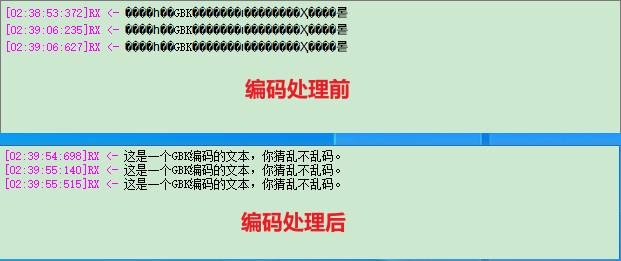
这里对接收模块的功能进行一个补充。上面说了应用程序默认编码是UTF-8,那么如果在ascii显示模式下收到的数据是GBK格式的编码就会造成显示乱码,所以需要对接收数据进行编码判断,如果是GBK编码则进行转换显示。
/*

    函   数:SerialPortReadyRead_slot

    描   述:readyRead()信号对应的数据接收槽函数

    输   入:无

    输   出:无

*/

void Widget::SerialPortReadyRead_slot()

{

    /*读取串口收到的数据*/

    QByteArray bytedata = serial->readAll();

    //......省略

    if(ui->HexDisp_checkBox->isChecked() == false)  //ascii显示

    {

        /* 判断编码 */

        QTextCodec::ConverterState state;

        //调用utf8转unicode的方式转码,获取转换结果

        QString asciidata = QTextCodec::codecForName("UTF-8")->toUnicode(bytedata.constData(),bytedata.size(),&state);

        //存在无效字符则是GBK,转码后返回

        if (state.invalidChars > 0)

        {

            asciidata = QTextCodec::codecForName("GBK")->toUnicode(bytedata);

        }

        else

        {

            asciidata = QString(bytedata);

        }

        //......省略

    }

    //......省略

}
四、总结
本章主要讲解对文件的操作。除了需要了解在QT中对文件类的常用操作之外,个人认为还有比较重要的两个知识点:1是文本编码的判断和转码处理,2是对于二进制文本的读取。
QT串口助手(五):文件操作的更多相关文章
- QT串口助手(四):数据发送
作者:zzssdd2 E-mail:zzssdd2@foxmail.com 一.前言 开发环境:Qt5.12.10 + MinGW 实现的功能 串口数据的发送 ascii字符与hex字符的相互转换 自 ...
- paip.c++ qt 目录遍历以及文件操作
paip.c++ qt 目录遍历以及文件操作 作者Attilax , EMAIL:1466519819@qq.com 来源:attilax的专栏 地址:http://blog.csdn.net/a ...
- QT串口助手(三):数据接收
作者:zzssdd2 E-mail:zzssdd2@foxmail.com 一.前言 开发环境:Qt5.12.10 + MinGW 实现的功能 串口数据的接收 ascii字符形式显示与hex字符形式显 ...
- Qt之课外实践——文件操作(简单清道夫)
说明:这个小项目是关于文件操作的.主要的功能有:重复文件的查找(根据文件的大小),说白了,就是讲大小相同的文件在一起显示出来,供用户自由的选择删除.这个360云盘里的文件去重还差的很远.还有空文件夹的 ...
- python之路(五)-文件操作
文件操作无非两个,即:读.写 python 2.x: 文件句柄 = file('文件路径', '模式') python3.x: 文件句柄 = open('文件路径', '模式') 打开文件的模式有: ...
- python成长之路五-文件操作
1,文件操作 f = open("D:\种子.txt",encoding="utf-8",mode="r") # 打开一个种子.txt文件, ...
- python高级 之(五) --- 文件操作
文件操作 """ 在程序中操作的文件内容: 1. 读取文件中的内容 2. 向文件中写入内容 首先: 在程序中与文件建立一个通道,通过通道操作文件指针,达到所要的结果 向文 ...
- 4.关于QT中的QFile文件操作,QBuffer,Label上添加QPixmap,QByteArray和QString之间的区别,QTextStream和QDataStream的区别,QT内存映射(
新建项目13IO 13IO.pro HEADERS += \ MyWidget.h SOURCES += \ MyWidget.cpp QT += gui widgets network CON ...
- 4.关于QT中的QFile文件操作,QBuffer,Label上加入QPixmap,QByteArray和QString之间的差别,QTextStream和QDataStream的差别,QT内存映射(
新建项目13IO 13IO.pro HEADERS += \ MyWidget.h SOURCES += \ MyWidget.cpp QT += gui widgets network CON ...
随机推荐
- Unsafe Filedownload - Pikachu
概述: 文件下载功能在很多web系统上都会出现,一般我们当点击下载链接,便会向后台发送一个下载请求,一般这个请求会包含一个需要下载的文件名称,后台在收到请求后会开始执行下载代码,将该文件名对应的文件r ...
- Android 中使用 config.gradle
各位同学大家好,当然了如果不是同学,那么大家也同好.哈哈. 大家知道config.gradle 是什么吗?我也不知道.开个完笑,其实config.gradle 就是我们为了统一gradle 中的各种配 ...
- Sgu149 Computer Network
Sgu149 Computer Network 题目描述 给你一棵N(N<=10000)个节点的树,求每个点到其他点的最大距离. 不难想到一个节点到其他点的最大距离为:max(以它为根的子树的最 ...
- 运用 pyinstaller 打包的python exe文件运行 去掉命令行窗口及其他参数汇总
运行exe文件的时候,会弹出一个dos命令窗口,这个窗口可以看到一些打印信息,如果想只运行tkinter 页面,去掉dos窗口需要在打包的时候 加上 -w 参数 pyinstaller -F XX.p ...
- 在nodejs中创建child process
目录 简介 child process 异步创建进程 同步创建进程 在nodejs中创建child process 简介 nodejs的main event loop是单线程的,nodejs本身也维护 ...
- JMeter联机负载及问题解决
主控制机:存放JMeter脚本的机器叫做主控制机 负载机:被连接并用来运行脚本的机器叫做负载机 操作步骤: 1.修改主控制机上,JMeter安装目录bin目录下的JMeter.properties文件 ...
- Swagger-UI展示接口
简单介绍API的管理工具Swagger的UI模块. 简介:swagger ui就是一个能整合到项目中让api的注释能够生成到一个网页上.能简单测试和给前端看. 第一步:添加引用 打开NuGet程序包管 ...
- etcd 与 Zookeeper、Consul 等其它 kv 组件的对比
基于etcd的分布式配置中心 etcd docs | etcd versus other key-value stores https://etcd.io/docs/v3.4.0/learning/w ...
- MySql(五)SQL优化-优化SQL语句的一般步骤
MySql(五)SQL优化-优化SQL语句的一般步骤 一.优化SQL语句的一般步骤 1.1 通过show status命令了解各种SQL的执行频率 1.2 定位执行效率较低的SQL语句 1.3 通过e ...
- jenkins 简介和简单操作
持续集成:Continuous Intergration (CI) 持续交付:Continuous Delivery(CD) 持续部署:Continuous Deployment(CD) jenkin ...