
【Flutter 实战】自定义动画-涟漪和雷达扫描

老孟导读:此篇文章是 Flutter 动画系列文章第五篇,本文介绍2个自定义动画:涟漪和雷达扫描效果。
涟漪
实现涟漪动画效果如下:
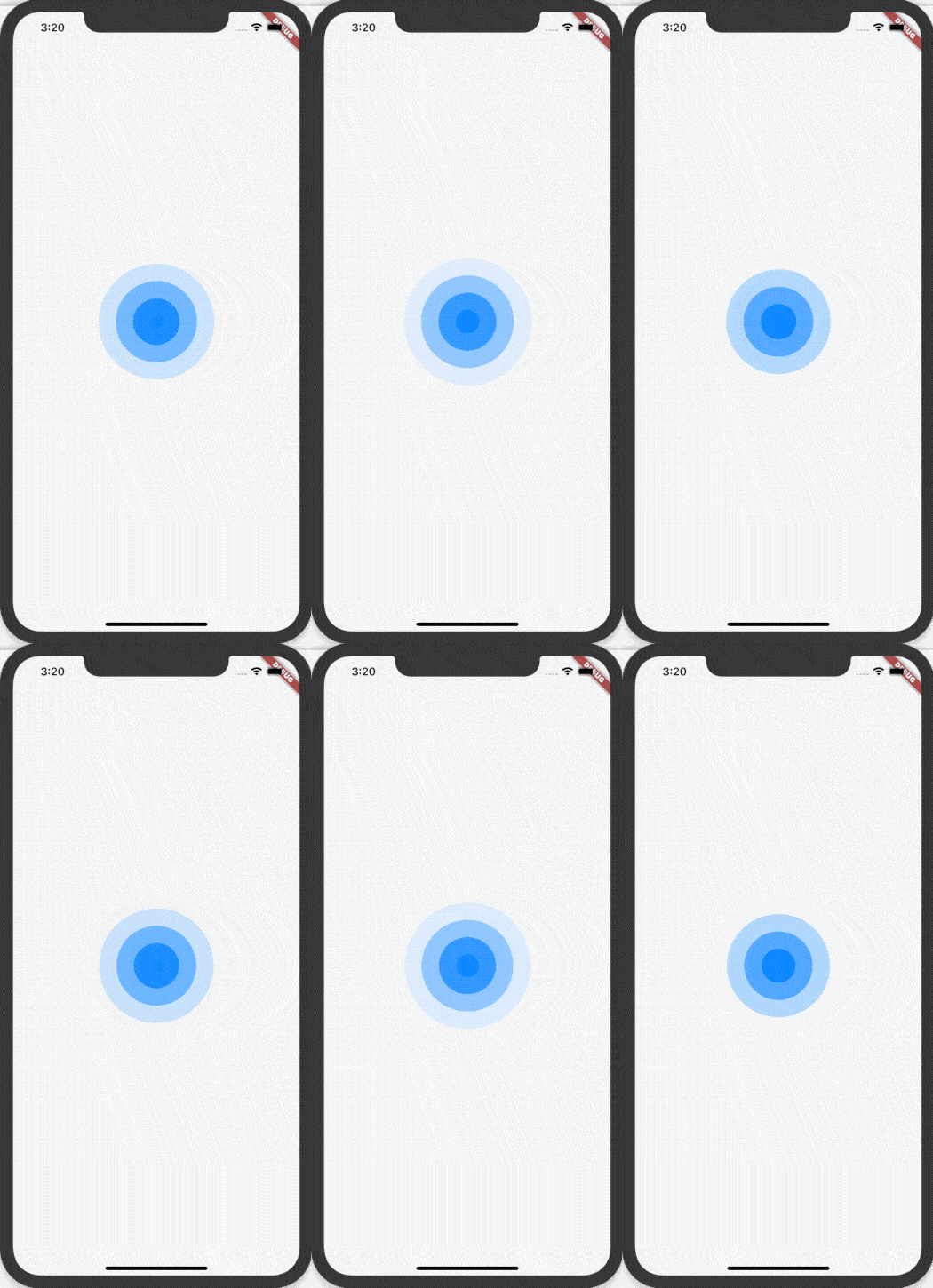
此动画通过 CustomPainter 绘制配合 AnimationController 动画控制实现,定义动画控制部分:
class WaterRipple extends StatefulWidget {

  final int count;

  final Color color;

  const WaterRipple({Key key, this.count = 3, this.color = const Color(0xFF0080ff)}) : super(key: key);

  @override

  _WaterRippleState createState() => _WaterRippleState();

}

class _WaterRippleState extends State<WaterRipple>

    with SingleTickerProviderStateMixin {

  AnimationController _controller;

  @override

  void initState() {

    _controller =

        AnimationController(vsync: this, duration: Duration(milliseconds: 2000))

          ..repeat();

    super.initState();

  }

  @override

  void dispose() {

    _controller.dispose();

    super.dispose();

  }

  @override

  Widget build(BuildContext context) {

    return AnimatedBuilder(

      animation: _controller,

      builder: (context, child) {

        return CustomPaint(

          painter: WaterRipplePainter(_controller.value,count: widget.count,color: widget.color),

        );

      },

    );

  }

}
count 和 color 分别代表水波纹的数量和颜色。
WaterRipplePainter 定义如下:
class WaterRipplePainter extends CustomPainter {

  final double progress;

  final int count;

  final Color color;

  Paint _paint = Paint()..style = PaintingStyle.fill;

  WaterRipplePainter(this.progress,

      {this.count = 3, this.color = const Color(0xFF0080ff)});

  @override

  void paint(Canvas canvas, Size size) {

    double radius = min(size.width / 2, size.height / 2);

    for (int i = count; i >= 0; i--) {

      final double opacity = (1.0 - ((i + progress) / (count + 1)));

      final Color _color = color.withOpacity(opacity);

      _paint..color = _color;

      double _radius = radius * ((i + progress) / (count + 1));

      canvas.drawCircle(

          Offset(size.width / 2, size.height / 2), _radius, _paint);

    }

  }

  @override

  bool shouldRepaint(CustomPainter oldDelegate) {

    return true;

  }

}
重点是 paint 方法,根据动画进度计算颜色的透明度和半径。
使用如下:
class WaterRipplePage extends StatelessWidget {

  @override

  Widget build(BuildContext context) {

    return Scaffold(

      body: Center(

          child: Container(height: 200, width: 200, child: WaterRipple())),

    );

  }

}
雷达扫描
实现雷达扫描效果:
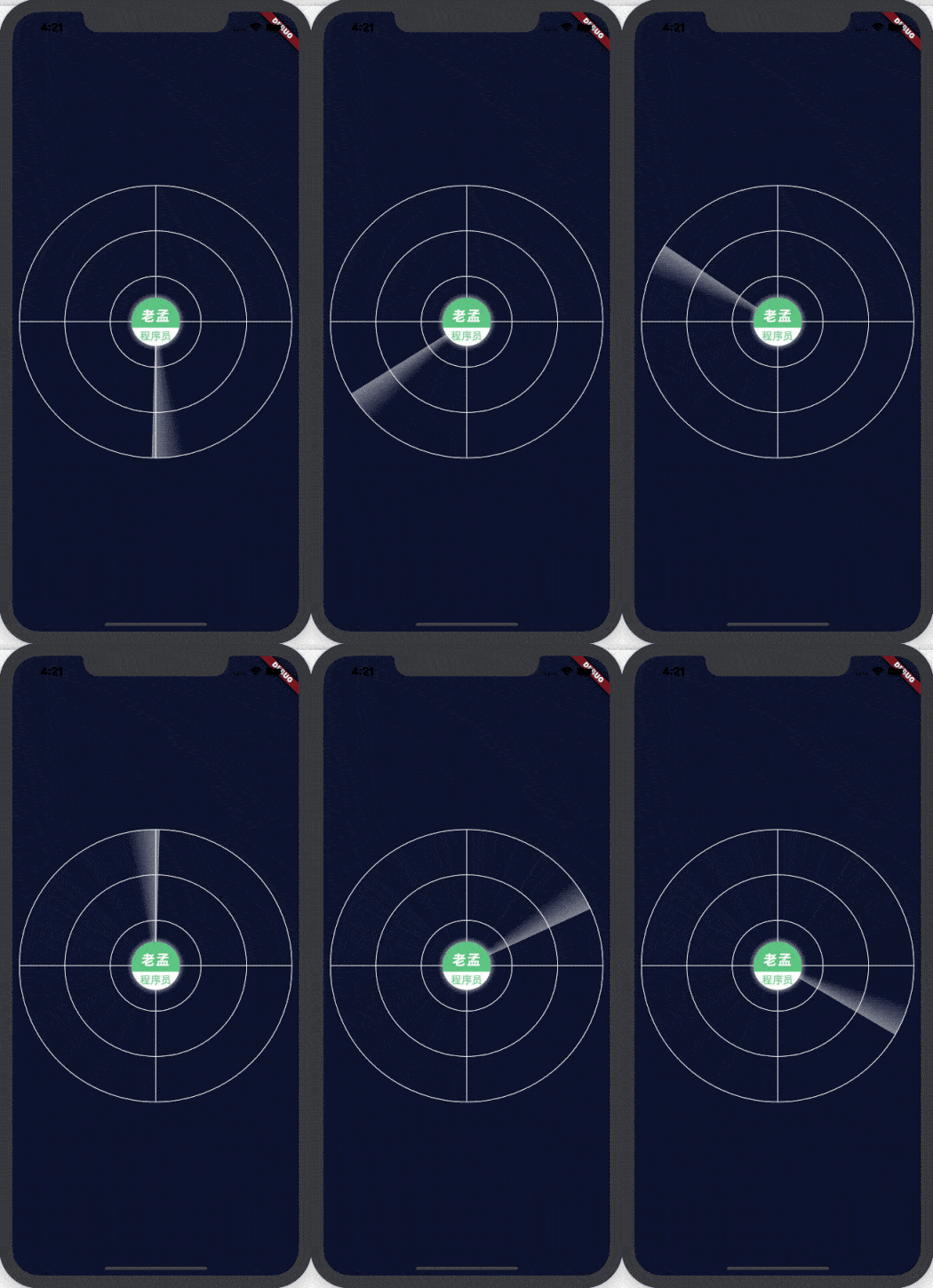
此效果分为两部分:中间的 logo 图片和扫描部分。
中间的 logo 图片
中间的 logo 图片边缘有阴影效果,像是太阳发光一样,实现:
Container(

  height: 70.0,

  width: 70.0,

  decoration: BoxDecoration(

      color: Colors.grey,

      image: DecorationImage(

          image: AssetImage('assets/images/logo.png')),

      shape: BoxShape.circle,

      boxShadow: [

        BoxShadow(

          color: Colors.white.withOpacity(.5),

          blurRadius: 5.0,

          spreadRadius: 3.0,

        ),

      ]),

)

扫描
定义雷达扫描的动画控制器:
class RadarView extends StatefulWidget {

  @override

  _RadarViewState createState() => _RadarViewState();

}

class _RadarViewState extends State<RadarView>

    with SingleTickerProviderStateMixin {

  AnimationController _controller;

  Animation<double> _animation;

  @override

  void initState() {

    _controller =

        AnimationController(vsync: this, duration: Duration(seconds: 5));

    _animation = Tween(begin: .0, end: pi * 2).animate(_controller);

    _controller.repeat();

    super.initState();

  }

  @override

  void dispose() {

    _controller.dispose();

    super.dispose();

  }

  @override

  Widget build(BuildContext context) {

    return AnimatedBuilder(

      animation: _animation,

      builder: (context, child) {

        return CustomPaint(

          painter: RadarPainter(_animation.value),

        );

      },

    );

  }

}
RadarPainter 定义如下:
class RadarPainter extends CustomPainter {

  final double angle;

  Paint _bgPaint = Paint()

    ..color = Colors.white

    ..strokeWidth = 1

    ..style = PaintingStyle.stroke;

  Paint _paint = Paint()..style = PaintingStyle.fill;

  int circleCount = 3;

  RadarPainter(this.angle);

  @override

  void paint(Canvas canvas, Size size) {

    var radius = min(size.width / 2, size.height / 2);

    canvas.drawLine(Offset(size.width / 2, size.height / 2 - radius),

        Offset(size.width / 2, size.height / 2 + radius), _bgPaint);

    canvas.drawLine(Offset(size.width / 2 - radius, size.height / 2),

        Offset(size.width / 2 + radius, size.height / 2), _bgPaint);

    for (var i = 1; i <= circleCount; ++i) {

      canvas.drawCircle(Offset(size.width / 2, size.height / 2),

          radius * i / circleCount, _bgPaint);

    }

    _paint.shader = ui.Gradient.sweep(

        Offset(size.width / 2, size.height / 2),

        [Colors.white.withOpacity(.01), Colors.white.withOpacity(.5)],

        [.0, 1.0],

        TileMode.clamp,

        .0,

        pi / 12);

    canvas.save();

    double r = sqrt(pow(size.width, 2) + pow(size.height, 2));

    double startAngle = atan(size.height / size.width);

    Point p0 = Point(r * cos(startAngle), r * sin(startAngle));

    Point px = Point(r * cos(angle + startAngle), r * sin(angle + startAngle));

    canvas.translate((p0.x - px.x) / 2, (p0.y - px.y) / 2);

    canvas.rotate(angle);

    canvas.drawArc(

        Rect.fromCircle(

            center: Offset(size.width / 2, size.height / 2), radius: radius),

        0,

        pi / 12,

        true,

        _paint);

    canvas.restore();

  }

  @override

  bool shouldRepaint(CustomPainter oldDelegate) {

    return true;

  }

}
将两者结合在一起:
class RadarPage extends StatelessWidget {

  @override

  Widget build(BuildContext context) {

    return Scaffold(

        backgroundColor: Color(0xFF0F1532),

        body: Stack(

          children: [

            Positioned.fill(

              left: 10,

              right: 10,

              child: Center(

                child: Stack(children: [

                  Positioned.fill(

                    child: RadarView(),

                  ),

                  Positioned(

                    child: Center(

                      child: Container(

                        height: 70.0,

                        width: 70.0,

                        decoration: BoxDecoration(

                            color: Colors.grey,

                            image: DecorationImage(

                                image: AssetImage('assets/images/logo.png')),

                            shape: BoxShape.circle,

                            boxShadow: [

                              BoxShadow(

                                color: Colors.white.withOpacity(.5),

                                blurRadius: 5.0,

                                spreadRadius: 3.0,

                              ),

                            ]),

                      ),

                    ),

                  ),

                ]),

              ),

            )

          ],

        ));

  }

}
交流
老孟Flutter博客地址(330个控件用法):http://laomengit.com
欢迎加入Flutter交流群(微信:laomengit)、关注公众号【老孟Flutter】:
 |
 |
【Flutter 实战】自定义动画-涟漪和雷达扫描的更多相关文章
- 【Flutter 实战】动画核心
老孟导读:动画系统是任何一个UI框架的核心功能,也是开发者学习一个UI框架的重中之重,同时也是比较难掌握的一部分,下面我们就一层一层的揭开 Flutter 动画的面纱. 任何程序的动画原理都是一样的, ...
- 【Flutter 实战】动画序列、共享动画、路由动画
老孟导读:此篇文章是 Flutter 动画系列文章第四篇,本文介绍动画序列.共享动画.路由动画. 动画序列 Flutter中组合动画使用Interval,Interval继承自Curve,用法如下: ...
- 【Flutter 实战】17篇动画系列文章带你走进自定义动画
老孟导读:Flutter 动画系列文章分为三部分:基础原理和核心概念.系统动画组件.8篇自定义动画案例,共17篇. 动画核心概念 在开发App的过程中,自定义动画必不可少,Flutter 中想要自定义 ...
- 【Flutter实战】自定义滚动条
老孟导读:[Flutter实战]系列文章地址:http://laomengit.com/guide/introduction/mobile_system.html 默认情况下,Flutter 的滚动组 ...
- 【Flutter 实战】一文学会20多个动画组件
老孟导读:此篇文章是 Flutter 动画系列文章第三篇,后续还有动画序列.过度动画.转场动画.自定义动画等. Flutter 系统提供了20多个动画组件,只要你把前面[动画核心](文末有链接)的文章 ...
- 《Flutter实战》开源电子书
<Flutter实战>开源电子书 <Flutter实战> 开源了,本书为 Flutter中文网开源电子书项目,本书系统介绍了Flutter技术的各个方面,本书属于原创书籍(并非 ...
- Android 5.0自定义动画
材料设计中的动画对用户的操作给予了反馈,并且在与应用交互时提供了持续的可见性.材料主题提供了一些按钮动画和活动过渡,Android 5.0允许你自定义动画并且可以创建新的动画: Touch Feedb ...
- python全栈开发day48-jqurey自定义动画,jQuery属性操作,jQuery的文档操作,jQuery中的ajax
一.昨日内容回顾 1.jQuery初识 1).使用jQuery而非JS的六大理由 2).jQuery对象和js对象转换 3).jQuery的两大特点 4).jQuery的入口函数三大写法 5).jQu ...
- Flutter实战】文本组件及五大案例
老孟导读:大家好,这是[Flutter实战]系列文章的第二篇,这一篇讲解文本组件,文本组件包括文本展示组件(Text和RichText)和文本输入组件(TextField),基础用法和五个案例助你快速 ...
随机推荐
- list 和 [ ] 的功能不相同
对于一个对象: list(对象) 可以进行强制转换 [对象] 不能够进行强制转换,只是在外围加上 [ ] 列表推导式中相同 2020-05-06
- Python os.rename() 方法
概述 os.rename() 方法用于命名文件或目录,从 src 到 dst,如果dst是一个存在的目录, 将抛出OSError.高佣联盟 www.cgewang.com 语法 rename()方法语 ...
- PHP tan() 函数
实例 返回不同数的正切: <?php高佣联盟 www.cgewang.comecho(tan(M_PI_4) . "<br>");echo(tan(0.50) . ...
- java开发-flyway
数据库版本管理工具 什么是数据库版本管理? 做过开发的小伙伴们都知道,实现一个需求时,一般情况下都需要设计到数据库表结构的修改.那么我们怎么能保证项目多人开发时,多个数据库环境(测试,生产环境)能够保 ...
- python7.2抛出自定义异常
pwd="123456"if len(pwd)<8: ex= Exception("密码不能低于8位数!")#自定义异常 raise ex #抛出自定义的 ...
- python2.4项目:快递计价程序
#开发一个快递计价程序3kg以内:东三省.宁夏.海南.12元:新疆.西藏20元:港澳台.国外:不接受:其他10元.超过3kg的部分:东三省.宁夏.海南每公斤10元:新疆.西藏每公斤20元:港澳台.国外 ...
- 一文说通C#中的异步编程补遗
前文写了关于C#中的异步编程.后台有无数人在讨论,很多人把异步和多线程混了. 文章在这儿:一文说通C#中的异步编程 所以,本文从体系的角度,再写一下这个异步编程. 一.C#中的异步编程演变 1. ...
- Java 程序员生产神器 IDEA 的常用快捷键、插件及设置
对于 Java 程序员来说,使用 IDEA 集成环境是最称手的.优点不多讲,用过的人都知道.IDEA 虽好,但为了充分利用 IDEA 的优势,我分享一下我常用快捷键.插件和设置. 常用快捷键 Ctrl ...
- linux常用命令(二)服务器硬件资源信息
内存:free -m 硬盘:df -h 负载:w/top cpu个数和核数:cat /proc/cpuinfo
- klassVtable与klassItable
klassVtable与klassItable类用来实现Java方法的多态,也可以叫动态绑定,是指在应用执行期间通过判断接受对象的实际类型,根据实际类型调用对应的方法.C++为了实现多态,在对象中嵌入 ...