
Main event loop
https://developer.apple.com/library/archive/documentation/General/Conceptual/Devpedia-CocoaApp/MainEventLoop.html
In the main event loop, an application continuously routes incoming events to objects for handling and, as a result of that handling, updates its appearance and state. An event loop is simply a run loop: an event-processing loop for scheduling work and coordinating the receipt of events from various input sources attached to the run loop. Every thread has access to a run loop. In all but the main thread, the run loop must be configured and run manually by your code. In Cocoa applications, the run loop for the main thread—the main event loop—is run automatically by the application object. What distinguishes the main event loop is that its primary input source receives events from the operating system that are generated by user actions—for example, tapping a view or entering text using a keyboard.
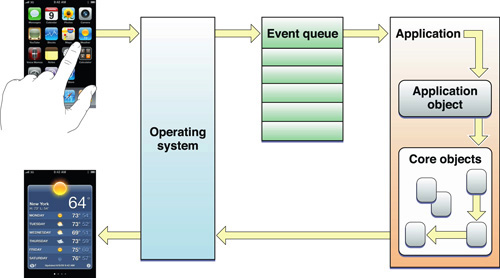
The Application Object Gets and Dispatches Events
Just after an application is launched, it sets up the infrastructure for the main event loop. It establishes a connection with those underlying system components that are responsible for the delivery of low-level user events. The application receives these events through an input source installed in the main thread’s run loop. Because the application must handle each event separately, in order of its arrival, these low-level events are placed in a first-in first-out event queue.
Once the initial user interface is on the screen, the application is thereafter driven by external events. The application object obtains the topmost object in the event queue, converts it to an event object (UIEvent on iOS, NSEvent on OS X), and dispatches it to other objects in the application for handling. When the call that dispatched the event returns, the application fetches the next object in the queue and dispatches it. It continues doing this until the application terminates.
Core Objects Respond to Events and Draw the User Interface
When an application is launched, it also sets up a core group of objects that are responsible for drawing the user interface and handling events. These core objects include windows and various kinds of views. When the application object gets an event from the event queue, it dispatches it to the window in which the user event occurred. The window sends the event to the view that is the most appropriate handler for it:
For multitouch and mouse events, the view is the one under the touch or mouse pointer.
For keyboard, motion, and other events, the view is the first responder.
If this initial view does not handle the event, it can pass it to other views in the application via the responder chain.
In handling the event, the view often initiates a series of actions that modify the appearance of the application and update the application’s state and data. When these actions have been completed, control returns to the application, which fetches the next event from the event queue.
Prerequisite Articles
Related Articles
Definitive Discussion
Event Handling Guide for iOS
Sample Code Projects
(None)
Main event loop的更多相关文章
- PYTHON ASYNCIO: FUTURE, TASK AND THE EVENT LOOP
from :http://masnun.com/2015/11/20/python-asyncio-future-task-and-the-event-loop.html Event Loop On ...
- [Javascript] Task queue & Event loop.
Javascript with Chorme v8 engine works like this : For Chorme engine, v8, it has call stack. And all ...
- 以setTimeout来聊聊Event Loop
平时的工作中,也许你会经常用到setTimeout这个方法,可是你真的了解setTimeout吗?本文想通过总结setTimeout的用法,顺便来探索javascript里面的事件执行机制. setT ...
- 浏览器与Node的事件循环(Event Loop)有何区别?
前言 本文我们将会介绍 JS 实现异步的原理,并且了解了在浏览器和 Node 中 Event Loop 其实是不相同的. 一.线程与进程 1. 概念 我们经常说 JS 是单线程执行的,指的是一个进程里 ...
- 【原】以setTimeout来聊聊Event Loop
平时的工作中,也许你会经常用到setTimeout这个方法,可是你真的了解setTimeout吗?本文想通过总结setTimeout的用法,顺便来探索javascript里面的事件执行机制. setT ...
- IDEA 运行报错 failed to create a child event loop
背景 在IDEA中写了测试代码,但是运行的时候一直提示 java.lang.IllegalStateException: failed to create a child event loop ... ...
- 事件轮询 event loop
Understanding the node.js event loop The first basic thesis of node.js is that I/O is expensive: So ...
- The Node.js Event Loop, Timers, and process.nextTick() Node.js事件循环,定时器和process.nextTick()
个人翻译 原文:https://nodejs.org/en/docs/guides/event-loop-timers-and-nexttick/ The Node.js Event Loop, Ti ...
- js的事件循环(Event Loop)
(本文从掘金小册整理) 首先介绍一下几个概念 进程与线程 相信大家经常会听到 JS 是单线程执行的,但是你是否疑惑过什么是线程? 讲到线程,那么肯定也得说一下进程.本质上来说,两个名词都是 CPU 工 ...
随机推荐
- ReentrantLock锁-CAS与阻塞
ReentrantLock锁 ReentrantLock通过原子操作和阻塞实现锁原理,一般使用lock获取锁,unlock释放锁 lock的时候可能被其他线程获得所,那么此线程会阻塞自己,关键原理底层 ...
- web基础知识,
# web基础 网上冲浪 surfing the Internet weibo.com 域名,主机名,微博服务器的地址名 当用户在地址栏输入一个URL(uniform resource,locator ...
- java斐波纳契数列
//斐波纳契数列,又称黄金分割数列,指的是这样一个数列:1.1.2.3.5.8.13.21.-- 这个数列从第三项开始,每一项都等于前两项之和. public class DiGui { public ...
- Android驱动学习-内部机制_回顾binder框架关键点
内部机制_回顾binder框架关键点server注册服务时, 对每个服务都提供不同的ptr/cookie,在驱动程序里对每个服务都构造一个binder_node, 它也含有ptr/cookie cli ...
- Spring IOC 笔记
什么是IOC与DI IOC(inversion of control) 它描述的其实是一种面向对象编程中的设计原则,用来降低代码之间的耦合度, 而DI(dependency Injection)依赖注 ...
- web攻防环境--一句话木马
任务一.基于centos7搭建dvwa web服务靶机 1.在centos7安装LAMP并启动,访问phpinfo页面 也即安装httpd.php.mysql服务. 直接进行yum安装即可,完成后检查 ...
- 使用ThreadLocal
使用ThreadLocal 阅读: 135212 多线程是Java实现多任务的基础,Thread对象代表一个线程,我们可以在代码中调用Thread.currentThread()获取当前线程.例如,打 ...
- Sqoop(四)增量导入、全量导入、减量导入
增量导入 一.说明 当在生产环境中,我们可能会定期从与业务相关的关系型数据库向Hadoop导入数据,导入数仓后进行后续离线分析.这种情况下我们不可能将所有数据重新再导入一遍,所以此时需要数据增量导入. ...
- 项目实战--idea中使用Git遇到的坑
问题 在一次代码的更新中,我按照以往的操作点,菜单中VCS下的Update Project,结果报错了,idea自动将我未提交的所有代码驻藏了stash了,全部代码还原了,心里慌了一下,去GitLab ...
- 记一次多事件绑定中自己给自己设置的坑——click,dblclick,mousedown,mousemove,mouseup
目录 项目综述 需求 问题 猜想 解决 反思 项目综述 在页面中模拟某操作系统的操作界面,提供应用窗口的最大化.最小化.还原等功能 需求 对一个应用窗口标题栏双击使其铺满整个视口,再次双击还原到原来大 ...