
requests 库和beautifulsoup库
python 爬虫和解析
库的安装:pip install requests; pip install beautifulsoup4
requests 的几个常用方法:
requests.request() #以下各方法的基础
requests.get(url,params=None,**kwargs) #获取html内容
requests.head() #获取网页头部内容
requests.post()
requests.put()
requests.patch()
requests.delete()
重点为:get()其有12个控制关键字参数 返回为response对象
r.status_code #200为正常
r.text #html内容
r.encoding 编码
r.apparent_encoding 备选编码
r.content 二进制形式返回,爬取 图片,视频,音频等的关键
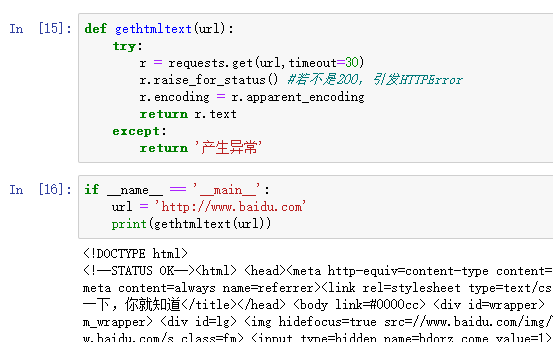
常使用try,except框架
import requests

import os

url = 'http://image.ngchina.com.cn/2018/1010/20181010031434134.jpg'

root = 'd://pics//'

path = root + url.split('/')[-1]

try:

    if not os.path.exists(root):

        os.mkdir(root)

    if not os.path.exists(path):

        r=requests.get(url)

        with open(path,'wb') as f:

            f.write(r.content)

            f.close()

            print('文件保存成功')

    else:

        print('文件已存在')

except:

    print('失败')
import requests

import os

url = 'http://mov.bn.netease.com/open-movie/nos/mp4/2016/05/16/SBM8NN8G6_shd.mp4'

root = 'd://vidio//'

path = root + url.split('/')[-1]

try:

    if not os.path.exists(root):

        os.mkdir(root)

    if not os.path.exists(path):

        r=requests.get(url)

        with open(path,'wb') as f:

            f.write(r.content)

            f.close()

            print('文件保存成功')

    else:

        print('文件已存在')

except:

    print('失败')
 1 import requests

 2 from bs4 import BeautifulSoup

 3 import bs4

 4 def gethtmltext(url):

 5     try:

 6         r = requests.get(url,timeout=30)

 7         r.raise_for_status()

 8         r.encoding=r.apparent_encoding

 9         return r.text

10     except:

11         return ''

12

13

14 def fillunivlist(ulist,html):

15     soup = BeautifulSoup(html,'html.parser')

16     for tr in soup.find('tbody').children:

17         if isinstance(tr,bs4.element.Tag):

18             tds = tr('td')

19             ulist.append([tds[0].string,tds[1].string,tds[2].string])

20

21 def printunivlist(ulist,num):

22     print('{:^10}\t{:^6}\t{:^10}'.format('排名','学校名称','总分'))

23     for i in range(num):

24         u=ulist[i]

25         print('{:^10}\t{:^6}\t{:^10}'.format(u[0],u[1],u[2]))

26

27

28 def main():

29     uinfo = []

30     url = 'http://www.zuihaodaxue.cn/zuihaodaxuepaiming2016.html'

31     html = gethtmltext(url)

32     fillunivlist(uinfo,html)

33     printunivlist(uinfo,20)

34

35 main()
查看爬虫协议在最后加上robots.txt 如:www.jd.com/robots.txt
Beautiful Soup库 #解析网页用
BeautifulSoup(text,'html.parser')
SOUP库的基本元素:
Tag 标签,最基本的信息单元,对应<>....</>
Name 标签名
attributes 标签属性:Tag.attrs
Navigablestring 标签内非属性字符串<>....</>中的字符串 格式:Tag.string
Comment 标签的注释部分
如:<p class='title'>.....</p> p标签
p.name p.attrs p.string
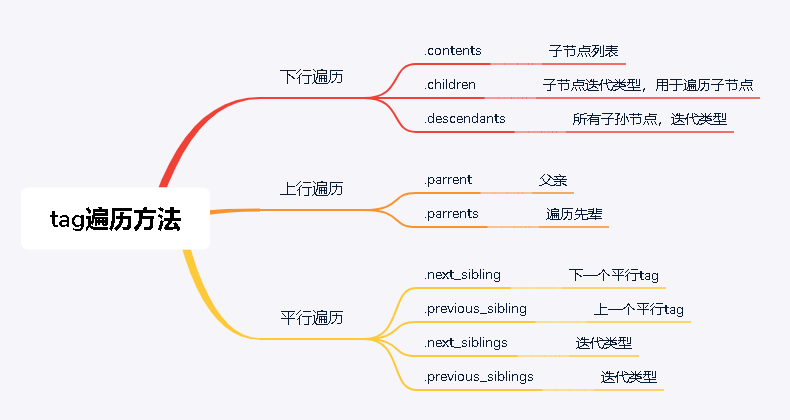
requests 库和beautifulsoup库的更多相关文章
- python爬虫学习(一):BeautifulSoup库基础及一般元素提取方法
最近在看爬虫相关的东西,一方面是兴趣,另一方面也是借学习爬虫练习python的使用,推荐一个很好的入门教程:中国大学MOOC的<python网络爬虫与信息提取>,是由北京理工的副教授嵩天老 ...
- Python:requests库、BeautifulSoup4库的基本使用(实现简单的网络爬虫)
Python:requests库.BeautifulSoup4库的基本使用(实现简单的网络爬虫) 一.requests库的基本使用 requests是python语言编写的简单易用的HTTP库,使用起 ...
- BeautifulSoup库整理
BeautifulSoup库 一.BeautifulSoup库的下载以及使用 1.下载 pip3 install beautifulsoup4 2.使用 improt bs4 二.BeautifulS ...
- 爬虫 Http请求,urllib2获取数据,第三方库requests获取数据,BeautifulSoup处理数据,使用Chrome浏览器开发者工具显示检查网页源代码,json模块的dumps,loads,dump,load方法介绍
爬虫 Http请求,urllib2获取数据,第三方库requests获取数据,BeautifulSoup处理数据,使用Chrome浏览器开发者工具显示检查网页源代码,json模块的dumps,load ...
- $python爬虫系列(2)—— requests和BeautifulSoup库的基本用法
本文主要介绍python爬虫的两大利器:requests和BeautifulSoup库的基本用法. 1. 安装requests和BeautifulSoup库 可以通过3种方式安装: easy_inst ...
- 利用python的requests和BeautifulSoup库爬取小说网站内容
1. 什么是Requests? Requests是用Python语言编写的,基于urllib3来改写的,采用Apache2 Licensed 来源协议的HTTP库. 它比urllib更加方便,可以节约 ...
- Python爬虫小白入门(三)BeautifulSoup库
# 一.前言 *** 上一篇演示了如何使用requests模块向网站发送http请求,获取到网页的HTML数据.这篇来演示如何使用BeautifulSoup模块来从HTML文本中提取我们想要的数据. ...
- 网络爬虫BeautifulSoup库的使用
使用BeautifulSoup库提取HTML页面信息 #!/usr/bin/python3 import requests from bs4 import BeautifulSoup url='htt ...
- 基于BeautifulSoup库的HTML内容的查找
一.BeautifulSoup库提供了一个检索的参数: <>.find_all(name,attrs,recursive,string,**kwargs),它返回一个列表类型,存储查找的结 ...
随机推荐
- Tengine更新安装
Tengine安装及配置 一,下载 http://tengine.taobao.org/download.html 找到下载包并且下载(Tengine-2.3.2.tar.gz) wget -c ht ...
- 一起构建Python生长土壤
环境 环境安装 1. 解释器 Python https://www.python.org/ 2. IDE Pycharm https://www.jetbrains.com/pycharm/downl ...
- Book of Shaders 03 - 学习随机与噪声生成算法
0x00 随机 我们不能预测天空中乌云的样子,因为它的纹理总是具有不可预测性.这种不可预测性叫做随机 (random). 在计算机图形学中,我们通常使用随机来模拟自然界中的噪声.如何获得一个随机值呢, ...
- c++缓冲区std::wstringbuf
参考:http://www.cplusplus.com/reference/sstream/wstringbuf/ class <sstream> std::wstringbuf type ...
- 【题解】 P2734 [USACO3.3]游戏 A Game
\(\color{purple}{Link}\) \(\text{Solution:}\) 考虑区间\([l,r]\)的最优解.显然它可以由\([l+1,r]\)或\([l,r-1]\)转移而来.至此 ...
- 099 01 Android 零基础入门 02 Java面向对象 03 综合案例(学生信息管理) 02 案例分析及实现 03 编写并测试Student类
099 01 Android 零基础入门 02 Java面向对象 03 综合案例(学生信息管理) 02 案例分析及实现 03 编写并测试Student类 本文知识点:编写并测试Subject类 说明: ...
- 最全vue的vue-amap使用高德地图插件画多边形范围
一.在vue-cli的框架下的main.js(或者main.ts)中引入高德插件,代码如下: import Vue from 'vue' import VueAMap from 'vue-amap' ...
- vue项目的elementui的form表单label的对齐方式和 el-date-picker 的长度设置
1.先按照官网的 :label-position 属性玩了一下毫无效果:发现单独使用这个属性是无效的,必须和 label-width 属性一起使用才生效: 如: <el-form :mod ...
- 最新vue项目添加水印
在utils文件夹中创建 wartermark.ts 文件(位置看自己的组件放那,这都行),内容如下: 1 "use strict"; 2 3 const setWatermark ...
- JavaScript倒计时效果
实现思路: 输入的时间减去现在的时间就是剩余的时间,但是不能拿着时分秒相减,比如05分减去25分,结果会是负的. 可以用时间戳来做,用户输入时间总的毫秒数减去现在时间的总的毫秒数,得到的就是剩余时间的 ...