
【Spring-Security】Re01 入门上手
一、所需的组件
SpringBoot项目需要的POM依赖:
<dependency>

     <groupId>org.springframework.boot</groupId>

     <artifactId>spring-boot-starter-security</artifactId>

 </dependency>

<dependency>

    <groupId>org.springframework.security</groupId>

    <artifactId>spring-security-test</artifactId>

</dependency>
具体的版本号是跟随你的Boot版本走的:
<parent>

    <groupId>org.springframework.boot</groupId>

    <artifactId>spring-boot-starter-parent</artifactId>

    <version>2.3.4.RELEASE</version>

    <relativePath/> <!-- lookup parent from repository -->

</parent>
其他常规依赖:
<dependency>

    <groupId>org.springframework.boot</groupId>

    <artifactId>spring-boot-starter-thymeleaf</artifactId>

</dependency>


<dependency>

    <groupId>org.springframework.boot</groupId>

    <artifactId>spring-boot-starter-web</artifactId>

</dependency>


<dependency>

    <groupId>org.springframework.boot</groupId>

    <artifactId>spring-boot-devtools</artifactId>

    <scope>runtime</scope>

    <optional>true</optional>

</dependency>


<dependency>

    <groupId>org.springframework.boot</groupId>

    <artifactId>spring-boot-configuration-processor</artifactId>

    <optional>true</optional>

</dependency>


<dependency>

    <groupId>org.projectlombok</groupId>

    <artifactId>lombok</artifactId>

    <optional>true</optional>

</dependency>


<dependency>

    <groupId>org.springframework.boot</groupId>

    <artifactId>spring-boot-starter-test</artifactId>

    <scope>test</scope>

    <exclusions>

        <exclusion>

            <groupId>org.junit.vintage</groupId>

            <artifactId>junit-vintage-engine</artifactId>

        </exclusion>

    </exclusions>

</dependency>
二、上手入门
在static目录下编写一个首页:
<!DOCTYPE html>

<html lang="en">

<head>

    <meta charset="UTF-8">

    <title>Project-Index</title>

</head>

<body>

    <h1>Hello Spring-Security !!!</h1>

</body>

</html>
启动项目访问项目地址:
http://locahost:8080
会发现被重定向到这个地址,并且要求登陆账号
http://localhost:8080/login
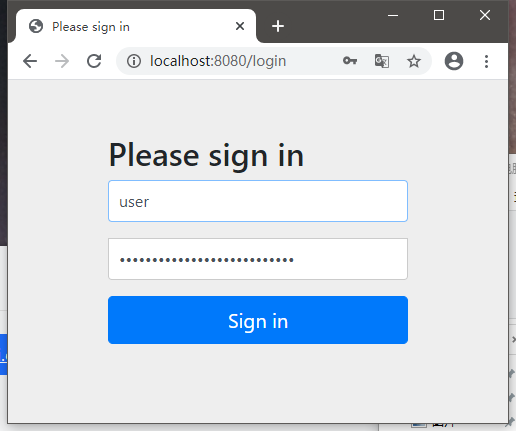
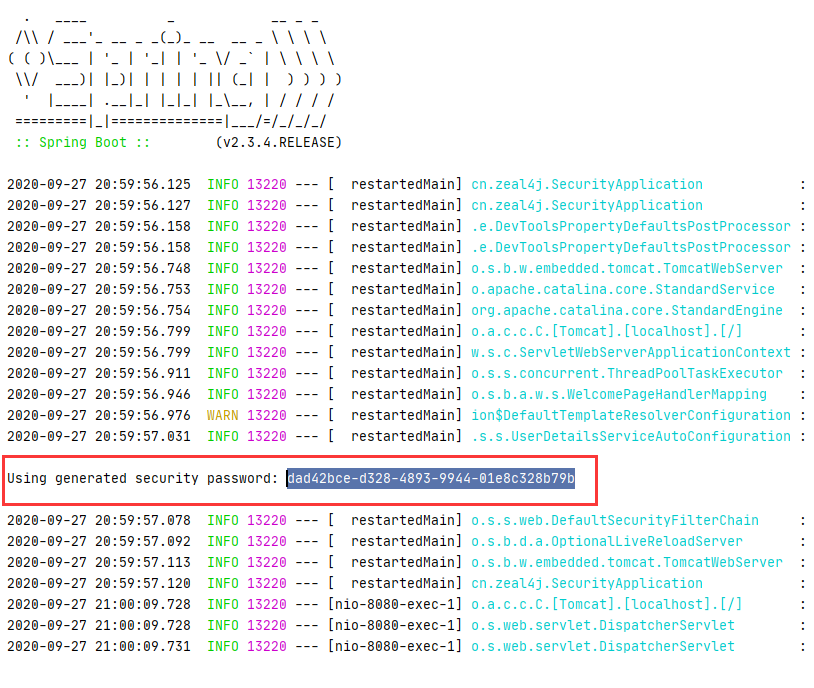
Spring-Security默认的用户是user,但是密码是由组件Spring-Security-Test随机生成的
在控制台输出可以找到:
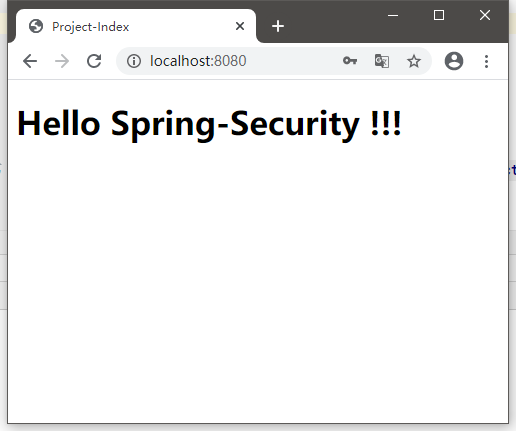
登陆成功之后,才会跳转到页面中来:
参考地址:
https://www.bilibili.com/video/BV12D4y1U7D8?p=3
三、UserDetailService接口分析
package org.springframework.security.core.userdetails;

public interface UserDetailsService {

    UserDetails loadUserByUsername(String var1) throws UsernameNotFoundException;

}
只有一个接口方法,通过用户名加载账号信息
注意,返回的是一个UserDetails类型对象,账号细节实例
再来看UserDetails接口:
package org.springframework.security.core.userdetails;

import java.io.Serializable;

import java.util.Collection;

import org.springframework.security.core.GrantedAuthority;

public interface UserDetails extends Serializable {

    Collection<? extends GrantedAuthority> getAuthorities();

    String getPassword();

    String getUsername();

    boolean isAccountNonExpired();

    boolean isAccountNonLocked();

    boolean isCredentialsNonExpired();

    boolean isEnabled();

}
该类型也是一个接口,不过多出了其他一些方法:
1、Collection<? extends GrantedAuthority> getAuthorities();

获取账户对应的所有权限的集合对象

2、String getPassword();

获取密码

3、String getUsername();

获取用户名

4、boolean isAccountNonExpired();

账户是否过期,过期的账户不可以被认证

5、boolean isAccountNonLocked();

账户状态是否为锁定,锁定的账户不可以被认证

6、boolean isCredentialsNonExpired();

凭证是否过期,凭证即密码

7、boolean isEnabled();

账户状态是否为可用
相比于Shiro来说,UserDetailsService更像Shiro的Realm
而这个UserDetails对象在ShIro中是需要我们自己来实现的,例如之前的项目中的ActivateUser。
注意上面权限集合类型,官方文档特别注释该方法返回不可以为NULL。
当然,Security也提供了对应的一些实现类:

四、密码加密 PasswordEncoder接口
package org.springframework.security.crypto.password;

public interface PasswordEncoder {

    String encode(CharSequence var1);

    boolean matches(CharSequence var1, String var2);

    default boolean upgradeEncoding(String encodedPassword) {

        return false;

    }

}
API说明:
1、String encode(CharSequence var1);

设置密码加密的方法,加密逻辑自行实现

2、matches(CharSequence var1, String var2);

匹配判断,var1 是原始密码,var2 是加密的密码

匹配逻辑自行实现

3、upgradeEncoding(String encodedPassword) {

判断是否能够二次加密密码,一般不使用,且默认false
该接口下的实现类:

官方推荐的实现类使用这个:
org.springframework.security.crypto.bcrypt.BCryptPasswordEncoder
API测试:
package cn.zeal4j;

import org.junit.jupiter.api.Test;

import org.springframework.boot.test.context.SpringBootTest;

import org.springframework.security.crypto.bcrypt.BCryptPasswordEncoder;

import org.springframework.security.crypto.password.PasswordEncoder;

@SpringBootTest

class SecurityApplicationTests {

    @Test

    void contextLoads() {

        cryptTest();

    }

    private static void cryptTest() {

        final String PASSWORD = "123456";

        PasswordEncoder passwordEncoder = new BCryptPasswordEncoder();

        String encode = passwordEncoder.encode(PASSWORD);

        System.out.println(encode);

        boolean matches = passwordEncoder.matches(PASSWORD, encode);

        System.out.println(matches);

    }

}
结果:
$2a$10$NNySuHkEHtzLHodCivAFN.FvakFpR6/tSpkgzDW4QPd8PMF5IBaza

true
【Spring-Security】Re01 入门上手的更多相关文章
- spring security 简单入门
spring security 简单入门示例 一.概述 Spring Security是一个能够为基于Spring的企业应用系统提供声明式的安全访问控制解决方案的安全框架 . 其中最主要的安全操作有两 ...
- Spring Security框架入门
1.Spring Security框架入门 1.1 Spring Security简介 Spring Security是一个能够为基于Spring的企业应用系统提供声明式的安全访问控制解决方案的安全框 ...
- springboot集成spring security安全框架入门篇
一. :spring security的简介 Spring Security是一个能够为基于Spring的企业应用系统提供声明式的安全访问控制解决方案的安全框架.它提供了一组可以在Spring应用上下 ...
- Spring Boot中使用 Spring Security 构建权限系统
Spring Security是一个能够为基于Spring的企业应用系统提供声明式的安全访问控制解决方案的安全框架.它提供了一组可以在Spring应用上下文中配置的Bean,为应用系统提供声明式的安全 ...
- Spring Security(一):官网向导翻译
原文出自 https://spring.io/guides/topicals/spring-security-architecture Spring Security Architecture ...
- SpringBoot安全篇Ⅵ --- 整合Spring Security
知识储备: 关于SpringSecurity的详细学习可以查看SpringSecurity的官方文档. Spring Security概览 应用程序的两个主要区域是"认证"和&qu ...
- [转]Spring Security架构
作者:before31原文:https://my.oschina.net/xuezi/blog/3126351 本指南是Spring Security的入门,它提供了对该框架的设计和基本构建的见解.我 ...
- Spring Security 入门(1-1)Spring Security是什么?
1.Spring Security是什么? Spring Security 是一个安全框架,前身是 Acegi Security , 能够为 Spring企业应用系统提供声明式的安全访问控制. Spr ...
- Spring Security 入门
一.Spring Security简介 Spring Security是一个能够为基于Spring的企业应用系统提供声明式的安全访问控制解决方案的安全框架.它提供了一组可以在Spring应用上下文中配 ...
随机推荐
- [Abp]Abp 新手入门随记
项目结构说明 *.Application 应用服务实现 *.Application.Contracts 包含DTO及应用服务接口 *.DbMigrator 数据迁移项目 开发和生产环境迁移数据库架构和 ...
- 你知道 react-color 的实现原理吗
一.前言 ReactColor 是一个优秀的 React 颜色选择器组件,官方给了多种布局供开发者选择. 笔者常用的主题为 Sketch,这种主题涵盖了颜色面板.推荐色块.RGB颜色输入等功能,比较完 ...
- 用python+sklearn(机器学习)实现天气预报 准备
用python+sklearn机器学习实现天气预报 准备 项目地址 系列教程 0.流程介绍 1. 环境搭建 a.python b.涉及到的机器学习相关库 sklearn panda seaborn j ...
- thinkphp redis实现文章点赞功能并同步入mysql
<?php namespace app\common\controller; use think\App; use think\facade\Cache; use think\facade\Db ...
- oracle数据库psu升级(本实验是将10.2.0.3.12升级到10.2.0.3.15)
psu升级(本实验是将10.2.0.3.12升级到10.2.0.3.15) 一.解压安装包自定义存放路径为/home/oracle/yjb/psu/10.2.0.3.15cd /home/oracle ...
- 谈谈你不知道的gist
1.Gist是什么关于Gist的详细介绍,请阅读官方文档About gists,下面只简略介绍部分功能: Gist是一种与其他人共享代码片段和粘贴的简单方法. 当您需要与同事或朋友共享示例代码或技术时 ...
- 修改hosts文件后不生效,该怎么办
对于web开发来说,经常需要修改hosts文件,用来将域名与ip对应匹配.但是有时候发现hosts文件明明已经改了,但就是不生效,页面还会跳到某个丧心病狂的私人小站.hosts文件不生效有很多种原因, ...
- webpack知识点整理
作用域 es6里模块化的写法 会存在的问题,变量.方法名字雷同,外部文件调用的时候出现问题 如 a.js里 var a='susan' b.js里 var a='jack' 问题解决方案,添加包裹 a ...
- leetcode 470. 用 Rand7() 实现 Rand10() (数学,优化策略)
题目链接 https://leetcode-cn.com/problems/implement-rand10-using-rand7/ 题意: 给定一个rand7()的生成器,求解如何产生一个rand ...
- Spring Boot Scheduled定时任务特性
SpringBoot中的Scheduled定时任务是Spring Boot中非常常用的特性,用来执行一些比如日切或者日终对账这种定时任务 下面说说使用时要注意的Scheduled的几个特性 Sched ...