
pythonanywhere笔记
https://www.pythonanywhere.com
Deploying an existing Django project on PythonAnywhere
Deploying a Django project on PythonAnywhere is a lot like running a Django project on your own PC. You'll use a virtualenv, just like you probably do on your own PC, you'll have a copy of your code on PythonAnywhere which you can edit and browse and commit to version control.
The main thing that's different is that, instead of using the Django dev server with manage.py runserver and viewing your site on localhost, you'll create what we call a Web app via the Web tab in our UI, and then configure it with a WSGI file whose job is simply to import your Django project.
And then your site will be live on the real, public Internet. woo!
Here's an overview of the steps involved.
- Upload your code to PythonAnywhere
- Set up a virtualenv and install Django and any other requirements
- Set up your web app using manual config and your WSGI file.
- Add any other setup (static files, environment variables etc)
Uploading your code to PythonAnywhere
Assuming your code is already on a code sharing site like GitHub or Bitbucket, you can just clone it from a Bash Console:
# for example

$ git clone https://github.com/myusername/myproject.git
That's the solution we recommend, but there are a few different methods documented on the Uploading code page,
Create a virtualenv and install Django and any other requirements
In your Bash console, create a virtualenv, naming it after your project, and choosing the version of Python you want to use:
$ mkvirtualenv --python=/usr/bin/python3.4 mysite-virtualenv

(mysite-virtualenv)$ pip install django

# or, if you have a requirements.txt:

(mysite-virtualenv)$ pip install -r requirements.txt
Warning: Django may take a long time to install. PythonAnywhere has very fast internet, but the filesystem access can be slow, and Django creates a lot of small files during its installation. Thankfully you only have to do it once!
TIP: if you see an error saying mkvirtualenv: command not found, check out InstallingVirtualenvWrapper.
Setting up your Web app and WSGI file
At this point, you need to be armed with 3 pieces of information:
- The path to your Django project's top folder -- the folder that contains "manage.py", eg /home/myusername/mysite
- The name of your project (that's the name of the folder that contains your settings.py), eg mysite
- The name of your virtualenv, eg mysite-virtualenv
Create a Web app with Manual Config
Head over to the Web tab and create a new web app, choosing the "Manual Configuration" option and the right version of Python (the same one you used to create your virtualenv).
Enter your virtualenv name
Once that's done, enter the name of your virtualenv in the Virtualenv section on the web tab and click OK. You can just use its short name "mysite-virtualenv", and it will automatically complete to its full path in /home/username/.virtualenvs.
Edit your WSGI file
One thing that's important here: your Django project (if you're using a recent version of Django) will have a file inside it called wsgi.py. This is not the one you need to change to set things up on PythonAnywhere -- the system here ignores that file.
Instead, the WSGI file to change is the one that has a link inside the "Code" section of the Web tab -- it will have a name something like/var/www/yourusername_pythonanywhere_com_wsgi.py or /var/www/www_yourdomain_com_wsgi.py.
Click on the WSGI file link, and it will take you to an editor where you can change it.
Delete everything except the Django section and then uncomment that section. Your WSGI file should look something like this:
# +++++++++++ DJANGO +++++++++++

# To use your own Django app use code like this:

import os

import sys

# assuming your Django settings file is at '/home/myusername/mysite/mysite/settings.py'

path = '/home/myusername/mysite'

if path not in sys.path:

    sys.path.append(path)

os.environ['DJANGO_SETTINGS_MODULE'] = 'mysite.settings'

## Uncomment the lines below depending on your Django version

###### then, for Django >=1.5:

from django.core.wsgi import get_wsgi_application

application = get_wsgi_application()

###### or, for older Django <=1.4

#import django.core.handlers.wsgi

#application = django.core.handlers.wsgi.WSGIHandler()
- Be sure to substitute the correct path to your project, the folder that contains manage.py, which you noted above.
- Don't forget to substitute in your own username too!
- Also make sure you put the correct value for
DJANGO_SETTINGS_MODULE. - This guide assumes you're using a recent version of Django, so leave the old
wsgi.WSGIHandler()code commented out, or better still, delete it.
Save the file, then go and hit the Reload button for your domain. (You'll find one at the top right of the wsgi file editor, or you can go back to the main web tab)
Database setup
Using MySQL
To start using MySQL, you'll need to go to the MySQL tab on your dashboard, and set up a password. You'll also find the connection settings (host name, username) on that tab, as well as the ability to create new databases.
You can start a new MySQL console to access your databases from this tab too, or alternatively you can open a MySQL shell with the following command from a bash console or ssh session:
mysql -u USERNAME -h HOSTNAME -p
The USERNAME is the username you use to log in to PythonAnywhere and the HOSTNAME is on your Databases tab. It will prompt you for a password -- use the one you entered on the Databases tab.
Accessing MySQL from Python
The appropriate libraries are installed for all versions of Python that we support, so if you're not using a virtualenv, to access a MySQL database just import MySQLdb.
If you are using a virtualenv, you'll need to install the correct package yourself. Start a bash console inside the virtualenv, then:
For Python 2.7
pip install mysql-python
For Python 3.x
pip install mysqlclient
MySQL with Django
To configure Django to access a MySQL database on PythonAnywhere, you need to do this in your settings file:
DATABASES = {

    'default': {

        'ENGINE': 'django.db.backends.mysql',

        'NAME': '<your_username>$<your_database_name>',

        'USER': '<your_username>',

        'PASSWORD': '<your_mysql_password>',

        'HOST': '<your_mysql_hostname>',

    }

}
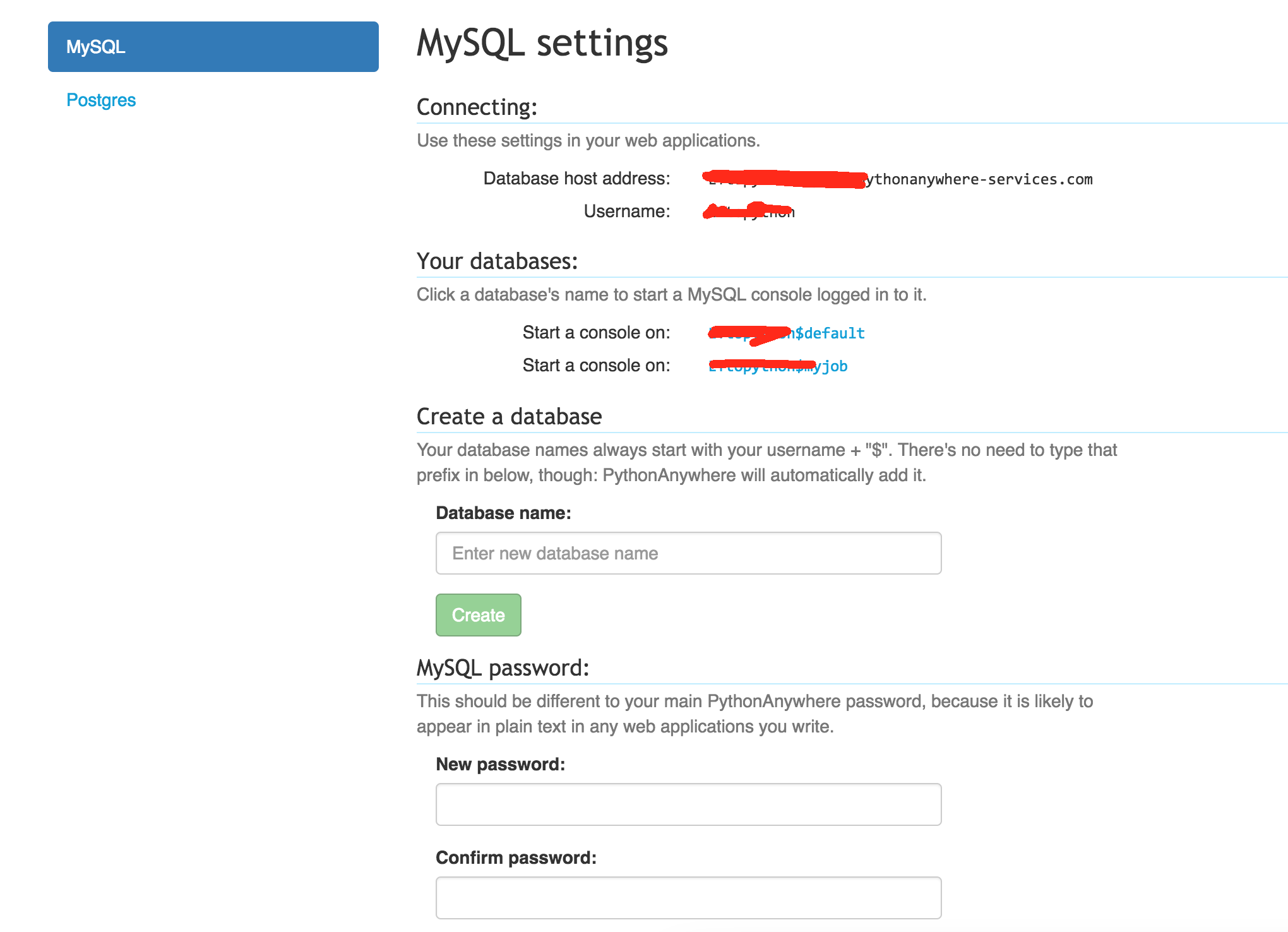
Again, you can get the username and hostname details from the "Databases" tab.
pythonanywhere笔记的更多相关文章
- python3.4学习笔记(七) 学习网站博客推荐
python3.4学习笔记(七) 学习网站博客推荐 深入 Python 3http://sebug.net/paper/books/dive-into-python3/<深入 Python 3& ...
- git-简单流程(学习笔记)
这是阅读廖雪峰的官方网站的笔记,用于自己以后回看 1.进入项目文件夹 初始化一个Git仓库,使用git init命令. 添加文件到Git仓库,分两步: 第一步,使用命令git add <file ...
- js学习笔记:webpack基础入门(一)
之前听说过webpack,今天想正式的接触一下,先跟着webpack的官方用户指南走: 在这里有: 如何安装webpack 如何使用webpack 如何使用loader 如何使用webpack的开发者 ...
- SQL Server技术内幕笔记合集
SQL Server技术内幕笔记合集 发这一篇文章主要是方便大家找到我的笔记入口,方便大家o(∩_∩)o Microsoft SQL Server 6.5 技术内幕 笔记http://www.cnbl ...
- PHP-自定义模板-学习笔记
1. 开始 这几天,看了李炎恢老师的<PHP第二季度视频>中的“章节7:创建TPL自定义模板”,做一个学习笔记,通过绘制架构图.UML类图和思维导图,来对加深理解. 2. 整体架构图 ...
- PHP-会员登录与注册例子解析-学习笔记
1.开始 最近开始学习李炎恢老师的<PHP第二季度视频>中的“章节5:使用OOP注册会员”,做一个学习笔记,通过绘制基本页面流程和UML类图,来对加深理解. 2.基本页面流程 3.通过UM ...
- NET Core-学习笔记(三)
这里将要和大家分享的是学习总结第三篇:首先感慨一下这周跟随netcore官网学习是遇到的一些问题: a.官网的英文版教程使用的部分nuget包和我当时安装的最新包版本不一致,所以没法按照教材上给出的列 ...
- springMVC学习笔记--知识点总结1
以下是学习springmvc框架时的笔记整理: 结果跳转方式 1.设置ModelAndView,根据view的名称,和视图渲染器跳转到指定的页面. 比如jsp的视图渲染器是如下配置的: <!-- ...
- 读书笔记汇总 - SQL必知必会(第4版)
本系列记录并分享学习SQL的过程,主要内容为SQL的基础概念及练习过程. 书目信息 中文名:<SQL必知必会(第4版)> 英文名:<Sams Teach Yourself SQL i ...
随机推荐
- ubuntu 设置计划任务
非常简便: crontab -e 以下是我的执行过程,输入命令后,会让我选择一个编辑器,我选的是2,因为后边写着easiest,最简单的. liuyx@myubuntu:/$ crontab -e n ...
- 【PHP】在目标字符串指定位置插入字符串
PHP如何在指定位置插入相关字符串,例子:123456789变为1_23_456789插入"_"到指定的位置! (可以用作换行或者其他处理) 插入示例,具体思路在代码中有注释: & ...
- int.TryParse非预期执行引发的思考 ASP.NET -- WebForm -- 给图片添加水印标记 Windows -- 使用批处理文件.bat删除旧文件
int.TryParse非预期执行引发的思考 问题出现 这天在写一个页面,想谨慎些就用了int.TryParse,结果出问题了. 代码如下: Copy int id = 1000; //Reque ...
- 火狐浏览器(firefox)中js要注意的问题
1.出现错误调用error方法或者ajax请求了多次,那么极有可能是异步请求的原因. 添加 async : false , -> async. 默认是 true,即为异步方式,$.aja ...
- GOF对Builder模式的定义(转载)
(1)意图 将一个复杂对象的构建与它的表示分离,使得同样的构建过程可以创建不同的表示. (2)适用性 1. 当创建复杂对象的算法应该独立于该对象的组成部分以及他们的装配方式:2. 当构造过程必须允许构 ...
- Sql 常用的语句实例与代码
在学习SQL的时候,本来预计花三天的时候掌握MS SQL这些基础,现在争取提前一天看完.总结沉底下来,其实也没有多少东西: 1.程序初始化前,先连接数据库 MFC程序中添加记录的代码: [cpp] v ...
- linux 下面压缩,解压.rar文件以及rar,unrar实例
http://www.rarlab.com/download.htm [root@bass src]# wget http://www.rarlab.com/rar/rarlinux-x64-5.4. ...
- CGameMainScene类
#ifndef __GAMEMAIN_SCENE_H__ #define __GAMEMAIN_SCENE_H__ #include "cocos2d.h" #include &q ...
- Django教程:[33]从数据库生成模型
在使用django做网站的时候,有时候我们的数据库来自一个已有的数据库,如何整合这个数据库呢? django提供了方便的方法来整合已有数据库,下面我们看看具体的方法: 1.先来设置数据库:在网站文件夹 ...
- jquery 查找元素
/************ 查找父元素 *************/ //closest()方法 $("#mytd1").bind("click",functi ...