
html学习-DOM操作
1.dom介绍
文档对象模型(Document Object Model,DOM)是一种用于HTML和XML文档的编程接口。它给文档提供了一种结构化的表示方法,可以改变文档的内容和呈现方式。我们最为关心的是,DOM把网页和脚本以及其他的编程语言联系了起来。DOM属于浏览器,而不是JavaScript语言规范里的规定的核心内容。

1.1dom元素查找
节点父、子和同胞
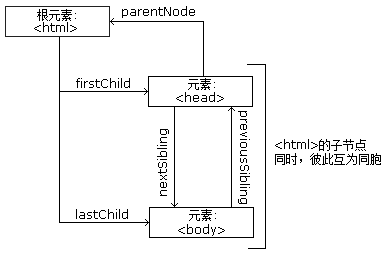
节点树中的节点彼此拥有层级关系。
父(parent)、子(child)和同胞(sibling)等术语用于描述这些关系。父节点拥有子节点。同级的子节点被称为同胞(兄弟或姐妹)。
- 在节点树中,顶端节点被称为根(root)
- 每个节点都有父节点、除了根(它没有父节点)
- 一个节点可拥有任意数量的子
- 同胞是拥有相同父节点的节点
下面的图片展示了节点树的一部分,以及节点之间的关系:
1.1.1直接查找
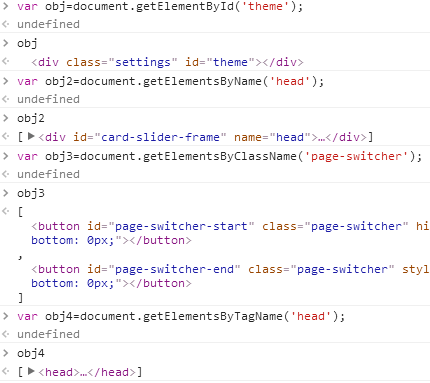
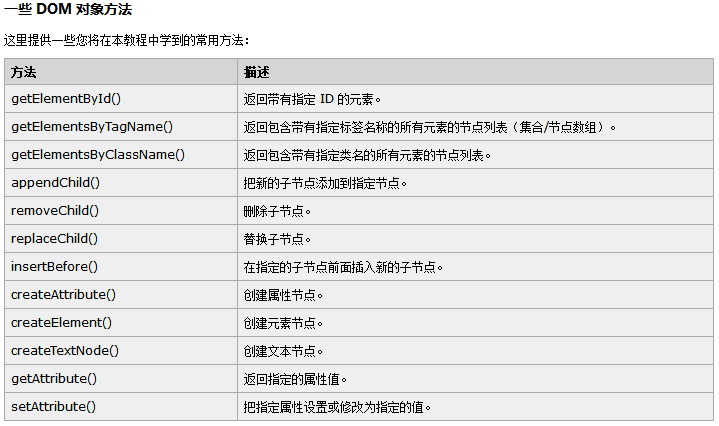
document.getElementById             //根据ID获取一个标签

document.getElementsByName         // 根据name属性获取标签集合

document.getElementsByClassName    // 根据class属性获取标签集合

document.getElementsByTagName       //根据标签名获取标签集合
1.1.2间接查找
parentNode          // 父节点

childNodes          // 所有子节点

firstChild          // 第一个子节点

lastChild           // 最后一个子节点

nextSibling         // 下一个兄弟节点

previousSibling     // 上一个兄弟节点

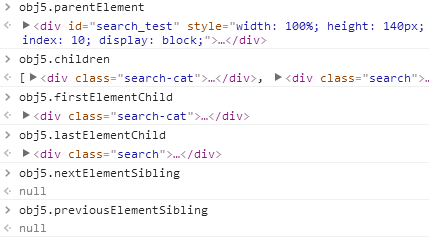
parentElement           // 父节点标签元素

children                // 所有子标签

firstElementChild       // 第一个子标签元素

lastElementChild        // 最后一个子标签元素

nextElementtSibling     // 下一个兄弟标签元素

previousElementSibling  // 上一个兄弟标签元素
实例:

2.dom操作
2.1dom内容操作
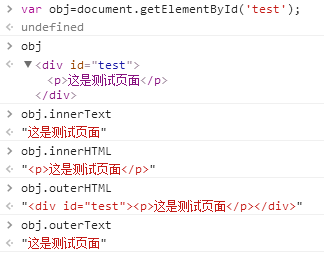
innerText   //文本

outerText

innerHTML   //HTML内容

innerText

value //值

<!DOCTYPE html>

<html lang="en">

<head>

    <meta charset="UTF-8">

    <!--<script src="jquery-3.1.1.js"></script>-->

    <title>Title</title>

</head>

<body style="float: right">

<input type="button" value="全选" onclick = "selectAll();"/>

<input type="button" value="取消" onclick = "cancelAll();"/>

<input type="button" value="反选" onclick = "ReverseAll();"/><br>

<table border="1" style="float: right">

    <thead>

    <tr>

        <th>操作</th>

        <th>ip</th>

        <th>端口</th>

    </tr>

    </thead>

    <tbody id="info">

    <tr>

        <td><input type="checkbox" /></td>

        <td>10.1.1.1</td>

        <td>81</td>

    </tr>

    <tr>

        <td><input type="checkbox" /></td>

        <td>10.1.1.2</td>

        <td>82</td>

    </tr>

    <tr>

        <td><input type="checkbox" /></td>

        <td>10.1.1.3</td>

        <td>83</td>

    </tr>

    </tbody>

</table>

</body>

    <script>

        function selectAll() {

//            找到顶节点

            var mytbody = document.getElementById('info');

//            找到子节点

            var mytrs = mytbody.children;

            for (var i = 0; i < mytrs.length; i++) {

//                循环找到目标标签

                var myinput = mytrs[i].children[0].children[0];

//                设置标签特有属性

                myinput.checked = true;

            }

        }

        function cancelAll() {

            var mytbody = document.getElementById('info');

            var mytrs = mytbody.children;

            for (var i = 0; i < mytrs.length; i++) {

                var myinput = mytrs[i].children[0].children[0];

                myinput.checked = false;

            }

        }

        function ReverseAll() {

            var mytbody = document.getElementById('info');

            var mytrs = mytbody.children;

            for (var i = 0; i < mytrs.length; i++) {

                var myinput = mytrs[i].children[0].children[0];

//                如果标签属性为真

                if(myinput.checked){

//                    去除相应属性

                    myinput.checked = false;

                }else {

//                    设置相应属性

                    myinput.checked = true;

                }

            }

        }

    </script>

</html>
js绑定事件-全选反选
2.2dom-calss操作
className                // 获取所有类名

classList.remove(cls)    // 删除指定类

classList.add(cls)       // 添加类


2.3标签操作
2.3.1创建标签
// 方式一

var tag = document.createElement('a')

tag.innerText = "wupeiqi"

tag.className = "c1"

tag.href = "http://www.cnblogs.com/wupeiqi"

// 方式二

var tag = "<a class='c1' href='http://www.cnblogs.com/wupeiqi'>wupeiqi</a>"
2.3.2操作标签
// 方式一

var obj = "<input type='text' />";

xxx.insertAdjacentHTML("beforeEnd",obj);

xxx.insertAdjacentElement('afterBegin',document.createElement('p'))

//注意:第一个参数只能是'beforeBegin'、 'afterBegin'、 'beforeEnd'、 'afterEnd'

// 方式二

var tag = document.createElement('a')

xxx.appendChild(tag)

xxx.insertBefore(tag,xxx[1])
2.3.3样式操作
var obj = document.getElementById('i1')

obj.style.fontSize = "32px";

obj.style.backgroundColor = "red";
<input onfocus="Focus(this);" onblur="Blur(this);" id="search" value="请输入关键字" style="color: gray;" />

    <script>

        function Focus(ths){

            ths.style.color = "black";

            if(ths.value == '请输入关键字' || ths.value.trim() == ""){

                ths.value = "";

            }

        }

        function Blur(ths){

            if(ths.value.trim() == ""){

                ths.value = '请输入关键字';

                ths.style.color = 'gray';

            }else{

                ths.style.color = "black";

            }

        }

    </script>
Deom
2.3.4位置操作
总文档高度

document.documentElement.offsetHeight

当前文档占屏幕高度

document.documentElement.clientHeight

自身高度

tag.offsetHeight

距离上级定位高度

tag.offsetTop

父定位标签

tag.offsetParent

滚动高度

tag.scrollTop

/*

    clientHeight -> 可见区域:height + padding

    clientTop    -> border高度

    offsetHeight -> 可见区域:height + padding + border

    offsetTop    -> 上级定位标签的高度

    scrollHeight -> 全文高:height + padding

    scrollTop    -> 滚动高度

    特别的:

        document.documentElement代指文档根节点

*/
<!DOCTYPE html>

<html>

<head lang="en">

    <meta charset="UTF-8">

    <title></title>

</head>

<body style="margin: 0;">

    <div style="height: 900px;">

    </div>

    <div style="padding: 10px;">

        <div id="i1" style="height:190px;padding: 2px;border: 1px solid red;margin: 8px;">

                <p>asdf</p>

                <p>asdf</p>

                <p>asdf</p>

                <p>asdf</p>

                <p>asdf</p>

        </div>

    </div>

    <script>

        var i1 = document.getElementById('i1');

        console.log(i1.clientHeight); // 可见区域:height + padding

        console.log(i1.clientTop);    // border高度

        console.log('=====');

        console.log(i1.offsetHeight); // 可见区域:height + padding + border

        console.log(i1.offsetTop);    // 上级定位标签的高度

        console.log('=====');

        console.log(i1.scrollHeight);   //全文高:height + padding

        console.log(i1.scrollTop);      // 滚动高度

        console.log('=====');

    </script>

</body>

</html>
Deom
<!DOCTYPE html>

<html>

<head lang="en">

    <meta charset="UTF-8">

    <title></title>

</head>

<style>

    body{

        margin: 0px;

    }

    img {

        border: 0;

    }

    ul{

        padding: 0;

        margin: 0;

        list-style: none;

    }

    .clearfix:after {

        content: ".";

        display: block;

        height: 0;

        clear: both;

        visibility: hidden;

    }

    .wrap{

        width: 980px;

        margin: 0 auto;

    }

    .pg-header{

        background-color: #303a40;

        -webkit-box-shadow: 0 2px 5px rgba(0,0,0,.2);

        -moz-box-shadow: 0 2px 5px rgba(0,0,0,.2);

        box-shadow: 0 2px 5px rgba(0,0,0,.2);

    }

    .pg-header .logo{

        float: left;

        padding:5px 10px 5px 0px;

    }

    .pg-header .logo img{

        vertical-align: middle;

        width: 110px;

        height: 40px;

    }

    .pg-header .nav{

        line-height: 50px;

    }

    .pg-header .nav ul li{

        float: left;

    }

    .pg-header .nav ul li a{

        display: block;

        color: #ccc;

        padding: 0 20px;

        text-decoration: none;

        font-size: 14px;

    }

    .pg-header .nav ul li a:hover{

        color: #fff;

        background-color: #425a66;

    }

    .pg-body{

    }

    .pg-body .catalog{

        position: absolute;

        top:60px;

        width: 200px;

        background-color: #fafafa;

        bottom: 0px;

    }

    .pg-body .catalog.fixed{

        position: fixed;

        top:10px;

    }

    .pg-body .catalog .catalog-item.active{

        color: #fff;

        background-color: #425a66;

    }

    .pg-body .content{

        position: absolute;

        top:60px;

        width: 700px;

        margin-left: 210px;

        background-color: #fafafa;

        overflow: auto;

    }

    .pg-body .content .section{

        height: 500px;

    }

</style>

<body onscroll="ScrollEvent();">

<div class="pg-header">

    <div class="wrap clearfix">

        <div class="logo">

            <a href="#">

                <img src="http://core.pc.lietou-static.com/revs/images/common/logo_7012c4a4.pn">

            </a>

        </div>

        <div class="nav">

            <ul>

                <li>

                    <a  href="#">首页</a>

                </li>

                <li>

                    <a  href="#">功能一</a>

                </li>

                <li>

                    <a  href="#">功能二</a>

                </li>

            </ul>

        </div>

    </div>

</div>

<div class="pg-body">

    <div class="wrap">

        <div class="catalog">

            <div class="catalog-item" auto-to="function1"><a>第1张</a></div>

            <div class="catalog-item" auto-to="function2"><a>第2张</a></div>

            <div class="catalog-item" auto-to="function3"><a>第3张</a></div>

        </div>

        <div class="content">

            <div menu="function1" class="section">

                <h1>第一章</h1>

            </div>

            <div menu="function2" class="section">

                <h1>第二章</h1>

            </div>

            <div menu="function3" class="section">

                <h1>第三章</h1>

            </div>

        </div>

    </div>

</div>

    <script>

        function ScrollEvent(){

            var bodyScrollTop = document.body.scrollTop;

            if(bodyScrollTop>50){

                document.getElementsByClassName('catalog')[0].classList.add('fixed');

            }else{

                document.getElementsByClassName('catalog')[0].classList.remove('fixed');

            }

        }

    </script>

</body>

</html>
Demo-滚动固定
<!DOCTYPE html>

<html>

<head lang="en">

    <meta charset="UTF-8">

    <title></title>

</head>

<style>

    body{

        margin: 0px;

    }

    img {

        border: 0;

    }

    ul{

        padding: 0;

        margin: 0;

        list-style: none;

    }

    h1{

        padding: 0;

        margin: 0;

    }

    .clearfix:after {

        content: ".";

        display: block;

        height: 0;

        clear: both;

        visibility: hidden;

    }

    .wrap{

        width: 980px;

        margin: 0 auto;

    }

    .pg-header{

        background-color: #303a40;

        -webkit-box-shadow: 0 2px 5px rgba(0,0,0,.2);

        -moz-box-shadow: 0 2px 5px rgba(0,0,0,.2);

        box-shadow: 0 2px 5px rgba(0,0,0,.2);

    }

    .pg-header .logo{

        float: left;

        padding:5px 10px 5px 0px;

    }

    .pg-header .logo img{

        vertical-align: middle;

        width: 110px;

        height: 40px;

    }

    .pg-header .nav{

        line-height: 50px;

    }

    .pg-header .nav ul li{

        float: left;

    }

    .pg-header .nav ul li a{

        display: block;

        color: #ccc;

        padding: 0 20px;

        text-decoration: none;

        font-size: 14px;

    }

    .pg-header .nav ul li a:hover{

        color: #fff;

        background-color: #425a66;

    }

    .pg-body{

    }

    .pg-body .catalog{

        position: absolute;

        top:60px;

        width: 200px;

        background-color: #fafafa;

        bottom: 0px;

    }

    .pg-body .catalog.fixed{

        position: fixed;

        top:10px;

    }

    .pg-body .catalog .catalog-item.active{

        color: #fff;

        background-color: #425a66;

    }

    .pg-body .content{

        position: absolute;

        top:60px;

        width: 700px;

        margin-left: 210px;

        background-color: #fafafa;

        overflow: auto;

    }

    .pg-body .content .section{

        height: 500px;

        border: 1px solid red;

    }

</style>

<body onscroll="ScrollEvent();">

<div class="pg-header">

    <div class="wrap clearfix">

        <div class="logo">

            <a href="#">

                <img src="http://core.pc.lietou-static.com/revs/images/common/logo_7012c4a4.pn">

            </a>

        </div>

        <div class="nav">

            <ul>

                <li>

                    <a  href="#">首页</a>

                </li>

                <li>

                    <a  href="#">功能一</a>

                </li>

                <li>

                    <a  href="#">功能二</a>

                </li>

            </ul>

        </div>

    </div>

</div>

<div class="pg-body">

    <div class="wrap">

        <div class="catalog" id="catalog">

            <div class="catalog-item" auto-to="function1"><a>第1张</a></div>

            <div class="catalog-item" auto-to="function2"><a>第2张</a></div>

            <div class="catalog-item" auto-to="function3"><a>第3张</a></div>

        </div>

        <div class="content" id="content">

            <div menu="function1" class="section">

                <h1>第一章</h1>

            </div>

            <div menu="function2" class="section">

                <h1>第二章</h1>

            </div>

            <div menu="function3" class="section">

                <h1>第三章</h1>

            </div>

        </div>

    </div>

</div>

    <script>

        function ScrollEvent(){

            var bodyScrollTop = document.body.scrollTop;

            if(bodyScrollTop>50){

                document.getElementsByClassName('catalog')[0].classList.add('fixed');

            }else{

                document.getElementsByClassName('catalog')[0].classList.remove('fixed');

            }

            var content = document.getElementById('content');

            var sections = content.children;

            for(var i=0;i<sections.length;i++){

                var current_section = sections[i];

                // 当前标签距离顶部绝对高度

                var scOffTop = current_section.offsetTop + 60;

                // 当前标签距离顶部,相对高度

                var offTop = scOffTop - bodyScrollTop;

                // 当前标签高度

                var height = current_section.scrollHeight;

                if(offTop<0 && -offTop < height){

                    // 当前标签添加active

                    // 其他移除 active

                    var menus = document.getElementById('catalog').children;

                    var current_menu = menus[i];

                    current_menu.classList.add('active');

                    for(var j=0;j<menus.length;j++){

                        if(menus[j] == current_menu){

                        }else{

                            menus[j].classList.remove('active');

                        }

                    }

                    break;

                }

            }

        }

    </script>

</body>

</html>
Demo-滚动菜单
<!DOCTYPE html>

<html>

<head lang="en">

    <meta charset="UTF-8">

    <title></title>

</head>

<style>

    body{

        margin: 0px;

    }

    img {

        border: 0;

    }

    ul{

        padding: 0;

        margin: 0;

        list-style: none;

    }

    h1{

        padding: 0;

        margin: 0;

    }

    .clearfix:after {

        content: ".";

        display: block;

        height: 0;

        clear: both;

        visibility: hidden;

    }

    .wrap{

        width: 980px;

        margin: 0 auto;

    }

    .pg-header{

        background-color: #303a40;

        -webkit-box-shadow: 0 2px 5px rgba(0,0,0,.2);

        -moz-box-shadow: 0 2px 5px rgba(0,0,0,.2);

        box-shadow: 0 2px 5px rgba(0,0,0,.2);

    }

    .pg-header .logo{

        float: left;

        padding:5px 10px 5px 0px;

    }

    .pg-header .logo img{

        vertical-align: middle;

        width: 110px;

        height: 40px;

    }

    .pg-header .nav{

        line-height: 50px;

    }

    .pg-header .nav ul li{

        float: left;

    }

    .pg-header .nav ul li a{

        display: block;

        color: #ccc;

        padding: 0 20px;

        text-decoration: none;

        font-size: 14px;

    }

    .pg-header .nav ul li a:hover{

        color: #fff;

        background-color: #425a66;

    }

    .pg-body{

    }

    .pg-body .catalog{

        position: absolute;

        top:60px;

        width: 200px;

        background-color: #fafafa;

        bottom: 0px;

    }

    .pg-body .catalog.fixed{

        position: fixed;

        top:10px;

    }

    .pg-body .catalog .catalog-item.active{

        color: #fff;

        background-color: #425a66;

    }

    .pg-body .content{

        position: absolute;

        top:60px;

        width: 700px;

        margin-left: 210px;

        background-color: #fafafa;

        overflow: auto;

    }

    .pg-body .content .section{

        height: 500px;

        border: 1px solid red;

    }

</style>

<body onscroll="ScrollEvent();">

<div class="pg-header">

    <div class="wrap clearfix">

        <div class="logo">

            <a href="#">

                <img src="http://core.pc.lietou-static.com/revs/images/common/logo_7012c4a4.pn">

            </a>

        </div>

        <div class="nav">

            <ul>

                <li>

                    <a  href="#">首页</a>

                </li>

                <li>

                    <a  href="#">功能一</a>

                </li>

                <li>

                    <a  href="#">功能二</a>

                </li>

            </ul>

        </div>

    </div>

</div>

<div class="pg-body">

    <div class="wrap">

        <div class="catalog" id="catalog">

            <div class="catalog-item" auto-to="function1"><a>第1张</a></div>

            <div class="catalog-item" auto-to="function2"><a>第2张</a></div>

            <div class="catalog-item" auto-to="function3"><a>第3张</a></div>

        </div>

        <div class="content" id="content">

            <div menu="function1" class="section">

                <h1>第一章</h1>

            </div>

            <div menu="function2" class="section">

                <h1>第二章</h1>

            </div>

            <div menu="function3" class="section" style="height: 200px;">

                <h1>第三章</h1>

            </div>

        </div>

    </div>

</div>

    <script>

        function ScrollEvent(){

            var bodyScrollTop = document.body.scrollTop;

            if(bodyScrollTop>50){

                document.getElementsByClassName('catalog')[0].classList.add('fixed');

            }else{

                document.getElementsByClassName('catalog')[0].classList.remove('fixed');

            }

            var content = document.getElementById('content');

            var sections = content.children;

            for(var i=0;i<sections.length;i++){

                var current_section = sections[i];

                // 当前标签距离顶部绝对高度

                var scOffTop = current_section.offsetTop + 60;

                // 当前标签距离顶部,相对高度

                var offTop = scOffTop - bodyScrollTop;

                // 当前标签高度

                var height = current_section.scrollHeight;

                if(offTop<0 && -offTop < height){

                    // 当前标签添加active

                    // 其他移除 active

                    // 如果已经到底部,现实第三个菜单

                    // 文档高度 = 滚动高度 + 视口高度

                    var a = document.getElementsByClassName('content')[0].offsetHeight + 60;

                    var b = bodyScrollTop + document.documentElement.clientHeight;

                    console.log(a+60,b);

                    if(a == b){

                        var menus = document.getElementById('catalog').children;

                        var current_menu = document.getElementById('catalog').lastElementChild;

                        current_menu.classList.add('active');

                        for(var j=0;j<menus.length;j++){

                            if(menus[j] == current_menu){

                            }else{

                                menus[j].classList.remove('active');

                            }

                        }

                    }else{

                        var menus = document.getElementById('catalog').children;

                        var current_menu = menus[i];

                        current_menu.classList.add('active');

                        for(var j=0;j<menus.length;j++){

                            if(menus[j] == current_menu){

                            }else{

                                menus[j].classList.remove('active');

                            }

                        }

                    }

                    break;

                }

            }

        }

    </script>

</body>

</html>
Demo-滚动高度
2.3.5提交表单
document.geElementById('form').submit()
2.3.6其他操作
console.log                 输出框

alert                       弹出框

confirm                     确认框

// URL和刷新

location.href               获取URL

location.href = "url"       重定向

location.reload()           重新加载

// 定时器

setInterval                 多次定时器

clearInterval               清除多次定时器

setTimeout                  单次定时器

clearTimeout                清除单次定时器
3.dom事件

对于事件需要注意的要点:
- this
- event
- 事件链以及跳出
this标签当前正在操作的标签,event封装了当前事件的内容
<!DOCTYPE html>

<html>

    <head>

        <meta charset='utf-8' />

        <title></title>

        <style>

            .gray{

                color:gray;

            }

            .black{

                color:black;

            }

        </style>

        <script type="text/javascript">

            function Enter(){

               var id= document.getElementById("tip")

               id.className = 'black';

               if(id.value=='请输入关键字'||id.value.trim()==''){

                    id.value = ''

               }

            }

            function Leave(){

                var id= document.getElementById("tip")

                var val = id.value;

                if(val.length==0||id.value.trim()==''){

                    id.value = '请输入关键字'

                    id.className = 'gray';

                }else{

                    id.className = 'black';

                }

            }

        </script>

    </head>

    <body>

        <input type='text' class='gray' id='tip' value='请输入关键字' onfocus='Enter();'  onblur='Leave();'/>

    </body>

</html>
搜索框
<!DOCTYPE html>
<html>
<head>
<meta charset='utf-8' >
<title>欢迎blue shit莅临指导 </title>
<script type='text/javascript'>
function Go(){
var content = document.title;
var firstChar = content.charAt(0)
var sub = content.substring(1,content.length)
document.title = sub + firstChar;
}
setInterval('Go()',1000);
</script>
</head>
<body>
</body>
</html>
跑马灯
参考链接
http://www.cnblogs.com/wupeiqi/articles/5643298.html
http://www.w3school.com.cn/htmldom/index.asp
html学习-DOM操作的更多相关文章
- js学习--DOM操作详解大全一(浏览器对象)
一.客户端中的window对象 window对象表示当前浏览器的窗口,它是一个顶级对象,我们创建的所有对象.函数.变量都是window对象的成员. window对象自带了一些非常有用的方法.属性. w ...
- js学习--DOM操作详解大全 前奏(认识DOM)
一 . 节点属性 DOM 是树型结构,相应的,可以通过一些节点属性来遍历节点树: 方法 说明 nodeName 节点名称,相当于tagName.属性节点返回属性名,文本节点返回#text.nodeNa ...
- js学习--DOM操作详解大全二(window对象)
一.window - 计时器 1、setTimeout()可以用来在指定的时间之后单次调用函数.setTimeount(f,1000);//一秒后调用函数fclearTimeout();取消函数的执行 ...
- 第25篇 jQuer快速学习(上)---选择器和DOM操作
这个文章经历的时间比较长,不是因为jQuery比较难,而是东西比较多,真心是个体力活.所以本来想把jQuery做成一篇去写,但由于写的时候发现jQuery发现写成一篇的话过于长,对于阅读起来也不是一个 ...
- jQuery学习之旅 Item4 细说DOM操作
jQuery-–DOM操作(文档处理) Dom是Document Object Model的缩写,意思是文档对象模型.DOM是一种与浏览器.平台.语言无关的接口,使用该接口可以轻松访问页面中所有的标准 ...
- jQuery学习笔记之DOM操作、事件绑定(2)
jQuery学习笔记之DOM操作.事件绑定(2) --------------------学习目录------------------------ 4.DOM操作 5.事件绑定 源码地址: https ...
- jQuery学习之路(2)-DOM操作
▓▓▓▓▓▓ 大致介绍 jQuery作为JavaScript库,继承并发扬了JavaScript对DOM对象操作的特性,使开发人员能方便的操作DOM对象. ▓▓▓▓▓▓ jQuery中的DOM操作 看 ...
- HTML 学习笔记 JQuery(DOM 操作)
一般来说,DOM操作分为三个方面,即:DOM Core(核心), HTML_DOM 和 CSS_DOM. 1.DOM Core DOM Core 并不专属于JavaScript,任何一种支持DOM的程 ...
- 【Java EE 学习 32 下】【JQuery】【JQuey中的DOM操作】
一.JQuery中的DOM操作. 什么是DOM:DOM是一中和浏览器.平台.语言无关的接口,使用该接口可以轻松访问页面中所有的标准组件.DOM简称文档对象模型,是Document Oject Mode ...
随机推荐
- 【OpenCV】特征检测器 FeatureDetector
<SIFT原理与源码分析>系列文章索引:http://www.cnblogs.com/tianyalu/p/5467813.html OpenCV提供FeatureDetector实现特征 ...
- 安装黑苹果的config.plist
前提条件:有mac真机.目前在测试虚拟机可行性 第一步:制作U盘启动盘 1.在 app store 下载 mac OS sierra 镜像 2.格式化 U 盘,gpt 格式 3.执行以下命令(具体名称 ...
- SDK代码记录
zynq中SDK相关API的学习.记录常用函数 /*************************************************************************** ...
- 日期/时间处理工具 DateTimeUtil
此类是我们项目的 日期/时间处理工具,在此做个记录! /* * Copyright 2014-2018 xfami.com. All rights reserved. * Support: https ...
- Python学习笔记(四十)— 内置模块(9)HTMLParser
摘抄自:https://www.liaoxuefeng.com/wiki/0014316089557264a6b348958f449949df42a6d3a2e542c000/001432002312 ...
- C11线程管理:线程创建
1.线程的创建 C11创建线程非常简单,只需要提供线程函数就行,标准库提供线程库,并可以指定线程函数的参数. #include <iostream> #include <thread ...
- 非法字符:"\ufeff"
Eclipse项目导入IDEA可能遇到这样的问题 ,原因就是: 带BOM的UTF-8」和「无BOM的UTF-8」 方法一.用Notepad++把文件转成无BOM的UTF-8 另存为,替换原来的文件 方 ...
- 解决Ubuntu终端里面显示路径名称太长
方法/步骤 找到配置文件先进行备份: cp ~/.bashrc ~/.bashrc-bak 找到配置文件修改: vi ~/.bashrc 备份是为了防止配置修改出错,可以还原: 下面是我的/h ...
- 免密码登录服务器python脚本
在自动化运维平台没有做完之前,常需要登录服务器做很多维护操作,每次找好长好长的密码,那么多服务器,你会疯掉的,所以瞎搞了以下脚本.先解一下燃眉之急,哈哈 cat login_root.exp #!/u ...
- 【CF802C】 Heidi and Library (hard)(费用流)
题目链接 感觉跟餐巾计划问题有点像.费用流. 决定每天买不买不太好搞,不如先把所有东西都买进来,再卖掉不必要的. 拆点,每个点拆成\(x,y\). 源点向每个点的\(x\)连费用为当天的价格,流量为1 ...