
Linux配置 xampp下的https证书(腾讯云申请)
准备
从腾讯云后台SSL证书管理里下载证书

一、上传文件
解压出来以后有三个文件:
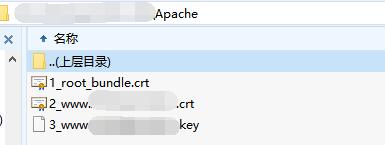
1_root_bundle.crt

2_www.xxxxx.com.crt

3_www.xxxxx.com.key
将1_root_bundle.crt文件上传到/opt/lampp/etc目录下
将2_www.xxxxx.com.crt文件上传到/opt/lampp/etc/ssl.crt目录下
将3_www.xxxxx.com.key文件上传到/opt/lampp/etc/ssl.key目录下
二、编辑httpd-ssl.conf文件
vi /opt/lampp/etc/extra/httpd-ssl.conf
找到
<VirtualHost _default_:443>
更改成以下
<VirtualHost _default_:443>

#   General setup for the virtual host

DocumentRoot "/opt/lampp/htdocs"

ServerName www.example.com:443

ServerAdmin you@example.com

ErrorLog "/opt/lampp/logs/error_log"

TransferLog "/opt/lampp/logs/access_log"

#   SSL Engine Switch:

#   Enable/Disable SSL for this virtual host.

SSLEngine on

#   Server Certificate:

#   Point SSLCertificateFile at a PEM encoded certificate.  If

#   the certificate is encrypted, then you will be prompted for a

#   pass phrase.  Note that a kill -HUP will prompt again.  Keep

#   in mind that if you have both an RSA and a DSA certificate you

#   can configure both in parallel (to also allow the use of DSA

#   ciphers, etc.)

#   Some ECC cipher suites (http://www.ietf.org/rfc/rfc4492.txt)

#   require an ECC certificate which can also be configured in

#   parallel.

SSLCertificateFile "/opt/lampp/etc/ssl.crt/2_www.xxxxx.com.crt"

#   Server Private Key:

#   If the key is not combined with the certificate, use this

#   directive to point at the key file.  Keep in mind that if

#   you've both a RSA and a DSA private key you can configure

#   both in parallel (to also allow the use of DSA ciphers, etc.)

#   ECC keys, when in use, can also be configured in parallel

SSLCertificateKeyFile "/opt/lampp/etc/ssl.key/3_www.xxxxx.com.key"

#   Server Certificate Chain:

#   Point SSLCertificateChainFile at a file containing the

#   concatenation of PEM encoded CA certificates which form the

#   certificate chain for the server certificate. Alternatively

#   the referenced file can be the same as SSLCertificateFile

#   when the CA certificates are directly appended to the server

#   certificate for convenience.

SSLCertificateChainFile "/opt/lampp/etc/1_root_bundle.crt"
三、强制跳转到HTTPS
vi /opt/lampp/etc/httpd.conf
找到
DocumentRoot "/opt/lampp/htdocs"
更正为
DocumentRoot "/opt/lampp/htdocs"

<Directory "/opt/lampp/htdocs">

    #

    # Possible values for the Options directive are "None", "All",

    # or any combination of:

    #   Indexes Includes FollowSymLinks SymLinksifOwnerMatch ExecCGI MultiViews

    #

    # Note that "MultiViews" must be named *explicitly* --- "Options All"

    # doesn't give it to you.

    #

    # The Options directive is both complicated and important.  Please see

    # http://httpd.apache.org/docs/trunk/mod/core.html#options

    # for more information.

    #

    #Options Indexes FollowSymLinks

    # XAMPP

    Options Indexes FollowSymLinks ExecCGI Includes

    #

    # AllowOverride controls what directives may be placed in .htaccess files.

    # It can be "All", "None", or any combination of the keywords:

    #   Options FileInfo AuthConfig Limit

    #

    #AllowOverride None

    # since XAMPP 1.4:

    AllowOverride All

    #

    # Controls who can get stuff from this server.

    #

    Require all granted

	#新增内容

    RewriteEngine on

    RewriteCond %{SERVER_PORT} !^443$

    RewriteRule ^(.*)?$ https://%{SERVER_NAME}%{REQUEST_URI} [L,R]

</Directory>
四、重启xampp
/opt/lampp/lampp restart
(转发请注明出处:http://www.cnblogs.com/zhangyongli2011/ 如发现有错,请留言,谢谢)
Linux配置 xampp下的https证书(腾讯云申请)的更多相关文章
- 腾讯云申请SSL证书与Nginx配置Https
0x00 为什么要安装证书 信息传输的保密性 数据交换的完整性 信息的不可否认性 交易者身份确定性 如今各大浏览器厂商不断推进Https安全访问强制性要求,为了避免以后网站数据量增多时安装证书造成不必 ...
- 【转载】网站配置Https证书系列(一):腾讯云申请免费的SSL证书的流程步骤(即https安全连接使用的证书)
很多网站为了安全性考虑都会上https安全连接,此时就需要考虑使用SSL证书,其实在腾讯云这边提供有免费的SSL证书申请,登录腾讯云管理控制台后,进入SSL证书管理页面,里面有个申请免费证书.腾讯云申 ...
- nginx使用ssl模块配置支持HTTPS访问,腾讯云申请免费证书
开始我尝试用 let's encrypt 让http 变 https 官方:https://github.com/certbot/certbot 参考:https://www.cnblogs.com/ ...
- Linux+Tomcat环境下安装SSL证书
1.将申请好的证书(4个文件)文件放入/home/tomcat/apache-tomcat-9.0.12/conf/cert文件夹下2.(或者)将申请好的证书(4个文件)文件放入/home/tomca ...
- 网站配置https(腾讯云域名操作)
我们都知道http协议是超文本传输协议,早期的网站使用的都是http,但是并不安全,数据在传输过程中容易被拦截篡改.所以后面有了https,也就是经过ssl加密的http协议.本文主要对网站配置htt ...
- Linux(Ubuntu)使用日记------ssh远程登录腾讯云
不知道是我自己电脑的问题还是其他的问题.总之在我的折腾之下算是用ssh连接上了我的腾讯云. 具体步骤: 1.生成密钥 ssh-keygen -t rsa 执行命令会出现这样,执行后让你输入东西的全部回 ...
- linux下安装https证书
https://www.aliyun.com/jiaocheng/165422.html
- Linux+Apache环境下安装SSL证书
一.安装证书 (温馨提示:安装证书前请先备份您需要修改的服务器配置文件) 1.确认证书文件及证书路径. 例证书文件为:zzidc.com.jks,放置目录为Tomcat的conf目录下. 2.配置 ...
- Nginx 配置 HTTPS 完整过程(阿里云申请免费版一年ssl证书)
1. nginx 的 ssl 模块安装 查看 nginx 是否安装 http_ssl_module 模块. $ /usr/local/nginx/sbin/nginx -V 如果出现 configur ...
随机推荐
- [转]Jquery实现页面定时跳转
<!DOCTYPE html PUBLIC "-//W3C//DTD XHTML 1.0 Transitional//EN" "http://www.w3.org/ ...
- 01-03-01【Nhibernate (版本3.3.1.4000) 出入江湖】id标签的unsaved-value属性
父表 <class name="Model.Customer, Model" discriminator-value="0"> <!--uns ...
- Buck converter uses low-side PWM IC
The most common switching-power topology is a buck converter, which efficiently transforms high volt ...
- Segger Real Time Terminal RTT JLINK 客户端软件 GUI 版本
- 取maven copy部分
mvn deploy:deploy-file -DgroupId=com.mycompany -DartifactId=my-project -Dversion=1.0.0 -Dpackaging=j ...
- JAVA EE 博客实例
http://www.cnblogs.com/hoojo/category/276244.html
- 执行计划解读 简朝阳 (Sky Jian) and 那蓝蓝海
http://greemranqq.iteye.com/blog/2072878 http://www.mysqlab.net/ http://www.mysqlpub.com/ http://blo ...
- SEAndroid安全机制简要介绍和学习计划
与iOS相比.Android最被人诟病的是其流畅性和安全性. 然而,从4.0開始,Android不遗余力地改善其流畅性. 特别是在即将公布的L版本号中,用ART替换了Dalvik,相信会越来越流畅.至 ...
- hihoCoder - 1082 - 然而沼跃鱼早就看穿了一切 (字符串处理!!)
#1082 : 然而沼跃鱼早就看穿了一切 时间限制:1000ms 单点时限:1000ms 内存限制:256MB 描写叙述 fjxmlhx每天都在被沼跃鱼刷屏,因此他急切的找到了你希望你写一个程序屏蔽全 ...
- Git本地仓库与Github远程仓库关联
如果你已经在本地创建了一个Git仓库,又想在GitHub创建一个Git仓库,并且让这两个仓库进行远程同步,那就需要用到SSH Key,github拿到了你的公钥就会知道内容是你推送的. SSH Key ...