
Docker企业级镜像仓库harbor(vmware 中国团队)
hostname = 10.0.0.11
harbor_admin_password = 123456
tar xf harbor-offline-installer-v1.5.1.tgz
cd harbor
vim harbor.cfg

hostname = 10.0.0.11
harbor_admin_password = 123456

 ./install.sh
页面测试:

cat /etc/docker/daemon.json

{
  "insecure-registries":["10.0.0.11:5000","10.0.0.11"],
"registry-mirrors": ["https://registry.docker-cn.com"],
 "hosts":["tcp://0.0.0.0:2376","unix:///var/run/docker.sock"],
  "cluster-store": "consul://10.0.0.11:8500",
  "cluster-advertise": "10.0.0.11:2376"
}

systemctl restart docker

docker tag nginx:latest 10.0.0.11/nsh/nginx:latest
docker puah 10.0.0.11/nsh/nginx:latest 这次推上去会失败,因为权限设置问题,需要登录

docker login 10.0.0.11
输入用户名和密码
之后推上去即可
页面查看是否推送成功:
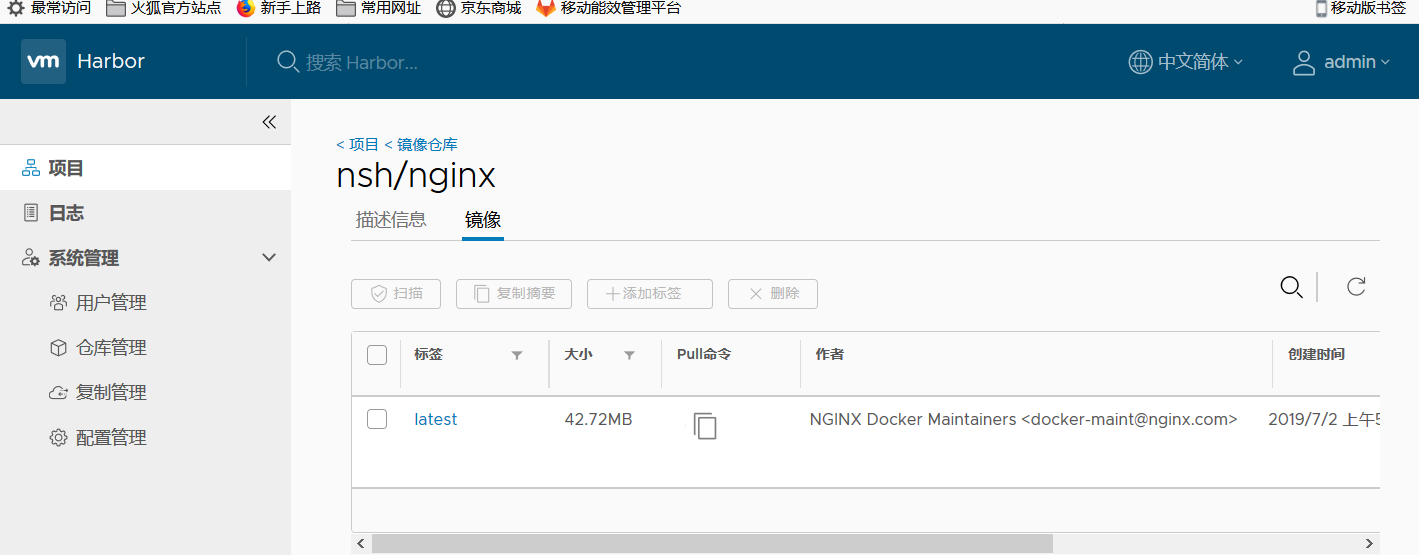

[root@docker2 ~]# docker pull 10.0.0.11/nsh/nginx:latest
latest: Pulling from nsh/nginx
fc7181108d40: Pull complete
d2e987ca2267: Pull complete
0b760b431b11: Pull complete
Digest: sha256:00be67d6ba53d5318cd91c57771530f5251cfbe028b7be2c4b70526f988cfc9f
Status: Downloaded newer image for 10.0.0.11/nsh/nginx:latest
[root@docker2 ~]# docker images
REPOSITORY                      TAG                 IMAGE ID            CREATED             SIZE
10.0.0.11:5000/kode             v2                  6914fda5fd44        41 hours ago        502MB
centos6.9_ssh                   v2                  03387f99f022        2 days ago          307MB
10.0.0.11:5000/centos6.9_kode   v1                  69145e114012        2 days ago          435MB
10.0.0.11/nsh/nginx             latest              f68d6e55e065        5 days ago          109MB
10.0.0.11:5000/busybox          latest              e4db68de4ff2        3 weeks ago         1.22MB
10.0.01.11:5000/busybox         latest              e4db68de4ff2        3 weeks ago         1.22MB
busybox                         latest              e4db68de4ff2        3 weeks ago         1.22MB
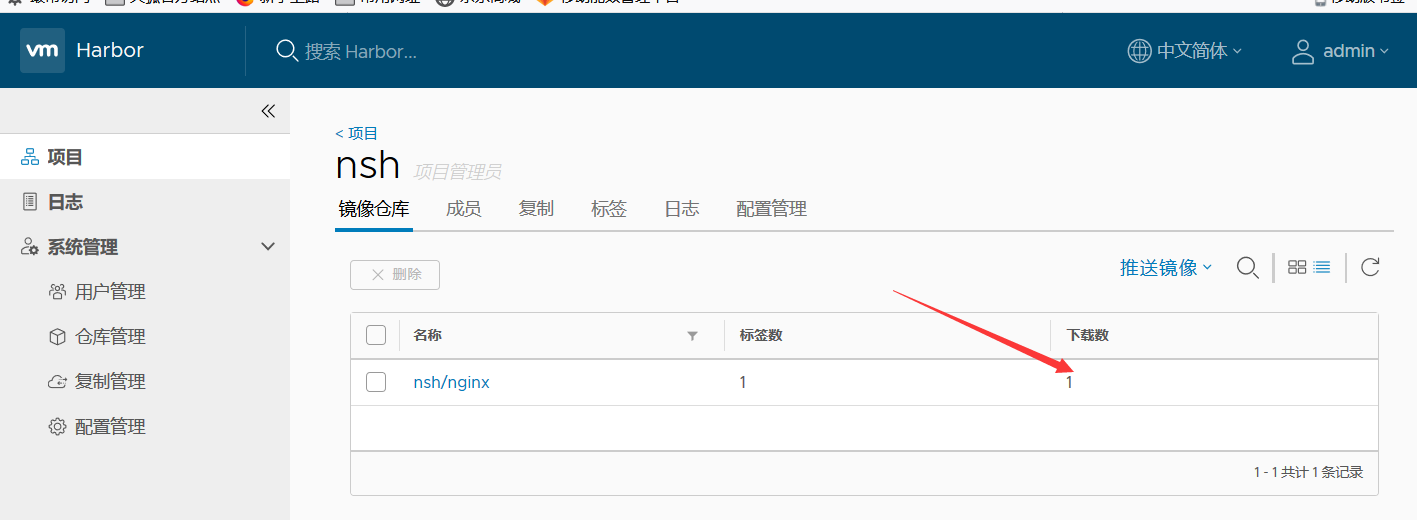
并且在页面上还可以看到下载的次数
剩下还有做ssl验证,待续...................................
Docker企业级镜像仓库harbor(vmware 中国团队)的更多相关文章
- Docker: 企业级镜像仓库Harbor的使用
上一节,演示了Harbor的安装部署 这次我们来讲解 Harbor的使用. 我们需要了解到: 1. 如何推镜像到镜像仓库 2. 如何从镜像仓库拉取镜像 3. 如何运行从私有仓库拉取的镜像 # 查看 h ...
- docker企业级镜像仓库Harbor管理
Harbor概述 Harbor是由VMWare公司开源的容器镜像仓库.事实上,Harbor是在Docker Registry上进行了相应的企业级扩展,从而获得了更加广泛的应用,这些新的企业级特性包括: ...
- Docker 企业级镜像仓库 Harbor 的搭建与维护
目录 一.什么是 Harbor 二.Harbor 安装 2.1.Harbor 安装环境 2.2.Harbor安装 2.3 配置HTTPS 三.Harbor 的使用 3.1.登录Harbor并使用 3. ...
- Docker: 企业级镜像仓库Harbor部署(http)
Harbor离线安装包下载地址:https://github.com/goharbor/harbor Docker compose(安装harbor需要用到docker compose)下载地址:ht ...
- docker企业级镜像仓库harbor
第一步:安装docker和docker-compose 第二步:下载harbor-offine-installer-v1.5.1.tgz 第三步:上传到/opt,并解压 第四步:修改harbor.cf ...
- 企业级镜像仓库harbor搭建
企业级镜像仓库harbor搭建 一. Harbor概述 VMware公司最近开源了企业级Registry项目Harbor,其的目标是帮助用户迅速搭建一个企业级的Docker registry 服 ...
- 企业级镜像仓库 harbor
企业级镜像仓库 harbor 前言 a. 本文主要为 Docker的视频教程 笔记. b. 环境为 CentOS 7.0 云服务器 c. 上一篇:跨 Docker 宿主机网络 overlay 类型 h ...
- docker进阶-搭建私有企业级镜像仓库Harbor
为什么要搭建私有镜像仓库 对于一个刚刚接触Docker的人来说,官方的Docker hub是用于管理公共镜像.既然官方提供了镜像仓库我们为什么还要去自己搭建私有仓库呢?虽然也可以托管私有镜像.我们 ...
- 使用docker搭建“企业级镜像仓库”Harbor
一.前沿 docker的官方镜像仓库registry,功能比较单一,不太好用,特别是删除镜像操作,不够友好. Harbor是一个用于存储和分发Docker镜像的企业级Registry服务器,通过添加一 ...
随机推荐
- 【PXC】关于限流的参数,状态值说明
一.什么是流控(FC)?如何工作? 节点接收写集并把它们按照全局顺序组织起来,节点将接收到的未应用和提交的事务保存在接收队列中,当这个接收队列达到一定的大小,将触发限流:此时节点将暂停复制,节点会先处 ...
- 01 语言基础+高级:1-8 File类与IO流_day10【缓冲流、转换流、序列化流】
day10[缓冲流.转换流.序列化流] 主要内容 缓冲流 转换流 序列化流 打印流 教学目标 能够使用字节缓冲流读取数据到程序 能够使用字节缓冲流写出数据到文件 能够明确字符缓冲流的作用和基本用法 能 ...
- vue wangeditor3封装
<script src="wangEditor/3.1.1/wangEditor.min.js"></script> Vue.component('my ...
- 可视化---seaborn
变量说明 x,y,hue 数据集变量 变量名 date 数据集 数据集名 row,col 更多分类变量进行平铺显示 变量名 col_wrap 每行的最高平铺数 整数 estimator 在每个分类中进 ...
- JetBrains Phpstorm 、 PyCharm 2019 最新破解码亲测可用
Phpstorm 2019 破解码最新亲测可用 6ZUMD7WWWU-eyJsaWNlbnNlSWQiOiI2WlVNRDdXV1dVIiwibGljZW5zZWVOYW1lIjoiSmV0cyBHc ...
- Vue 项目中应用
Vue使用 一.vue生命周期 # main.js import Vue from 'vue' import App from './App.vue' import router from './ro ...
- CodeForces 996B World Cup(思维)
https://codeforces.com/problemset/problem/996/B 题意: 圆形球场有n个门,Allen想要进去看比赛.Allen采取以下方案进入球场:开始Allen站在第 ...
- Linux shell脚本 基础
一.shell中三个引号的用法 1.单引号:所见即所得 例如:var=123 var2='${var}123' echo var2 var2结果为${var}123 2.双引号:输出引号中的内容,若存 ...
- DocCms_2016 代码审计
0x00 结构浏览 按照代码审计的惯例,拿到这款cms之后首先浏览了一下目录结构,在基本了解之后,首先进入/index.php,这里包含了两个文件:/admini/config/qd-config.p ...
- 华为路由器AR1220E-S通过web页面不能登录
问题原因:由于在WEB页面配置了“远程信任主机”,但是信任主机和路由器不在一个网段,导致所有IP都不能通过WEB页面管理路由器 解决方案:通过console口直接连接路由器,删除信任主机,此次咨询了华 ...