
解读Spring源码之前的准备
请忽略以下的文章,现在回过头来才发现学习源码不用如此复杂
1.IDEA 新建一个maven项目,
2.pom 中倒入 spring5 的基本包,然后利用maven 插件down下源码
3.然后就可以开始,源码分析了。
4.需要做笔记的地方自己摘抄下来即可。
---------------------------------
---------------------------------
---------------------------------
1.安装gradle
spring没有通过maven 构建项目,而是gradle,(点击下载)
gradle 的配置参考 Maven 在Mac下的配置,类似
2.下载源码导入idea,
eclipse的导入我就不讲了,毕竟《spring源码深度解析》就是这么一步一步喂给我们的
我直接下载的spring-framework-master.zip,解压,导入idea那就要看这个import-into-idea.md这个文件了
 The following has been tested against IntelliJ IDEA 2016.2.

 ## Steps

 _Within your locally cloned spring-framework working directory:_

 . Precompile `spring-oxm` with `./gradlew :spring-oxm:compileTestJava`

 . Import into IntelliJ (File -> New -> Project from Existing Sources -> Navigate to directory -> Select build.gradle)

 . When prompted exclude the `spring-aspects` module (or after the import via File-> Project Structure -> Modules)

 . Code away

 ## Known issues

 . `spring-core` and `spring-oxm` should be pre-compiled due to repackaged dependencies.

 See `*RepackJar` tasks in the build and https://youtrack.jetbrains.com/issue/IDEA-160605).

 . `spring-aspects` does not compile due to references to aspect types unknown to

 IntelliJ IDEA. See http://youtrack.jetbrains.com/issue/IDEA-64446 for details. In the meantime, the

 'spring-aspects' can be excluded from the project to avoid compilation errors.

 . While JUnit tests pass from the command line with Gradle, some may fail when run from

 IntelliJ IDEA. Resolving this is a work in progress. If attempting to run all JUnit tests from within

 IntelliJ IDEA, you will likely need to set the following VM options to avoid out of memory errors:

     -XX:MaxPermSize=2048m -Xmx2048m -XX:MaxHeapSize=2048m

 . If you invoke "Rebuild Project" in the IDE, you'll have to generate some test

 resources of the `spring-oxm` module again (`./gradlew :spring-oxm:compileTestJava`)

 ## Tips

 In any case, please do not check in your own generated .iml, .ipr, or .iws files.

 You'll notice these files are already intentionally in .gitignore. The same policy goes for eclipse metadata.

 ## FAQ

 Q. What about IntelliJ IDEA's own [Gradle support](http://confluence.jetbrains.net/display/IDEADEV/Gradle+integration)?

 A. Keep an eye on http://youtrack.jetbrains.com/issue/IDEA-53476
大致意思就是:
2.1.预编译`spring-core` and `spring-oxm` ,以spring-core为例,切到该目录,输入命令如图:
如果下载太慢不能忍受,记得科学上网

2.2.导入idea中
Import into IntelliJ (File -> New -> Project from Existing Sources -> Navigate to directory -> Select build.gradle)
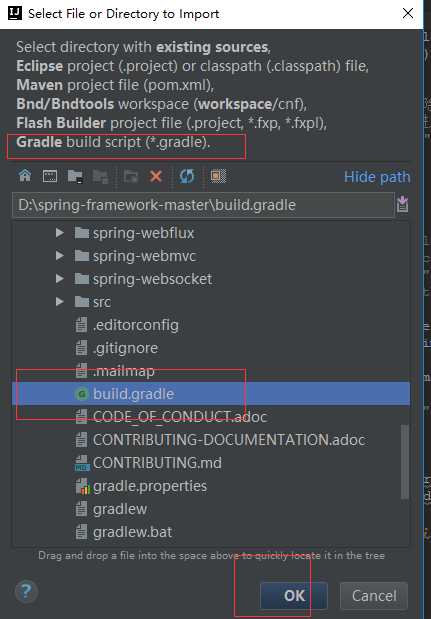
2.3.移除 `spring-aspects` module ,说是这个模块会编译错误
2.4.然后就开始Code !!
3.最后环境
另外:gradle的基本用法可以了解下 https://gradle.org/guides/
我们的工作环境还是要说下:spring 5.0 , jdk1.8, gradle 4.0, idea 2017.2

解读Spring源码之前的准备的更多相关文章
- Spring 源码 (2)Spring IOC 容器 前戏准备工作
Spring 最重要的方法refresh方法 根据上一篇文章 https://www.cnblogs.com/redwinter/p/16141285.html Spring Bean IOC 的创建 ...
- Spring源码之SimpleAliasRegistry解读(一)
Spring源码之SimpleAliasRegistry解读(一) 阅读spring源码中org.springframework.core.SimpleAliasRegistry类时发现该类主要是使用 ...
- Spring源码-循环依赖源码解读
Spring源码-循环依赖源码解读 笔者最近无论是看书还是从网上找资料,都没发现对Spring源码是怎么解决循环依赖这一问题的详解,大家都是解释了Spring解决循环依赖的想法(有的解释也不准确,在& ...
- Spring源码解读之BeanFactoryPostProcessor的处理
前言 前段时间旁听了某课堂两节Spring源码解析课,刚好最近自己又在重新学习中,便在这里记录一下学习所得.我之前写过一篇博文,是介绍BeanFactoryPostProcessor跟BeanPost ...
- Spring源码解读--(一)源码下载
走在Java程序员这条路上,网上Java各种工具满天飞,写个简单的CRUD,相信是个开发都能写出来,于是在思考如何可以在同行业中更有竞争力(其实就是如何赚更多钱).那么,老大给我推荐了Spring源码 ...
- 【Spring源码解读】bean标签中的属性
说明 今天在阅读Spring源码的时候,发现在加载xml中的bean时,解析了很多标签,其中有常用的如:scope.autowire.lazy-init.init-method.destroy-met ...
- Spring源码解读:核心类DefaultListableBeanFactory的继承体系
1 简介 我们常用的ClassPathXmlApplicationContext是AbstractRefreshableApplicationContext的子类,而DefaultListableBe ...
- Spring源码分析——BeanFactory体系之抽象类、类分析(一)
上一篇介绍了BeanFactory体系的所有接口——Spring源码分析——BeanFactory体系之接口详细分析,本篇就接着介绍BeanFactory体系的抽象类和接口. 一.BeanFactor ...
- Spring源码情操陶冶-AbstractApplicationContext#obtainFreshBeanFactory
前言-阅读源码有利于陶冶情操,本文承接前文Spring源码情操陶冶-AbstractApplicationContext 约束: 本文指定contextClass为默认的XmlWebApplicati ...
随机推荐
- 推荐一款复式记账软件——GnuCash
本文需要搞清楚两个事情,第一,什么是复式记账:第二,GnuCash操作 复式记账,来自百度百科的解释:复式记账法是以资产与权益平衡关系作为记账基础,对于每一笔经济业务,都要以相等的金额在两个或两个以上 ...
- CF948B Primal Sport
题目链接:http://codeforces.com/contest/948/problem/B 知识点: 素数 解题思路: \(f(x)\) 表示 \(x\) 的最大素因子.不难想到:\(X_1 \ ...
- Docker搭建VS Code Server ,设置访问密码随时随地写代码
今天在N1盒子上安装了 VS Code Server,简单的记录一下. 安装docker Docker一键安装脚本 $ sudo wget -qO- https://get.docker.com/ | ...
- MySql 常用的函数
一.聚合函数 avg(col) 计算平均值 count(col) 计算中非NULL值的个数(这个容易忘) greatest(x1,x2,...,xn) 返回集合中最大的值 ...
- Java-KTVByLinkedList模拟点歌工具
import java.util.LinkedList; import java.util.Scanner; public class KTVByLinkedList { public static ...
- 极客手中的利器Electron
作为一个前端开发人员,你可能已经听说过Electron了,你知道VS Code是基于这个技术开发的.不但VS Code, 目前一些大热的软件:飞书.Slack.WhatsApp都是基于这个技术开发的. ...
- word dde payload
payload: ctrl+F9 {DDEAUTO c:\\windows\\system32\\cmd.exe "/k calc.exe" } Since this techni ...
- 01 . Keepalived原理使用和配置
Keepalived简介 是什么? keepalived是一个类似于layer3, 4 & 5交换机制的软件,也就是我们平时说的第3层.第4层和第5层交换.Keepalived的作用是检测we ...
- Node.js躬行记(2)——文件系统和网络
一.文件系统 fs模块可与文件系统进行交互,封装了常规的POSIX函数.POSIX(Portable Operating System Interface,可移植操作系统接口)是UNIX系统的一个设计 ...
- 多服务器 vps 管理方法,十款远程桌面软件测评分析
作为运维工作者,从几年前巨大的工作量到如今有了极大的改善,这些年试用的远程桌面管理软件不在少数. 远程桌面是微软公司为了方便网络管理员管理维护服务器而推出的一项服务.从windows 2000 ser ...