
How Many Partitions Does An RDD Have
From https://databricks.gitbooks.io/databricks-spark-knowledge-base/content/performance_optimization/how_many_partitions_does_an_rdd_have.html
For tuning and troubleshooting, it's often necessary to know how many paritions an RDD represents. There are a few ways to find this information:
View Task Execution Against Partitions Using the UI
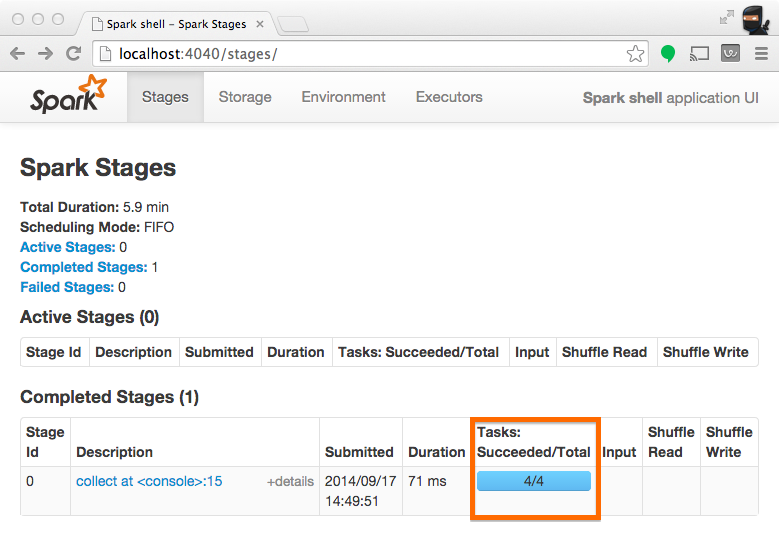
When a stage executes, you can see the number of partitions for a given stage in the Spark UI. For example, the following simple job creates an RDD of 100 elements across 4 partitions, then distributes a dummy map task before collecting the elements back to the driver program:
scala> val someRDD = sc.parallelize(1 to 100, 4)

someRDD: org.apache.spark.rdd.RDD[Int] = ParallelCollectionRDD[0] at parallelize at <console>:12

scala> someRDD.map(x => x).collect

res1: Array[Int] = Array(1, 2, 3, 4, 5, 6, 7, 8, 9, 10, 11, 12, 13, 14, 15, 16, 17, 18, 19, 20, 21, 22, 23, 24, 25, 26, 27, 28, 29, 30, 31, 32, 33, 34, 35, 36, 37, 38, 39, 40, 41, 42, 43, 44, 45, 46, 47, 48, 49, 50, 51, 52, 53, 54, 55, 56, 57, 58, 59, 60, 61, 62, 63, 64, 65, 66, 67, 68, 69, 70, 71, 72, 73, 74, 75, 76, 77, 78, 79, 80, 81, 82, 83, 84, 85, 86, 87, 88, 89, 90, 91, 92, 93, 94, 95, 96, 97, 98, 99, 100)
In Spark's application UI, you can see from the following screenshot that the "Total Tasks" represents the number of partitions:
View Partition Caching Using the UI
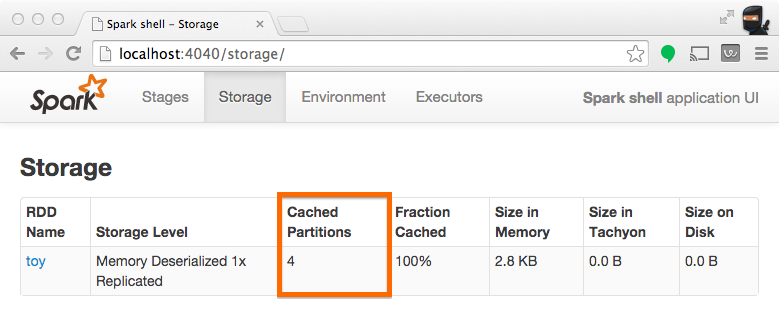
When persisting (a.k.a. caching) RDDs, it's useful to understand how many partitions have been stored. The example below is identical to the one prior, except that we'll now cache the RDD prior to processing it. After this completes, we can use the UI to understand what has been stored from this operation.
scala> someRDD.setName("toy").cache

res2: someRDD.type = toy ParallelCollectionRDD[0] at parallelize at <console>:12

scala> someRDD.map(x => x).collect

res3: Array[Int] = Array(1, 2, 3, 4, 5, 6, 7, 8, 9, 10, 11, 12, 13, 14, 15, 16, 17, 18, 19, 20, 21, 22, 23, 24, 25, 26, 27, 28, 29, 30, 31, 32, 33, 34, 35, 36, 37, 38, 39, 40, 41, 42, 43, 44, 45, 46, 47, 48, 49, 50, 51, 52, 53, 54, 55, 56, 57, 58, 59, 60, 61, 62, 63, 64, 65, 66, 67, 68, 69, 70, 71, 72, 73, 74, 75, 76, 77, 78, 79, 80, 81, 82, 83, 84, 85, 86, 87, 88, 89, 90, 91, 92, 93, 94, 95, 96, 97, 98, 99, 100)
Note from the screenshot that there are four partitions cached.
Inspect RDD Partitions Programatically
In the Scala API, an RDD holds a reference to it's Array of partitions, which you can use to find out how many partitions there are:
scala> val someRDD = sc.parallelize(1 to 100, 30)

someRDD: org.apache.spark.rdd.RDD[Int] = ParallelCollectionRDD[0] at parallelize at <console>:12

scala> someRDD.partitions.size

res0: Int = 30
In the python API, there is a method for explicitly listing the number of partitions:
In [1]: someRDD = sc.parallelize(range(101),30)

In [2]: someRDD.getNumPartitions()

Out[2]: 30
Note in the examples above, the number of partitions was intentionally set to 30 upon initialization.
How Many Partitions Does An RDD Have的更多相关文章
- Spark核心概念之RDD
RDD: Resilient Distributed Dataset RDD的特点: 1.A list of partitions 一系列的分片:比如说64M一片:类似于Hadoop中的s ...
- RDD的依赖关系
RDD的依赖关系 Rdd之间的依赖关系通过rdd中的getDependencies来进行表示, 在提交job后,会通过在DAGShuduler.submitStage-->getMissingP ...
- RDD.scala(源码)
---- map. --- flatMap.fliter.distinct.repartition.coalesce.sample.randomSplit.randomSampleWithRange. ...
- Spark函数详解系列之RDD基本转换
摘要: RDD:弹性分布式数据集,是一种特殊集合 ‚ 支持多种来源 ‚ 有容错机制 ‚ 可以被缓存 ‚ 支持并行操作,一个RDD代表一个分区里的数据集 RDD有两种操作算子: ...
- Spark编程模型及RDD操作
转载自:http://blog.csdn.net/liuwenbo0920/article/details/45243775 1. Spark中的基本概念 在Spark中,有下面的基本概念.Appli ...
- 【原创】大数据基础之Spark(4)RDD原理及代码解析
一 简介 spark核心是RDD,官方文档地址:https://spark.apache.org/docs/latest/rdd-programming-guide.html#resilient-di ...
- Spark源码系列:RDD repartition、coalesce 对比
在上一篇文章中 Spark源码系列:DataFrame repartition.coalesce 对比 对DataFrame的repartition.coalesce进行了对比,在这篇文章中,将会对R ...
- 【Spark-core学习之二】 RDD和算子
环境 虚拟机:VMware 10 Linux版本:CentOS-6.5-x86_64 客户端:Xshell4 FTP:Xftp4 jdk1.8 scala-2.10.4(依赖jdk1.8) spark ...
- spark 算子之RDD
map map(func) Return a new distributed dataset formed by passing each element of the source through ...
随机推荐
- Project Euler 32 Pandigital products
题意:找出所有形如 39 × 186 = 7254 这种,由 1 - 9,9个数字构成的等式的和,注意相同的积不计算两次 思路:如下面两种方法 方法一:暴力枚举间断点 /*************** ...
- 训练1-Z
有一头母牛,它每年年初生一头小母牛.每头小母牛从第四个年头开始,每年年初也生一头小母牛.请编程实现在第n年的时候,共有多少头母牛? Input 输入数据由多个测试实例组成,每个测试实例占一行,包括一个 ...
- centos7把编译安装的服务通过systemctl管理
nginx编译安装的目录是/usr/local/nginx nginx配置文件是/usr/local/nginx/conf/nginx.conf systemctl管理的服务文件在/usr/lib/s ...
- C#实现简单的串口通信
前言 本着学习研究的态度,用c#语言实现简单的串口通信工具. 一.串口通信原理 串口通信 串口通信(Serial Communications)的概念非常简单,串口按位(bit)发送和接收字节.尽管比 ...
- 【codeforces 732F】Tourist Reform
[题目链接]:http://codeforces.com/contest/732/problem/F [题意] 给你一张无向图; n个点,m条边; 让你把这张图改成有向边 然后定义r[i]为每个点能够 ...
- Hibernate 一对多
表与表之间关系回顾(重点) 1 一对多 (1)分类和商品关系,一个分类里面有多个商品,一个商品只能属于一个分类 (2)客户和联系人是一对多关系 - 客户:与公司有业务往来,百度.新浪.360 - 联系 ...
- oracle double和float,number
float,double,number都是oracle的数值类型.1个汉子=2个英文=2个字节float表示单精度浮点数在机内占4个字节,用32位二进制描述. double表示双精度浮点数在机内占8个 ...
- 0111MySQL优化的奇技淫巧之STRAIGHT_JOIN
转自博客http://huoding.com/2013/06/04/261 问题 通过「SHOW FULL PROCESSLIST」语句很容易就能查到问题SQL,如下: SELECT post.* F ...
- 命令模式之2 Invoker Vs. Client
当程序中直接编写下达命令的语句如new Cmd1().execute()时.一般会将调用者与客户类合二为一. 在GUI程序中.下达命令的语句通常包括在底层框架中.或者说底层框架包括了调用者.这时程序猿 ...
- Uva 12012 Detection of Extraterrestrial 求循环节个数为1-n的最长子串长度 KMP
题目链接:option=com_onlinejudge&Itemid=8&page=show_problem&problem=3163">点击打开链接 题意: ...