
Android 调整透明度的图片查看器
本文以实例讲解了基于Android的可以调整透明度的图片查看器实现方法,具体如下:
main.xml部分代码如下:
<?xml version="1.0" encoding="utf-8"?>

<LinearLayout xmlns:android="http://schemas.android.com/apk/res/android"

  android:layout_width="fill_parent"

  android:layout_height="fill_parent"

  android:orientation="vertical" >

  <LinearLayout

    android:layout_width="match_parent"

    android:layout_height="wrap_content" >

    <Button

      android:id="@+id/button1"

      android:layout_width="wrap_content"

      android:layout_height="wrap_content"

      android:text="增大透明度" />

    <Button

      android:id="@+id/button2"

      android:layout_width="wrap_content"

      android:layout_height="wrap_content"

      android:text="减小透明度" />

    <Button

      android:id="@+id/button3"

      android:layout_width="wrap_content"

      android:layout_height="wrap_content"

      android:text="下一张" />

  </LinearLayout>

  <!-- 定义显示整体图片的ImageView -->

  <ImageView

    android:id="@+id/imageView1"

    android:layout_width="wrap_content"

    android:layout_height="wrap_content"

    android:background="#0000ff"

    android:scaleType="fitCenter"

    android:src="@drawable/shuangta" />

  <!-- 定义显示局部图片的ImageView -->

  <ImageView

    android:id="@+id/imageView2"

    android:layout_width="wrap_content"

    android:layout_height="wrap_content"

    android:layout_marginTop="10dp"

    android:background="#0000ff" />

</LinearLayout>
java部分代码为:
package android.demo;

import android.app.Activity;

import android.graphics.Bitmap;

import android.graphics.BitmapFactory;

import android.graphics.drawable.BitmapDrawable;

import android.os.Bundle;

import android.view.MotionEvent;

import android.view.View;

import android.view.View.OnClickListener;

import android.view.View.OnTouchListener;

import android.widget.Button;

import android.widget.ImageView;

public class AndroidDemo5Activity extends Activity {

  // 定义一个访问图片的数组

  int[] images = new int[] { R.drawable.lijiang, R.drawable.qiao,

      R.drawable.shuangta, R.drawable.shui, R.drawable.xiangbi,

      R.drawable.ic_launcher, };

  // 定义当前显示的图片

  int currentImage = ;

  // 定义图片的初始透明度

  private int alpha = ;

  @Override

  protected void onCreate(Bundle savedInstanceState) {

    // TODO Auto-generated method stub

    super.onCreate(savedInstanceState);

    setContentView(R.layout.main);

    final Button plusButton = (Button) findViewById(R.id.button1);

    final Button minuxButton = (Button) findViewById(R.id.button2);

    final Button nextButton = (Button) findViewById(R.id.button3);

    final ImageView imageview1 = (ImageView) findViewById(R.id.imageView1);

    final ImageView imageview2 = (ImageView) findViewById(R.id.imageView2);

    // 定义查看下一张图片的时间监听器

    nextButton.setOnClickListener(new OnClickListener() {

      @Override

      public void onClick(View v) {

        if (currentImage >= ) {

          currentImage = -;

        }

        BitmapDrawable bitmap = (BitmapDrawable) imageview1

            .getDrawable();

        // 如果图片还没有回收,先强制回收图片

        if (!bitmap.getBitmap().isRecycled()) {

          bitmap.getBitmap().recycle();

        }

        // 改变ImageView的图片

        imageview1.setImageBitmap(BitmapFactory.decodeResource(

            getResources(), images[++currentImage]));

      }

    });

    // 定义改变图片透明度的方法

    OnClickListener listener = new OnClickListener() {

      @Override

      public void onClick(View v) {

        if (v == plusButton) {

          alpha += ;

        }

        if (v == minuxButton) {

          alpha -= ;

        }

        if (alpha > ) {

          alpha = ;

        }

        if (alpha <= ) {

          alpha = ;

        }

        // 改变图片的透明度

        imageview1.setAlpha(alpha);

      }

    };

    // 为2个按钮添加监听器

    plusButton.setOnClickListener(listener);

    minuxButton.setOnClickListener(listener);

    imageview1.setOnTouchListener(new OnTouchListener() {

      @Override

      public boolean onTouch(View arg0, MotionEvent arg1) {

        // TODO Auto-generated method stub

        BitmapDrawable bitmapDeaw = (BitmapDrawable) imageview1

            .getDrawable();

        // 获取第一个图片显示框中的位图

        Bitmap bitmap = bitmapDeaw.getBitmap();

        double scale = bitmap.getWidth();

        // 或许需要显示图片的开始点

        int x = (int) (arg1.getX() * scale);

        int y = (int) (arg1.getY() * scale);

        if (x +  > bitmap.getWidth()) {

          x = bitmap.getWidth() - ;

        }

        if (y +  > bitmap.getHeight()) {

          y = bitmap.getHeight() - ;

        }

        // 显示图片的指定区域

        imageview2.setImageBitmap(Bitmap.createBitmap(bitmap, x, y,

            , ));

        imageview2.setAlpha(alpha);

        return false;

      }

    });

  }

}
运行效果图如下:
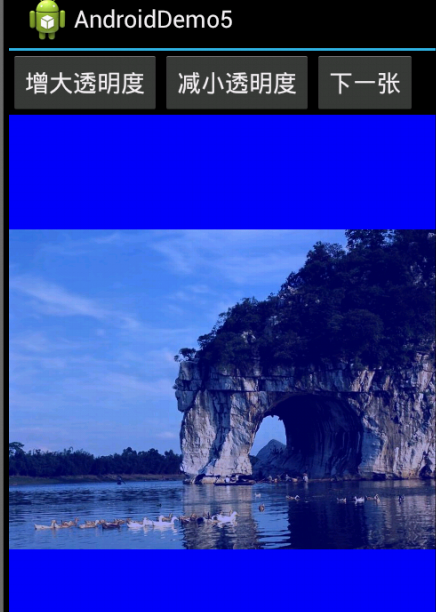
Android 调整透明度的图片查看器的更多相关文章
- Android中的图片查看器
本案例,使用Eclipse来开发Android2.1版本号的图片查看器. 1)首先,打开Eclipse.新建一个Android2.1版本号的项目ShowTu,打开res/values中文件夹下的str ...
- Objective-C ,ios,iphone开发基础:快速实现一个简单的图片查看器
新建一个single view 工程: 关闭ARC , 在.xib视图文件上拖放一个UIImageView 两个UIButton ,一个UISlider ,布局如图. 并为他们连线, UIImage ...
- Bitmap图片查看器
在Android 应用中使用assets目录下存放的资源文件,assets目录下存放的资源代表应用无法直接访问的原生资源,应用程序通过AssetManager以二 进制流的形式来读取资源.此应用是查看 ...
- 如何在pyqt中使用 QGraphicsView 实现图片查看器
前言 在 PyQt 中可以使用很多方式实现照片查看器,最朴素的做法就是重写 QWidget 的 paintEvent().mouseMoveEvent 等事件,但是如果要在图像上多添加一些形状,那么在 ...
- wpf 仿QQ图片查看器
参考博客 WPF下的仿QQ图片查看器 wpf图片查看器,支持鼠标滚动缩放拖拽 实现效果 主要参考的WPF下的仿QQ图片查看器,原博主只给出了部分代码. 没有完成的部分 1.右下角缩略图是原图不是缩略图 ...
- 发布两款JQ小插件(图片查看器 + 分类选择器),开源
图片查看器,github地址:https://github.com/VaJoy/imgViewer 效果如下: 这款当初大概写了2小时,有点匆忙地赶出来的,使用的接口很简单: $.bindViewer ...
- wpf图片查看器,支持鼠标滚动缩放拖拽
最近项目需要,要用到一个图片查看器,类似于windows自带的图片查看器那样,鼠标滚动可以缩放,可以拖拽图片,于是就写了这个简单的图片查看器. 前台代码: <Window x:Class=&qu ...
- 用JQ仿造礼德财富网的图片查看器
现在就职于一家P2P平台,自然也会关注同行其它网站的前端技术,今天要仿造的是礼德内页的一个图片查看器效果.不过说白了,无论人人贷也好礼德财富也好,很多地方的前端都做的不尽如人意,比如忽略细节.缺乏交互 ...
- 基于jQuery的一个简单的图片查看器
项目中自己diy了一个图片查看器.因为初始代码不是自己的,只是在上面改了一下也没有弄的很漂亮.等以后有时间了在重写一下样式和封装,作为备用的只是积累吧.如果有童鞋有用到,完全可以在此基础上改,比较容易 ...
随机推荐
- View源码分析如何创建
本文来自http://blog.csdn.net/liuxian13183/ ,引用必须注明出处! 文/jj120522 博主导读:View是Android中最重要的控件,几乎所有的控件都与View相 ...
- 洛谷 P3669 [USACO17OPEN]Paired Up 牛牛配对
P3669 [USACO17OPEN]Paired Up 牛牛配对 题目描述 Farmer John finds that his cows are each easier to milk when ...
- 强连通分量分解 Kosaraju算法 (poj 2186 Popular Cows)
poj 2186 Popular Cows 题意: 有N头牛, 给出M对关系, 如(1,2)代表1欢迎2, 关系是单向的且能够传递, 即1欢迎2不代表2欢迎1, 可是假设2也欢迎3那么1也欢迎3. 求 ...
- 深入理解HTTP协议及原理分析之缓存(3种缓存机制)
3.2 缓存的实现原理 3.2.1什么是Web缓存 WEB缓存(cache)位于Web服务器和客户端之间. 缓存会根据请求保存输出内容的副本,例如html页面,图片,文件,当下一个请求来到的时候:如果 ...
- 使用IPV6
使用IPV6 知道IPV6已经很久了,但是一直没有使用过. 我使用的IPV4网络一般是 内网-->外网-->互联网,IPV6也不外乎这样,但是对IPV6而言,必须有它的"世界&q ...
- 【Codeforces Round #447 (Div. 2) C】Marco and GCD Sequence
[链接] 我是链接,点我呀:) [题意] 在这里输入题意 [题解] 把gcd(a[1..n])放在输入的n个数之间. [代码] /* 1.Shoud it use long long ? 2.Have ...
- stm32单片机下载方式
引用 编辑:什么鱼 引用地址:http://www.eeworld.com.cn/mcu/2015/1012/article_22873.html 第一种 ISP下载: 这里类似51. boot1 ...
- Testfan软件测试社区
1. http://ask.testfan.cn/article/902 Appium 服务端安装-windows2. http://ask.testfan.cn/article/1078 最新 ...
- Qt的焦点策略
Qt的窗口部件在图形用户界面中按用户的习惯的方式来处理键盘焦点.基本出发点是用户的击键能定向到屏幕上窗口中的任何一个,和在窗口中任何一个部件中.当用户按下一个键,他们期望键盘焦点能够到达正确的位置,并 ...
- 【POJ 3415】Common Substrings
[链接]h在这里写链接 [题意] 求两个串的长度大于等于k的公共子串个数. 相同的重复计数. [题解] 先把两个字符串用一个分隔符分开.最好比出现的字符都大的一个数字. ...