
iOS9 Spotlight使用
1.Spotloight是什么?
Spotlight在iOS9上做了一些新的改进, 也就是开放了一些新的API, 通过Core Spotlight Framework你可以在你的app中集成Spotlight。集成Spotlight的App可以在Spotlight中搜索App的内容,并且通过内容打开相关页面。
Demo演示
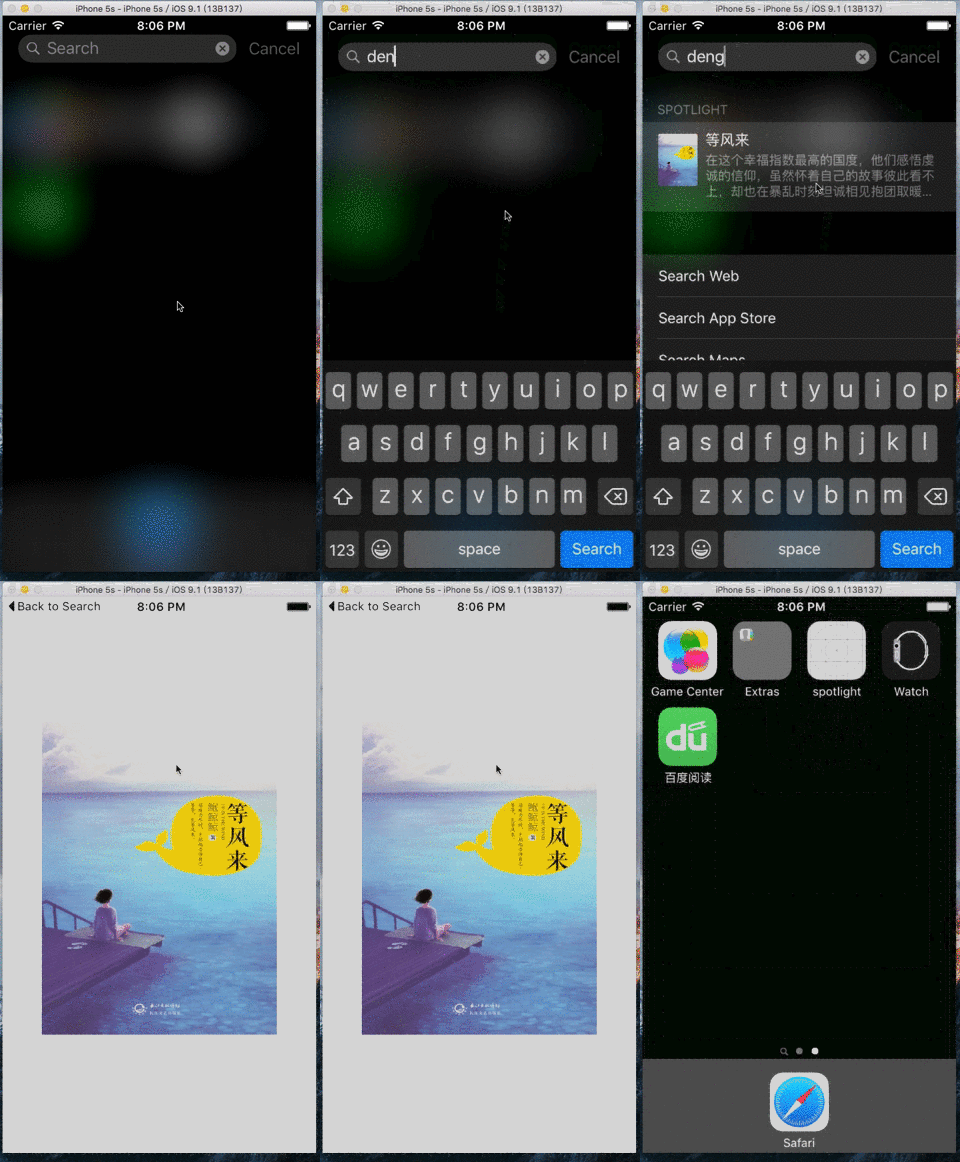
2.如何集成Spotlight
a.添加所需要的框架
#if __IPHONE_OS_VERSION_MAX_ALLOWED >= 90000

#import <CoreSpotlight/CoreSpotlight.h>

#import <MobileCoreServices/MobileCoreServices.h>

#endif
注,很多APP都是支持iOS9以下的,因此加入#if __IPHONE_OS_VERSION_MAX_ALLOWED >= 90000,可以解决iOS9以下设备运行崩溃的问题
b.创建 CSSearchableItemAttributeSet 对象
CSSearchableItemAttributeSet *attributeSet = [[CSSearchableItemAttributeSet alloc] initWithItemContentType:(NSString *)kUTTypeImage];

    attributeSet.title = spotlightTitle;                // 标题

    attributeSet.keywords = keywords;                   // 关键字,NSArray格式

    attributeSet.contentDescription = spotlightDesc;    // 描述

    attributeSet.thumbnailData = photo;                 // 图标, NSData格式

  // 把图片转换成NSData的方法
  UIImagePNGRepresentation([UIImage imageNamed:@"xxx.png"]
c.创建可检索条目CSSearchableItem
// spotlightInfo 可以作为一些数据传递给接受的地方

// domainId      id,通过这个id来判断是哪个spotlight

CSSearchableItem *item = [[CSSearchableItem alloc] initWithUniqueIdentifier:spotlightInfo domainIdentifier:domainId attributeSet:attributeSet];
d.添加检索入口
[[CSSearchableIndex defaultSearchableIndex] indexSearchableItems:@[item] completionHandler:^(NSError * error) {

     if (error) {

        NSLog(@"indexSearchableItems Error:%@",error.localizedDescription);

     }

}];
========完整代码========
- (void)insertSearchableItem:(NSData *)photo spotlightTitle:(NSString *)spotlightTitle description:(NSString *)spotlightDesc keywords:(NSArray *)keywords spotlightInfo:(NSString *)spotlightInfo domainId:(NSString *)domainId {

    CSSearchableItemAttributeSet *attributeSet = [[CSSearchableItemAttributeSet alloc] initWithItemContentType:(NSString *)kUTTypeImage];

    attributeSet.title = spotlightTitle;                // 标题

    attributeSet.keywords = keywords;                   // 关键字,NSArray格式

    attributeSet.contentDescription = spotlightDesc;    // 描述

    attributeSet.thumbnailData = photo;                 // 图标, NSData格式

    // spotlightInfo 可以作为一些数据传递给接受的地方

    // domainId      id,通过这个id来判断是哪个spotlight

    CSSearchableItem *item = [[CSSearchableItem alloc] initWithUniqueIdentifier:spotlightInfo domainIdentifier:domainId attributeSet:attributeSet];

    [[CSSearchableIndex defaultSearchableIndex] indexSearchableItems:@[item] completionHandler:^(NSError * error) {

        if (error) {

            NSLog(@"indexSearchableItems Error:%@",error.localizedDescription);

        }

    }];

}
========加载本地图片的使用方法========
[self insertSearchableItem:UIImagePNGRepresentation([UIImage imageNamed:@"xxx.png"]) spotlightTitle:@"等风来" description:@"等风来描述" keywords:@[@"鲍鲸鲸",@"大丽花"] spotlightInfo:@"传递过去的值" domainId:@"com.wb.spotlight"];
========加载网络图片的使用方法========
    dispatch_async(dispatch_get_global_queue(DISPATCH_QUEUE_PRIORITY_DEFAULT, ), ^{

        NSData * data = [NSData dataWithContentsOfURL:[NSURL URLWithString:@"http://hiphotos.baidu.com/doc/pic/item/eaf81a4c510fd9f905f61934262dd42a2934a48e.jpg"]];

        [self insertSearchableItem:data spotlightTitle:@"等风来" description:@"等风来描述" keywords:@[@"鲍鲸鲸",@"大丽花"] spotlightInfo:@"传递过去的值" domainId:@"com.wb.spotlight"];

    });
========删除所有spotlight的方法========
[[CSSearchableIndex defaultSearchableIndex] deleteAllSearchableItemsWithCompletionHandler:^(NSError * _Nullable error) {

     if (error) {

         NSLog(@"%@", error.localizedDescription);

     }

 }];
========删除指定的spotlight的方法========
[[CSSearchableIndex defaultSearchableIndex] deleteSearchableItemsWithDomainIdentifiers:@"domainId" completionHandler:^(NSError * _Nullable error) {

     if (error) {

         NSLog(@"%@", error.localizedDescription);

     }

 }];
========点击spotlight后的响应方法========
- (BOOL)application:(UIApplication *)application continueUserActivity:(NSUserActivity *)userActivity restorationHandler:(void (^)(NSArray * _Nullable))restorationHandler {

    if ([[userActivity activityType] isEqualToString:CSSearchableItemActionType]) {

        NSString *uniqueIdentifier = [userActivity.userInfo objectForKey:CSSearchableItemActivityIdentifier];

        // 接受事先定义好的数值,如果是多个参数可以使用把json转成string传递过来,接受后把string在转换为json

        NSLog(@"传递过来的值%@", uniqueIdentifier);

    }

    return YES;

}
备注:
#if __IPHONE_OS_VERSION_MAX_ALLOWED >= 90000
  // 相关spotlight的方法等
#endif

// Spotlight支持iOS9以上设备运行,对与低版本的设备需加入这个防止崩溃问题
如果你不是在wb145230博客园看到本文,请点击查看原文.
iOS9 Spotlight使用的更多相关文章
- iOS开发之集成iOS9中的Core Spotlight Framework搜索App的内容
Spotlight在iOS9上做了一些新的改进, 也就是开放了一些新的API, 通过Core Spotlight Framework你可以在你的app中集成Spotlight.集成Spotlight的 ...
- iOS9 Search API 之 Spotlight
iOS9以后 有三种api提供搜搜方式 加强引导用户关注 我们的app及相关内容的方式 NSUserActivity Web Markup Core Spotlight 用法 前两种 实战操作性不够 ...
- iOS9 开发新特性 Spotlight使用
1.Spotloight是什么? Spotlight在iOS9上做了一些新的改进, 也就是开放了一些新的API, 通过Core Spotlight Framework你可以在你的app中集成Spotl ...
- What's New in iOS9 iOS9功能改进
What's New in iOS9 This article summarizes the key developer-related features introduced in iOS 9, w ...
- iOS 9 Spotlight搜索 OC版
介绍: 在WWDC 2015会议上,苹果官方公布了iOS9.除开许多新的特性和增强功能,这次升级也给了开发者们一个机会让他们的app里的内容能通过Spotlight 搜索功能被发现和使用.在iO ...
- Swift基础之如何使用iOS 9的Core Spotlight框架
本文由CocoaChina译者KingOfOnePiece(博客)翻译 作者:GABRIEL THEODOROPOULOS?校对:hyhSuper 原文:How To Use Core Spotlig ...
- iOS7,iOS8和iOS9的区别
iOS7,iOS8和iOS9的区别:iOS7.0 1.iOS 7是iOS面世以来在用户界面上做出改变最大的一个操作系统.iOS 7抛弃了以往的拟物化设计,而采用了扁平化设计. 苹果在重新思考 iOS ...
- iOS9支付宝无法调起客户端
1.为了适配 iOS9.0 中的 App Transport Security(ATS)对 http 的限制,这里需要对 支付宝的请求地址 alipay.com 做例外,在 app 对应的 info. ...
- 【转】 iOS9.2-iOS9.3.3越狱插件清单
以下是iOS9.3.3越狱插件清单 原文地址:http://bbs.feng.com/read-htm-tid-10668605.html 序列 支持与否 插件名称 兼容版本 支持设备 1 是 20 ...
随机推荐
- 一起学Python:tcp服务器
tcp服务器 生活中的电话机 如果想让别人能更够打通咱们的电话获取相应服务的话,需要做以下几件事情: 买个手机 插上手机卡 设计手机为正常接听状态(即能够响铃) 静静的等着别人拨打 tcp服务器 如同 ...
- 【u012】数字游戏
Time Limit: 1 second Memory Limit: 128 MB [问题描述] 小W发明了一个游戏,他在黑板上写出了一行数字a1,a2,-an,然后给你m个回合的机会,每回合你可以从 ...
- FullPage.js全屏滚动插件解说
1.主要功能 1).支持鼠标滚动 2).多个回调函数 3).支持手机.平板触屏事件 4).支持css3动画 5).支持窗口缩放 6).窗口缩放时自动调整 7).可设置滚动宽度.背景颜色.滚动速度.循环 ...
- thinkphp5开发规范(加强复习之前的)
thinkphp5开发规范(加强复习之前的) 一.总结 一句话总结:和类相关的采用驼峰命名法:变量,函数,类,方法,属性采用驼峰命名发:数据库及文件及配置参数是小写字母加下划:常量大写加下划线 1.T ...
- Vagi单点登录1.0
Vagi是一款基于CAS(CAS v4)的Web应用单点登录系统.(cas web https://github.com/Jasig/cas) 对数据库用户存储支持 加入登录验证码 新浪微博和QQ互联 ...
- Erlang 转至维基百科
Erlang(英语发音:/ˈɜrlæŋ/)是一种通用的并行程序设计语言,它由乔·阿姆斯特朗(Joe Armstrong)在瑞典电信设备制造商爱立信所辖的计算机科学研究室开发,目的是创造一种可以应付大规 ...
- Erlang 学习笔记
http://wenku.baidu.com/link?url=AUQR8Hn-e-fEB_lqjXsd8XfapWj1qAK7J05JoBXFib_LlSk5qSOTia8HIxNV1XkeZi-k ...
- zoj 1008 Gnome Tetravex
开放式存储阵列为每平方米有几个,否则,超时-- #include <stdio.h> #include <string.h> #include <iostream> ...
- WebHost failed to process a request.Memory gates checking failed because the free memory (140656640 bytes) is less than 5% of total memory
WebHost failed to process a request. Sender Information: System.ServiceModel.ServiceHostingEnvironme ...
- 静态资源命名的注意点以及document.write与innerHTML的区别
今天拿出了去年刚开始学前端的那本书来看,发现好多新东西. 使用下划线和混合大小写不利于SEO! document.write与innerHTML的区别 这个问题大概是初学前端的人才会问的吧,业务代码中 ...