
1、获取APP 冷/热启动时间
最近在研究Android APP性能测试。所以发现一些有趣的东西,在这里进行分享。我们先讲第一个内容,如何获取APP冷/热启动时间?为什么要做这个测试,道理其实很简单,如果启动APP特别耗时的话,用户反馈百分之99不好。所以在这里我们可以获取APP冷/热启动时间,同竞品进行比较。
环境准备(可参考我写的monkey测试)
- adb
- 手机/模拟器
- cmder
- python2
获取APK包名及主活动名
adb logcat | grep START //监控指令
具体步骤:
1、cmder下输入 adb logcat | grep START
2、点击想监控的APP,比如这里我点击的是手机自带浏览器,然后会生成一些log,我们找到cmp,如下 com.android.browser 是我们要找的包名,.BrowserActivity 是我们找的主活动名
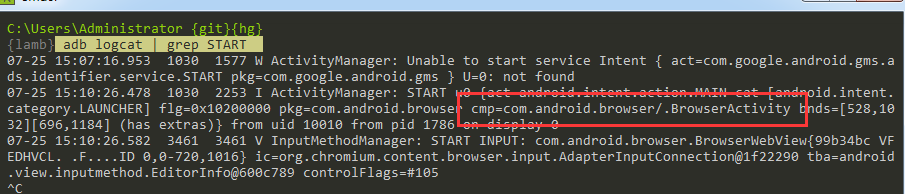
Windows下获取APP 冷/热启动时间
冷启动
adb shell am start -W -n com.android.browser/.BrowserActivity
冷启动停止APP
adb shell am force-stop com.android.browser
热启动
adb shell am start -W -n com.android.browser/.BrowserActivity
热启动停止APP
adb shell input keyevent 3
python脚本实现APP 冷/热启动时间
思路:
1. 创建一个APP类,进行APP相关操作,其中包含,冷/热启动APP,冷/热关闭APP,获取冷/热启动时间
2. 创建一个Controller类,主要实现多次启动/关闭APP,获取时间戳,数据的存储
# /usr/bin/python

# encoding:utf-8

import csv

import os

import time

class App(object):

    def __init__(self):

        self.content = ""

        self.startTime = 0

    # 启动App

    def LaunchApp(self):

        cmd = 'adb shell am start -W -n com.begoit.studyplan/.ui.act.SplashActivity'

        self.content = os.popen(cmd)

    # 停止App

    def StopApp(self):

        # cmd = 'adb shell am force-stop com.android.browser'

        cmd = 'adb shell input keyevent 3'

        os.popen(cmd)

    # 获取启动时间

    def GetLaunchedTime(self):

        for line in self.content.readlines():

            if "ThisTime" in line:

                self.startTime = line.split(":")[1]

                break

        return self.startTime

# 控制类

class Controller(object):

    def __init__(self, count):

        self.app = App()

        self.counter = count

        self.alldata = [("timestamp", "elapsedtime")]

    # 单次测试过程

    def testprocess(self):

        self.app.LaunchApp()

        time.sleep(5)

        elpasedtime = self.app.GetLaunchedTime()

        self.app.StopApp()

        time.sleep(3)

        currenttime = self.getCurrentTime()

        self.alldata.append((currenttime, elpasedtime))

    # 多次执行测试过程

    def run(self):

        while self.counter > 0:

            self.testprocess()

            self.counter = self.counter - 1

    # 获取当前的时间戳

    def getCurrentTime(self):

        currentTime = time.strftime("%Y-%m-%d %H:%M:%S", time.localtime())

        return currentTime

    # 数据的存储

    def SaveDataToCSV(self):

        csvfile = file('startTime2.csv', 'wb')

        writer = csv.writer(csvfile)

        writer.writerows(self.alldata)

        csvfile.close()

if __name__ == "__main__":

    controller = Controller(5)

    controller.run()

    controller.SaveDataToCSV()
运行结果展示:

总结:
我们通过两种方式实现记录APP冷/热启动时间,进行比较,编写脚本方式相对简单些。也更容易对测试结果进行分析。所以在这里推荐大家学习python基础知识。关于adb shell am 的命令推荐阅读:https://blog.csdn.net/soslinken/article/details/50245865
1、获取APP 冷/热启动时间的更多相关文章
- 2、获取APP CPU占用率
前面已经介绍过如何获取包名和主活动名.这里不再过多赘述.我们依旧采取两种方案实现APP CPU占有率 Windows下获取APP CPU占用率 adb shell "dumpsys cpui ...
- Android 查看App冷启动时间/热启动时间/页面打开时间
Android 查看App冷启动时间/热启动时间/页面打开时间 冷启动时间 热启动时间 页面打开时间 通过adb查看 adb shell am start -W packageName/Activit ...
- 获取app启动时间
启动APP并收集消耗时间的命令: adb shell am start -W -n package/activity 手动关闭谷歌浏览器APP(也可以使用命令关闭adb shell am force ...
- 3、获取APP 内存占用率
关于APP内存占用,不用多说,应该是APP性能测试中比较重要的一点.试想一下,开个应用把手机内存占满了,其它应用无法打开,那么这个应用还会有人安装吗?我觉得是没有的.下面就通过adb命令获取APP虚存 ...
- iOS获取app图标和启动图片名字(AppIcon and LaunchImage's name)
在某种场景下,可能我们需要获取app的图标名称和启动图片的名称.比如说app在前台时,收到了远程通知但是通知栏是不会有通知提醒的,这时我想做个模拟通知提示,需要用到icon名称:再比如在加载某个控制器 ...
- NSDate获取当前时区的时间
[NSDate date]获取的是GMT时间,要想获得某个时区的时间,以下代码可以解决这个问题 NSDate *date = [NSDate date]; NSTimeZone *zone = [NS ...
- python 获取文件大小,创建时间和访问时间
# -*- coding: UTF8 -*- import timeimport datetime import os 1. '''把时间戳转化为时间: 1479264792 to 2016-11-1 ...
- 获取APP应用的包名信息
语言: python 3.7 需求:获取APP的包名和程序入口信息,以便在 Appium 脚本中配置 appPackage 和 appActivity 参数. 场景一 资源:已有APP应用的apk安装 ...
- Appium+Python自动化 3 -获取 app 包名和 activity
方法一: ①手机通过USB连接电脑 ②打开手机上被测app ③在电脑上 dos命令窗口,输入命令 adb shell dumpsys window w | findstr \/ | findstr n ...
随机推荐
- z-index只能用在定位元素上
弄了很久才突然想到z-index只能用在被定位的元素上. 定位的时候要注意给父级定位 在ie7里有问题的部分
- 32. 持续集成简介及JDK、Tomcat、Jenkins环境搭建
持续集成简介 持续集成是一种软件开发实践,即团队开发成员经常集成他们的工作,通常每个成员每天至少集成一次,也就意味着每天可能会发生多次集成.每次集成都通过自动化的构建(包括编译,发布,自动化测试)来验 ...
- shell 过滤器(管道)
将几个命令通过管道符组合在一起就是一个管道,通常,通过这种方式使用的命令就被称为过滤器. 过滤器会获得输入,通过某种方式修改其内容,然后将其输出. 常用的被用作过滤器使用的命令为: 1.awk---用 ...
- 搭建RAID10(5块硬盘)过程并模拟其中一块硬盘损坏
首先:RAID 10,实际是将RAID 0和RAID 1标准结合的产物,在连续地以位或字节为单位分割数据并且并行读/写多个磁盘的同时,为每一块磁盘作磁盘镜像进行冗余.它的优点是同时拥有RAID 0的超 ...
- 调用WPF程序时传入参数
http://blog.csdn.net/martin_cheng/article/details/41351013 http://blog.csdn.net/libby1984/article/de ...
- ABTest介绍及abtest流量切换实现
本文为学习abtest切流方案方便以后查看大部分内容转载自原文 https://blog.csdn.net/tanweii163/article/details/80543083 互联网公司的业务发展 ...
- python调用tushare获取沪深A股票资金流向数据
接口:moneyflow 描述:获取沪深A股票资金流向数据,分析大单小单成交情况,用于判别资金动向 限量:单次最大提取4000行记录,总量不限制 积分:用户需要至少1500积分才可以调取,基础积分有流 ...
- Raspberry Pi 开机启动QT程序
https://blog.csdn.net/coekjin/article/details/52498212 https://blog.csdn.net/dubuzherui/article/deta ...
- shell位置参数和 shift 命令
- Spring的PropertyPlaceholderConfigurer应用(转)
转自:http://www.cnblogs.com/yl2755/archive/2012/05/06/2486752.html Spring 利用PropertyPlaceholderConfigu ...