
Centos安装PHP PS:LAMP环境时,为少出错误,先安装一下编译环境
下面安装PHP时数显很多问题,为了减少问题,直接安装先yum一下

yum -y install gcc pcre pcre-devel gcc-c++ autoconf libxml2 libxml2-devel zlib zlib-devel glibc libjpeg libjpeg-devel libpng libpng-devel glibc-devel glib2 glib2-devel ncurses ncurses-devel curl curl-devel e2fsprogs e2fsprogs-devel openssl openssl-devel openldap openldap-devel  openldap-clients openldap-servers make cmake freetype-devel
1、下载
php官方下载地址: http://www.php.net/downloads.php 此处下载版本:php-5.6.7
cd /usr/local/src //进入目录
tar -zxvf php-5.6.7 //解压
cd php-5.6.7 //进入文件目录
# ./configure --prefix=/usr/local/php --with-config-file-path=/etc --with-apxs2=/usr/local/apache2/bin/apxs --with-mysql --with-mysqli --with-libxml-dir --with-png-dir --with-jpeg-dir --with-freetype-dir --with-gd --with-zlib-dir --with-mcrypt --enable-soap --enable-mbstring=all --enable-sockets --enable-ftp --enable-zip --with-gettext
错误:configure: error: xml2-config not found. Please check your libxml2 installation
[root@XKWB3403 php-5.3.]# rpm -qa |grep  libxml2

libxml2-2.6.-2.1.

libxml2-python-2.6.-2.1.

重新安装libxml2和libxml2-devel包

yum install libxml2

yum install libxml2-devel -y
错误:mcrypt.h not found. Please reinstall libmcrypt
解决办法一

、安装第三方yum源

yum install epel-release

sh ./atomic

、使用yum命令安装

yum  install  php-mcrypt  libmcrypt  libmcrypt-devel

解决办法二、

使用php mcrypt 前必须先安装Libmcrypt

libmcrypt源码安装方法:

cd /usr/local/src

wget http://softlayer.dl.sourceforge.net/sourceforge/mcrypt/libmcrypt-2.5.8.tar.gz

tar -zxvf libmcrypt-2.5..tar.gz

cd /usr/local/src/libmcrypt-2.5.

./configure --prefix=/usr/local

make

make install
checking for BZip2 support… yes checking  for BZip2 in default path… not found configure: error: Please reinstall the  BZip2 distribution

解决方法: yum install  bzip2-devel

*******************************************************************************

checking for cURL support… yes checking  if we should use cURL for url streams… no checking for cURL in default path…  not found configure: error: Please reinstall the libcurl distribution –  easy.h should be in/include/curl/

解决方法: yum install  curl-devel

*******************************************************************************

checking for curl_multi_strerror in  -lcurl… yes checking for QDBM support… no checking for GDBM support… no  checking for NDBM support… no configure: error: DBA: Could not find necessary  header file(s).

解决方法: yum install  db4-devel

*******************************************************************************

checking for fabsf… yes checking for  floorf… yes configure: error: jpeglib.h not found.

解决方法: yum install  libjpeg-devel

*******************************************************************************

checking for fabsf… yes checking for  floorf… yes checking for jpeg_read_header in -ljpeg… yes configure: error:  png.h not found.

解决方法: yum install  libpng-devel

*******************************************************************************

checking for png_write_image in -lpng…  yes If configure fails try –with-xpm-dir=

configure: error: freetype.h not found.

解决方法:
Reconfigure your  PHP with the following option. --with-xpm-dir=/usr

*******************************************************************************

checking for png_write_image in -lpng…  yes configure: error: libXpm.(a|so) not found.

解决方法: yum install  libXpm-devel

*******************************************************************************

checking for bind_textdomain_codeset in  -lc… yes checking for GNU MP support… yes configure: error: Unable to locate  gmp.h

解决方法: yum install  gmp-devel

*******************************************************************************

checking for utf8_mime2text signature…  new checking for U8T_DECOMPOSE… configure: error: utf8_mime2text() has new  signature, but U8T_CANONICAL is missing. This should not happen. Check  config.log for additional information.

解决方法: yum install  libc-client-devel

*******************************************************************************

checking for LDAP support… yes, shared  checking for LDAP Cyrus SASL support… yes configure: error: Cannot find  ldap.h

解决方法: yum install  openldap-devel

*******************************************************************************

checking for mysql_set_character_set in  -lmysqlclient… yes checking for mysql_stmt_next_result in -lmysqlclient… no  checking for Oracle Database OCI8 support… no checking for unixODBC support…  configure: error: ODBC header file ‘/usr/include/sqlext.h’ not found!

解决方法:yum install  unixODBC-devel

*******************************************************************************

checking for PostgreSQL support for PDO…  yes, shared checking for pg_config… not found configure: error: Cannot find  libpq-fe.h. Please specify correct PostgreSQL installation path

解决方法: yum install  postgresql-devel

*******************************************************************************

checking for sqlite  support for PDO…  yes, shared checking for PDO includes… (cached) /usr/local/src/php-5.3./ext  checking for sqlite3 files in default path… not found configure: error:  Please reinstall the sqlite3 distribution

解决方法: yum install  sqlite-devel

*******************************************************************************

checking for utsname.domainname… yes  checking for PSPELL support… yes configure: error: Cannot find pspell

解决方法: yum install  aspell-devel

*******************************************************************************

checking whether to enable UCD SNMP hack…  yes checking for default_store.h… no

checking for kstat_read in -lkstat… no  checking for snmp_parse_oid in -lsnmp… no checking for init_snmp in -lsnmp…  no configure: error: SNMP sanity check failed. Please check config.log for  more information.

解决方法: yum install  net-snmp-devel

*******************************************************************************

checking whether to enable XMLWriter  support… yes, shared checking for xml2-config path… (cached)  /usr/bin/xml2-config checking whether libxml build works… (cached) yes  checking for XSL support… yes, shared configure: error: xslt-config not  found. Please reinstall the libxslt >= 1.1. distribution

解决方法: yum install  libxslt-devel

*******************************************************************************

configure: error: xml2-config not found.  Please check your libxml2 installation.

解决方法: yum install libxml2-devel

*******************************************************************************

checking for PCRE headers location…  configure: error: Could not find pcre.h in /usr

解决方法: yum install  pcre-devel

*******************************************************************************

configure: error: Cannot find MySQL  header files under yes. Note that the MySQL client library is not bundled  anymore!

解决方法: yum install  mysql-devel

*******************************************************************************

checking for unixODBC support… configure:  error: ODBC header file ‘/usr/include/sqlext.h’ not found!

解决方法: yum install  unixODBC-devel

*******************************************************************************

checking for pg_config… not found  configure: error: Cannot find libpq-fe.h. Please specify correct PostgreSQL  installation path

解决方法:yum install  postgresql-devel

*******************************************************************************

configure: error: Cannot find pspell

解决方法: yum install  pspell-devel

*******************************************************************************

configure: error: Could not find  net-snmp-config binary. Please check your net-snmp installation.

解决方法: yum install  net-snmp-devel

*******************************************************************************

configure: error: xslt-config not found.  Please reinstall the libxslt >= 1.1. distribution

解决方法: yum install  libxslt-devel
make && make install
echo $?
#设置环境变量

vi /etc/profile

#在末尾添加以下内容

PATH=/usr/local/php/bin:$PATH

export PATH

#让刚才的修改生效

source /etc/profile
#复制配置文件到etc目录

cp /usr/src/php-5.6./php.ini-production /etc/php.ini

#修改默认时区

vim /etc/php.ini
date.timezone =Asia/Shanghai
此处要做以说明,由于前面安装Apache2.4时候没有指定配置文件,所以/etc/没有http目录,因此下文中的方法需要改进:
#让httpd支持php解析

vim /etc/httpd/httpd.conf

#找到这行

AddType application/x-gzip .gz .tgz

#添加这一句

AddType application/x-httpd-php .php

#找到以下这句,在后面添加index.php

DirectoryIndex index.html

DirectoryIndex index.html index.php
改进方法:
mkdir /etc/httpd/                //创建httpd目录

cd /etc/httpd

ln -s /usr/local/apache2/conf/httpd.conf .         //创建软链接文件,方便修改
vim /etc/httpd/httpd.conf

#找到这行

AddType application/x-gzip .gz .tgz

#添加这一句

AddType application/x-httpd-php .php

#找到以下这句,在后面添加index.php

DirectoryIndex index.html

DirectoryIndex index.html index.php
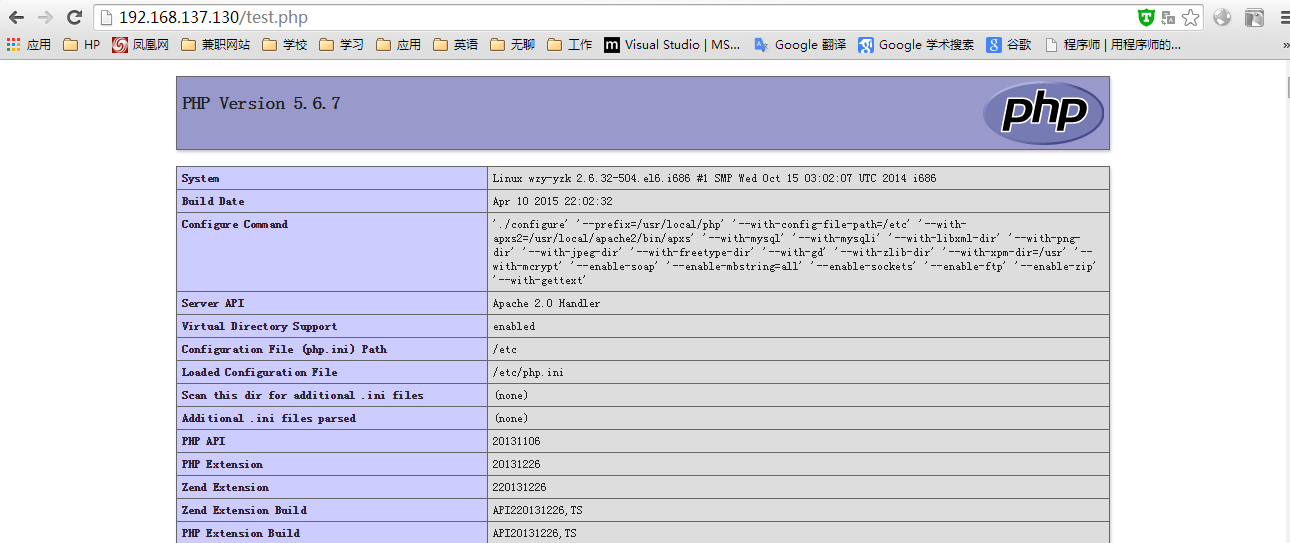
至此PHP安装成功
测试PHP
touch /usr/local/apache2/htdocs/test.php

vim /usr/local/apache2/htdocs/test.php
写入

<?php

        phpinfo();

?>
浏览器输入 "IP"/test.php 出现以下内容即为成功
Centos安装PHP PS:LAMP环境时,为少出错误,先安装一下编译环境的更多相关文章
- 迁移到MSYS2 与 Qt 工具链注意的几个事情(g++在链接时,符号依赖项查找遵循从左至右的顺序,但qmake会自动合并造成错误。使用脚本给Mingw32-make创造出一个局部的VC编译环境)
Microsoft Visual Studio 2015社区版提供了强大的开发体验,且 Qt 提供了预编译版本.然而,由于客户提出兼容Windows XP ~ Windows 8.1 这样宽泛的环境要 ...
- 配置Robot Framework 环境时如何查看wxPython是否成功安装
配置Robot Framework,win10系统,安装版本分别如下:
- centos shell基础 alias 变量单引号 双引号 history 错误重定向 2>&1 jobs 环境变量 .bash_history source配置文件 nohup & 后台运行 cut,sort,wc ,uniq ,tee ,tr ,split, paste cat> 2.txt <<EOF 通配符 glob模式 发邮件命令mail 2015-4-8 第十二节课
centos shell基础知识 alias 变量单引号 双引号 history 错误重定向 2>&1 jobs 环境变量 .bash_history source配置文件 ...
- MinGW安装与环境变量配置和Sublime Text 2搭建C++编译环境
MinGW安装与环境变量配置 从http://sourceforge.net/projects/mingw/下载MinGW,安装到D:\MinGW.工具集选择安装(之后还可以进行安装卸载):至少需要安 ...
- windows 10环境下 使用 msys2 + vs code 配置 c++ 的编译环境
不太多描述 msys2 与 vs code ,既然你需要安装 一种语言的编译环境了 ,你肯定对这两个不陌生: 1. 先安装msys2; (下载多少位的msys2就安装多少位的 mingw,本人安装 ...
- skyline添加wfs服务时,弹出错误“no layers were found”!
1.问题描述: 使用TerraExplorer Pro添加ArcGIS Server 10.2发布的WFS服务图层时,弹出如下错误: 2.错误原因: 发布wfs服务前,图层数据源的空间参考未设置,不能 ...
- 【CentOS 6.5】QtCreator启动时关于dbus-1的错误解决方法
关于上篇文章留下的启动QtCreator提示:dbus_connection_can_send_type的错误,解决办法: 更新dbus版本来解决.. 首先去 http://dbus.freedesk ...
- 安装python后,启动时提示“0x00000000001”内存错误
直关资料: https://www.cnblogs.com/onewalee/p/7887747.html 问题情况:安装python后,在CMD命令中启动python就提示一个内存错误的对话框,重新 ...
- 使用IntelliJ IDEA搭建kafka源码环境时遇到Output path错误解决办法
kafka源码环境搭建好之后,需要在IntelliJ IDEA开发工具中以debug方式启动kafka服务器来测试消息的生产和消费. 但是在启动kafka.Kafka类中的main方法(也就是运行 k ...
随机推荐
- Monkeyrunner自动化测试由浅入深(第一节)
(原版)Monkeyrunner自动化测试由浅入深(第一节) 博主原创,请勿转载 第一.相关软件和环境的配置 1.Android sdk下载和配置 2.java jdk下载和配置 第二.Monkeyr ...
- 通过jvm 查看死锁
jstack -l jvm_pid 运行以下代码之后运行上面命令,可以在控制台上看到死锁. public class DeadLock { public static String obj1 = &q ...
- MVC的一个简单实例
基本思路: 一个Regist.jsp注册页面,用于收集用户信息,发送请求给控制器Servlet:控制器层Servlet封装模型层对象 jBean,并调用其方法regiser实现用户信息的保存:模型层J ...
- java中的同步和异步
摘自:https://www.cnblogs.com/caotao0918/p/10699785.html 在多线程的环境中,经常会碰到数据的共享问题,即当多个线程需要访问同一个资源时,它们需要以某种 ...
- 错误 NETSDK1007 找不到“E:\Project\MyProject\MyProject.Common\MyProject.Utility.csproj”的项目信息。这可以指示缺少一个项目引用。 MyProject.Data C:\Program Files\dotnet\sdk\2.2.107\Sdks\Microsoft.NET.Sdk\targets\Microsof
因为对MyProject.Data引用的项目MyProject.Common进行了重命名为MyProject.Utility,导致这个错误 解决办法: 1.找到MyProject.Data中的E:\P ...
- sed将一个文件插入到另一个文件(合并两个文件)
将before.sh的内容插入到catalina.sh的第一行之后 sed -i '1r /srv/tomcat8/bin/before.sh' /srv/tomcat8/bin/catalina.s ...
- C/C++中的 void 和 void*
转自:https://blog.csdn.net/tonglin12138/article/details/86516789 写在前面:开门见山,大家看下面这个例子: unsigned char er ...
- spring boot 整合saml2
项目是国外的一位大神发布到githut上,这里只是对项目代码的分析与学习,也算是一种强化记忆 附上 githut地址:https://github.com/OpenConext/Mujina 项目分为 ...
- shims-vue.d.ts 解析
TypeScript的文档看起来比较让人匪夷所思 TS是从2012年就开始的项目,那时ES6的模块化还没有成为继定标准,所以今天来看TS中一些名词让人匪夷所思,其实都是历史遗留问题 比如namespa ...
- Java连接Hive使用Zookeeper的方式
Java连接Hive的方式就是通过JDBC的方式来连接,URL为jdbc:hive2://host:port/db;principal=X@BIGDATA.COM等,这种方式是直接连接HiveServ ...