
JAVA笔记26-网络编程(不等于网站编程)
一、网络基础(TCP/IP详解)
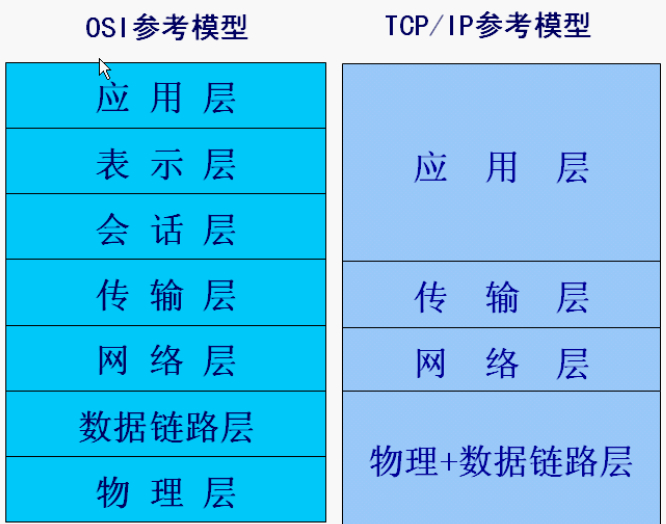
1、IP协议(Internet Protocol):网络层,支持网间数据报通信。无连接数据报传送,数据报路由选择和差错控制。

IPv4 32位(4字节),IPv6 128位(16字节)。P
ping ICMP协议
2、TCP协议、UDP协议
(1)TCP(transmission control protocol 打电话):专门设计用于在不可靠的因特网上提供可靠的、端到端的字节流通信的协议。它是一种面向连接的协议。有三次握手。慢
(2)UDP(user data protocol 寄信):提供了一种发送封装的原始IP数据报的方法、并且发送时无需建立连接,是一种不可靠的连接。快
二、Socket
两个Java应用程序可以通过一个双向的网络通信连接实现数据交换,这个双向链路的一端称为一个Socket。
Socket通常用来实现client-server连接。
java.net包中定义的两个类Socket和ServerSocket,分别用来实现双向连接(TCP连接)的client和server端。
建立连接时所需的寻址信息为远程计算机的IP地址和端口号(Port number)。端口号2字节,可以区分不同的应用程序。端口号又分TCP端口和UDP端口,每个都是65536个端口。
例如:
收邮件 POP3 110
STMP 25
FTP 21
HTTP 80
1、TCP Socket通信模型
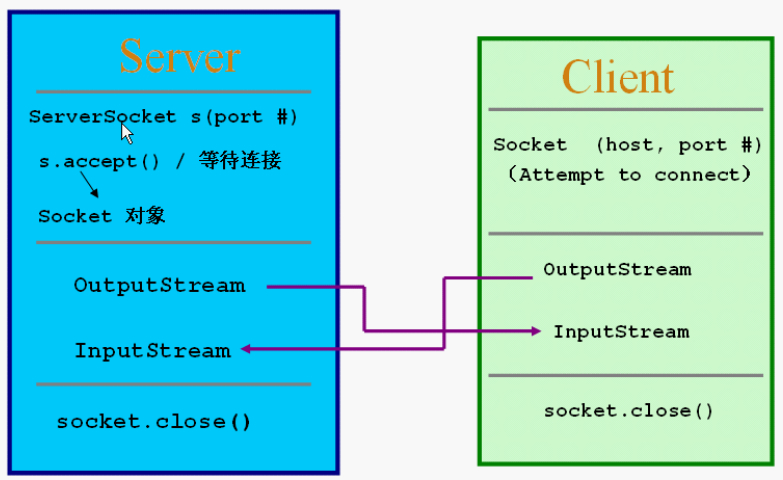
这只是练习,实际上的网络编程都是异步式的。System.in,accept(),readUTF()都是阻塞式的(非重点)
例1
import java.net.*;

import java.io.*;

public class TCPServer{

    public static void main(String args[]) throws Exception{

        ServerSocket ss = new ServerSocket(6666);//端口号6666

        while(true){

            Socket s = ss.accept();

            System.out.println("a client connect!");

            DataInputStream dis = new DataInputStream(s.getInputStream());

            System.out.println(dis.readUTF());

            dis.close();

            s.close();

        }

    }

}
import java.net.*;

import java.io.*;

public class TCPClient{

    public static void main(String args[]) throws Exception{

        Socket s = new Socket("127.0.0.1",6666);

        OutputStream os = s.getOutputStream();

        DataOutputStream dos = new DataOutputStream(os);

        dos.writeUTF("hello server!");

        dos.flush();

        dos.close();

        s.close();

    }

}
例2
import java.io.*;

import java.net.*;

public class TestServer{

    public static void main(String[] args){

        try{

            ServerSocket s = new ServerSocket(8888);//服务器端口号8888

            while(true){

                Socket s1 = s.accept();

                OutputStream os = s1.getOutputStream();

                DataOutputStream dos = new DataOutputStream(os);

                dos.writeUTF("Hello,"+s1.getInetAddress()+"port#"+s1.getPort()+" byebye!");//客户端的IP地址和端口号

                dos.close();

                s1.close();

            }

        }catch(IOException e){

            e.printStackTrace();

        }

    }

}
import java.net.*;

import java.io.*;

public class TestClient{

    public static void main(String[] args){

        try{

            Socket s1 = new Socket("127.0.0.1",8888);//服务器地址和端口号

            InputStream is = s1.getInputStream();

            DataInputStream dis = new DataInputStream(is);

            System.out.println(dis.readUTF());

            dis.close();

            s1.close();

        }catch(ConnectException e){

            e.printStackTrace();

        }catch(IOException e){

            e.printStackTrace();

        }

    }

}
例3
import java.io.*;

import java.net.*;

public class TestServer{

    public static void main(String[] args){

        InputStream in = null;

        OutputStream out = null;

        try{

            ServerSocket ss = new ServerSocket(5888);//设置端口号

            Socket s1 = ss.accept();

            in = s1.getInputStream();

            out = s1.getOutputStream();

            DataOutputStream dos = new DataOutputStream(out);

            DataInputStream dis = new DataInputStream(in);

            String s = null;

            if((s=dis.readUTF())!=null){

                System.out.println(s);

                System.out.println("from: "+s1.getInetAddress());

                System.out.println("Port: "+s1.getPort());

            }

            dos.writeUTF("hi,hello");

            dis.close();

            dos.close();

            s1.close();

        }catch(IOException e){

            e.printStackTrace();

        }

    }

}
import java.net.*;

import java.io.*;

public class TestClient{

    public static void main(String[] args){

        InputStream in = null;

        OutputStream out = null;

        try{

            Socket s1 = new Socket("localhost",5888);//服务器地址和端口号

            in = s1.getInputStream();

            out = s1.getOutputStream();

            DataInputStream dis = new DataInputStream(in);

            DataOutputStream dos = new DataOutputStream(out);

            dos.writeUTF("hey");

            String s = null;

            if((s=dis.readUTF())!=null){

                System.out.println(s);

            }

            dos.close();

            dis.close();

            s1.close();

        }catch(UnknownHostException e){

            e.printStackTrace();

        }catch(IOException e){

            e.printStackTrace();

        }

    }

}
练习4:(by myself)
import java.io.*;

import java.net.*;

public class TestServer{

    public static void main(String[] args){

        InputStream in = null;

        OutputStream out = null;

        String si = null;

        String so = "";

        try{

            ServerSocket ss = new ServerSocket(5888);//设置端口号

            while(true){

                Socket s1 = ss.accept();

                in = s1.getInputStream();//接收数据

                out = s1.getOutputStream();//发送数据

                DataInputStream dis = new DataInputStream(in);

                DataOutputStream dos = new DataOutputStream(out);

                //从键盘读入

                InputStreamReader isr2 = new InputStreamReader(System.in);

                BufferedReader br2 = new BufferedReader(isr2);

                while(!so.equals("exit")){

                    if((so=br2.readLine())!=null&&!so.equals("exit")){

                        System.out.println("Server:"+so);

                        dos.writeUTF(so);

                    }

                    if((si=dis.readUTF())!=null){

                        System.out.println("Client:"+si);

                    }

                }

                dis.close();

                br2.close();

                dos.close();

                s1.close();

            }

        }catch(IOException e){

            e.printStackTrace();

        }

    }

}
import java.net.*;

import java.io.*;

public class TestClient{

    public static void main(String[] args){

        InputStream in = null;

        OutputStream out = null;

        String si = null;

        String so= "";

        try{

            Socket s1 = new Socket("127.0.0.1",5888);//服务器地址和端口号

            in = s1.getInputStream();//接收

            out = s1.getOutputStream();//发送

            DataInputStream dis = new DataInputStream(in);

            DataOutputStream dos = new DataOutputStream(out);

            //从键盘读入

            InputStreamReader isr2 = new InputStreamReader(System.in);

            BufferedReader br2 = new BufferedReader(isr2);

            while(!so.equals("exit")){

                if((si=dis.readUTF())!=null){

                    System.out.println("Server:"+si);

                }

                if((so=br2.readLine())!=null&&!so.equals("exit")){

                    System.out.println("Client:"+so);

                    dos.writeUTF(so);

                }

            }

            dis.close();

            br2.close();

            dos.close();

            s1.close();

        }catch(UnknownHostException e){

            e.printStackTrace();

        }catch(IOException e){

            e.printStackTrace();

        }

    }

}
2、UDP Socket通信模型
没有server,client的概念,不区分两者的socket。receive()方法也是阻塞式的。
例1
import java.net.*;

public class TestUDPServer{

    public static void main(String args[]) throws Exception{

        byte buf[] = new byte[1024];

        DatagramPacket dp = new DatagramPacket(buf, buf.length);

        DatagramSocket ds = new DatagramSocket(5678);

        while(true){

            ds.receive(dp);

            System.out.println(new String(buf, 0, dp.getLength()));

        }

    }

}
import java.net.*;

public class TestUDPClient{

    public static void main(String args[]) throws Exception{

        byte[] buf = (new String("Hello")).getBytes();

        DatagramPacket dp = new DatagramPacket(buf, buf.length, new InetSocketAddress("127.0.0.1", 5678));

        DatagramSocket ds = new DatagramSocket(9999);

        ds.send(dp);

        ds.close();

    }

}
例2
import java.net.*;

import java.io.*;

public class TestUDPServer{

    public static void main(String args[]) throws Exception{

        byte buf[] = new byte[1024];

        ByteArrayInputStream bais = new ByteArrayInputStream(buf);//从字节数组读数据

        DataInputStream dis = new DataInputStream(bais);

        DatagramPacket dp = new DatagramPacket(buf, buf.length);

        DatagramSocket ds = new DatagramSocket(5678);

        while(true){

            ds.receive(dp);

            long l = dis.readLong();

            System.out.println(l);

        }

    }

}
import java.net.*;

import java.io.*;

public class TestUDPClient{

    public static void main(String args[]) throws Exception{

        long n = 10000L;

        ByteArrayOutputStream baos = new ByteArrayOutputStream();

        DataOutputStream dos = new DataOutputStream(baos);

        dos.writeLong(n);

        byte[] buf = baos.toByteArray();

        System.out.println(buf.length);

        DatagramPacket dp = new DatagramPacket(buf,buf.length,new InetSocketAddress("127.0.0.1",5678));

        DatagramSocket ds = new DatagramSocket(9999);

        ds.send(dp);

        ds.close();

    }

}
JAVA笔记26-网络编程(不等于网站编程)的更多相关文章
- Java笔记 - Socket编程
两个Java应用程序可以通过一个双向的网络通讯连接实现数据交换,这个双向链路的一端称为一个Socket.java.net包中定义的两个类Socket和ServerSocket,分别用来实现双向链路的c ...
- Java 学习之网络编程案例
网络编程案例 一,概念 1,网络编程不等于网站编程 2,编程只和传输层打交道,即TCP和UDP两个协议 二,案例 1,TCP实现点对点的聊天 Server端:两个输入流:读客户端和控制台,一个输出端: ...
- 大数据学习笔记——Java篇之网络编程基础
Java网络编程学习笔记 1. 网络编程基础知识 1.1 网络分层图 网络分层分为两种模型:OSI模型以及TCP/IP网络模型,前者模型分为7层,是一个理论的,参考的模型:后者为实际应用的模型,具体对 ...
- JAVA自学笔记26
JAVA自学笔记26 1.网络编程 1)用来实现网络互联的不同计算机上运行的程序可以进行数据交换 2)网络模型一般泛指 OSI:(Open System Interconnection)开放系统互联参 ...
- Java学习之网络编程实例
转自:http://www.cnblogs.com/springcsc/archive/2009/12/03/1616413.html 多谢分享 网络编程 网络编程对于很多的初学者来说,都是很向往的一 ...
- Java进阶之网络编程
网络编程 网络编程对于很多的初学者来说,都是很向往的一种编程技能,但是很多的初学者却因为很长一段时间无法进入网络编程的大门而放弃了对于该部分技术的学习. 在 学习网络编程以前,很多初学者可能觉得网络编 ...
- java第九节 网络编程的基础知识
/** * * 网络编程的基础知识 * 网络协议与TCP/IP * IP地址和Port(端口号) * 本地回路的IP地址:127.0.0.1 * 端口号的范围为0-65535之间,0-1023之间的端 ...
- 20165324 Java实验五 网络编程与安全
20165324 Java实验五 网络编程与安全 一.实验报告封面 课程:Java程序设计 班级:1653班 姓名:何春江 学号:20165324 指导教师:娄嘉鹏 实验日期:2018年5月28日 实 ...
- Java网络编程 -- NIO非阻塞网络编程
从Java1.4开始,为了替代Java IO和网络相关的API,提高程序的运行速度,Java提供了新的IO操作非阻塞的API即Java NIO.NIO中有三大核心组件:Buffer(缓冲区),Chan ...
随机推荐
- 清晰理解redux中的
首先需要明白 Redux 的单一状态树的概念,所谓的单一状态树,就是指“所有的 state 都以一个对象树的形式储存在一个单一的 store 中.” 比如我们有这么一个状态树(或者你叫它状态对象也行) ...
- Python学习之协程
8.8 协程 我们都知道线程间的任务切换是由操作系统来控制的,而协程的出现,就是为了减少操作系统的开销,由协程来自己控制任务的切换 协程本质上就是线程.既然能够切换任务,所以线程有两个最基本的 ...
- lua基础学习(四)
一,lua字符串 单引号间的一串字符. 双引号间的一串字符. [[和]]间的一串字符. 1.几个常用的转义字符 \b 退格 \f 换页 \n 换行 \r 回车 \t 跳到下一个tab位置 \0 ...
- 【Linux 网络编程】网络IP地址结构体
(1)IPv4套接口地址结构通常也称为"网际套接字地址结构",它以"sockaddr_in"命名, 定义在<netinet/in.h> ...
- [UER #1] DZY Loves Graph
题目描述 开始有 \(n\) 个点,现在对这 \(n\) 个点进行了 \(m\) 次操作,对于第 \(i\) 个操作(从 \(1\) 开始编号)有可能的三种情况: \(Add\) a b: 表示在 \ ...
- layer弹出框的简易封装和使用
1. 封装layer 下载layer绿色版和jquery引入页面 <!DOCTYPE html> <html lang="zh-CN"> . . . < ...
- Linux等操作系统杂谈
这部分基本上都是感性认识,介绍一下发展历史什么的.所以基本上都不是我原创的,转载来源都标记在文中了,如果侵权的话请联系删除 操作系统发展历史吃瓜 <Unix.Windows.Mac OS.Lin ...
- ORA-00979: 不是 GROUP BY 表达式
在oracle数据库中,sql语句中group by子句报错,原因是select 存在列字段,而group by中不存在.
- thinkphp5服务器部署遇到的问题
candir() has been disabled for security reasons 解决办法: 进入到php的配置目录,编辑php.ini cd /usr/local/php/etcvi ...
- Python基础——函数进阶
等待更新…………………… 后面再写