
springboot2.0整合redis的发布和订阅
1.Maven引用
        <dependency>

            <groupId>org.springframework.boot</groupId>

            <artifactId>spring-boot-starter-web</artifactId>

        </dependency>

        <dependency>

            <groupId>org.springframework.boot</groupId>

            <artifactId>spring-boot-starter-data-redis</artifactId>

        </dependency>
2.redis属性配置
spring.redis.database=

spring.redis.host=127.0.0.1

spring.redis.port=

spring.redis.password=******

server.port=
3.设置监听相关对象
3.1接听对象
RedisReceiver可以是普通类或者继承MessageListener,普通类的写法如下,接收的时候只接收到消息,没有频道名
package com.example.redistest.config;

import org.springframework.data.redis.connection.Message;

import org.springframework.data.redis.connection.MessageListener;

import org.springframework.stereotype.Component;

@Component

public class RedisReceiver {

    public void receiveMessage(String message) {

        // TODO 这里是收到通道的消息之后执行的方法

        System.out.println(message);

    }

}
继承MessageListener,就能拿到消息体和频道名。
package com.example.redistest.config;

import org.springframework.data.redis.connection.Message;

import org.springframework.data.redis.connection.MessageListener;

import org.springframework.stereotype.Component;

@Component

public class RedisReceiver implements MessageListener {

    @Override

    public void onMessage(Message message, byte[] pattern) {

        System.out.println(new String(message.getBody()));

        System.out.println(new String(message.getChannel()));

    }

}
3.2 配置监听适配器、消息监听容器
container.addMessageListener(listenerAdapter, new PatternTopic("channel:test"));
消息监听容器增加监听的消息,第一个参数是监听适配器,第2个参数是监听的频道。
package com.example.redistest.config;

import org.springframework.cache.annotation.EnableCaching;

import org.springframework.context.annotation.Bean;

import org.springframework.context.annotation.Configuration;

import org.springframework.data.redis.connection.MessageListener;

import org.springframework.data.redis.connection.RedisConnectionFactory;

import org.springframework.data.redis.core.StringRedisTemplate;

import org.springframework.data.redis.listener.PatternTopic;

import org.springframework.data.redis.listener.RedisMessageListenerContainer;

import org.springframework.data.redis.listener.adapter.MessageListenerAdapter;

@Configuration

@EnableCaching

public class RedisCacheConfig {

    @Bean

    RedisMessageListenerContainer container(RedisConnectionFactory connectionFactory,

                                            MessageListenerAdapter listenerAdapter) {

        RedisMessageListenerContainer container = new RedisMessageListenerContainer();

        container.setConnectionFactory(connectionFactory);

        // 可以添加多个 messageListener,配置不同的交换机

        container.addMessageListener(listenerAdapter, new PatternTopic("channel:test"));

        return container;

    }

    @Bean

    MessageListenerAdapter listenerAdapter(RedisReceiver receiver) {

        System.out.println("消息适配器1");

        return new MessageListenerAdapter(receiver, "onMessage");

    }

    @Bean

    StringRedisTemplate template(RedisConnectionFactory connectionFactory) {

        return new StringRedisTemplate(connectionFactory);

    }

}
3.3 消息发送
package com.example.redistest.controller;

import org.springframework.beans.factory.annotation.Autowired;

import org.springframework.data.redis.core.RedisTemplate;

import org.springframework.data.redis.core.StringRedisTemplate;

import org.springframework.data.redis.core.ValueOperations;

import org.springframework.stereotype.Controller;

import org.springframework.web.bind.annotation.PathVariable;

import org.springframework.web.bind.annotation.RequestMapping;

import java.util.Date;

@RequestMapping("/redis")

@Controller

public class RedisController {

    @Autowired

    StringRedisTemplate template;

    /**

     * 发布消息

     *

     * @param id

     * @return

     */

    @RequestMapping("/sendMessage/{id}")

    public String sendMessage(@PathVariable String id) {

        for(int i = 1; i <= 5; i++) {

            template.convertAndSend("channel:test", String.format("我是消息{%d}号: %tT", i, new Date()));

        }

        return "";

    }

}
测试
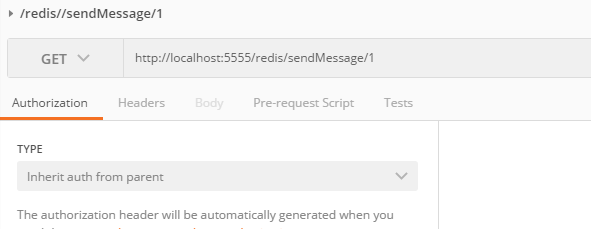
postman访问http://localhost:5555/redis/sendMessage/1
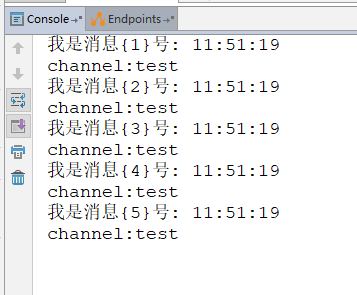
接收消息后打印
springboot2.0整合redis的发布和订阅的更多相关文章
- SpringBoot2.0 整合 Redis集群 ,实现消息队列场景
本文源码:GitHub·点这里 || GitEE·点这里 一.Redis集群简介 1.RedisCluster概念 Redis的分布式解决方案,在3.0版本后推出的方案,有效地解决了Redis分布式的 ...
- Springboot2.0整合Redis(注解开发)
一. pom.xm文件引入对应jar包 <dependency> <groupId>org.springframework.boot</groupId> <a ...
- SpringBoot2.0整合Redis
Spring Boot2.0在2018年3月份正式发布,相比1.0还是有比较多的改动,例如SpringBoot 自2.0起支持jdk1.8及以上的版本.第三方类库升级.响应式 Spring 编程支持等 ...
- springboot2.0整合redis作为缓存以json格式存储对象
步骤1 <dependency> <groupId>org.springframework.boot</groupId> <artifactId>spr ...
- SpringBoot2.x整合Redis实战 4节课
1.分布式缓存Redis介绍 简介:讲解为什么要用缓存和介绍什么是Redis,新手练习工具 1.redis官网 https://redis.io/download 2.新手 ...
- redis实现发布(订阅)消息
redis实现发布(订阅)消息 什么是redis的发布订阅(pub/sub)? Pub/Sub功能(means Publish, Subscribe)即发布及订阅功能.基于事件的系统中,Pub/S ...
- 小D课堂 - 零基础入门SpringBoot2.X到实战_第9节 SpringBoot2.x整合Redis实战_39、SpringBoot2.x整合redis实战讲解
笔记 3.SpringBoot2.x整合redis实战讲解 简介:使用springboot-starter整合reids实战 1.官网:https://docs.spring.io/spring-bo ...
- 第二篇:SpringBoot2.0整合ActiveMQ
本篇开始将具体介绍SpringBoot如何整合其它项目. 如何创建SpringBoot项目 访问https://start.spring.io/. 依次选择构建工具Maven Project.语言ja ...
- SpringBoot2.0 整合 QuartJob ,实现定时器实时管理
一.QuartJob简介 1.一句话描述 Quartz是一个完全由java编写的开源作业调度框架,形式简易,功能强大. 2.核心API (1).Scheduler 代表一个 Quartz 的独立运行容 ...
随机推荐
- Microsoft Visual Studio 2013 Language Pack
Microsoft Visual Studio 2013 Language Pack Microsoft Visual Studio 2013 各版本语言包下载地址: https://my.visua ...
- java开发客户端发送请求到服务器端出现这样:JSON parse error: Unexpected character ('}' (code 125)): was expecting
org.springframework.http.converter.HttpMessageNotReadableException: JSON parse error: Unexpected cha ...
- day48—JavaScript键盘事件
转行学开发,代码100天——2018-05-03 今天继续学习JavaScript事件基础之键盘事件. 键盘代号获取 keyCode 键盘事件:onkeydown onkeyup 如通过键盘上下左右按 ...
- 编程字体Source Code Pro 免费下载
对于程序员来说,好的字体应该满足的基本条件: 字母和数字易于分辨,如: 英文字母o 和 阿拉伯数字 0 ,或者 英文字母 l 和 阿拉伯数字 1 ,两个单引号 '' 和双引号 ”. 字体等宽,保持对齐 ...
- ecshop注册用户增加手机验证功能
1.去掉“用户名”注册 a.去掉提交 user_passport.dwt页面去掉 <input name="username" type="text" s ...
- 20191105 《Spring5高级编程》笔记-【目录】
背景 开始时间:2019/09/18 21:30 Spring5高级编程 版次:2019-01-01(第5版) Spring5最新版本:5.1.9 CURRENT GA 官方文档 Spring Fra ...
- linux串口编程--cssl库
cssl库使用方法概括: 1.cssl_t *ser; //定义一个串口结构体 2.cssl_start(); //使用cssl串口库 3.cssl_open(); //打开并配置串口,参数: 串口名 ...
- java Map与Bean相互转化
import java.beans.BeanInfo; import java.beans.IntrospectionException; import java.beans.Introspector ...
- [Python3 练习] 005 汉诺塔1 递归解法
题目:汉诺塔 I (1) 描述 传说,在世界中心贝拿勒斯(在印度北部)的圣庙外有左中右三根足够长的柱子(塔) 左边柱子上套着 64 片金片,金片按"上小下大"排,其余两根是空柱子 ...
- 探究Javascript模板引擎mustache.js使用方法
这篇文章主要为大家介绍了Javascript模板引擎mustache.js使用方法,mustache.js是一个简单强大的Javascript模板引擎,使用它可以简化在js代码中的html编写,压缩后 ...