
Hive(一)—— 启动与基本使用
一、基本概念
The Apache Hive™ data warehouse software facilitates reading, writing, and managing large datasets residing in distributed storage and queried using SQL syntax.
Hive数据仓库软件,致力于解决读写、管理分布式存储中的大规模数据集,以及使用SQL语法进行查询的问题。
Hive用于解决海量结构化日志的数据统计问题。
Hive是基于Hadoop的一个数据仓库工具。本质是将HQL(Hive的查询语言)转化成MapReduce程序。
HIve处理的数据存储在HDFS
HIve分析数据底层的默认实现是MapReduce
执行程序运行在Yarn上
Hive的优缺点
优点:
可以快速进行数据分析,不需要写MapReduce程序。
MapReduce适合处理大数据,不适合处理小数据
缺点:
HQL表达能力有限,迭代式算法不能表达,粒度较粗,调优比较困难。
自定义函数类别:
- UDF
- UDAF
- UDTF
架构原理
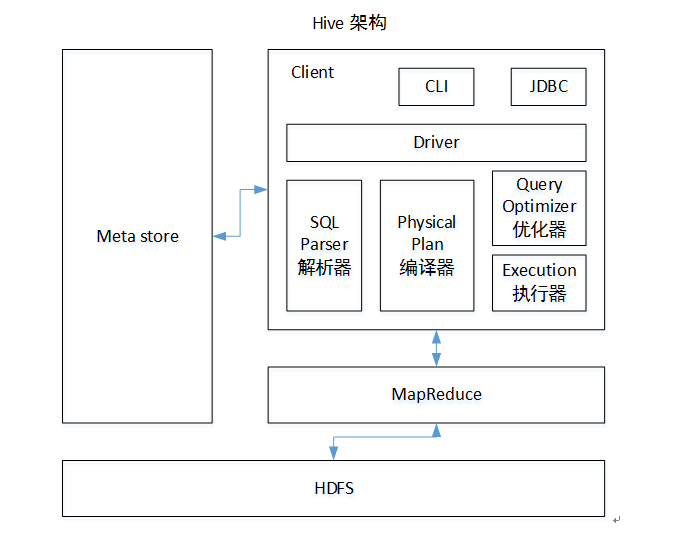
执行顺序:解析器-编译器-优化器-执行器
Hive与数据库对比
HIve相比数据库,读多写少,没有索引,需要暴力扫描所有数据,即使引入了MapReduce机制,也不适合实时查询,扩展性和Hadoop的是一致的,扩展性强。
二、安装与启动
需要启动Hadoop的HDFS和Yarn
配置conf/hive-env.sh
export HADOOP_HOME=/usr/local/hadoop(改成hadoop-home路径)

export HIVE_CONF_DIR=/ur/local/hive/conf
启动
bin/hive
三、Hive语句
显示数据库
show databases;
使用本地模式执行
hive> SET mapreduce.framework.name=local;
创建表、插入记录、查询记录
use default;

#### 创建表

create table student(id int,name string);

#### 插入记录

insert into table student values(1,'fonxian');

#### 查询记录

select * from student;
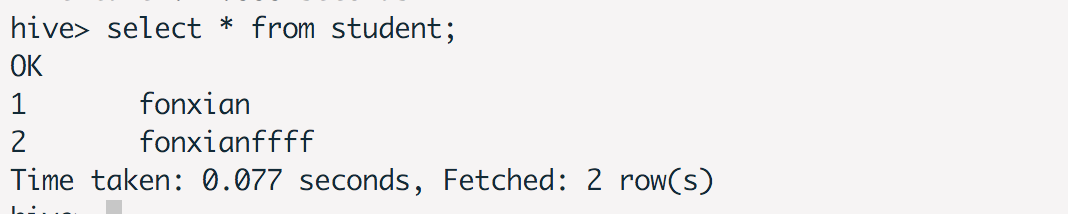
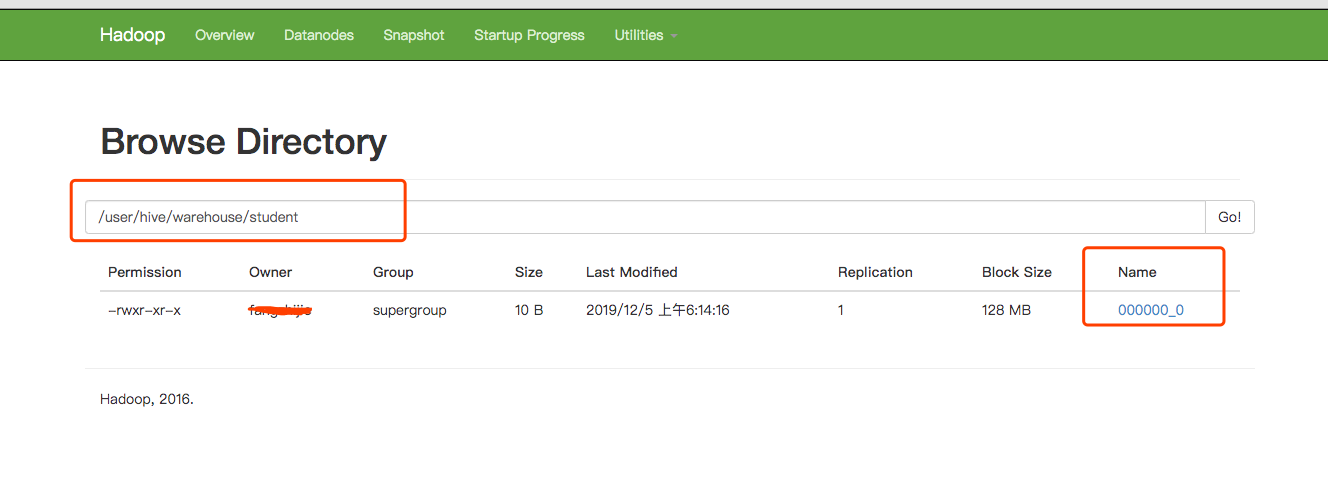
在Hadoop上查看记录
从文件系统加载数据
创建数据文本student.txt
3,kafka

4,flume

5,hbase

6,zookeeper
创建表,定义分隔符
create table stu1(id int,name string) row format delimited fields terminated by ',';
加载数据
load data local inpath '/usr/local/hive/data/student.txt' into table stu1;
查看数据后的执行效果
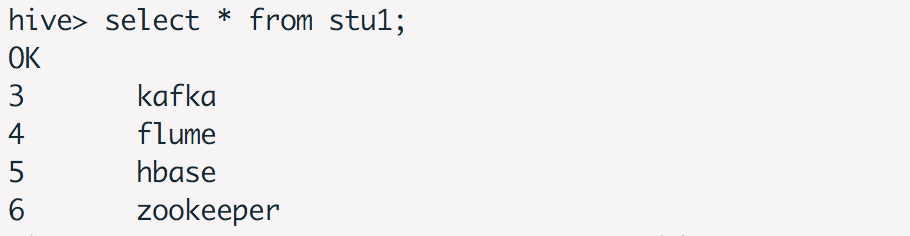
四、Hive Hook使用
添加依赖
<?xml version="1.0" encoding="UTF-8"?>

<project xmlns="http://maven.apache.org/POM/4.0.0"

         xmlns:xsi="http://www.w3.org/2001/XMLSchema-instance"

         xsi:schemaLocation="http://maven.apache.org/POM/4.0.0 http://maven.apache.org/xsd/maven-4.0.0.xsd">

    <modelVersion>4.0.0</modelVersion>

    <groupId>hive-hook-example</groupId>

    <artifactId>Hive-hook-example</artifactId>

    <version>1.0</version>

    <dependencies>

        <dependency>

            <groupId>org.apache.hive</groupId>

            <artifactId>hive-exec</artifactId>

            <version>1.1.0</version>

        </dependency>

    </dependencies>

</project>
创建HiveExampleHook
public class HiveExampleHook implements ExecuteWithHookContext {

    public void run(HookContext hookContext) throws Exception {

        System.out.println("operation name :" + hookContext.getQueryPlan().getOperationName());

        System.out.println(hookContext.getQueryPlan().getQueryPlan());

        System.out.println("Hello from the hook !!");

    }

}
编译好,获得Hive-hook-example-1.0.jar
hive> add jar Hive-hook-example-1.0.jar

hive> set hive.exec.pre.hooks=HiveExampleHook;

hive> select * from student;

operation name :QUERY

Query(queryId:fangzhijie_20191221231550_0e949bbf-f8f7-45a8-8726-c1cdd679cef9, queryType:null, queryAttributes:{queryString=select * from student}, queryCounters:null, stageGraph:Graph(nodeType:STAGE, roots:null, adjacencyList:null), stageList:null, done:false, started:true)

Hello from the hook !!

OK

Time taken: 1.718 seconds

Time taken: 1.68 seconds
五、使用MySQL存储元数据
在本地安装mysql,创建hive-site.xml
<configuration>

    <property>

        <name>javax.jdo.option.ConnectionURL</name>

        <value>jdbc:mysql://127.0.0.1:3306/metastore?createDatabaseIfNotExist=true</value>

        <description>JDBC connect string for a JDBC metastore</description>

    </property>

    <property>

        <name>javax.jdo.option.ConnectionDriverName</name>

        <value>com.mysql.jdbc.Driver</value>

        <description>Driver class name for a JDBC metastore</description>

    </property>

    <property>

        <name>javax.jdo.option.ConnectionUserName</name>

        <value>root</value>

        <description>username to use against metastore database</description>

    </property>

    <property>

        <name>javax.jdo.option.ConnectionPassword</name>

        <value>123456</value>

        <description>password to use against metastore database</description>

    </property>

</configuration>
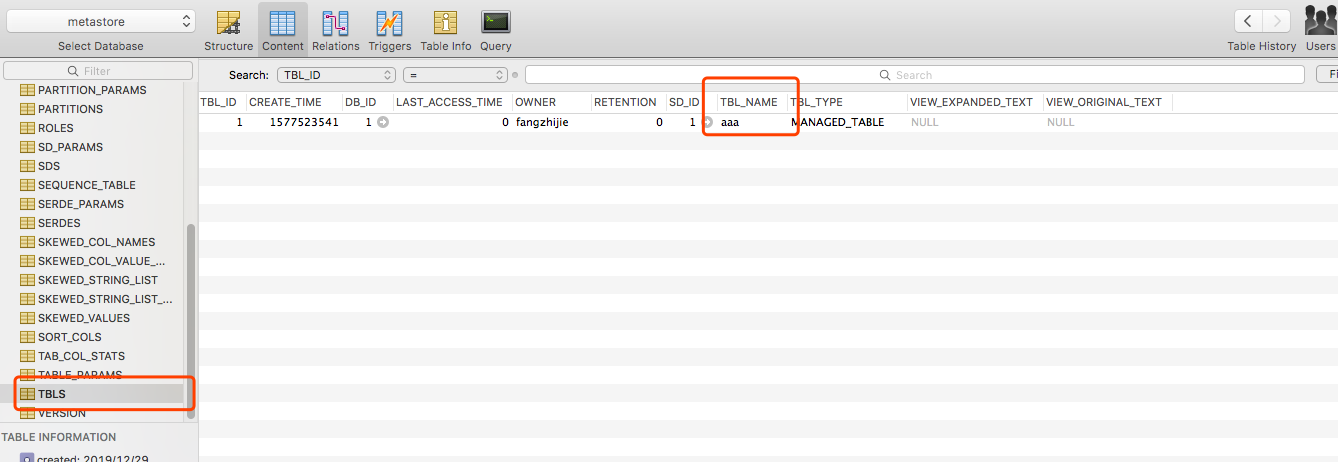
执行bin/hive,查看数据库,发现有创建表。
在hive中执行reate table aaa(id int);,HDFS中有创建该文件,且metastore的TBLS表中有记录。
六、Beeline
HiveServer2 (introduced in Hive 0.11) has its own CLI called Beeline. HiveCLI is now deprecated in favor of Beeline, as it lacks the multi-user, security, and other capabilities of HiveServer2. To run HiveServer2 and Beeline from shell:
HiveServer2有自己的客户端,叫Beeline。HiveCLI目前已经废弃了,建议使用Beeline。
使用Beeline连接HiveServer2
beeline -u "jdbc:hive2://host:port/;serviceDiscoveryMode=zooKeeper;zooKeeperNamespace=hiveserver2" -n username -p password
七、报错信息解决&问题定位
修改配置不生效
可能是配置路径的问题,查看hive-env.sh,最后发现hive配置路径写错。
错误的路径配置,导致根本找不到配置路径
export HIVE_CONF_DIR=/ur/local/hive/conf
正确的配置
export HIVE_CONF_DIR=/usr/local/hive/conf
插入数据失败
hive> insert into table student values(1,'fonxian');

Query ID = fangzhijie_20191205061055_6c8c233e-2d46-470a-972d-38f36bb8068c

Total jobs = 3

Launching Job 1 out of 3

Number of reduce tasks is set to 0 since there's no reduce operator

Starting Job = job_1575495654045_0004, Tracking URL = http://localhost:8088/proxy/application_1575495654045_0004/

Kill Command = /usr/local/hadoop/bin/hadoop job  -kill job_1575495654045_0004

Hadoop job information for Stage-1: number of mappers: 0; number of reducers: 0

2019-12-05 06:10:58,803 Stage-1 map = 0%,  reduce = 0%

Ended Job = job_1575495654045_0004 with errors

Error during job, obtaining debugging information...

FAILED: Execution Error, return code 2 from org.apache.hadoop.hive.ql.exec.mr.MapRedTask

MapReduce Jobs Launched:

Stage-Stage-1:  HDFS Read: 0 HDFS Write: 0 FAIL

Total MapReduce CPU Time Spent: 0 msec
解决方法:执行下面的命令
hive> SET mapreduce.framework.name=local;
分析:
参考官方文档
Hive compiler generates map-reduce jobs for most queries. These jobs are then submitted to the Map-Reduce cluster indicated by the variable:  mapred.job.tracker

Hive编译器 为大多数查询操作生成MR任务,这些任务之后会被提交到MR集群。

Hive fully supports local mode execution. To enable this, the user can enable the following option:

Hive支持本地模式执行,用户可以使用下列操作:

hive> SET mapreduce.framework.name=local;
参考文档
Hive Getting Started
尚硅谷大数据课程之Hive
hive-hook-example
Beeline 官方文档
Hive(一)—— 启动与基本使用的更多相关文章
- hive cli 启动缓慢问题
hive-0.13.1启动缓慢的原因 发现时间主要消耗在以下3个地方: 1. hadoopjar的时候要把相关的jar包上传到hdfs中(这里大概消耗5s,hive0.11一样,这个地方不太好优化) ...
- 单节点伪分布集群(weekend110)的Hive子项目启动顺序
因为,我的mysql是用root用户,在/home/hadoop/app/目录下,创建的. 第一步:开启mysql服务 第二步:启动hive [hadoop@weekend110 app]$ su r ...
- ambari下 hive metastore 启动失败
由字符集引起的hive 元数据进程启动失败 解决方法新增 这2句话 reload(sys)sys.setdefaultencoding('utf8')
- CDH hive metastore启动报错:Unknown column 'A0.SCHEMA_VERSION_V2' in 'field list'
新集群CDH版本,刚刚搭建起来,5个节点起了1个hive服务,另外5个节点又单独起了1个hive服务,一共2个人hive服务.老哥对其中的一个hive进行了数据迁移,对hive数据库进行了替换,就这样 ...
- Hive元数据启动失败,端口被占用
org.apache.thrift.transport.TTransportException: Could not create ServerSocket on address 0.0.0.0/0. ...
- Hive元数据启动失败
Caused by: java.net.ConnectException: Connection refused (Connection refused) at java.net.PlainSocke ...
- hive安装启动错误总结
错误一: Exception in thread "main" java.lang.NoClassDefFoundError: jline/console/completer/Ar ...
- Hive启动时的棘手问题的处理
Hive是存在于Hadoop集群之上的数据仓库,作为大数据处理时的主要工具,对于大数据开发人员的重要性不言而喻.当然要使用Hive仓库的前提就是对于hive的安装,hive的安装是很简单的过程,主要关 ...
- Hive 学习笔记(启动方式,内置服务)
一.Hive介绍 Hive是基于Hadoop的一个数据仓库,Hive能够将SQL语句转化为MapReduce任务进行运行. Hive架构图分为以下四部分. 1.用户接口 Hive有三个用户接口: 命令 ...
随机推荐
- Spring对于事务的控制@Transactional注解详解
引用自:https://blog.csdn.net/fanxb92/article/details/81296005 先简单介绍一下Spring事务的传播行为: 所谓事务的传播行为是指,如果在开始当前 ...
- pandas-01 Series()的几种创建方法
pandas-01 Series()的几种创建方法 pandas.Series()的几种创建方法. import numpy as np import pandas as pd # 使用一个列表生成一 ...
- python 工厂方法
工厂方法模式(FACTORY METHOD)是一种常用创建型设计模式,此模式的核心精神是封装类中变化的部分,提取其中个性化善变的部分为独立类, 通过依赖注入以达到解耦.复用和方便后期维护拓展的目的. ...
- 微信小程序下拉框组件
>>下拉组件 1.组件结构: 2.index.js: //index.js Component({ /** * 组件的属性列表 */ properties: { propArray: { ...
- 【HCIA Gauss】学习汇总-数据库管理(SQL语法 数据类型 函数)-4
DDL data definition language 数据库定义语言 定义修改等DML data manipulation language 数据库操控语言 增删改 DCL data crontr ...
- Python数据结构汇总
Python数据结构汇总 作者:尹正杰 版权声明:原创作品,谢绝转载!否则将追究法律责任. 一.线性数据结构 1>.列表(List) 在内存空间中是连续地址,查询速度快,修改也快,但不利于频繁新 ...
- 安恒西湖论剑线下上午CTF部分题目WP
简单的做了两个题,一道逆向,一道misc,其他题目,因为博主上课,时间不太够,复现时间也只有一天,后面的会慢慢补上 先说RE1,一道很简单的win32逆向,跟踪主函数,R或者TAB按几下, 根据esp ...
- beta版本——第五次冲刺
第五次冲刺 (1)SCRUM部分☁️ 成员描述: 姓名 李星晨 完成了哪个任务 界面优化 花了多少时间 2h 还剩余多少时间 2h 遇到什么困难 没有 这两天解决的进度 2/2 后续两天的计划 完成文 ...
- IPS检测
华为IPS语法: https://isecurity.huawei.com/sec/web/ipsmanual.do IPS漏洞查询(例如搜索反弹shell): https://isecurity.h ...
- 51nod 2502 最多分成多少块
小b有个长度为n的数组a,她想将这个数组排序. 然而小b很懒,她觉得对整个数组排序太累了,因此她请你将a分成一些块,使得她只需要对每一块分别排序,就能将整个数组排序. 请问你最多能把a分成多少块. 保 ...