
【使用篇二】SpringBoot整合jsp(6)
1. pom.xml中添加jstl和jasper
springboot不推荐使用jsp,所以在spring-boot-starter-web启动器中并没有包括这两个,所以我们需要单独引入:
<!-- jstl -->
<dependency>
    <groupId>javax.servlet</groupId>
    <artifactId>jstl</artifactId>
</dependency>
<!-- jasper:jsp引擎 -->
<dependency>
    <groupId>org.apache.tomcat.embed</groupId>
    <artifactId>tomcat-embed-jasper</artifactId>
    <scope>provided</scope>
</dependency>
2. 在src/main/resources目录下创建application.properties,添加jsp的视图映射
#jsp映射配置
spring.mvc.view.prefix=/WEB-INF/jsp/
spring.mvc.view.suffix=.jsp
3. 编写controller
public class User {
    private Integer userId;
    private String userName;
    private Integer age;

    public User() {
    }
    public User(Integer userId, String userName, Integer age) {
        this.userId = userId;
        this.userName = userName;
        this.age = age;
    }
    public Integer getUserId() {
        return userId;
    }
    public void setUserId(Integer userId) {
        this.userId = userId;
    }
    public String getUserName() {
        return userName;
    }
    public void setUserName(String userName) {
        this.userName = userName;
    }
    public Integer getAge() {
        return age;
    }
    public void setAge(Integer age) {
        this.age = age;
    }
}
@RestController
public class UserController {

    @RequestMapping("/findUserList")
    public Object findUserList(Model model){
        List<User> list = new ArrayList<User>();
        list.add(new User(1, "张三", 20));
        list.add(new User(2, "李四", 27));
        list.add(new User(3, "王五", 30));
        model.addAttribute("list",list);
        //因为使用@RestController注解,所以要返回视图,必须使用ModelAndView
        ModelAndView view = new ModelAndView();
        view.addObject(model);
        view.setViewName("userList");//视图名称
        return view;
    }
}
4. 在src/main下创建webapp
前面在application.properties中,已添加了jsp的视图映射,所以在webapp目录下创建WEB-INF/jsp,并创建userList.jsp
<%@ page language="java" contentType="text/html; charset=utf-8"
    pageEncoding="utf-8"%>
<%@ taglib uri="http://java.sun.com/jsp/jstl/core" prefix="c"%>
<!DOCTYPE html PUBLIC "-//W3C//DTD HTML 4.01 Transitional//EN" "http://www.w3.org/TR/html4/loose.dtd">
<html>
<head>
<meta http-equiv="Content-Type" content="text/html; charset=utf-8">
<title>用户列表</title>
</head>
<body>
<table>
    <thead>
        <tr>
            <th>Id</th>
            <th>Name</th>
            <th>Age</th>
        </tr>
    </thead>
    <tbody>
        <c:forEach items="${list}" var="user">
            <tr>
                <td>${user.userId }</td>
                <td>${user.userName }</td>
                <td>${user.age }</td>
            </tr>
        </c:forEach>
    </tbody>
</table>
</body>
</html>
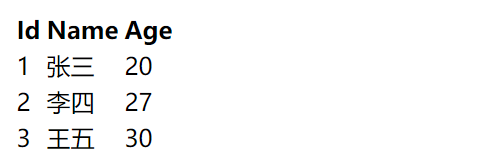
5. 编写启动类,执行main方法,访问浏览器:http://localhost:8080/findUserList
6. IDEA下的注意事项
以上是在Eclipse工具下开发的。如果大家用的是IDEA,需要特别注意其中一个项目配置,否则可能找不到jsp页面。
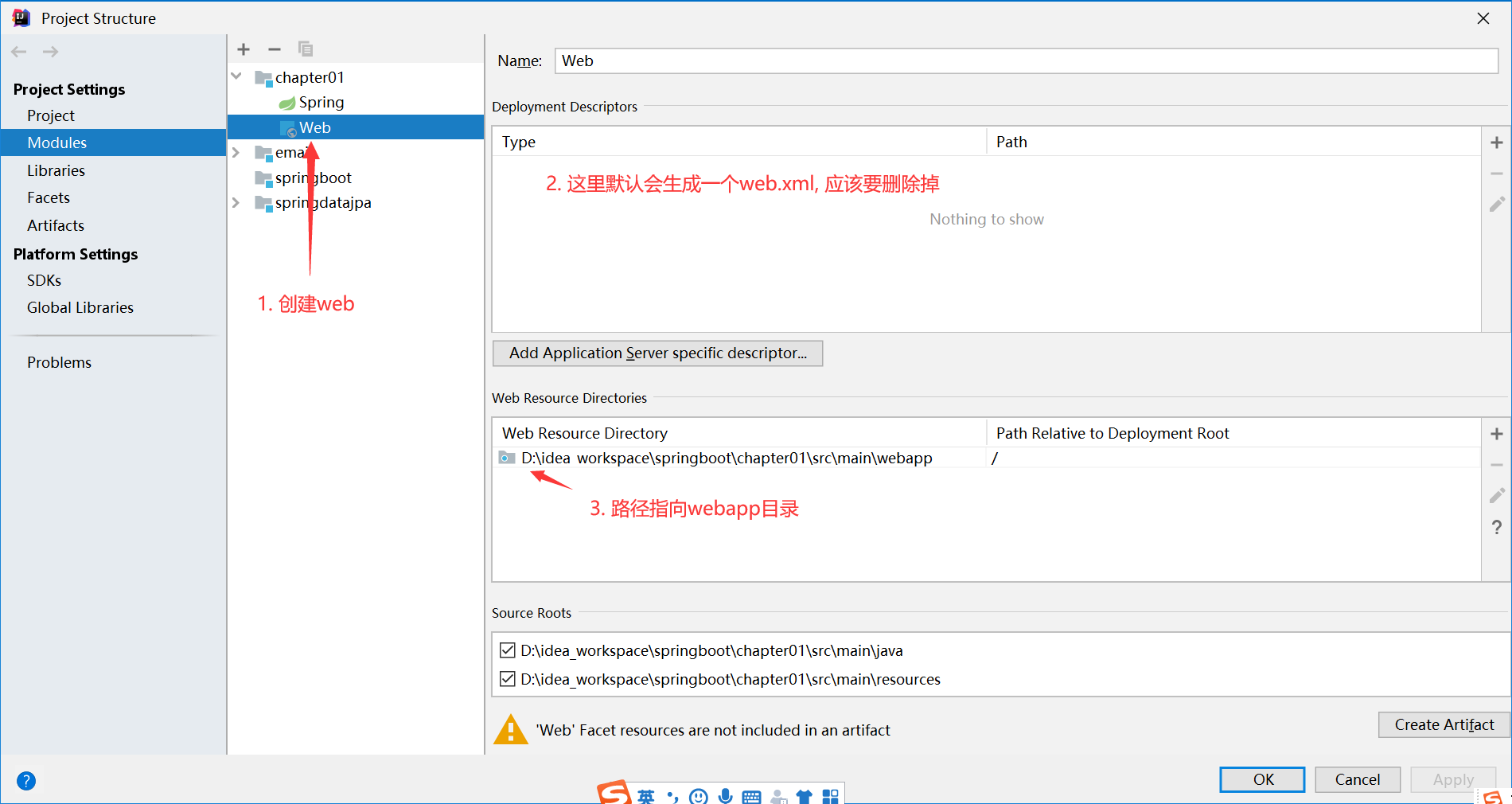
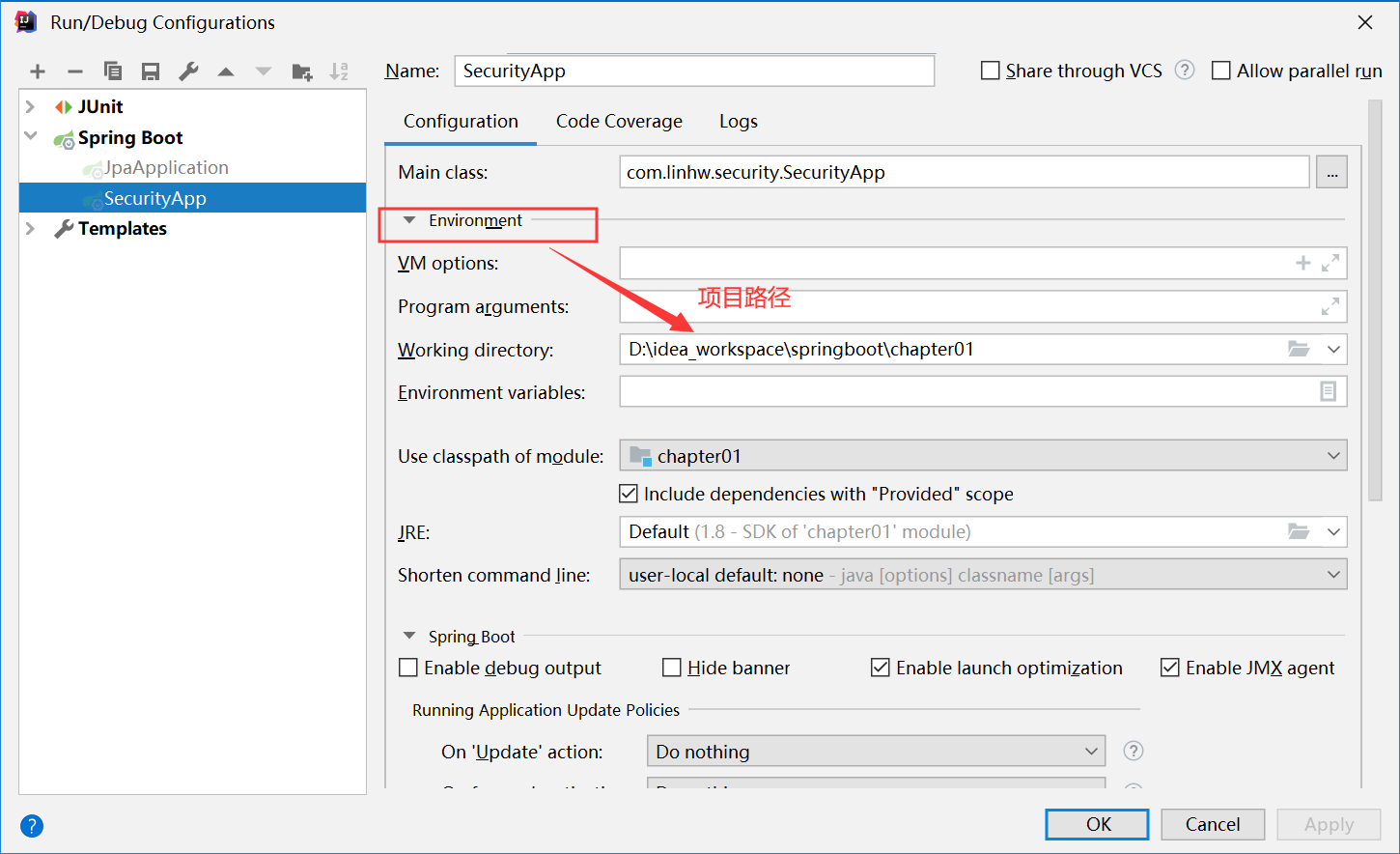
其次,使用jsp的页面还是设置pom.xml的<packaging>war</packaging>。
【使用篇二】SpringBoot整合jsp(6)的更多相关文章
- SpringBoot整合Jsp和Thymeleaf (附工程)
前言 本篇文章主要讲述SpringBoot整合Jsp以及SpringBoot整合Thymeleaf,实现一个简单的用户增删改查示例工程.事先说明,有三个项目,两个是单独整合的,一个是将它们整合在一起的 ...
- springboot整合jsp模板
springboot整合jsp模板 在使用springboot框架里使用jsp的时候,页面模板使用jsp在pom.xnl中需要引入相关的依赖,否则在controller中无法返回到指定页面 〇.搭建s ...
- jackson学习之十(终篇):springboot整合(配置类)
欢迎访问我的GitHub https://github.com/zq2599/blog_demos 内容:所有原创文章分类汇总及配套源码,涉及Java.Docker.Kubernetes.DevOPS ...
- 1、SpringBoot整合之SpringBoot整合JSP
SpringBoot整合JSP 一.创建SpringBoot项目,仅选择Web模块即可 二.在POM文件中添加依赖 <!-- 添加servlet依赖模块 --> <dependenc ...
- Canal 实战 | 第一篇:SpringBoot 整合 Canal + RabbitMQ 实现监听 MySQL 数据库同步更新 Redis 缓存
一. Canal 简介 canal [kə'næl],译意为水道/管道/沟渠,主要用途是基于 MySQL 数据库增量日志解析,提供增量数据订阅和消费 早期阿里巴巴因为杭州和美国双机房部署,存在跨机房同 ...
- 03-01:springboot 整合jsp
1.修改pom文件,添加坐标 <!-- jstl --> <dependency> <groupId>javax.servlet ...
- SpringBoot整合jsp技术
1.修改pom.xml文件 <?xml version="1.0" encoding="UTF-8"?> <project xmlns=&qu ...
- Idea中SpringBoot整合JSP
最近在学习SpringBoot,看到SpringBoot整合jsp,顺带记录一下. 1.创建一个SpringBoot项目 点击Next 注意:packaging选中War,点击Next Webà选中W ...
- 【SpringBoot】08.SpringBoot整合jsp
SpringBoot整合jsp 1.修改pom文件加入两个坐标jstl标签库和jasper <project xmlns="http://maven.apache.org/POM/4. ...
- springboot整合jsp,完成公交车站路线图
转: springboot整合jsp,完成公交车站路线图 点赞再看,养成习惯 开发环境: jdk 8 intellij idea tomcat 8 mysql 5.7 maven 3.6 所用技术: ...
随机推荐
- Ubuntu16.04下安装Cmake-3.8.2并为其配置环境变量
下载安装包 首先我们到官网下载最新的cmake二进制安装包https://cmake.org/files/ 这里,我下载的是比较新的cmake-3.8.2-Linux-x86_64.tar.gz解压安 ...
- 工具资源系列之给 windows 虚拟机装个 centos
前面我们已经介绍了如何在 Windows 宿主机安装 VMware 虚拟机,这节我们将利用安装好的 VMware 软件安装 centos 系统. 前情回顾 由于大多数人使用的 Windows 电脑而工 ...
- mysql数据库的创建问题
数据库客户端工具navicate 1.使用create database语句创建数据库 (1)指定字符集 create [database|schema ]if not exists 数据库名 def ...
- vue 使用key唯一令牌解决表单值混乱
vue在渲染元素时,出于效率考虑,会尽可能地复用已有元素的而非重新渲染,如果你不希望这样可以使用Vue中提供的key属性,它可以让你决定是否要复用元素,key值必须是唯一的 代码: <!doct ...
- 1130不允许连接到MySql server
连接远程服务器mysql时,报错: 1130-host ... is not allowed to connect to this MySql server 这是因为默认只让localhost的主机连 ...
- 在macOS苹果电脑上安装Azure DevOps Server(TFS)代理
1. 概述 MacOS是一套运行于苹果Macintosh系列电脑上的操作系统,是首个在商用领域成功的图形用户界面操作系统.Iphone应用软件的开发人员,都使用运行macOS的电脑或mini盒子进行软 ...
- ItelliJ Idea 2019提交TFVC变更,系统提示Validation must be performed before checking in
问题描述 全新安装的Idea 2019,从Azure DevOps Server 2019 (原名TFS)的TFVC代码库下载文件,正常. 修改代码后,签入,系统提示"Validation ...
- 微信小程序跳转web-vie时提示appId无法读取:Cannot read property 'appId' of undefined
微信小程序报web-view错无法读取appId:Cannot read property 'appId' of undefined 问题描述: 我以前一直如下写代码没报错也都是可以使用的,并且小程序 ...
- Leetcode练习题Two Sum
1 Two Sum: Question Solution 知识点总结 常见方法 HashMap由value获得key Question: Given an array of integers, ret ...
- Mongodb--内存管理MMAP
MongoDB使用的是内存映射存储引擎,即Memory Mapped Storage Engine,简称MMAP. MMAP可以把磁盘文件的一部分或全部内容直接映射到内存,这样文件中的信息位置就会在内 ...