
SpringBoot(十九)_spring.profiles.active=@profiles.active@ 的使用
现在在的公司用
spring.profiles.active=@profiles.active@当我看到这个的时候,一脸蒙蔽,这个@是啥意思。
这里其实是配合 maven profile进行选择不同配置文件进行开发
实战
1.构建一个springboot 项目
这里使用idea进行构建的,这个过程省略
2.pom文件配置
<profiles>

        <profile>

            <!-- 生产环境 -->

            <id>prod</id>

            <properties>

                <profiles.active>prod</profiles.active>

            </properties>

        </profile>

        <profile>

            <!-- 本地开发环境 -->

            <id>dev</id>

            <properties>

                <profiles.active>dev</profiles.active>

            </properties>

            <activation>

                <activeByDefault>true</activeByDefault>

            </activation>

        </profile>

        <profile>

            <!-- 测试环境 -->

            <id>test</id>

            <properties>

                <profiles.active>test</profiles.active>

            </properties>

        </profile>

    </profiles>
- 这里默认dev配置
3.配置多个配置文件
application.properties
注意这里的profiles.active 要和pom文件的对应上
spring.profiles.active=@profiles.active@
application-dev.properties
name = "dev"
application-prod.properties
name = "prod"
application-test.properties
name = "test"
4.编写个测试的controller
/**

 * @author kevin

 * @date 2019/6/28 16:12

 */

@RestController

public class HelloController {

    @Value("${name}")

    private String name;

    @RequestMapping(value = {"/hello"},method = RequestMethod.GET)

    public String say(){

        return name;

    }

}
5.启动测试
使用idea工具启动开发
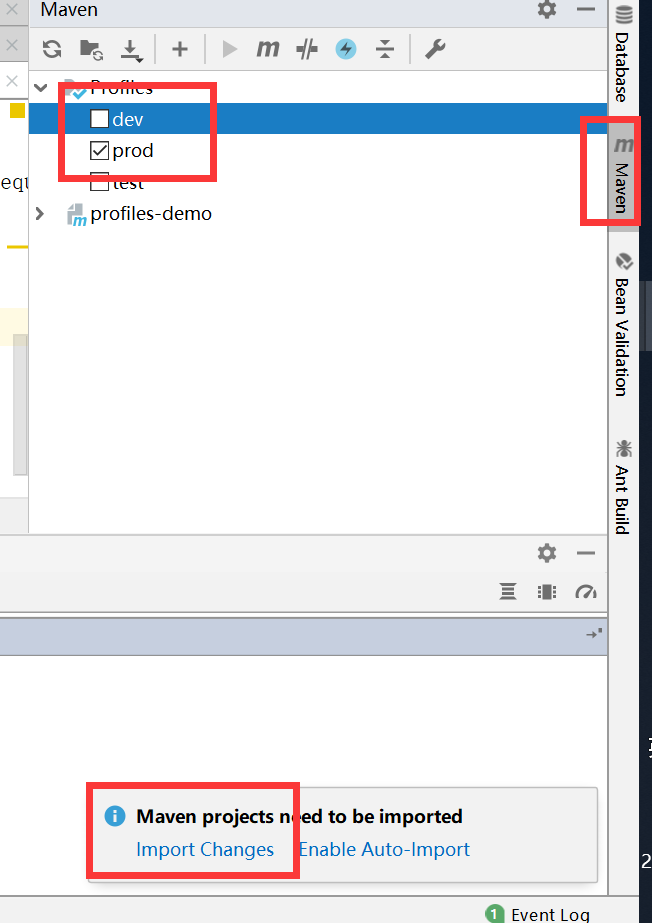
默认是dev,假如想要使用prod配置文件,如上图选择prod,注意下面的导入,重启项目
D:\dev_code\profiles-demo\target>curl http://localhost:8080/hello

"prod"
6 打包
这里使用idea打包不再介绍,如果你使用命令
mvn clean package -P dev
则是使用dev配置
好了,玩的开心
SpringBoot(十九)_spring.profiles.active=@profiles.active@ 的使用的更多相关文章
- springboot(十九)使用actuator监控应用【转】【补】
springboot(十九)使用actuator监控应用 微服务的特点决定了功能模块的部署是分布式的,大部分功能模块都是运行在不同的机器上,彼此通过服务调用进行交互,前后台的业务流会经过很多个微服务的 ...
- springboot(十九)使用actuator监控应用
微服务的特点决定了功能模块的部署是分布式的,大部分功能模块都是运行在不同的机器上,彼此通过服务调用进行交互,前后台的业务流会经过很多个微服务的处理和传递,出现了异常如何快速定位是哪个环节出现了问题? ...
- springboot(十九)-线程池的使用
我们常用ThreadPoolExecutor提供的线程池服务,springboot框架提供了@Async注解,帮助我们更方便的将业务逻辑提交到线程池中异步执行. 话不多说,编码开始: 1.创建spri ...
- springboot(十九):使用Spring Boot Actuator监控应用
微服务的特点决定了功能模块的部署是分布式的,大部分功能模块都是运行在不同的机器上,彼此通过服务调用进行交互,前后台的业务流会经过很多个微服务的处理和传递,出现了异常如何快速定位是哪个环节出现了问题? ...
- springboot(十九):SpringBoot+EHcache实现缓存
https://blog.csdn.net/qq_28143647/article/details/79789368
- SpringBoot(十九)_404返回统一异常处理结果
之前写过一篇统一异常处理的文章,今天测试了下如果访问一个不存在的接口,也想返回统一的错误信息,应该怎么做 1.修改application.properties文件 # 自定义404 #出现错误时, 直 ...
- SpringBoot利用spring.profiles.active=@spring.active@不同环境下灵活切换配置文件
一.创建配置文件 配置文件结构:这里建三个配置文件,application.yml作为主配置文件配置所有共同的配置:-dev和-local分别配置两种环境下的不同配置内容,如数据库地址等. appli ...
- How to set spring boot active profiles with maven profiles
In the previous post you could read about separate Spring Boot builds for a local development machin ...
- spring.profiles.active=@profiles.active@的含义
spring.profiles.active=@profiles.active@ ,其实是配合 maven profile进行选择不同配置文件进行启动. 当执行 mvn clean package - ...
随机推荐
- C#常用多线程方法
1. Thread类 C#多线程编程中Thread类需要包含名称空间System.Threading. class Program { static void Main(string[] args) ...
- DDD实战11 在项目中使用JWT的token 进行授权验证
步骤: 1.首先要在webapi的管道中 使用认证(Authentication) 2.要在webapi的服务中注册验证条件 代码如下: namespace Dealer.WebApi { publi ...
- C# WPF 仿网易云音乐(PC)Banner动画控件
在自定义用户控件内添加3个border(左.中.右,以下分别简称为:b1.b2.b3),对border进行缩放和移动动画.往右切换时b1放大平移到b2的位置,b2缩小平移到b3的位置,b3平移到b1的 ...
- Linux性能测试 top命令
原文地址:http://www.cnblogs.com/txw1958/archive/2012/07/25/linux-top-command.html top命令是Linux下常用的性能分析工具, ...
- ASP.NET Core 配置 EF SQLite 支持 - ASP.NET Core 基础教程 - 简单教程,简单编程
原文:ASP.NET Core 配置 EF SQLite 支持 - ASP.NET Core 基础教程 - 简单教程,简单编程 ASP.NET Core 配置 EF SQLite 支持 上一章节我有提 ...
- ASP.NET Core 基本项目目录结构 - ASP.NET Core 基础教程 - 简单教程,简单编程
原文:ASP.NET Core 基本项目目录结构 - ASP.NET Core 基础教程 - 简单教程,简单编程 ASP.NET Core 基本项目目录结构 上一章节中我们成功创建了一个名为 Hell ...
- react项目实践——(3)babel
1. babel Babel是一个广泛使用的转码器,可以将ES6代码转为ES5代码,从而在现有环境执行. (1)安装 npm install --save-dev babel-core babel-e ...
- RPC的发展历史(本质就是双方定义好协议,传递参数后远程调用)
服务器通讯原理就是一台socket服务器A,另一台socket客户端B,现在如果要通讯的话直接以流方式写入或读出. 这样能实现通讯,但有个问题.如何知道更多信息?比如需要发送流大小,编码,Ip等. 这 ...
- VS发布到IIS Express外网Debug(如微信开发)
主要效果是本机调试网站,将网站发布到某域名(如m16758r728.iok.la),可以进入VS断点,不必再用远程调试!!! 环境 VS2015windows 10操作系统花生壳(可以用其他内网穿透的 ...
- Bootstrap 标签徽章巨幕页头
@{ Layout = null;}<!DOCTYPE html><html><head> <meta name="viewport&q ...