
利用HtmlAgilityPack插件写的一个抓取指定网页的图片 第一次写 很乱 随便看看就行
public partial class Form1 : Form
{
/// <summary>
/// 存放图片地址
/// </summary>
List<string> ImgList = new List<string>();
/// <summary>
/// 当前下载文件
/// </summary>
int _loadFile = 0;
//图片标题
string title = "";
/// <summary>
/// 文件总数
/// </summary>
int _totalFile = 0;
string[] exts = {
".bmp", ".dib", ".jpg", ".jpeg",
".jpe", ".jfif", ".png", ".gif",
".tif", ".tiff" };
public Form1()
{
InitializeComponent();
Control.CheckForIllegalCrossThreadCalls = false;
}
private void Form1_Load(object sender, EventArgs e)
{
this.comboBoxEdit1.Properties.Items.Add("UTF-8");
this.comboBoxEdit1.Properties.Items.Add("GB2312");
}
/// <summary>
/// 获取当前页面图片数量
/// </summary>
/// <param name="sender"></param>
/// <param name="e"></param>
private void button1_Click(object sender, EventArgs e)
{
getImgs();
}
/// <summary>
/// 下载图片
/// </summary>
/// <param name="sender"></param>
/// <param name="e"></param>
private void button2_Click(object sender, EventArgs e)
{
try
{
this.textBox1.Clear();
if (ImgList.Count <= 0) return;
//重置加载文件数
_loadFile = 0;
int index = 1;
Task.Factory.StartNew(() =>
{
foreach (var item in ImgList)
{
WebClient webClient = new WebClient();
webClient.DownloadProgressChanged += new DownloadProgressChangedEventHandler(webClient_DownloadProgressChanged);
webClient.DownloadFileCompleted += new AsyncCompletedEventHandler(webClient_DownloadFileCompleted);
webClient.Proxy = null;
Uri uri = new Uri(item);
if (!Directory.Exists(System.Environment.CurrentDirectory + "\\Img"))
{
Directory.CreateDirectory(System.Environment.CurrentDirectory + "\\Img");
}
var imghouzhui = item.Substring(item.LastIndexOf(".")).Substring(0, 4);
string fileName = title == "" ? Guid.NewGuid().ToString() : title + "_" + index + imghouzhui;
webClient.DownloadFileAsync(uri, System.Environment.CurrentDirectory + "\\Img\\" + fileName);
index++;
}
});
}
catch (Exception ex)
{
MessageBox.Show(ex.Message);
}
}
/// <summary>
/// 下载文件进度条
/// </summary>
/// <param name="sender"></param>
/// <param name="e"></param>
private void webClient_DownloadProgressChanged(object sender, DownloadProgressChangedEventArgs e)
{
this.Invoke(new MethodInvoker(delegate
{
this.progressBar2.Value = e.ProgressPercentage;
this.label2.Text = string.Format("正在下载文件,完成进度{0}% {1}/{2}(字节)"
, e.ProgressPercentage
, e.BytesReceived
, e.TotalBytesToReceive);
}));
}
/// <summary>
/// 抓取https://www.mntup.com/网站写真
/// </summary>
public void getImgs()
{
this.textBox1.Clear();
this.progressBar1.Value = 0;
this.progressBar2.Value = 0;
this.label2.Text = "单个文件进度:";
this.label1.Text = "总进度:";
ImgList.Clear();
HtmlWeb htmlWeb = new HtmlWeb();
if (textBox2.Text.Trim().Length <= 0 || comboBoxEdit1.SelectedText == "")
{
return;
}
try
{
htmlWeb.OverrideEncoding = Encoding.GetEncoding(comboBoxEdit1.SelectedText.ToString());
int pageMinIndex = Convert.ToInt32(pageMin.Value);
int pageMaxIndex = Convert.ToInt32(pageMax.Value);
this.textBox1.AppendText("抓取到的图片地址");
for (int i = pageMinIndex; i <= pageMaxIndex; i++)
{
string url = this.textBox2.Text.Trim().ToString();
if (i >= 2)
{
url = url.Substring(0, url.LastIndexOf(".")).ToString() + "_" + i + ".html";
}
HtmlAgilityPack.HtmlDocument htmlDocument = htmlWeb.Load(url);
//if (htmlDocument.DocumentNode.InnerText.Contains("未找到")) return;
////*[@id="big-pic"]
HtmlNodeCollection nodes = null;
if (url.Contains("https://www.mntup.com"))
{
title = htmlDocument.DocumentNode.SelectSingleNode("//div[@class='title']").InnerText;
nodes = htmlDocument.DocumentNode.SelectNodes("//img");
}
else if (url.StartsWith("http://www.mmonly.cc", StringComparison.OrdinalIgnoreCase))
{
title = htmlDocument.DocumentNode.SelectSingleNode("//h1").InnerText.Substring(0, htmlDocument.DocumentNode.SelectSingleNode("//h1").InnerText.Length - 5);
nodes = htmlDocument.DocumentNode.SelectNodes("//div[@id='big-pic']//img");
}
else
{
title = htmlDocument.DocumentNode.SelectSingleNode("//div[@class='title']")?.InnerText;
nodes = htmlDocument.DocumentNode.SelectNodes("//img");
}
bool flag2 = nodes == null || nodes.Count <= 0;
if (flag2)
{
MessageBox.Show($@"当前页{i}未找到图片,或没有第{i}页");
ImgList.Clear();
textBox1.Clear();
return;
}
int index = this.textBox2.Text.Trim().IndexOf(".com");
string urls = this.textBox2.Text.Trim().ToString().Substring(0, 21);
foreach (HtmlNode item in nodes)
{
//https://www.mntup.com/YouMi/zhangyumeng_38bebee5.html
string houzui = item.Attributes["src"]?.Value;
if (string.IsNullOrEmpty(houzui)) continue;
houzui = houzui.Substring(houzui.LastIndexOf("."), 4);
if (houzui != ".jpg")
{
continue;
};
string imgurl = "";
if (!item.Attributes["src"].Value.StartsWith("http") &&
!item.Attributes["src"].Value.StartsWith("https"))
{
imgurl = urls + item.Attributes["src"].Value;
}
else
{
imgurl = item.Attributes["src"].Value;
}
this.textBox1.AppendText(imgurl + "\r\n");
this.ImgList.Add(imgurl);
}
}
//ImgList = ImgList.Distinct().ToList();
this._totalFile = ImgList.Count;
this.textBox1.AppendText("总共获取图片" + ImgList.Count);
}
catch (Exception ex)
{
MessageBox.Show(ex.Message);
return;
}
}
/// <summary>
/// 文件下载时事件
/// </summary>
/// <param name="sender"></param>
/// <param name="e"></param>
private void webClient_DownloadFileCompleted(object sender, AsyncCompletedEventArgs e)
{
//https://image.baidu.com/search/index?tn=baiduimage&ipn=r&ct=201326592&cl=2&lm=-1&st=-1&fm=index&fr=&hs=0&xthttps=111111&sf=1&fmq=&pv=&ic=0&nc=1&z=&se=1&showtab=0&fb=0&width=&height=&face=0&istype=2&ie=utf-8&word=%E8%90%9D%E8%8E%89&oq=%E8%90%9D%E8%8E%89&rsp=-1
_loadFile++;
int percent = (int)(100.0 * _loadFile / _totalFile);
this.Invoke(new MethodInvoker(delegate
{
this.progressBar1.Value = percent;
this.label1.Text = string.Format("已完成文件下载{0}% {1}/{2}(文件个数)"
, percent
, _loadFile
, _totalFile);
}));
this.textBox1.Invoke(new Action(() =>
{
textBox1.AppendText($"正在下载第{_loadFile}张......\r\n");
}));
if (sender is WebClient)
{
((WebClient)sender).CancelAsync();
((WebClient)sender).Dispose();
}
if (percent == 100)
{
this.textBox1.Invoke(new Action(() =>
{
this.textBox1.AppendText("下载完毕");
}));
}
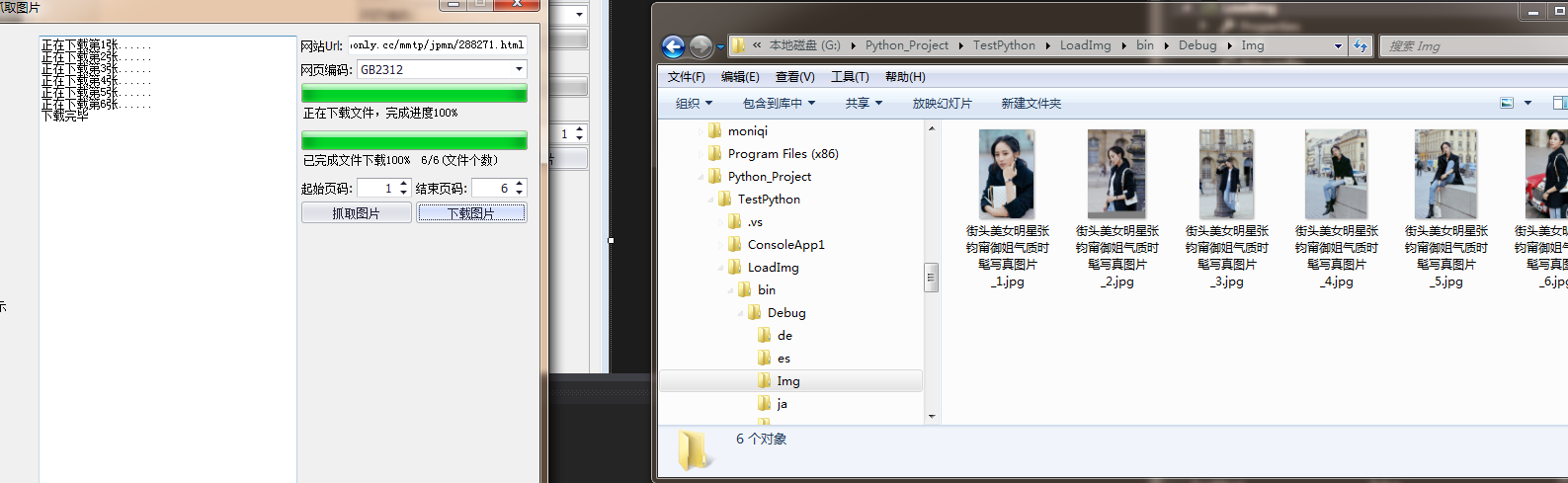
}
}
利用HtmlAgilityPack插件写的一个抓取指定网页的图片 第一次写 很乱 随便看看就行的更多相关文章
- 利用python脚本(re)抓取美空mm图片
很久没有写博客了,这段时间一直在搞风控的东西,过段时间我把风控的内容整理整理发出来大家一起研究研究. 这两天抽空写了两个python爬虫脚本,一个使用re,一个使用xpath. 直接上代码——基于re ...
- 利用HtmlAgilityPack库进行HTML数据抓取
主要介绍基于XPATH的文本分析方式的实现,代码如下: using System; using System.Collections.Generic; using System.Linq; using ...
- 利用python脚本(xpath)抓取数据
有人会问re和xpath是什么关系?如果你了解js与jquery,那么这个就很好理解了. 上一篇:利用python脚本(re)抓取美空mm图片 # -*- coding:utf-8 -*- from ...
- 微信朋友圈转疯了(golang写小爬虫抓取朋友圈文章)
很多人在朋友圈里转发一些文章,标题都是什么转疯啦之类,虽然大多都也是广告啦,我觉得还蛮无聊的,但是的确是有一些文章是非常值得收藏的,比如老婆经常就会收藏一些养生和美容的文章在微信里看. 今天就突发奇想 ...
- 利用wget 抓取 网站网页 包括css背景图片
利用wget 抓取 网站网页 包括css背景图片 wget是一款非常优秀的http/ftp下载工具,它功能强大,而且几乎所有的unix系统上都有.不过用它来dump比较现代的网站会有一个问题:不支持c ...
- 30分钟编写一个抓取 Unsplash 图片的 Python爬虫
我一直想用 Python and Selenium 创建一个网页爬虫,但从来没有实现它. 几天前, 我决定尝试一下,这听起来可能是挺复杂的, 然而编写代码从 Unsplash 抓取一些美丽的图片 ...
- fiddler4如何只抓取指定浏览器的包
在实际工作中,常常会抓取浏览器的数据,其加载的数据较多,不好区分,不知道其是哪个是需要抓取的数据,所以就需抓取指定浏览器的数据,这样就能很清晰知道数据的来源. 步骤一: 打开fiddler4,再打开浏 ...
- python网络爬虫抓取动态网页并将数据存入数据库MySQL
简述以下的代码是使用python实现的网络爬虫,抓取动态网页 http://hb.qq.com/baoliao/ .此网页中的最新.精华下面的内容是由JavaScript动态生成的.审查网页元素与网页 ...
- 下载远程(第三方服务器)文件、图片,保存到本地(服务器)的方法、保存抓取远程文件、图片 将图片的二进制字节字符串在HTML页面以图片形式输出 asp.net 文件 操作方法
下载远程(第三方服务器)文件.图片,保存到本地(服务器)的方法.保存抓取远程文件.图片 将一台服务器的文件.图片,保存(下载)到另外一台服务器进行保存的方法: 1 #region 图片下载 2 3 ...
随机推荐
- glibc 内存申请和释放及堆连续检查
C语言有两种内存申请方式: 1.静态申请:当你声明全局或静态变量的时候,会用到静态申请内存.静态申请的内存有固定的空间大小.空间只在程序开始的时候申请一次,并且不再释放(除非程序结束). 2.自动申请 ...
- SICP 1.9-1.10
1.9 2^102^162^16 2n2^(n)2的(n-1)层次方(每一层都是2次方) 比如 h(4) = 2^(2^(2^2)) = 2^16
- Hermite曲线插值
原文 Hermite Curve Interpolation Hermite Curve Interpolation Hamburg (Germany), the 30th March 1998. W ...
- JS 三个对话框
<!DOCTYPE html><html lang="en" xmlns="http://www.w3.org/1999/xhtml"> ...
- This problem will occur when running in 64 bit mode with the 32 bit Oracle client components installed.
Attempt to load Oracle client libraries threw BadImageFormatException. This problem will occur when ...
- linux系统中ls命令的用法
普通文件: -,f目录文件: d链接文件(符号链接): L设备文件:字符设备:c块设备:b命名管道: p套接字文件: s linux文件时间戳 时间分为三种类型:创建时间,修改时间:open访问时间: ...
- MFC应用程序配置不正确解决方案(manifest对依赖的强文件名,WinSxs是windows XP以上版本提供的非托管并行缓存)
[现象] 对这个问题的研究是起源于这么一个现象:当你用VC++2005(或者其它.NET)写程序后,在自己的计算机上能毫无问题地运行,但是当把此exe文件拷贝到别人电脑上时,便不能运行了,大致的错误提 ...
- Go 的文件系统抽象 Afero
Afero 是一个文件系统框架,提供一个简单.统一和通用的 API 和任何文件系统进行交互,作为抽象层还提供了界面.类型和方法.Afero 的界面十分简洁,设计简单,舍弃了不必要的构造函数和初始化方法 ...
- vxworks下libpcap的移植
linux下的libpcap应用能够成熟的使用在第三方的应用中,但基于vxworks开发的项目中需要使用libpcap的部分功能则无相应的实现. 研究了下libpcap向vxworks的移植,并且小有 ...
- Windows应用程序文件说明
bin文件夹:包含debug子目录,含有.exe可执行文件和pdb文件,其中pdb文件包含完整的调试信息(包含函数原型): obj文件夹:包含debug子目录,含有编译过程中生成的中间代码. Prop ...