
JS旋转和css旋转
js旋转
<!DOCTYPE html>

<html>

    <head>

        <meta charset="utf-8">

<style>

        div{

        background: repeating-linear-gradient(45deg,red,yellow 20%);

        width: 200px;

        height: 200px;

        border-radius: 50%;

        text-align: center;

        line-height: 200px;

        animation-name: MX;

        animation-duration:6s;

        animation-timing-function:linear;

        /*动画速度曲线*/

        animation-iteration-count:infinite;

        /*动画无限次播放*/

        transition-property: height;

        /*2b转换需要属性的名称*/

        transition-duration: 6s;

        /*2d转换时间*/

        transition-timing-function: linear;

         /*转换速度曲线*/}

        @keyframes MX

        {

        from{font-size: 0px;color:black;}

        to{font-size: 80px;color:white;}

        }

        /*#ym:hover{

            animation-play-state:paused;

            停止2d转换

            }*/

</style>

</head>

<body>

<script>

    var x=0;

    var timerid;

    var fx;

    function start(){

        clearInterval(timerid)

        timerid=setInterval(function(){

        if(x==0)

          fx=true

        if(fx==true)

          x=x+1;

        if(x==360)

          fx=false

        if(fx==false)

           x=x-1

        document.getElementById("ym").style.transform='rotate(' + x + 'deg)';

    },30)

}

// clearInterval() 方法可取消由 setInterval()函数佘定德定时执行操作。

// clearInterval() 方法的参数必须是由 setInterval() 返回的 ID 值。

// setInterval() 方法可按照指定的周期(以毫秒计)来调用函数或计算表达式。

</script>

<!--onmouseover="clearInterval(timerid)" onmouseout="start()"-->

<div id="ym" >明</div>

<button onclick="start()">开始</button>

<button onclick="clearInterval(timerid)">停止</button>

</body>

</html>

css旋转
<!DOCTYPE html>

<html lang="en">

<head>

    <meta charset="UTF-8">

    <title>Document</title>

    <style type="text/css">

        *{padding: 0;

        margin: 0;}

        #a{

            width:500px;

            height:500px;

            margin: 300px auto;

            transform: translate(-50%,-50%);

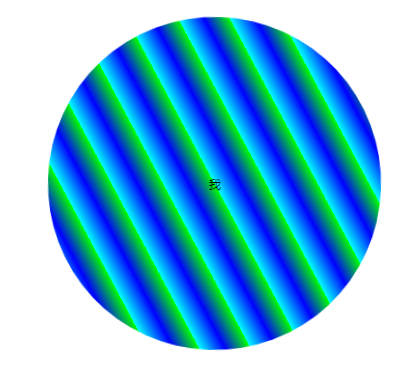
            background: repeating-linear-gradient(60deg,#0ff,#00f,#0f0 10%);

            border-radius:50%;

            /*animation:run 6s linear 5s infinite alternate;*/

            animation-name: run;

            animation-duration:6s;

            animation-timing-function: linear;

            animation-delay:0s;

            animation-iteration-count:infinite;

            animation-direction: /*normal|*/alternate;

        }

        #a:hover{

            animation-play-state:paused;

        }

         p{

             position: absolute;

             top: 50%;

             left: 50%;

             transform: translate(-50%,-50%);

             /*利用绝对定位和2d转换进行水平垂直居中*/

         }

        @keyframes run{

            from{

                transform:rotate(0deg);font-size: 0px;color:black;

            }

            to{

                transform:rotate(360deg);font-size: 80px;color:white;

            }

        }

    </style>

</head>

<body>

    <div id="a"><p>我</P></div>

</body>
Document
JS旋转和css旋转的更多相关文章
- canvas星空背景特效+CSS旋转相册学习
今天在看帖子的时候,看到了个有趣的css旋转相册,刚好之前做了一个星空背景dome,这里给大家分享下代码: 旋转相册参考:https://blog.csdn.net/gitchatxiaomi/art ...
- IOS6屏幕旋转详解(自动旋转、手动旋转、兼容IOS6之前系统)
转自 http://blog.csdn.net/zzfsuiye/article/details/8251060 概述: 在iOS6之前的版本中,通常使用 shouldAutorotateToInte ...
- js中获取css属性
直接获取 window.onload = function() { var but = document.getElementById('button'); var div = document.ge ...
- 区域及分离、Js压缩、css、jquery扩展
后台管理区域及分离.Js压缩.css.jquery扩展 本系列目录:ASP.NET MVC4入门到精通系列目录汇总 有好一段时间没更新博文了,最近在忙两件事:1.看书,学习中...2.为公司年会节目做 ...
- vue脚手架使用swiper /引入js文件/引入css文件
1.安装vue-cli 参考地址:https://github.com/vuejs/vue-cli 如果不使用严格语法需要在后三项打no:(加了挺头疼的,老是报错,但是对自己的代码规范性也是有很大的帮 ...
- js中获取css样式属性值
关于js中style,currentStyle和getComputedStyle几个注意的地方 (1)用js的style只能获取元素的内联样式,内部样式和外部样式使用style是获取不到的.针对css ...
- 平衡树及笛卡尔树讲解(旋转treap,非旋转treap,splay,替罪羊树及可持久化)
在刷了许多道平衡树的题之后,对平衡树有了较为深入的理解,在这里和大家分享一下,希望对大家学习平衡树能有帮助. 平衡树有好多种,比如treap,splay,红黑树,STL中的set.在这里只介绍几种常用 ...
- Comparing Code Playgrounds Codepen, JSFiddle, JS Bin, Dabblet, CSS Deck, and Liveweave
What is a code playground? Codepen, JSFiddle, JS Bin, Dabblet, CSS Deck, and Liveweave are HTML, CSS ...
- APP---发布动态、朋友圈类似,多张图片动响应式正方形展示布局 vue.js,aui.css,apiclouv
环境:vue.js,aui.css,apicloud 1.没做控制之前.图片真实长度宽度. 2.下面用js控制高度 js部分 //js 部分 //先动态的获取属性宽度 var box4_col3 = ...
随机推荐
- 常见MySQL数据库语句
##############Author: Fan ################# (1)数据库 # 查看所有的数据库 SHOW DATABASES ; # 创建一个数据库 ...
- 读《深入理解Elasticsearch》点滴-改正用户拼写错误
1.使用“建议”的方法:在query body的json结构体中,增加suggest节点:或者使用特殊的REST端点 2.es自带有多个不同的suggest实现,用来纠正用户的拼写错误及创建自动补全等 ...
- Mycat 配置文件schema.xml
1.介绍 schema.xml 作为 MyCat 中重要的配置文件之一,管理着 MyCat 的逻辑库.表.分片规则. DataNode 以及 DataSource. 2.schema相关标签 sche ...
- Python列表的深度排序
实例1:>>>L = [2,3,1,4]>>>L.sort()>>>L>>>[1,2,3,4] 实例2:>>> ...
- Docker详解(四) — Dockerfile剖析
目录 1.Dockfile简介 2. Dockerfile构建过程解析 3. Dockerfile体系结构 4. 案例 4.1 自定义mycentos 4.2 CMD/ENTRYPOINT 镜像案例 ...
- 移动端适配 rem 设置
refresh(); window.onresize = function(){ setTimeout(function(){ refresh(); },10) ...
- Spark 学习笔记之 map/flatMap/filter/mapPartitions/mapPartitionsWithIndex/sample
map/flatMap/filter/mapPartitions/mapPartitionsWithIndex/sample:
- ELK 学习笔记之 elasticsearch Mget操作
Mget操作: 查询多个文档: curl -XGET 'http://192.168.1.151:9200/_mget' -d '{"docs": [{"_index&q ...
- App Crawler
Google官方出了一款App遍历工具App Crawler. 文档:https://developer.android.google.cn/training/testing/crawler App ...
- 【Java】支付宝获取人脸采集认证的图片base64格式
人脸识别结果查询接口zoloz.identification.user.web.query返回的imgStr图片字符串并不是标准的base64格式,解析不出图片. 由于标准的Base64并不适合直接放 ...