
mask-rcnn代码解读(六):resize_image()函数的解析
我已经根据resize_image()函数的解析对原图像与resize图像进行了解析,
若有读者想对原图像与目标图像不同尺寸验证,可根据以下代码,调整函数参数,
其细节如下:
import cv2 as cv
import numpy as np
img=cv.imread('D:\\MASKRCNN\\mask-rcnn-me\\MASKRCNN_myself\\0.bmp')
def resize_image(image, min_dim=230, max_dim=220, min_scale=2, mode="square"):
    """Resizes an image keeping the aspect ratio unchanged.

    min_dim: if provided, resizes the image such that it's smaller dimension == min_dim
    max_dim: if provided, ensures that the image longest side doesn't exceed this value.
    min_scale: if provided, ensure that the image is scaled up by at least
        this percent even if min_dim doesn't require it.
    mode: Resizing mode.
        none: No resizing. Return the image unchanged.
        square: Resize and pad with zeros to get a square image of size [max_dim, max_dim].
        pad64: Pads width and height with zeros to make them multiples of 64.
               If min_dim or min_scale are provided, it scales the image up
               before padding. max_dim is ignored in this mode.
               The multiple of 64 is needed to ensure smooth scaling of feature
               maps up and down the 6 levels of the FPN pyramid (2**6=64).
        crop: Picks random crops from the image. First, scales the image based
              on min_dim and min_scale, then picks a random crop of
              size min_dim x min_dim. Can be used in training only.
              max_dim is not used in this mode.

    Returns:
    image: the resized image
    window: (y1, x1, y2, x2). If max_dim is provided, padding might
        be inserted in the returned image. If so, this window is the
        coordinates of the image part of the full image (excluding
        the padding). The x2, y2 pixels are not included.
    scale: The scale factor used to resize the image
    padding: Padding added to the image [(top, bottom), (left, right), (0, 0)]
    """
    # Keep track of image dtype and return results in the same dtype
    image_dtype = image.dtype
    print('original_image_shape=',image.shape)
    # Default window (y1, x1, y2, x2) and default scale == 1.
    h, w = image.shape[:2]
    window = (0, 0, h, w)
    scale = 1
    padding = [(0, 0), (0, 0), (0, 0)]
    crop = None

    if mode == "none":
        return image, window, scale, padding, crop

    # Scale?
    if min_dim:
        # Scale up but not down
        scale = max(1, min_dim / min(h, w))  # h, w是原始图片的高与宽
    if min_scale and scale < min_scale:  # min_scale是最小填充倍数的,至少要大于它
        scale = min_scale

    # Does it exceed max dim?
    if max_dim and mode == "square":
        image_max = max(h, w)
        if round(image_max * scale) > max_dim: # 最终原图片最大边扩充不能超过最大max_dim维度,否则重新选择scale
            scale = max_dim / image_max

    # Resize image using bilinear interpolation
    print('scale=',scale)
    if scale != 1:
        image = cv.resize(image, (round(h * scale), round(w * scale)))
        print('resize_image=',image.shape)
        # 上一行代码对图像做了resize,那么会改变图像的尺寸,这是我不愿意看到的,我觉的这样会对缺陷特征有损失,
        # 或者出现变异,因此小心这里的变化
    # Need padding or cropping?
    if mode == "square":
        # Get new height and width
        h, w = image.shape[:2]  # 此时已经将原图按照scale进行了改变
        top_pad = (max_dim - h) // 2
        bottom_pad = max_dim - h - top_pad
        left_pad = (max_dim - w) // 2
        right_pad = max_dim - w - left_pad
        padding = [(top_pad, bottom_pad), (left_pad, right_pad), (0, 0)]
        print('padding=',padding)
        print('before_pad.shape=',image.shape)
        image = np.pad(image, padding, mode='constant', constant_values=0) # 将改变的图片进行了填充
        print('after_pad.shape=', image.shape)

        window = (top_pad, left_pad, h + top_pad, w + left_pad)  # 保存经过resize后图片的真实大小
        print('window=',window)

    return image.astype(image_dtype), window, scale, padding

print('输入图像尺寸小于max_dim的尺寸')
resize_image(img, min_dim=230, max_dim=280, min_scale=2, mode="square")

print('输入图像尺寸大于max_dim的尺寸')
resize_image(img, min_dim=200, max_dim=220, min_scale=2, mode="square")

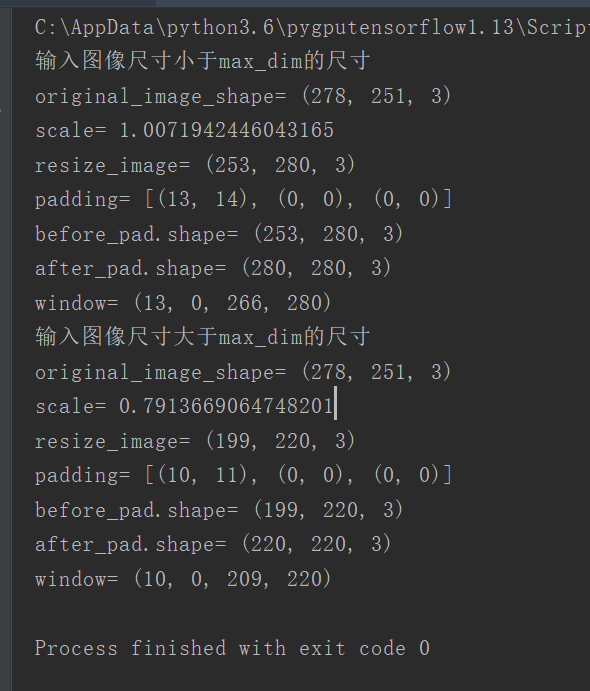
结果如下:
mask-rcnn代码解读(六):resize_image()函数的解析的更多相关文章
- 使用colab运行深度学习gpu应用(Mask R-CNN)实践
1,目的 Google Colaboratory(https://colab.research.google.com)是谷歌开放的一款研究工具,主要用于机器学习的开发和研究.这款工具现在可以免费使用, ...
- [代码解析]Mask R-CNN介绍与实现(转)
文章来源 DFann 版权声明:如果你觉得写的还可以,可以考虑打赏一下.转载请联系. https://blog.csdn.net/u011974639/article/details/78483779 ...
- 论文阅读笔记三十六:Mask R-CNN(CVPR2017)
论文源址:https://arxiv.org/pdf/1703.06870.pdf 开源代码:https://github.com/matterport/Mask_RCNN 摘要 Mask R-CNN ...
- CVPR2019 | Mask Scoring R-CNN 论文解读
Mask Scoring R-CNN CVPR2019 | Mask Scoring R-CNN 论文解读 作者 | 文永亮 研究方向 | 目标检测.GAN 推荐理由: 本文解读的是一篇发表于CVPR ...
- Mask R-CNN用于目标检测和分割代码实现
Mask R-CNN用于目标检测和分割代码实现 Mask R-CNN for object detection and instance segmentation on Keras and Tenso ...
- 目标检测论文解读11——Mask R-CNN
目的 让Faster R-CNN能做实例分割的任务. 方法 模型的结构图如下. 与Faster R-CNN相比,主要有两点变化. (1) 用RoI Align替代RoI Pool. 首先回顾一下RoI ...
- 论文笔记:Mask R-CNN
之前在一次组会上,师弟诉苦说他用 UNet 处理一个病灶分割的任务,但效果极差,我看了他的数据后发现,那些病灶区域比起整张图而言非常的小,而 UNet 采用的损失函数通常是逐像素的分类损失,如此一来, ...
- Mask RCNN 源码阅读(update)
之前看了Google官网的object_dectect 的源码,感觉Google大神写的还不错.最近想玩下Mask RCNN,就看了下源码,这里刚好当做总结和梳理.链接如下: Google官网的obj ...
- Mask RCNN 学习笔记
下面会介绍基于ResNet50的Mask RCNN网络,其中会涉及到RPN.FPN.ROIAlign以及分类.回归使用的损失函数等 介绍时所采用的MaskRCNN源码(python版本)来源于GitH ...
随机推荐
- SpringBoot(三) 配置文件 篇章
SpringBoot 配置文件默认为application.properties,但是本章节主要讲解yaml文件配置,因为现在的趋势是使用yaml,它是类似于标准通用标记语言的子集XML的数据描述语言 ...
- 利用Fiddler模拟通过Dynamics 365的OAuth 2 Client Credentials认证后调用Web API
微软动态CRM专家罗勇 ,回复337或者20190521可方便获取本文,同时可以在第一间得到我发布的最新博文信息,follow me. 配置Dynamics 365 & PowerApps 支 ...
- 版本管理·玩转git(推到远程仓库)
经过前面的练习,你在本地的仓库里管理代码已经比较熟练了,但如果是团队开发呢,如何配合起来呢? 我们可以把版本仓库放在互联网上,开发者把自己最新的版本推到线上仓库,同时,把线上仓库的最新代码拉到自己本地 ...
- 论文学习-混沌系统以及机器学习模型-11-29-wlg
混沌系统以及机器学习模型 概述: 必要条件下: negative values of the sub-Lyapunov exponents. 通过rc方法, 可以在参数不匹配的情况下,实现输入信号,混 ...
- MySQL 时间类型 DATE、DATETIME和TIMESTAMP
1.DATE.DATETIME和TIMESTAMP 表达的时间范围 Type Range Remark DATE '1000-01-01' to '9999-12-31' 只有日期部分,没有时间部分 ...
- 江苏OSS用户权限修改
市场服务二部”修改为“市场二部”.“市场服务三部”修改为“市场三部”.“县域服务一部”修改为“县域一部”.“县域服务二部”修改为“县域二部”.“综合管理部”修改为“综合业务部”. SELECT * ...
- Redis学习笔记(六、哨兵)
目录: 基本概念 环境部署 哨兵原理 哨兵命令 基本概念: 1.什么是哨兵 我们先从字面意思来了解哨兵,哨兵是对执行警戒任务的士兵的统称:在redis中哨兵也是一样,他监控着redis服务器的状态. ...
- web-never give up
打开题目连接 ?id=1 ,疑是注入点 但是输入其他数字无果 打开源码,发现注释有网页链接 打开连接123.206.87.240:8006/test/1p.html 发现回到了bugku的论坛首页,应 ...
- oracle 分组拼接
方法一:listagg, 参考链接,从oracle11g后出现的新函数 如果拼接的字符串长度超过4000字节,会报ora-01489错误,ora-01489 字符串连接的结果过长 解决方案. SELE ...
- CentOs篇
Advanced-高级配置.Security-安全.Boot-启动引导: 1.Removable Devices-移动设备 2.Hard Drive-本地硬盘 3.CD-ROM- Drive-光盘 4 ...