
android开发 静态碎片布局实现
实现思维:
1.需要写2个或者多个子布局
2.写一个Java的class去实现将子布局与父类布局铺满。(一个子布局对应一个class)
3.在父类布局中导入fragment布局,并且添加android:name=“”属性;
1.写2个布局:
<?xml version="1.0" encoding="utf-8"?>

<LinearLayout xmlns:android="http://schemas.android.com/apk/res/android"

    android:orientation="vertical"

    android:layout_width="match_parent"

    android:layout_height="match_parent"

    android:background="@color/colorAccent">

    <TextView

        android:layout_marginTop="20dp"

        android:layout_width="wrap_content"

        android:layout_height="wrap_content"

        android:text="下面的布局"

        android:textSize="30sp"

        android:textColor="@color/colorBlack"

        android:maxEms="1"

        android:maxLines="5"

        android:layout_gravity="center"

        />

</LinearLayout>
<?xml version="1.0" encoding="utf-8"?>

<LinearLayout xmlns:android="http://schemas.android.com/apk/res/android"

    android:orientation="vertical"

    android:layout_width="match_parent"

    android:layout_height="match_parent">

    <TextView

        android:layout_marginTop="20dp"

        android:layout_width="wrap_content"

        android:layout_height="wrap_content"

        android:layout_gravity="center"

        android:text="上面的布局"

        android:textSize="30sp"

        android:textColor="@color/colorBlack"

        android:maxEms="1"

        android:maxLines="5"/>

</LinearLayout>
2.Java的class去实现将子布局与父类布局铺满
package com.example.lenovo.mydebrisdemo;

import android.app.Fragment;

import android.os.Bundle;

import android.support.annotation.Nullable;

import android.view.LayoutInflater;

import android.view.View;

import android.view.ViewGroup;

/**

 * Created by lenovo on 2018/5/5.

 */

public class Top extends Fragment {

    @Nullable

    @Override

    public View onCreateView(LayoutInflater inflater, @Nullable ViewGroup container, Bundle savedInstanceState) {

        View view = inflater.inflate(R.layout.top_fragment,container,false);

        return view;

    }

}
package com.example.lenovo.mydebrisdemo;

import android.app.Fragment;

import android.os.Bundle;

import android.support.annotation.Nullable;

import android.view.LayoutInflater;

import android.view.View;

import android.view.ViewGroup;

/**

 * Created by lenovo on 2018/5/5.

 */

public class Button extends Fragment {

    @Nullable

    @Override

    public View onCreateView(LayoutInflater inflater, @Nullable ViewGroup container, Bundle savedInstanceState) {

        View view = inflater.inflate(R.layout.botton_fragment,container,false);

        return view;

    }

}
3.父类布局中导入fragment布局,并且添加android:name=“”属性;
<?xml version="1.0" encoding="utf-8"?>

<LinearLayout xmlns:android="http://schemas.android.com/apk/res/android"

    android:orientation="vertical"

    android:layout_width="match_parent"

    android:layout_height="match_parent">

    <!--id一定要加否则会报错-->

    <fragment

        android:id="@+id/top"

        android:name="com.example.lenovo.mydebrisdemo.Top"

        android:layout_width="match_parent"

        android:layout_height="0dp"

        android:layout_weight="1"/>

    <fragment

        android:id="@+id/button"

        android:name="com.example.lenovo.mydebrisdemo.Button"

        android:layout_width="match_parent"

        android:layout_height="0dp"

        android:layout_weight="1"/>

</LinearLayout>
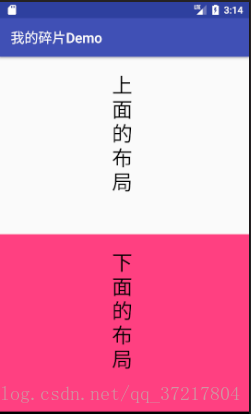
运行效果:
android开发 静态碎片布局实现的更多相关文章
- Android开发-之五大布局
在html中大家都知道布局是什么意思了,简单来说就是将页面划分模块,比如html中的div.table等.那么Android中也是这样的.Android五大布局让界面更加美化,开发起来也更加方便.当然 ...
- Android开发5大布局方式详解
Android中常用的5大布局方式有以下几种: 线性布局(LinearLayout):按照垂直或者水平方向布局的组件. 帧布局(FrameLayout):组件从屏幕左上方布局组件. 表格布局(Tabl ...
- Android开发 静态static类与static方法持有Context是否导致内存泄露的疑问
简述 在Android开发的过程中,难免会使用单例模式或者静态方法工具类.我们会让它们持有一些外部的Context或者View一般有以下几种情况: 单例模式,类的全局变量持有Context 或 Vie ...
- .Net程序猿玩转Android开发---(6)线性布局LinearLayout
LinearLayout控件是Android中重要的布局控件,是一个线性控件,所谓线性控件的意思是指该控件里面的内容仅仅能水平或垂直排列.也就 ...
- Android开发 ---Fragment片段布局
前言 Fragment想必大家不陌生吧,在日常开发中,对于Fragment的使用也很频繁,现在主流的APP中,基本的架构也都是一个主页,然后每个Tab项用Fragment做布局,不同选项做切换,使用起 ...
- android 开发 使用自定义布局实现标题栏复用(标题栏内容自定义:使用代码实现和xml布局自定义属性2种办法实现)
在个人学习的情况下可能很少使用自定义布局去实现大量复用的情况下,但是在一个开发工作的环境下就会使用到大量复用的自定义控件. 实现思维: 1.写一个xml的布局,用于标题栏的样式,并且添加在标题栏中你想 ...
- android开发学习---layout布局、显示单位和如何进行单元测试
一.五大布局(layout) android中的用五大布局:LinearLayout (线性布局).AbsoluteLayout(绝对布局).RelativeLayout(相对布局).TableLay ...
- android开发中常见布局的注意点
常见布局的注意点 线性布局: 必须有一个布局方向 水平或者垂直 在垂直布局中 只有左对齐 右对齐 水平居中生效 在水平布局中 只有顶部对齐 底部对齐 垂直居中生效 权重:组件按比例分配屏幕的剩余部分( ...
- Android开发中XML布局的常用属性说明
<!-- 常用属性说明: android:id="@+id/button" 为控件指定Id android:text="NNNNNNNNNN" 指定控件的 ...
随机推荐
- 阅读《7 Series FPGAs GTX/GTH Transceivers User Guide》
阅读<7 Series FPGAs GTX/GTH Transceivers User Guide> 1.GTX在XC7K325T芯片内的排列 2.参考时钟的配置 在GTXE2_COMMO ...
- [转]python实现RESTful服务(基于flask)
python实现RESTful服务(基于flask) 原文: https://www.jianshu.com/p/6ac1cab17929 前言 上一篇文章讲到如何用java实现RESTful服务, ...
- CentOS 7.4 初次手记:第二章 CentOS安装步骤
第二章 CentOS安装步骤... 18 第一节 下载... 18 第二节 分区参考... 18 第三节 安装... 19 I Step 1:引导... 19 II Step 2:配置... 20 I ...
- java取余%练习
package ltb6w1; import java.io.*; public class TestMod { String st; int c; InputStreamReader is=new ...
- LeetCode——12. Integer to Roman
一.题目链接:https://leetcode.com/problems/integer-to-roman/ 二.题目大意: 给定一个整数,返回它的罗马数字的形式. 三.题解: 要想做出这道题目,首先 ...
- centos 7 免密登录
本文转载自:https://www.cnblogs.com/hobinly/p/6039844.html 环境示例 Centos7 192.168.1.101 master Centos7 192. ...
- 【rabbitmq】rabbitmq概念解析--消息确认--示例程序
概述 本示例程序全部来自rabbitmq官方示例程序,rabbitmq-demo: 官方共有6个demo,针对不同的语言(如 C#,Java,Spring-AMQP等),都有不同的示例程序: 本示例程 ...
- 使用Softmax回归将神经网络输出转成概率分布
神经网络解决多分类问题最常用的方法是设置n个输出节点,其中n为类别的个数.对于每一个样例,神经网络可以得到一个n维数组作为输出结果.数组中的每一个维度(也就是每一个输出节点)对应一个类别,通过前向传播 ...
- ipv6下jdbc的连接数据库方式
ipv6下jdbc的连接数据库方式 MySQL: ipv4 Driver URL: jdbc:mysql://127.0.0.1:3306/database ipv6 Driv ...
- 计算机存储单位KB,MB,GB,TB,PB,EB,ZB,YB后面是什么?
关于计算机存储单位KB,MB,GB,TB,PB,EB,ZB,YB后面是什么? 我们知道Kb是1000的1次方,所以 MB就是1000的2次方(106) GB就是1000的3次方(109) TB就是10 ...