
Spring Security(三)
Spring Security(三)
个性化用户认证流程
自定义登录页面
在配置类中指定登录页面和接收登录的 url
@Configuration

public class BrowserSecurityConfig extends WebSecurityConfigurerAdapter {

    @Bean

    public PasswordEncoder passwordEncoder() {

        return new MyPasswordEncoder();

    }

    @Override

    protected void configure(HttpSecurity http) throws Exception {

        // 启用表单登陆

        http.formLogin()

                // 指定登录页面

                .loginPage("/imooc-signIn.html")

                // 登录页面表单提交的 action

                .loginProcessingUrl("/authentication/form")

                .and()

                // 对请求做授权

                .authorizeRequests()

                // 访问指定url时不需要身份认证(放行)

                .antMatchers("/imooc-signIn.html").permitAll()

                // 任何请求

                .anyRequest()

                // 都需要身份认证

                .authenticated()

                .and()

                .csrf().disable();

    }

}
- 在项目中新建登录页面
<!DOCTYPE html>

<html lang="en">

<head>

    <meta charset="UTF-8">

    <title>登录</title>

</head>

<body>

    <h2>标准登录页面</h2>

    <h3>表单登录</h3>

    <form action="/authentication/form" method="post">

        <table>

            <tr>

                <td>用户名:</td>

                <td><label>

                    <input type="text" name="username" />

                </label></td>

            </tr>

            <tr>

                <td>密码:</td>

                <td><label>

                    <input type="password" name="password" />

                </label>

                </td>

            </tr>

            <tr>

                <td colspan="2">

                    <button type="submit">登录</button>

                </td>

            </tr>

        </table>

    </form>

</body>

</html>
启动项目时再访问 Security 就会跳转到你自已定义的登陆页面让你登录。
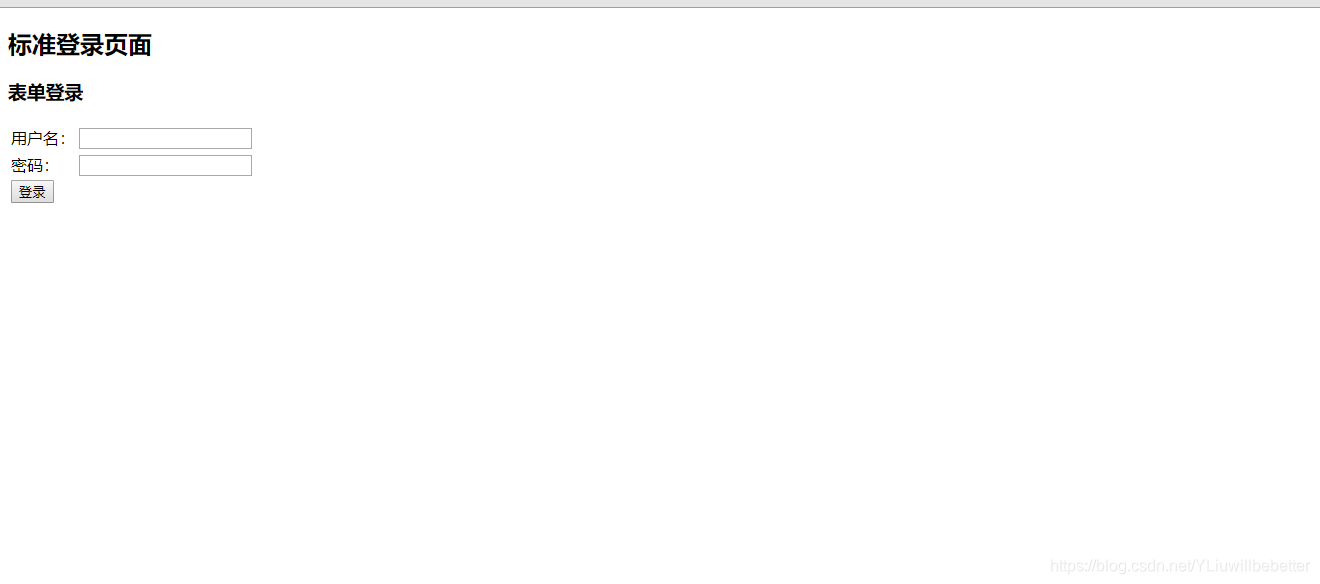
- 深入定义(判断是PC端还是移动端,PC端跳转页面,移动端响应 json)
创建一个控制器,用来处理操作
@RestController

public class BrowserSecurityController {

    private static final Logger log = LoggerFactory.getLogger(BrowserSecurityController.class);

    private RequestCache requestCache = new HttpSessionRequestCache();

    private RedirectStrategy redirectStrategy = new DefaultRedirectStrategy();

    /**

     * 当需要身份验证时跳转到这里处理

     */

    @RequestMapping("/authentication/require")

    @ResponseStatus(code = HttpStatus.UNAUTHORIZED)

    public Map<String, String> requireAuthentication(final HttpServletRequest request,

                                                final HttpServletResponse response) throws IOException {

        SavedRequest savedRequest = requestCache.getRequest(request, response);

        if (null != savedRequest) {

            String target = savedRequest.getRedirectUrl();

            log.info("引发跳转的请求是 ={}", target);

            if (StringUtils.endsWithIgnoreCase(target, ".html")) {

                redirectStrategy.sendRedirect(request, response, "/imooc-signIn.html");

            }

        }

        Map<String, String> map = new HashMap<>();

        map.put("status", "401");

        map.put("msg", "error");

        map.put("content","访问的服务需要身份认证,请引导用户到登录页!" );

        return map;

    }

}
自定义登录成功处理
要做自定义登录成功处理需要实现一下 Security 的 AuthenticationSuccessHandler 接口
/**

 * 自定义登录成功处理

 */

@Configuration

public class ImoocAuthenticationSuccessHandler implements AuthenticationSuccessHandler {

	private static final Logger log = LoggerFactory.getLogger(ImoocAuthenticationSuccessHandler.class);

    private final ObjectMapper objectMapper;

    @Autowired

    public ImoocAuthenticationSuccessHandler(ObjectMapper objectMapper) {

        this.objectMapper = objectMapper;

    }

    // 参数 Authentication 是Security的核心接口之一,封装了用户登录认证信息

    // UserDetails 接口就包装到了此接口中

    @Override

    public void onAuthenticationSuccess(HttpServletRequest request,

                                        HttpServletResponse response,

                                        Authentication authentication) throws IOException, ServletException {

        log.info("登录成功");

        // 响应 json 信息

        response.setContentType("application/json;charset=utf-8");

        PrintWriter out = response.getWriter();

        out.write(objectMapper.writeValueAsString(authentication));

        out.flush();

        out.close();

    }

}
- 启动项目,访问跳转登录页面后,输入正确用户名,密码后响应信息如下:
{

  "authorities": [

    {

      "authority": "admin"

    }

  ],

  // 包含了认证请求的信息

  "details": {

    "remoteAddress": "127.0.0.1",

    "sessionId": "1126C43793FD600CA6DC74169A38F64E"

  },

  // 这里代表当前用户是否经过了身份认证,boolean表示

  "authenticated": true,

  // 这里是 我们自定义UserDetailsService接口实现类 返回的数据

  "principal": {

    "password": null,

    "username": "user",

    // 用户权限

    "authorities": [

      {

        "authority": "admin"

      }

    ],

    "accountNonExpired": true,

    "accountNonLocked": true,

    "credentialsNonExpired": true,

    "enabled": true

  },

  // 这里一般代表用户输入的密码,Security 做了处理,前台不会响应

  "credentials": null,

  // 用户名

  "name": "user"

}
自定义登录错误处理
要做自定义登录成功处理需要实现一下 Security 的 AuthenticationFailureHandler 接口
/**

 * 自定义登录失败处理

 */

@Configuration

public class ImoocAuthenticationFailureHandler implements AuthenticationFailureHandler {

	// 参数 AuthenticationException 是 Security 的一个抽象异常类

    @Override

    public void onAuthenticationFailure(HttpServletRequest request,

                                        HttpServletResponse response,

                                        AuthenticationException exception) throws IOException, ServletException {

    }

}
- 启动项目,访问跳转登录页面后,输入错误用户名,密码后响应信息如下:
{**省略堆栈信息**"localizedMessage":"坏的凭证","message":"坏的凭证","suppressed":[]}
注意:以上两个自定义登录/失败的处理,一定要在 自定义Security配置类中加入,不然不会生效!!!
加入自定义登录成功/失败处理
/**

 * Security 配置

 */

@Configuration

public class BrowserSecurityConfig extends WebSecurityConfigurerAdapter {

    @Autowired

    private SecurityProperties securityProperties;

    @Autowired

    private ImoocAuthenticationSuccessHandler imoocAuthenticationSuccessHandler;

    @Autowired

    private ImoocAuthenticationFailureHandler imoocAuthenticationFailureHandler;

    @Bean

    public PasswordEncoder passwordEncoder() {

        return new MyPasswordEncoder();

    }

    @Override

    protected void configure(HttpSecurity http) throws Exception {

        BrowserProperties browser = securityProperties.getBrowser();

        // 启用表单登陆

        http.formLogin()

                // 指定登录页面

                .loginPage("/authentication/require")

                // 登录页面表单提交的 action

                .loginProcessingUrl("/authentication/form")

                // 引入自己定义的登录成功处理配置类

                .successHandler(imoocAuthenticationSuccessHandler)

                // 引入自己定义的登录失败处理配置类

                .failureHandler(imoocAuthenticationFailureHandler)

                .and()

                // 对请求做授权

                .authorizeRequests()

                // 访问指定url时不需要身份认证(放行)

                .antMatchers("/authentication/require",

                        browser.getLoginPage()).permitAll()

                // 任何请求

                .anyRequest()

                // 都需要身份认证

                .authenticated()

                .and()

                .csrf().disable();

    }

}
以上实现了自定义成功/失败响应,但是要想PC/移动端通用,需要深化配置一下
- 改造 自定义成功处理
创建一个枚举类,用来区分 重定向,还是响应 json
public enum LoginType {

    REDIRECT, JSON;

}
让此枚举类成为 BrowserProperties 类的一个属性
public class BrowserProperties {

    /**

     * 指定默认值(如果配置了用配置的页面,没配置用默认的。)

     */

    private String loginPage = "/imooc-signIn.html";

    /**

     * 指定登录成功/失败后的响应方式

     */

    private LoginType loginType = LoginType.JSON;

    // 省略 GET/SET/toString 方法

}
改造自定义成功处理类
/**

 * 自定义登录成功处理

 */

@Configuration

// 让自定义的成功处理类 继承 Security 默认的成功处理类 SavedRequestAwareAuthenticationSuccessHandler

public class ImoocAuthenticationSuccessHandler extends SavedRequestAwareAuthenticationSuccessHandler {

    private static final Logger log = LoggerFactory.getLogger(ImoocAuthenticationSuccessHandler.class);

    private final ObjectMapper objectMapper;

    private final SecurityProperties securityProperties;

    @Autowired

    public ImoocAuthenticationSuccessHandler(ObjectMapper om, SecurityProperties sp) {

        this.objectMapper = om;

        this.securityProperties = sp;

    }

    @Override

    public void onAuthenticationSuccess(HttpServletRequest request,

                                        HttpServletResponse response,

                                        Authentication authentication) throws IOException, ServletException {

        log.info("登录成功。。。");

        // 响应 json 信息

        response.setContentType("application/json;charset=utf-8");

        PrintWriter out = response.getWriter();

        out.write(objectMapper.writeValueAsString(authentication));

        out.flush();

        out.close();

    }

}
改造自定义失败处理类
/**

 * 自定义登录失败处理

 */

@Configuration

// SimpleUrlAuthenticationFailureHandler 为 Security 默认的登录失败处理类

public class ImoocAuthenticationFailureHandler extends SimpleUrlAuthenticationFailureHandler {

    private static final Logger log = LoggerFactory.getLogger(ImoocAuthenticationSuccessHandler.class);

    private final ObjectMapper objectMapper;

    private final SecurityProperties securityProperties;

    @Autowired

    public ImoocAuthenticationFailureHandler(ObjectMapper om, SecurityProperties sp) {

        this.objectMapper = om;

        this.securityProperties = sp;

    }

    @Override

    public void onAuthenticationFailure(HttpServletRequest request,

                                        HttpServletResponse response,

                                        AuthenticationException exception) throws IOException, ServletException {

        log.info("登录失败。。。");

        // 如果配置了用 Json 响应

        if (LoginType.JSON.equals(securityProperties.getBrowser().getLoginType())) {

            // 响应状态码为 500

            response.setStatus(HttpStatus.INTERNAL_SERVER_ERROR.value());

            // 响应 json 信息

            response.setContentType("application/json;charset=utf-8");

            PrintWriter out = response.getWriter();

            out.write(objectMapper.writeValueAsString(exception));

            out.flush();

            out.close();

        } else {

            // 调用父类方法

            super.onAuthenticationFailure(request, response, exception);

        }

    }

}
由于 BrowserProperties 类中的loginType属性默认为 Json ,你可以在具体的 properties 文件中,定义一下属性。如:
imooc.security.browser.login-type=REDIRECT
这样可以测试一下是否配置成功。
测试图就不贴上了,自已耐心测试一下~
Spring Security(三)的更多相关文章
- Spring Security(三) —— 核心配置解读
摘要: 原创出处 https://www.cnkirito.moe/spring-security-3/ 「老徐」欢迎转载,保留摘要,谢谢! 3 核心配置解读 上一篇文章<Spring Secu ...
- Spring Security三种认证
Spring Security: 1.用户名+密码认证 2.手机号+短信认证 Spring Social: 1.第三方认证, QQ登录等 Spring Security OAuth: 1.把认证之后的 ...
- SpringBoot + Spring Security 学习笔记(三)实现图片验证码认证
整体实现逻辑 前端在登录页面时,自动从后台获取最新的验证码图片 服务器接收获取生成验证码请求,生成验证码和对应的图片,图片响应回前端,验证码保存一份到服务器的 session 中 前端用户登录时携带当 ...
- Spring Security(三十二):10. Core Services
Now that we have a high-level overview of the Spring Security architecture and its core classes, let ...
- Spring Security(三十):9.5 Access-Control (Authorization) in Spring Security
The main interface responsible for making access-control decisions in Spring Security is the AccessD ...
- 朱晔和你聊Spring系列S1E10:强大且复杂的Spring Security(含OAuth2三角色+三模式完整例子)
Spring Security功能多,组件抽象程度高,配置方式多样,导致了Spring Security强大且复杂的特性.Spring Security的学习成本几乎是Spring家族中最高的,Spr ...
- 【Spring Security】三、自定义数据库实现对用户信息和权限信息的管理
一 自定义表结构 这里还是用的mysql数据库,所以pom.xml文件都不用修改.这里只要新建三张表即可,user表.role表.user_role表.其中user用户表,role角色表为保存用户权限 ...
- Spring Security教程(三):自定义表结构
在上一篇博客中讲解了用Spring Security自带的默认数据库存储用户和权限的数据,但是Spring Security默认提供的表结构太过简单了,其实就算默认提供的表结构很复杂,也不一定能满足项 ...
- Spring Security 动态url权限控制(三)
一.前言 本篇文章将讲述Spring Security 动态分配url权限,未登录权限控制,登录过后根据登录用户角色授予访问url权限 基本环境 spring-boot 2.1.8 mybatis-p ...
随机推荐
- .NET MVC 学习笔记(二)— Bootstrap框架
二..NET MVC 学习笔记(一)—— Bootstrap框架 在实际开发过程中,页面的样式问题是让人很头疼的问题,良好的用户界面可以大大提高用户体检,而在你没有前端开发人员的火力支援情况下,并不是 ...
- LOJ#3048. 「十二省联考 2019」异或粽子(trie树+堆)
题面 传送门 题解 我们先把它给前缀异或和一下,然后就是要求前\(k\)大的\(a_i\oplus a_j\).把\(k\)乘上个\(2\),变成前\(2k\)大的\(a_i\oplus a_j\), ...
- Linux下查看文档指令
1,cat直接查看 cat /etc/profile 2,more,less分页查看 less /etc/profile more /etc/profile less -N /etc/profile ...
- GoLang学习之Golang数组
Go语言数组 数组是Go语言编程中最常用的数据结构之一.顾名思义,数组就是指一系列同一类型数据的集合.数组中包含的每个数据被称为数组元素( element),一个数组包含的元素个数被称为数组的长度.需 ...
- shopify网站转化率优化之结账页checkout优化
昨天分享了“利用GOOGLE地图API实现shopify结账页checkout地址自动填写地址字段”是个非常屌的功能,但shopify默认的结账页checkout是这样的如图 [caption id= ...
- MySQL笔记(4)---表
1.前言 上一章记录了MySQL中的一些文件组成,以及相关作用和参数配置,本章开始记录深层次的存储结构,以便更好理解MySQL的设计. 2.索引组织表 InnoDB中,表都是根据主键顺序组织存放的,这 ...
- 8皇后问题(c++/python实现)
问题描述:在8*8的国际象棋盘上摆放8个皇后,使其不能互相攻击,即任何两个皇后都不能处于同一行.同一列或者同一斜线上,问有多少种摆法. 算法分析: 利用3个数组分表来标记冲突,数组a.b.c. a数组 ...
- 链表的反转、合并(不借助额外list数组)
链表的基本操作:线性表 (单链表.循环链表-python实现) 反转链表: # -*- coding:utf-8 -*- class ListNode: def __init__(self, x): ...
- Python Mock的入门学习
一.Mock是什么 Mock这个词在英语中有模拟的这个意思,因此我们可以猜测出这个库的主要功能是模拟一些东西.准确的说,Mock是Python中一个用于支持单元测试的库,它的主要功能是使用mock对象 ...
- 一口一口吃掉Volley(二)
欢迎访问我的个人博客转发请注明出处:http://www.wensibo.top/2017/02/17/一口一口吃掉Volley(二)/ 相信看了第一篇教程之后,你应该会对Volley有一个初步的了解 ...