
localstorage和vue结合使用2
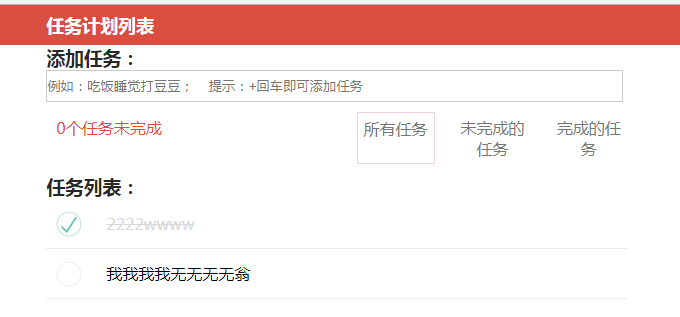
html
 <template>

   <div class="hello">

     <div class="page-top">

         <div class="page-content">

             <h2>任务计划列表</h2>

         </div>

     </div>

     <div class="main">

       <h3 class="big-title">添加任务:</h3>

       <input

           placeholder="例如:吃饭睡觉打豆豆;    提示:+回车即可添加任务"

           class="task-input"

           type="text"

           v-model="todo"

           v-on:keyup.enter="addTodo"

       />

       <ul class="task-count" >

           <li >0个任务未完成</li>

           <li class="action">

               <a class="active" href="#all">所有任务</a>

               <a href="#unfinished">未完成的任务</a>

               <a href="#finished">完成的任务</a>

           </li>

       </ul>

       <h3 class="big-title">任务列表:</h3>

       <div class="tasks">

         <span class="no-task-tip" v-show="!list.length">还没有添加任何任务</span>

         <ul class="todo-list">

             <li class="todo" :class="{completed:item.isChecked,editing:item===edtorTodos}"  v-for="item in list">

                 <div class="view">

                     <input class="toggle" type="checkbox" v-model="item.isChecked"/>

                     <label @dblclick="edtorTodo(item)">{{item.title}}</label>

                     <button class="destroy" @click="deleteTodo(item)"></button>

                 </div>

                 <input

                     v-foucs="edtorTodos === item"

                     class="edit"

                     type="text"

                     v-model = "item.title"

                     @keyup.enter="edtorTodoed(item)"

                     @keyup.esc="cancelTodo(item)"

                     @blur="edtorTodoed(item)"

                 />

             </li>

         </ul>

       </div>

     </div>

   </div>

 </template>
js
我在main.js里面引入了一个自定义的storage.js库
库
 /*

     storage 主要放项目中的storage相关操作:存取等

 */

 var storage = {

     /**

      对本地数据进行操作的相关方法,如localStorage,sessionStorage的封装

     */

     setStorage: function(key, value, duration) {

         var data = {

             value: value,

             expiryTime: !duration || isNaN(duration) ? 0 : this.getCurrentTimeStamp() + parseInt(duration)

         };

         localStorage[key] = JSON.stringify(data);

     },

     getStorage: function(key) {

         var data = localStorage[key];

         if (!data || data === "null") {

             return null;

         }

         var now = this.getCurrentTimeStamp();

         var obj;

         try {

             obj = JSON.parse(data);

         } catch (e) {

             return null;

         }

         if (obj.expiryTime === 0 || obj.expiryTime > now) {

             return obj.value;

         }

         return null;

     },

     removeStorage: function(key){

         localStorage.removeItem(key);

     },

     getSession: function(key) {

         var data = sessionStorage[key];

         if (!data || data === "null") {

             return null;

         }

         return JSON.parse(data).value;

     },

     setSession: function(key, value) {

         var data = {

             value: value

         }

         sessionStorage[key] = JSON.stringify(data);

     },

     getCurrentTimeStamp: function() {

         return Date.parse(new Date());

     }

 };

 export default storage;
import storage from '@/utils/storage.js'
Vue.config.productionTip = false
//将常用工具方法扩展成Vue实例
Vue.prototype.$storage=storage;
 export default {

   components:{Tab2},

   data () {

     return {

       todo:"",

       list:[],

       beforeTitle:"",

       edtorTodos:""

     }

   },

   created(){

     if(this.$storage.getStorage("miao-class")){

       var index=this.$storage.getStorage("miao-class");

       this.list=index;

     }

   },

   watch:{

     list:{

       handler:function(val,oldVal){

         this.$storage.setStorage("miao-class",val);

       },

       deep:true

     }

   },

   computed:{

   },

   methods: {

     addTodo(){

       this.list.push({

         title:this.todo,

         isChecked:false

       })

       this.todo='';

     },

     deleteTodo(todo){

       var index=this.list.indexOf(todo);

       this.list.splice(index,1);

     },

     edtorTodo(todo){

       this.beforeTitle=todo.title,

       this.edtorTodos=todo;

     },

     edtorTodoed(todo){

       //编辑成功

       this.edtorTodos='';

     },

     cancelTodo(todo){

       //取消编辑

       todo.title=this.beforeTitle;

       this.beforeTitle = '';

       //让div显示出来,input隐藏

       this.edtorTodos = '';

     }

   },

   directives:{

     "foucs":{

       update(el,binding){

         if(binding.value){

           el.focus();

         }

       }

     }

   }

 }

 </script>
localstorage和vue结合使用2的更多相关文章
- localstorage和vue结合使用
父组件 <template> <div class="hello"> <p>Original message:"{{message}} ...
- vue中使用localStorage存储信息
一 什么是localStorage 对浏览器来说,使用 Web Storage 存储键值对比存储 Cookie 方式更直观,而且容量更大,它包含两种:localStorage 和 sessionSto ...
- Vue应用框架整合与实战--Vue技术生态圈篇
实用框架以及工具 UI组件 开发框架 实用库 服务端 辅助工具 应用实例 Demo示例 UI组件 Element-UI ★13489 - 饿了么出品的Vue2的web UI工具套件 Vux ★8133 ...
- 【转载】 github vue 高星项目
内容 UI组件 开发框架 实用库 服务端 辅助工具 应用实例 Demo示例 UI组件 element ★13489 - 饿了么出品的Vue2的web UI工具套件 Vux ★8133 - 基于Vue和 ...
- VUE组件汇总
内容 UI组件 开发框架 实用库 服务端 辅助工具 应用实例 Demo示例 UI组件 element ★13489 - 饿了么出品的Vue2的web UI工具套件 Vux ★8133 - 基于Vue和 ...
- 【分享】Vue 资源典藏(UI组件、开发框架、服务端、辅助工具、应用实例、Demo示例)
Vue 资源典藏,包括:UI组件 开发框架 服务端 辅助工具 应用实例 Demo示例 element ★11612 - 饿了么出品的Vue2的web UI工具套件 Vux ★7503 - 基于Vue和 ...
- Vue开源项目汇总(史上最全)(转)
目录 UI组件 开发框架 实用库 服务端 辅助工具 应用实例 Demo示例 UI组件 element ★13489 - 饿了么出品的Vue2的web UI工具套件 Vux ★8133 - 基于Vue和 ...
- vue(6)生态
来自:https://www.jianshu.com/p/22a99426b524?utm_campaign=maleskine&utm_content=note&utm_medium ...
- Vue相关开源项目库汇总 http://www.opendigg.com/tags/front-vue
awesome-github-vue 是由OpenDigg整理并维护的Vue相关开源项目库集合.我们会定期同步OpenDigg上的项目到这里,也欢迎各位提交项目给我们. 如果收录的项目有错误,可以通过 ...
随机推荐
- 遍历DOM树,获取父节点
通过获取父节点,还可以获取父节点的父节点. 有3个常用方法: 方法 说明 parent() 选取父节点 parents() 选取所有父节点 parentsUntil("div&q ...
- Celery + RabbitMq 示意图
一直搞不清楚消息队列和任务队列是如何结合的,直到碰到了 :http://www.cnblogs.com/jijizhazha/p/8086119.html 中的图,恍然大悟,凭借自己的理解,画了这幅组 ...
- [图解tensorflow源码] 入门准备工作附常用的矩阵计算工具[转]
[图解tensorflow源码] 入门准备工作 附常用的矩阵计算工具[转] Link: https://www.cnblogs.com/yao62995/p/5773142.html tensorf ...
- tensflow分布式
https://blog.csdn.net/CodeMaster_/article/details/76223835 代码解析好文: https://wenku.baidu.com/view/94b2 ...
- 新手如何学习Java——Java学习路线图
推荐初学者阅读:新手如何学习Java——Java学习路线图
- hello world讲解1
1. HelloWorld程序解析---------------------------------------------------------------------------------- ...
- python 分词
import jieba text = '我来到北京清华大学' default_mode =jieba.cut(text) full_mode = jieba.cut(text,cut_all=Tru ...
- 下载安装windows版Redis
链接 https://github.com/MicrosoftArchive/redis/releases 选择版本下载 在redis目录打开cmd命令输入 redis-server.ex ...
- JMeter学习(二十六)逻辑控制器(转载)
转载自 http://www.cnblogs.com/yangxia-test JMeter中的Logic Controller用于为Test Plan中的节点添加逻辑控制器. JMeter中的Log ...
- JMeter学习(五)集合点(转载)
转载自 http://www.cnblogs.com/yangxia-test JMeter也有像LR中的集合点,本篇就来介绍下JMeter的集合点如何去实现. JMeter里面的集合点通过添加定时器 ...