
localstorage和vue结合使用
父组件
 <template>

   <div class="hello">

     <p>Original message:"{{message}}"</p><br/>

     <input v-model="newTodoText" v-on:keyup.enter="addNewText" placeholder="Add a todo">

     <ul>

       <li is="tab2" v-for="(todo,index) in todos" :key="todo.id" :title="todo.title" @remove="todos.splice(index,1)">

       </li>

     </ul>

   </div>

 </template>

 <script>

 import store from '@/store/todo_list.js'

 import Tab2 from '@/components/tab2/tab2'

 export default {

   components:{Tab2},

   data () {

     return {

       message:"Hello",

       newTodoText:'',

       todos: store.fetch(),

       nextTodoId: 4

     }

   },

   watch:{

     todos:function(val){

       console.log(val);

       store.save(val);

     }

   },

   computed:{

   },

   methods: {

     addNewText: function () {

       this.todos.push({

         id: this.nextTodoId++,

         title: this.newTodoText

       })

       this.newTodoText = ''

     }

   }

 }

 </script>

 <!-- Add "scoped" attribute to limit CSS to this component only -->

 <style scoped>

 h1, h2 {

   font-weight: normal;

 }

 ul {

   list-style-type: none;

   padding: 0;

 }

 li {

   display: inline-block;

   margin: 0 10px;

 }

 a {

   color: #42b983;

 }

 .active{

   color:red;

 }

 .text-danger{

   color:green;

 }

 </style>
todo_list.js
 const STORAGE_KEY = 'todos-vuejs'

 export default {

   fetch: function() {

     return window.JSON.parse(window.localStorage.getItem(STORAGE_KEY) || '[]')

   },

   save: function(items) {

     window.localStorage.setItem(STORAGE_KEY, window.JSON.stringify(items))

   }

 }
子组件返回删除按钮
 <template>

     <li>{{title}}

         <button v-on:click="close">X</button>

     </li>

 </template>

 <script>

 export default{

     props:['title'],

     data(){

         return{

         }

     },

     methods:{

         close(){

             this.$emit('remove');

         }

     }

 }

 </script>

 <style>

 </style>
效果
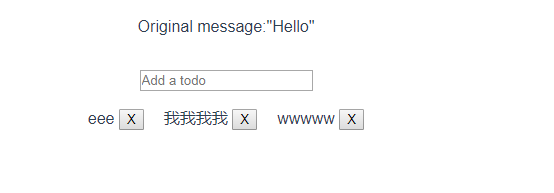
接一篇自己写的
引入jquery和bootstrap查考我vue分类里面的随便,
我这里在页面里面构建了自己的storage全局工具类
<template>
<div class="container">
<form role="form">
<div class="form-group">
<label for="username">用户名:</label>
<input type="text" id="username" class="form-control" placeholder="输入用户名"
v-model.trim="username">
</div>
<div class="form-group">
<label for="age">年 龄:</label>
<input type="text" id="age" class="form-control" placeholder="输入年龄" v-model.trim="age">
</div>
<div class="form-group">
<input type="button" value="添加" class="btn btn-primary" @click="add()">
<input type="button" value="重置" class="btn btn-danger">
</div>
</form>
<hr>
<table class="table table-bordered table-hover">
<caption class="h2 text-info">用户信息表</caption>
<tr class="text-danger">
<th class="text-center">序号</th>
<th class="text-center">名字</th>
<th class="text-center">年龄</th>
<th class="text-center">操作</th>
</tr>
<tr class="text-center" v-for="(item,index) in myData">
<td>{{index}}</td>
<td>{{item.name}}</td>
<td>{{item.age}}</td>
<td>
<button class="btn btn-primary btn-sm" data-toggle="modal" data-target="#layer"
@click="nowIndex==index">删除</button>
</td>
</tr> <tr v-show="myData.length!=0">
<td colspan="4" class="text-right">
<button class="btn btn-danger btn-sm" data-toggle="modal" data-target="#layer"
v-on:click="nowIndex=-2">删除全部</button>
</td>
</tr>
<tr v-show="myData.length==0">
<td colspan="4" class="text-center text-muted">
<p>暂无数据....</p>
</td>
</tr>
</table> <!--模态框 弹出框-->
<div role="dialog" class="modal fade bs-example-modal-sm" id="layer">
<div class="modal-dialog">
<div class="modal-content">
<div class="modal-header">
<button type="button" class="close" data-dismiss="modal">
<span>×</span>
</button>
<h4 class="modal-title">确认删除么?</h4>
</div>
<div class="modal-body text-right">
<button data-dismiss="modal" class="btn btn-primary btn-sm">取消</button>
<button data-dismiss="modal" class="btn btn-danger btn-sm"
@click="deleteMsg(nowIndex)">确认</button>
</div>
</div>
</div>
</div>
</div>
</template> <script>
export default {
name: 'HelloWorld',
data () {
return {
myData:[],
username:'',
age:'',
nowIndex:-100
}
},
created(){
if(this.$storage.getStorage("myData-list")){
var index=this.$storage.getStorage("myData-list");
this.myData=index;
}
},
watch:{
myData:function(nowVal,oldVal){
this.$storage.setStorage("myData-list",nowVal);
}
},
methods:{
add(){
if(this.username.length==0 || this.age.length==0){
alert("用户名或年龄不为空");
}else{
this.myData.push({
name:this.username,
age:this.age
});
this.username="";
this.age=""
}
},
deleteMsg(n){
if(n==-2){
this.myData=[];
}else{
this.myData.splice(n,1);
}
}
}
}
</script>
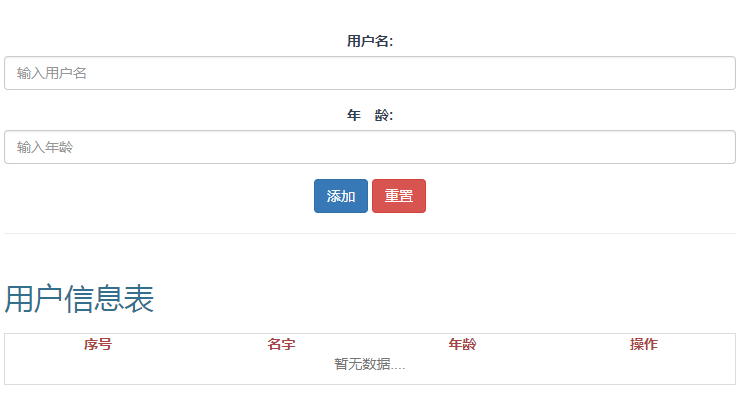
参考链接:http://www.cnblogs.com/yingzi1028/p/7774954.html
localstorage和vue结合使用的更多相关文章
- localstorage和vue结合使用2
html <template> <div class="hello"> <div class="page-top"> < ...
- vue中使用localStorage存储信息
一 什么是localStorage 对浏览器来说,使用 Web Storage 存储键值对比存储 Cookie 方式更直观,而且容量更大,它包含两种:localStorage 和 sessionSto ...
- Vue应用框架整合与实战--Vue技术生态圈篇
实用框架以及工具 UI组件 开发框架 实用库 服务端 辅助工具 应用实例 Demo示例 UI组件 Element-UI ★13489 - 饿了么出品的Vue2的web UI工具套件 Vux ★8133 ...
- 【转载】 github vue 高星项目
内容 UI组件 开发框架 实用库 服务端 辅助工具 应用实例 Demo示例 UI组件 element ★13489 - 饿了么出品的Vue2的web UI工具套件 Vux ★8133 - 基于Vue和 ...
- VUE组件汇总
内容 UI组件 开发框架 实用库 服务端 辅助工具 应用实例 Demo示例 UI组件 element ★13489 - 饿了么出品的Vue2的web UI工具套件 Vux ★8133 - 基于Vue和 ...
- 【分享】Vue 资源典藏(UI组件、开发框架、服务端、辅助工具、应用实例、Demo示例)
Vue 资源典藏,包括:UI组件 开发框架 服务端 辅助工具 应用实例 Demo示例 element ★11612 - 饿了么出品的Vue2的web UI工具套件 Vux ★7503 - 基于Vue和 ...
- Vue开源项目汇总(史上最全)(转)
目录 UI组件 开发框架 实用库 服务端 辅助工具 应用实例 Demo示例 UI组件 element ★13489 - 饿了么出品的Vue2的web UI工具套件 Vux ★8133 - 基于Vue和 ...
- vue(6)生态
来自:https://www.jianshu.com/p/22a99426b524?utm_campaign=maleskine&utm_content=note&utm_medium ...
- Vue相关开源项目库汇总 http://www.opendigg.com/tags/front-vue
awesome-github-vue 是由OpenDigg整理并维护的Vue相关开源项目库集合.我们会定期同步OpenDigg上的项目到这里,也欢迎各位提交项目给我们. 如果收录的项目有错误,可以通过 ...
随机推荐
- 关于jsp基本语法:第一章节
今天我学习了关于JSP基本语法的一些知识点. JSP全名是 Java server pages,其根本是一个简化的Servlet设计,实现了在java当中使用HTML标签.JSP是一种动态网页技术,标 ...
- ArcGIS案例学习笔记3_1_ArcMap编辑练习
ArcGIS案例学习笔记3_1_ArcMap编辑练习 计划时间:第三天上午 目的:ArcMap编辑练习 教程: pdf page67 数据: gis_ex10/ex07 方法: 1.新建shp文件 目 ...
- C# 图像处理:将图像(24位真彩)转为 8位灰度图像 采用了内存法,大大提高了效率
/// <summary> /// 将源图像灰度化,并转化为8位灰度图像. /// </summary> /// <param name="original&q ...
- 修改maven项目的编译版本
在pom.xml中添加如下代码 <build> <!-- 配置了很多插件 --> <plugins> <plugin> <groupId>o ...
- qt 中的基本知识
1. 由 .ui 文件生成界面头文件: uic -o ui_dialog.h dialog.ui 2. 在工程目录下生成与平台无关的工程文件 : qmake -project 3. 生成与平台相关的 ...
- kafka 配置启动
Kafka配置(注意log.dirs不要配置在tmp目录下,因为该目录会被linux定时任务删除,会导致kafka崩溃)需要三个Kafka实例,分别安装在下面三个机器上:192.168.240.167 ...
- k8s 创建deployment流程
pod 创建流程https://blog.csdn.net/yan234280533/article/details/72567261 api server -> etcd -> cont ...
- vue 学习1
.static{ border-radius:4px; } .active { width: 100px; height: 100px; background: green; } .text-dang ...
- msf客户端渗透(五):注册表
先获取到一个session 上传nc到被攻击主机上 建立一个键值 创建一个策略 kali上查看是否成功创建键值 后台开启cmd 查看防火墙的策略 打开防火墙的端口 添加一条防火墙策略 在win7上查看 ...
- artTemplate js模板引擎动态给html赋值
html放到$("#area").append(html);之前,否则文档流获取不到#area <table width="90%" class=&quo ...