
delphi Drag and Drop sample 鼠标拖放操作实例
Drag and Drop is a common operation that makes the interface user friendly: a user can drag/drop information to controls instead of having to type etc.
The following sample explains basics of drag and drop. For detailed information you should refer to other articles in the wiki and reference documentation.
Please note, since LCL is partially compatible with Delphi's VCL, some articles/examples about Delphi drag-and-drop may also apply to LCL.
Contents
Drag and Drop
Despite of the operation's simplicity from the user's point of view, it might give hard times to an inexperienced developer.
For the code, Drag and Drop operation always consists of at least these 3 steps:
- Some control starts the drag-and-drop operation. This is called the Source
- User drags the mouse cursor around, above other controls or the Source itself. Now a dragged over control needs to decide, if it is able to accept the dragged data.
- Drop happens if a control agrees to accept the dragged data. The accepting control is called the Sender.
To simplify drag-and-drop handling, the LCL provides "automatic" mode. It doesn't mean, that LCL does the whole drag-and-drop for you, but it will handle low-level drag object managing (which is not covered in this article).
Example
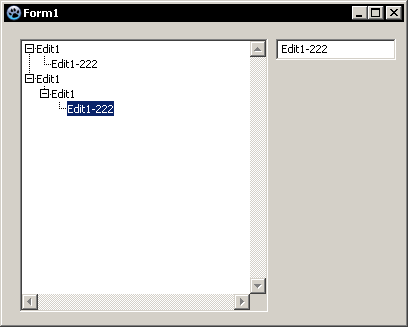
The example covers automatic drag-and-drop feature between 2 controls (Edit->Treeview) as well as inside a single control (Treeview->Treeview)
- Start the new application.
- Put a TreeView component and Edit on the form.
- Enable Automatic drag-and-drop mode for TreeView and Edit in Object Inspector:
DragMode: dkAutomatic
You can launch the application now, and try to drag anything around. You should not get anything working for now. But, if you press the left mouse button on the Treeview, you'll probably see that the cursor icon changed, but still nothing happens when releasing the mouse .
Dragging between controls
Let's make a drag-and-drop operation between Edit and TreeView. There the content of Edit will be "dragged" to TreeView and a new tree node created.
To initiate the drag, controls have a special method: BeginDrag()
Create OnMouseDown event for the Edit:
procedure TForm1.Edit1MouseDown(Sender: TObject; Button: TMouseButton;

  Shift: TShiftState; X, Y: Integer);

begin

  if Button = mbLeft then   {check if left mouse button was pressed}

    Edit1.BeginDrag(true);  {starting the drag operation}

end;
If you launch the application right now and try drag and drop, you'll notice that Edit starts the operation, but still nothing happens then you're trying to drop to TreeView.
This is because TreeView doesn't accept the data. None of the controls accept data by default, so you'll always need to provide the proper event handler.
Assign TreeView.OnDragOver operation:
procedure TForm1.TreeView1DragOver(Sender, Source: TObject; X, Y: Integer;

  State: TDragState; var Accept: Boolean);

begin

  Accept := true;

end;
Of course in some cases, TreeView might deny dropping (if Source or data cannot be handled), but for now, TreeView always accepts the dragging.
Run application and test. Everything should be better now, though still nothing happens on drop.
Assign TreeView.OnDragDrop operation:
procedure TForm1.TreeView1DragDrop(Sender, Source: TObject; X, Y: Integer);

var

  tv     : TTreeView;

  iNode  : TTreeNode;

begin

  tv := TTreeView(Sender);      { Sender is TreeView where the data is being dropped  }

  iNode := tv.GetNodeAt(x,y);   { x,y are drop coordinates (relative to the Sender)   }

                                {   since Sender is TreeView we can evaluate          }

                                {   a tree at the X,Y coordinates                     }

  { TreeView can also be a Source! So we must make sure }

  { that Source is TEdit, before getting its text }

  if Source is TEdit then

    tv.Items.AddChild(iNode, TEdit(Source).Text); {now, we can add a new node, with a text from Source }

end;
Run and test. It should be working now. Dragging a text from Edit to TreeView should create a new node.
Dragging within a control
Sender and Source can be the same control! It's not prohibited in any way. Let's add the ability to a TextView, to change its nodes location. Since TextView is in automatic DragMode, you don't need to start the drag by using DragBegin(). It's started automatically on mouse moved with left button hold.
Make sure you have "Accept:=true;" inside the DragOver operation for TreeView source.
Modify the DragDrop event handler to the following:
procedure TForm1.TreeView1DragDrop(Sender, Source: TObject; X, Y: Integer);

var

  tv     : TTreeView;

  iNode  : TTreeNode;

begin

  tv := TTreeView(Sender);      { Sender is TreeView where the data is being dropped  }

  iNode := tv.GetNodeAt(x,y);   { x,y are drop coordinates (relative to the Sender)   }

                                {   since Sender is TreeView we can evaluate          }

                                {   a tree at the X,Y coordinates                     }

  { TreeView can also be a Source! So we must make sure }

  { that Source is TEdit, before getting its text }

  if Source is TEdit then

    tv.Items.AddChild(iNode, TEdit(Source).Text) {now, we can add a new node, with a text from Source }

  else if Source = Sender then begin         { drop is happening within a TreeView   }

    if Assigned(tv.Selected) and             {  check if any node has been selected  }

      (iNode <> tv.Selected) then            {   and we're dropping to another node  }

    begin

      if iNode <> nil then

        tv.Selected.MoveTo(iNode, naAddChild) { complete the drop operation, by moving the selectede node }

      else

        tv.Selected.MoveTo(iNode, naAdd); { complete the drop operation, by moving in root of a TreeView }

    end;

  end;

end;
That's it. If you run the application now, you should have both features working.
- Adding a new node by dragging text from Edit to TreeView
- Dragging nodes inside the treeview
Hints
- You can?/cannot? use some global data to inspect what is being dragged now. Don't use global variables, but your form class's fields.
- Put the data when you start the drag
- Inspect the data, during control's drag over event, and modify Accept flag accordingly
- Read and use the data on drop event
Dragging from other applications
You can drag/drop
Files
Files can be dropped and handled easily by implementing the FormDropFiles event, once AllowDropFiles on the form is set:
procedure TForm1.FormDropFiles(Sender: TObject; const FileNames: array of String);

var FileName : String;

begin

  for FileName in FileNames do

  begin

    ShowMessage(FileName);

  end;

end;
Text etc
You can drag and drop e.g. text from another application (e.g.t notepad) to a control on your application. The way this is implemented is platform-dependent.
Windows
This code lets you drag and drop selected text from other applications onto an edit control.
unit Unit1;

{$mode objfpc}{$H+}

interface

uses

  Classes, SysUtils, FileUtil, Forms, Controls, Graphics, Dialogs, StdCtrls,

  Windows, ActiveX, ComObj;

type

  { TForm1 }

  TForm1 = class(TForm, IDropTarget)

    Memo1: TMemo;

    procedure FormCreate(Sender: TObject);

    procedure FormDestroy(Sender: TObject);

  private

    // IDropTarget

    function DragEnter(const dataObj: IDataObject; grfKeyState: DWORD; pt: TPoint; var dwEffect: DWORD): HResult;StdCall;

    function DragOver(grfKeyState: DWORD; pt: TPoint; var dwEffect: DWORD): HResult;StdCall;

    function DragLeave: HResult;StdCall;

    function Drop(const dataObj: IDataObject; grfKeyState: DWORD; pt: TPoint; var dwEffect: DWORD):HResult;StdCall;

    // IUnknown

    // Ignore referance counting

    function _AddRef: Integer; stdcall;

    function _Release: Integer; stdcall;

  public

    { public declarations }

  end;

var

  Form1: TForm1;

implementation

{$R *.lfm}

{ TForm1 }

procedure TForm1.FormCreate(Sender: TObject);

begin

  OleInitialize(nil);

  OleCheck(RegisterDragDrop(Handle, Self));

end;

procedure TForm1.FormDestroy(Sender: TObject);

begin

  RevokeDragDrop(Handle);

  OleUninitialize;

end;

function TForm1.DragEnter(const dataObj: IDataObject; grfKeyState: DWORD;

  pt: TPoint; var dwEffect: DWORD): HResult; StdCall;

begin

  dwEffect := DROPEFFECT_COPY;

  Result := S_OK;

end;

function TForm1.DragOver(grfKeyState: DWORD; pt: TPoint; var dwEffect: DWORD

  ): HResult; StdCall;

begin

  dwEffect := DROPEFFECT_COPY;

  Result := S_OK;

end;

function TForm1.DragLeave: HResult; StdCall;

begin

  Result := S_OK;

end;

function TForm1._AddRef: Integer; stdcall;

begin

   Result := ;

end;

function TForm1._Release: Integer; stdcall;

begin

   Result := ;

end;

function TForm1.Drop(const dataObj: IDataObject; grfKeyState: DWORD;

  pt: TPoint; var dwEffect: DWORD): HResult; StdCall;

var

  aFmtEtc: TFORMATETC;

  aStgMed: TSTGMEDIUM;

  pData: PChar;

begin

  {Make certain the data rendering is available}

  if (dataObj = nil) then

    raise Exception.Create('IDataObject-Pointer is not valid!');

  with aFmtEtc do

  begin

    cfFormat := CF_TEXT;

    ptd := nil;

    dwAspect := DVASPECT_CONTENT;

    lindex := -;

    tymed := TYMED_HGLOBAL;

  end;

  {Get the data}

  OleCheck(dataObj.GetData(aFmtEtc, aStgMed));

  try

    {Lock the global memory handle to get a pointer to the data}

    pData := GlobalLock(aStgMed.hGlobal);

    { Replace Text }

    Memo1.Text := pData;

  finally

    {Finished with the pointer}

    GlobalUnlock(aStgMed.hGlobal);

    {Free the memory}

    ReleaseStgMedium(aStgMed);

  end;

  Result := S_OK;

end;

end.
Source forum: http://forum.lazarus.freepascal.org/index.php/topic,25769.msg156933.html#msg156933
delphi Drag and Drop sample 鼠标拖放操作实例的更多相关文章
- HTML5 拖放(Drag 和 Drop)详解与实例
简介 拖放是一种常见的特性,即抓取对象以后拖到另一个位置. 在 HTML5 中,拖放是标准的一部分,任何元素都能够拖放. 先点击一个小例子:在用户开始拖动 <p> 元素时执行 JavaSc ...
- HTML5 拖放(Drag 和 Drop)详解与实例(转)
公司要开一个技术分享会,给我们出了几个简单的题去实现,其中有如何实现表格中列之间的拖拽,我知道html5中有个新方法可以实现,但是没有认真学习,现在闲了去学学,发现关于drag和drop的文章有很多, ...
- WPF开发快速入门【7】WPF的拖放功能(Drag and Drop)
概述 本文描述WPF的拖放功能(Drag and Drop). 拖放功能涉及到两个功能,一个就是拖,一个是放.拖放可以发生在两个控件之间,也可以在一个控件自己内部拖放.假设界面上有两个控件,一个Tre ...
- HTML5 拖放(Drag 和 Drop)功能开发——基础实战
随着HTML5的普及度越来越高,现在写代码也遇到一些了,经过同事的点播开展了一次Dojo活动用以技术交流,我也乘此机会将HTML5的拖放功能整理了一下. 简介 拖拽(Drag/Drop)是个非常普遍的 ...
- 拖放API中的drag和drop实战
原文地址:→传送门 写在前面 在HTML5之前,实现拖放功能需要借助mousedown/mousemove/mouseover/mouseout/mouseup等鼠标事件来完成,HTML5中拖放API ...
- Android 用户界面---拖放(Drag and Drop)(三)
设计拖放操作 本节主要内容如下: 1. 如何开始拖拽: 2. 在拖拽期间如何响应事件: 3. 如何响应落下事件: 4. 如何结束拖放操作. 开始拖拽 用户使用一个拖拽手势开始拖拽,通常是在 ...
- Android 用户界面---拖放(Drag and Drop)(二)
拖拽事件监听器和回调方法 View对象既可以用实现View.OnDragListener接口的拖放事件监听器,也可以用View对象的onDragEvent(DragEvent)回调方法来接收拖拽事 ...
- Android 用户界面---拖放(Drag and Drop)(一)
用Android的拖放框架,能够允许用户使用图形化的拖放手势,把数据从当前布局中的一个View对象中移到另一个View对象中.这个框架包括:拖拽事件类.拖拽监听器.以及辅助的方法和类. 尽管这个框架主 ...
- Android开发者指南-用户界面-拖放-Drag and Drop[原创译文]
英文原文:http://developer.android.com/guide/topics/ui/drag-drop.html 版本:Android 4.0 r1 译者注:黄色底色为未决译文 快 ...
随机推荐
- JQuery 删除子元素
删除元素/内容 如需删除元素和内容,一般可使用以下两个 jQuery 方法: remove() - 删除被选元素(及其子元素) empty() - 从被选元素中删除子元素 $("#div1& ...
- Shiro ini配置
Shiro.ini配置: ini配置文件类似Java中的properties(key = value),不过提供了key/value分类的特性,每个部分的key不重复即可 在eclipse中设置打开方 ...
- Chapter3:Qt5布局管理
3.1分割窗口QSplitter类 QSplitter *splitterMain = new QSplitter(Qt::Horizontal,0); QTextEdit *textLeft = n ...
- django-request获取数据
request 如果说 urls.py 是 Django 中前端页面和后台程序桥梁,那么 request 就是桥上负责运输的小汽车 可以说后端接收到的来至前端的信息几乎全部来自于requests中. ...
- Solr Date类型的哪些你不得不了解的细节
我们先来看看Solr日期类型的一些内幕,然后讨论一下Solr日期类型存在的一些问题,最后我们看看怎么解决现存的问题.概述 DateField 在Solr4.x之前,我们只有DateField,这类型现 ...
- Error: Can't find Python executable "G:\Python27"
错误如题,node-gyp官网介绍不够详细,应设置python.exe的具体绝对路径,如下所示: npm config set python G:\Python27\python.exe
- jmater分布式压力测试总结
总结,总是为了方便以后 1.jmeter 2000个并发,4台slave ,每台slave是500个线程即可完成测试 2.jmx文件只需要拷贝到master下 jmeter目录下(最保险的方法) 3. ...
- java多线程的认识
[线程定义] 定义:线程(英语:thread)是操作系统能够进行运算调度的最小单位.它被包含在进程之中,是进程中的实际运作单位.一条线程指的是进程中一个单一顺序的控制流,一个进程中可以并发多个线程 ...
- rem 布局的闪现问题
<script type="text/javascript"> var sizeRate = document.documentElement.clientWidth/ ...
- 【Linux】【Maven】Linux下安装和配置Maven
创建maven的文件夹并下载maven的tar包到此文件夹中 //进入一个目录 cd /usr/local//创建一个文件夹 mkdir maven//下载maven的tar包 wget http:/ ...